

Best Image-to-Video AI Tools: Compare Google Gemini Veo 3.1, OpenAI Sora 2, Runway Gen-4, Kling AI and Luma Dream Machine
lists-rankings
In today’s digital-first world, visual content plays a key role in communication. Converting static images into engaging videos has become a valuable tool for creators and businesses alike. Image-to-video AI tools make this process simple, fast, and accessible, helping marketers, designers, and storytellers create dynamic content without advanced technical skills. These tools use artificial intelligence to add motion, effects, and transitions to still images, turning them into compelling videos for social media, advertising, and presentations.
In this article, we explore a list of some of the best image-to-video AI tools, comparing their features, strengths, pricing, and ideal use cases to help you choose the right one.
Comparison of Top Image-to-Video AI Tools
| Tool | Best Use Case | Pricing (Starting) | Platform | Quality | Supported Formats (Input/Output) | Output Quality | Key Features |
|---|---|---|---|---|---|---|---|
| Google Gemini Veo 3.1 | Professional Marketing & High-End Content | Free / $19.99/mo | Web/App | Ultra-High | Image, Text / MP4 | Up to 4K | Nano Banana integration, cinematic motion control, multi-modal consistency |
| OpenAI Sora 2 | Cinematic Storytelling & Social Media | $20/mo | App/Web | Cinematic | Image, Text / MP4 | Up to 1080p | Character Cameos, integrated audio, TikTok-style interface |
| Runway Gen-4 | Professional Filmmaking & VFX | $12/mo | Web/App | Professional | Image, Text, Video / MP4, MOV | Up to 4K | Gen-4 Turbo, Aleph editing suite, Motion Brush 2.0, Director Mode |
| Kling AI | Budget-Friendly & Long Clips | $6.99/mo | Web | High | Image, Text / MP4 | Up to 1080p | Kling O1 reasoning, subject/face reference, up to 2-minute videos |
| Luma Dream Machine | Rapid Ideation & Quick Social Posts | Free / $9.99/mo | Web | High | Image, Text / MP4 | Up to 1080p | Real-time previews, high-fidelity physics engine, "Dream" mode |
List of Best Image-to-Video AI Tools
Google Gemini Veo 3.1
Google Gemini Veo 3.1 stands as Google's cutting-edge video generation model, seamlessly integrated within the broader Gemini ecosystem. This tool excels at producing high-fidelity video content from both textual prompts and image references, setting a new benchmark for realism and creative control in AI-driven video production.
Key Features: Veo 3.1 boasts integration with Nano Banana for rapid image-to-video conversions, offering cinematic motion control and ensuring multi-modal consistency across generated sequences. It supports upscaling to 4K resolution, providing exceptional visual clarity and detail.
Pros: Users consistently praise Veo 3.1 for its exceptional realism and strong adherence to prompts, ensuring that the generated videos closely match the user's intent. Its seamless integration with Google Workspace enhances workflow efficiency, making it a powerful tool for professionals.
Cons: While highly capable, the higher-tier plans for Veo 3.1 can be quite expensive. The free tier, though functional, imposes strict daily limits on video generation, which might hinder extensive creative projects.
Pricing: The free tier offers 100 credits per month, typically sufficient for about three videos per day. The AI Pro plan is available at $19.99 per month, providing 1,000 credits but with watermarked output. For unwatermarked, 4K support, and 25,000 credits, the AI Ultra plan costs $249.99 per month.
Best Use Cases: Veo 3.1 is ideally suited for professional marketing campaigns, high-end content creation, and any scenario demanding ultra-realistic video output from static images.
Example: A marketing team could use Veo 3.1 to animate a high-resolution product photograph into a dynamic 10-second commercial-grade video, showcasing its features with cinematic flair and realistic motion.
 Rishi Mundra
OpenAI Sora 2
OpenAI Sora 2 represents a revolutionary advancement in video generation, capable of creating complex scenes with multiple characters, specific movements, and intricate background details. It is available both as a standalone TikTok-style application and as an integrated model, pushing the boundaries of what AI can achieve in visual storytelling.
Key Features: Sora 2 introduces
innovative features such as Character Cameos, allowing for the persistence of likenesses across different video segments. It also boasts integrated audio generation, enabling the creation of videos with synchronized sound and dialogue. The standalone app offers a user-friendly, TikTok-style interface for easy content creation.
Pros: Sora 2 is lauded for its unmatched physical accuracy, producing videos that adhere closely to real-world physics. It can generate coherent long-form clips, extending up to 60 seconds, and exhibits high emotional expression in its characters, making it ideal for narrative content.
Cons: Access to some of Sora 2's advanced features can be restricted, often requiring an invite. Additionally, premium features may incur high credit costs, which can be a consideration for users with limited budgets.
Pricing: Sora 2 is included with ChatGPT Plus, which costs $20 per month, offering credit-based usage. A Pro plan is available for $200 per month, providing higher generation limits, watermark removal, and priority access to new features.
Best Use Cases: This tool is perfect for cinematic storytelling, social media influencers looking to create engaging narratives, and concept artists seeking to animate their ideas.
Example: A user could transform a detailed character sketch into a fully animated scene, complete with synchronized dialogue and evocative background music, bringing their fictional world to life.
Runway Gen-4
Runway has established itself as an industry standard for creative AI, offering a comprehensive suite of tools for both professional video editing and advanced video generation. Its latest iteration, Gen-4, continues to push the boundaries of what is possible in AI-driven creative workflows.
Key Features: Runway Gen-4 features the powerful Gen-4 Turbo model, an advanced Aleph editing suite, and Motion Brush 2.0 for precise animation of specific elements within an image. Its Director Mode provides granular control over camera movements, allowing for sophisticated cinematic effects.
Pros: Users benefit from unparalleled control over every aspect of their video creations, leading to professional-grade outputs. Runway also offers an extensive library of community assets and tutorials, fostering a vibrant creative ecosystem.
Cons: The platform can present a steeper learning curve compared to more simplified tools, and achieving optimal results often requires more detailed and nuanced prompting.
Pricing: Runway offers a free tier with limited credits and watermarked outputs. The Standard plan is priced at $12 per month when billed annually, or $15 per month for monthly billing. For more extensive use, the Pro plan costs $28 per month annually, or $35 per month on a monthly basis.
Best Use Cases: Runway Gen-4 is the tool of choice for filmmakers, VFX artists, and professional creative agencies who require precise control and high-quality output for their projects.
Example: A visual effects artist could use Motion Brush to animate specific elements within a static landscape photograph, such as flowing water in a river or swaying trees in the wind, creating a dynamic and immersive scene.
Vivek Dev Jacob
Kling AI (Kling 2.1/2.6)
Kling AI has emerged as a formidable challenger in the AI video generation landscape, particularly noted for its high-quality subject rendering and competitive pricing. It has quickly gained recognition for its ability to produce compelling video content with a focus on character and motion.
Key Features: Kling AI incorporates the Kling O1 reasoning model, which enhances its understanding of complex prompts and subject interactions. It offers robust support for subject and face referencing, ensuring consistency in character appearance. A notable feature is its ability to generate videos up to two minutes in length, providing more scope for narrative development.
Pros: Kling AI is celebrated for its very affordable entry price, making advanced AI video generation accessible to a wider audience. It excels at rendering realistic human movement and supports longer video durations, which is a significant advantage for creators.
Cons: Users may encounter occasional inconsistencies in complex background elements. The interface, while functional, can be less intuitive or polished compared to offerings from Google or OpenAI.
Pricing: The Standard plan is available at an introductory rate of $6.99 per month, or $10 per month for regular billing. A Pro plan is offered at $25.99 per month, providing higher credit limits and priority processing.
Best Use Cases: Kling AI is ideal for independent creators, social media managers operating on a budget, and anyone looking to create longer video clips with a strong emphasis on character animation.
Example: An independent animator could use Kling AI to create a consistent 30-second video of a person performing a specific dance routine, using just a single reference photo to maintain character fidelity throughout the clip.
Luma Dream Machine
Luma Dream Machine is a high-speed video generator that prioritizes realism and physical accuracy, making it an excellent tool for rapid prototyping and quick visual content creation. It's designed to quickly transform ideas into dynamic video sequences.
Key Features: Dream Machine offers real-time generation previews, allowing users to iterate quickly on their ideas. It boasts a high-fidelity physics engine that accurately simulates natural phenomena like liquids, hair, and cloth. The
“Dream” mode provides creative exploration tools, further enhancing its utility for diverse projects.
Pros: The tool is celebrated for its extremely fast generation capabilities, enabling quick turnaround times for video projects. Its realistic physics engine produces highly convincing animations, and its user-friendly interface makes it accessible even for beginners.
Cons: Compared to more advanced platforms like Runway, Luma Dream Machine offers fewer manual control options, which might limit its appeal for users requiring granular adjustments. The pricing, while competitive, can be considered relatively high given its feature set.
Pricing: Luma Dream Machine provides a free tier that includes 30 generations per month. The Lite plan is available for $9.99 per month. For commercial use and unwatermarked outputs, the Plus plan costs $29.99 per month.
Best Use Cases: This tool is ideal for rapid ideation, creating engaging memes, and generating quick social media posts where speed and visual impact are paramount.
Example: A social media content creator could instantly transform a photo of a coffee cup into a short video clip showing steam rising and the coffee swirling, perfect for a quick and engaging post.
Conclusion: Shaping the Future of Visual Content
The idea of image-to-video AI tools in 2026 is vibrant and diverse, offering solutions for nearly every creative need and budget. From professional filmmakers to casual social media users, these tools are democratizing video creation, making it more accessible, efficient, and imaginative than ever before.
For beginners and those looking for quick, high-quality results without a steep learning curve, Google Gemini Veo 3.1 and Luma Dream Machine are excellent starting points. Veo 3.1 offers exceptional realism and ease of use, while Dream Machine provides unparalleled speed for rapid ideation.
Professionals and filmmakers seeking granular control, advanced editing capabilities, and cinematic quality will find Runway Gen-4 to be an indispensable asset. Its comprehensive suite of tools and robust features caters to the demands of high-end production.
Marketers and social media managers aiming for engaging narratives and consistent character animation will benefit greatly from OpenAI Sora 2 for its storytelling prowess and Kling AI for its budget-friendly approach and ability to handle longer clips with subject control.
Ultimately, the choice of tool depends on individual requirements, budget, and the specific creative vision. The continuous evolution of AI technology promises even more sophisticated and intuitive tools in the years to come, further blurring the lines between imagination and reality in visual content creation.
Which tool will you try first to bring your static images to life?
FAQs
What are image-to-video AI tools and how do they work?
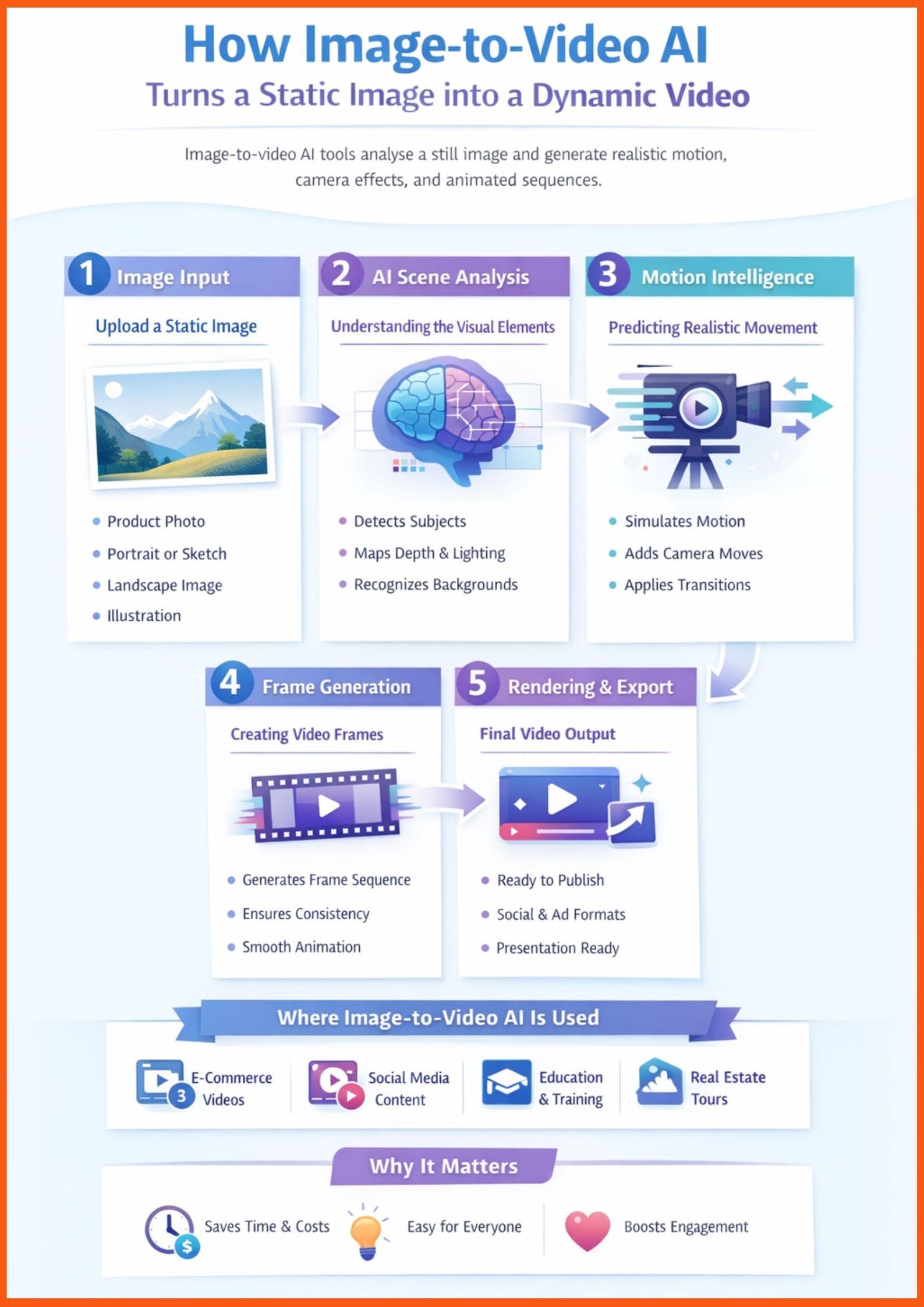
Image-to-video AI tools use artificial intelligence and generative models to convert static images into short video clips. They analyse image elements such as subjects, depth, lighting and motion cues, then generate animated sequences with transitions, camera movements, and effects. Platforms like Google Gemini Veo 3.1 and Runway Gen-4 use advanced diffusion and multimodal AI systems to produce realistic, high-resolution video outputs from still images and text prompts.
Which is the best image-to-video AI tool for professional marketing videos?
For professional marketing and commercial-grade output, Google Gemini Veo 3.1 and Runway Gen-4 are strong choices due to their 4K support, cinematic motion control, and advanced editing features. If storytelling and character-driven content are the priority, OpenAI Sora 2 offers powerful scene consistency and integrated audio capabilities.
Are there affordable image-to-video AI tools for beginners and social media creators?
Yes, budget-friendly options like Kling AI and Luma Dream Machine offer affordable monthly plans and free tiers. These platforms are suitable for quick social media posts, memes, short-form videos, and rapid content ideation without requiring advanced editing skills.