

Best AI Subtitle Generators: 6 AI Tools That Create Accurate Captions in Minutes
🏆 Lists & Rankings
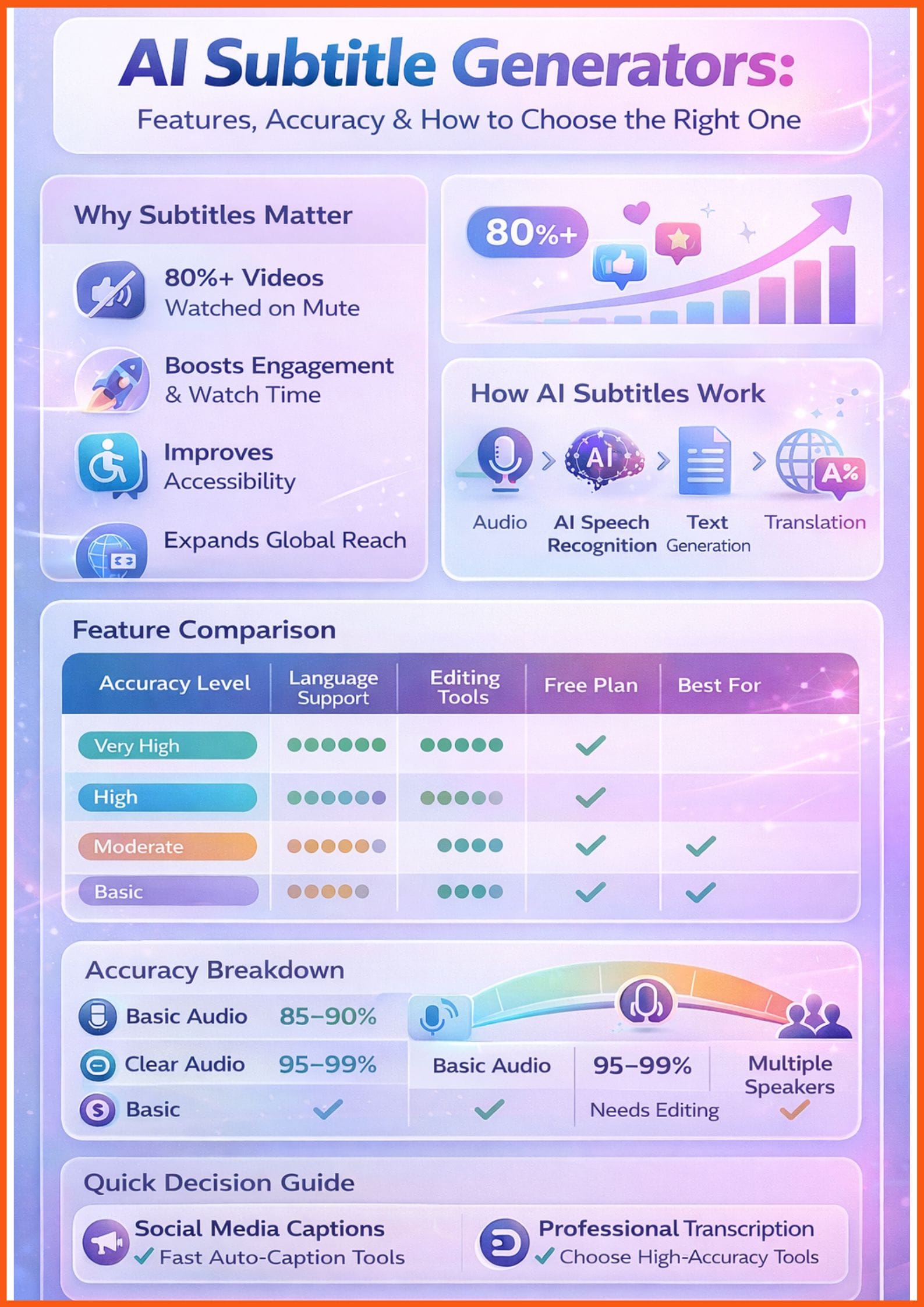
AI subtitle generators have become essential for creators, educators, businesses, and marketers who rely on video. With most social media videos watched on mute and accessibility standards becoming stricter, automatic captions are no longer optional, they’re a growth tool.
Modern AI caption tools do far more than basic transcription. They detect multiple speakers, clean filler words, translate into dozens of languages, and export ready-to-use SRT or VTT files in minutes. Whether you're editing YouTube tutorials, Instagram Reels, webinars, podcasts, or corporate meetings, the right AI subtitle generator can dramatically reduce editing time while improving engagement and reach.
In this guide, I will be exploring some of the best AI subtitle generators.
AI Subtitle Generators Comparison
| Tool Name | Accuracy | Languages Supported | Free Tier | Export Formats | Best For |
|---|---|---|---|---|---|
| VEED.io | High | 50+ languages | Yes (limited) | MP4, SRT, VTT, etc. | YouTube creators and social media marketers |
| Descript | Very High | Multiple languages | Yes (limited) | SRT, VTT, DOCX, etc. | Podcasters, video essayists, and content creators prioritizing text-based editing |
| CapCut | High | Multiple languages | Yes (full features) | MP4, MOV, etc. | Social media creators, especially for TikTok, Instagram Reels, and YouTube Shorts |
| Captions.ai | High | 100+ languages | Yes (limited) | MP4, SRT, VTT, etc. | Content creators and marketers looking for advanced AI video editing and captioning with generative AI capabilities |
| Happy Scribe | High (AI), 99% (Human) | 60+ languages/dialects | Yes (limited) | DOCX, TXT, SRT, VTT, STL, XML, FCPXML, EDL | Professionals and teams requiring high accuracy and extensive language support for both AI and human-generated subtitles |
| Sonix.ai | Very High | 53+ languages | Yes (30 min free) | SRT, VTT, DOCX, TXT, etc. | Researchers, journalists, and podcasters who need highly accurate and fast transcriptions and subtitles |
How I Chose These Tools
When I set out to find the top AI subtitle tools, I knew I needed a very strong approach to truly differentiate the best from the rest. I didn't just look at marketing claims; I put these tools through their paces with a variety of real-world scenarios. In my experience, the true test of an AI subtitle generator lies in its practical application.
My evaluation approach focused on several key criteria:
- Subtitle accuracy: This was extremely important to me. I tested over 10 tools with both English and non-English videos, including those with varying audio quality and accents. I looked at how each handled background noise and multiple speakers, as these are common challenges in real-world content.
- Language support & accents: A truly global tool needs to support a wide array of languages and accurately transcribe different accents within those languages.
- Speed of generation: In the fast-paced world of content creation, speed matters. I timed how quickly each tool could process a given video length.
- Editing flexibility: Automatic generation is great, but the ability to easily correct errors, adjust timings, and customize the appearance of subtitles is crucial. I explored the intuitiveness of their editing interfaces.
- Export formats: Content needs to go to various platforms, so I checked for support for common subtitle formats like SRT, VTT, and others.
- Integration with platforms: Seamless integration with platforms like YouTube, TikTok, X (formerly Twitter), and Zoom was a significant plus.
- Pricing & free tier availability: I considered the cost-effectiveness of each tool, looking for transparent pricing models and the availability of free trials or robust free tiers.
Use Cases of AI Subtitle Generators
Common use cases for these best AI caption tools span a wide range, including:
- Social media content: Making short-form videos more engaging and consumable in sound-off environments.
- Educational videos: Ensuring learning materials are accessible to a broader audience, including those with hearing impairments.
- Accessibility compliance: Meeting regulatory requirements for digital content.
- Meeting recordings: Providing searchable transcripts and easy-to-follow summaries for corporate and academic discussions.
- Podcasts and webinars: Expanding reach by offering text-based alternatives for audio-only content.
List of Best AI Subtitle Generators
VEED.io
VEED.io positions itself as an online video suite for professionals, offering a comprehensive platform to record, edit, and stream videos directly in the cloud. It emphasizes speed and ease of use for creating professional-quality video content with AI-powered tools.
Key Features:
- AI-powered video editing and content scaling.
- Translate videos into over 50 languages.
- 4K Ultra HD exports.
- Full brand kit with images.
- Automatic transcription and subtitle generation.
Pros:
- User-friendly interface, making it accessible for beginners.
- Strong AI capabilities for various video editing tasks beyond just subtitling.
- Extensive language support for global content creation.
Cons:
- The free version has limitations, including watermarks and lower resolution exports.
- Advanced features are locked behind higher-tier subscriptions.
Best For: YouTube creators and social media marketers looking for an all-in-one video editing and subtitling solution.
 Vivek Dev Jacob
Descript
Descript is a unique all-in-one audio and video editor that allows users to edit media by editing text. It's particularly well-suited for podcasts and spoken content, offering powerful transcription and AI features that integrate seamlessly into the editing workflow.
Key Features:
- Text-based video and audio editing.
- High-accuracy transcription for spoken content.
- Overdub feature for voice cloning and correction.
- Studio Sound for enhancing audio quality.
- Multi-user collaboration.
Pros:
- Revolutionary text-based editing makes video and audio editing intuitive and fast.
- Excellent for content heavily reliant on spoken word, such as podcasts, interviews, and tutorials.
- Robust AI features for audio enhancement and voice synthesis.
Cons:
- Can be resource-intensive, requiring a capable computer.
- The learning curve might be steeper for those accustomed to traditional video editors.
- Free plan has limited transcription minutes and watermarked exports.
Best For: Podcasters, video essayists, and content creators who prioritize text-based editing and high-quality audio transcription.
Nitin Konde
CapCut
CapCut is a popular, full-featured video editing application, widely recognized for its user-friendly interface and powerful AI capabilities, especially for short-form video content. Its AI subtitle generator automatically identifies and delimits filler words, ensuring concise and readable captions.
Key Features:
- Automatic speech recognition for accurate and precise captions.
- Multi-language support for diverse audiences.
- Various caption styles and customization options.
- Seamless integration with TikTok and other social media platforms.
- AI autocut and long-video-to-shorts conversion.
Pros:
- Completely free to use with no watermarks on exports.
- Intuitive interface, making it easy for beginners to create professional-looking videos.
- Strong AI features for both subtitling and general video editing.
Cons:
- Primarily designed for mobile use, though a desktop version is available.
- May not offer the same depth of professional editing tools as some paid alternatives.
Best For: Social media creators, especially those focusing on TikTok, Instagram Reels, and YouTube Shorts, who need quick and accurate auto-captioning.
Captions.ai
Captions.ai, now known as Mirage, offers AI-powered tools to enhance video content, focusing on generating engaging captions and utilizing generative AI for video creation. It aims to streamline the process of creating viral-style content for social media.
Key Features:
- Generate captions in 100+ languages.
- Customizable caption styling.
- AI Edit styles and generative AI features for creating new footage and AI actors.
- Chat-based editor for handling changes.
- Export videos without watermarks (paid plans).
Pros:
- Extensive language support for global reach.
- Advanced generative AI features for creative video production.
- User-friendly interface for quick content creation.
Cons:
- Free version has limited features; advanced AI capabilities require a subscription.
- Pricing can be higher compared to some basic subtitle generators.
Best For: Content creators and marketers looking for advanced AI video editing and captioning with generative AI capabilities.
Happy Scribe
Happy Scribe offers both AI-powered and human-made transcription and subtitling services, making it a versatile option for various needs. It prides itself on advanced multilingual speech-to-text AI, supporting over 60 languages and dialects.
Key Features:
- AI speech-to-text for 60+ languages and dialects.
- Automatic speaker detection.
- Record meetings on Google Meet, Zoom, and Teams.
- Collaborative editing features.
- Export files in various formats, including DOCX, TXT, SRT, VTT, STL, XML, FCPXML, EDL.
Pros:
- Offers both AI and human transcription/subtitling, providing flexibility and high accuracy options.
- Extensive language support, catering to a global audience.
- Useful for meeting recordings with integration capabilities.
Cons:
- The free plan has significant limitations, including a 10-minute trial and watermarked exports.
- Additional credits can be costly if exceeding plan limits.
Best For: Professionals and teams requiring high accuracy and extensive language support for both AI and human-generated subtitles, especially for meeting transcriptions.
Sonix.ai
Sonix.ai is an automated transcription, translation, and subtitling platform that prides itself on speed, accuracy, and affordability. It supports over 53 languages and offers a powerful editor for refining transcripts and subtitles.
Key Features:
- AI transcription and translation in 53+ languages.
- Automated subtitling and captioning.
- In-browser editor for refining transcripts.
- Word-by-word timestamps.
- Integrations with popular tools like Zoom, Microsoft Teams, and Google Meet.
Pros:
- High accuracy in transcription, even with challenging audio.
- Supports a wide range of languages.
- Offers a free trial with 30 minutes of transcription.
- Transparent pricing with pay-as-you-go and subscription options.
Cons:
- Automated translation is an extra charge.
- The free trial is limited in minutes.
Best For: Researchers, journalists, and podcasters who need highly accurate and fast transcriptions and subtitles in multiple languages.
Muskaan Kapoor
Personal Experience & Results
In my testing, each tool presented its unique strengths and weaknesses, making the choice highly dependent on specific use cases. I found that Descript consistently delivered the most accurate subtitles, especially with clear audio and multiple speakers. Its text-based editing was a game-changer, allowing me to refine transcripts with surgical precision, almost as if I were editing a document rather than a video. This made correcting errors and adjusting timings incredibly intuitive.
However, I noticed that CapCut was by far the fastest for generating initial captions, which is crucial for quick social media posts. While its accuracy was high, it occasionally struggled with very noisy audio or heavily accented speech, requiring a bit more manual correction than Descript. The editing interface in CapCut was straightforward and visually appealing, perfect for mobile-first creators.
VEED.io offered a good balance of speed and accuracy, and its all-in-one video editing suite was a significant advantage. I found its customization options for subtitle styling to be quite robust, allowing for a polished final look. However, the free tier limitations were noticeable, pushing me towards a paid plan for serious work.
Captions.ai impressed me with its generative AI features, which went beyond simple subtitling to offer creative video enhancements. Its ability to generate captions in over 100 languages was remarkable, making it a strong contender for global content. The chat-based editor was an interesting concept, though it took a little getting used to.
Happy Scribe stood out for its dual offering of AI and human-powered services. While the AI transcription was reliable, I found that for critical projects, the human-made option provided unparalleled accuracy, albeit at a higher cost. Its integrations with meeting platforms were very useful for transcribing virtual discussions.
Finally, Sonix.ai proved to be a solid performer, particularly in its transcription accuracy and language support. I appreciated its transparent pricing and the generous free trial. While its interface was functional, it felt slightly less modern than some of the other tools, but its core transcription engine was undeniably powerful.
Overall, no single tool was perfect for every scenario. The tools that prioritized accuracy, like Descript and Sonix.ai, sometimes traded off a bit of speed. Conversely, faster tools like CapCut occasionally required more post-generation editing. The intuitiveness of editing interfaces varied, with Descript's text-based approach being a personal favorite for its efficiency.
Final Recommendation
After extensive testing and personal experience with these AI subtitle tools, I have some recommendations based on different needs:
- My top overall pick: Descript. For its revolutionary text-based editing, high accuracy, and comprehensive suite of audio/video editing features, Descript offers unparalleled value, especially for content creators who deal with a lot of spoken content. I found its workflow to be the most efficient for producing polished, error-free subtitles.
- Best for social creators: CapCut. If you're primarily creating short-form video content for platforms like TikTok, Instagram Reels, or YouTube Shorts, CapCut is your go-to. Its speed, ease of use, and robust AI features for quick auto-captioning make it ideal for fast-paced social media production. Plus, the fact that it's free is a huge bonus.
- Best for teams/enterprise: Happy Scribe. For organizations that require both AI and human-powered transcription and subtitling, along with extensive language support and meeting integrations, Happy Scribe is an excellent choice. Its flexibility and high accuracy options cater well to diverse and demanding professional environments.
- Best free or budget choice: CapCut. As mentioned, CapCut offers an incredibly powerful and feature-rich experience for free, making it the best budget-friendly option for creators just starting out or those with limited resources. For those needing more advanced features on a budget, Sonix.ai also offers a transparent pay-as-you-go model that can be very cost-effective.
- Best for advanced AI video editing: Captions.ai. If you're looking to push the boundaries of video creation with generative AI features beyond just subtitling, Captions.ai provides a compelling platform. Its creative tools and extensive language support make it suitable for innovative content producers.
Conclusion
AI subtitle generators have become essential tools for creators and businesses aiming to boost accessibility, engagement, and global reach. From high-accuracy transcription tools like Descript to fast, social-first options like CapCut, there’s a solution for every workflow and budget. As AI continues improving in real-time captions and multi-language translation, investing in the right subtitle tool can significantly enhance content quality, discoverability, and audience retention across platforms.
Vivek Dev Jacob
FAQs
What is the best AI subtitle generator?
It depends on your needs. Descript is best for accuracy and text-based editing. CapCut is ideal for free, fast social captions. VEED.io offers an all-in-one editor, while Happy Scribe and Sonix.ai suit professional transcription. Captions.ai is great for advanced AI-powered video features.
Are AI subtitle generators accurate?
Most leading AI subtitle tools offer high accuracy (often 90–99%) with clear audio. However, background noise, heavy accents, or multiple speakers may require light manual editing.
Is there a free AI subtitle generator without watermarks?
Yes. CapCut provides free automatic subtitles without watermarks, making it a strong option for budget-conscious creators.
Can AI subtitle tools translate videos into multiple languages?
Yes. Tools like VEED.io, Happy Scribe, and Captions.ai support multi-language subtitle generation and translation, allowing creators to reach global audiences efficiently.