

Best AI Tools for SOP Creation & Internal Documentation
🛠️ToolsExplore top AI tools that help you create SOPs and internal documents quickly. These tools automate workflows, improve team collaboration, and make documentation simple and efficient.

The AI system transforms disorganized, unknown information into straightforward instructions that anyone can follow. The system measures actual work performance through its listening function, which detects work patterns.
The system produces basic structured systems together with standard office documents in a quick manner. Your team maintains authority over its operations. You have the power to remove unnecessary content while you add relevant information and establish your organizational culture through tone selection.
The process, which used to take time and cause distress, now operates at high speed with practical results. People find it easier to handle documentation tasks.
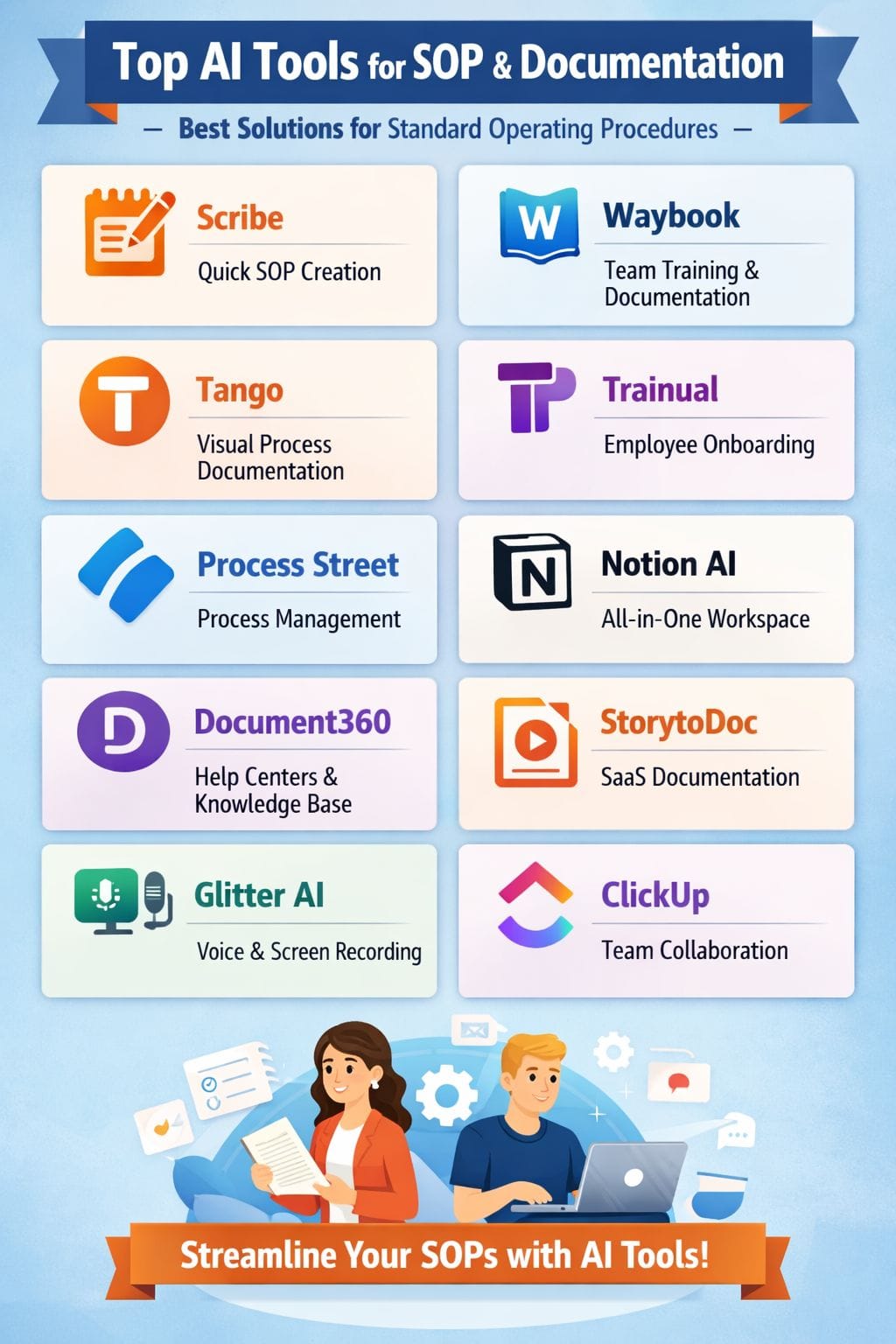
Quick Comparison of AI Documentation Tools
| Tool Name | Pros | Cons |
|---|---|---|
| Scribe | Fast SOP creation, easy editing, strong collaboration | Free plan limitations, weak document management |
| Waybook | User-friendly, built-in training, AI SOP creation | Limited export options, basic reminders |
| Tango | Auto workflow capture, visual guides, easy sharing | Limited free plan, premium required for advanced features |
| Trainual | Quick SOP creation, structured organization, training paths | Static documents, manual updates needed |
| Process Street | Workflow automation, AI generation, strong compliance | Complex for small teams, limited automation depth |
| Notion AI | All-in-one workspace, templates, real-time collaboration | Slows with large workspaces, AI costs extra |
| Document360 | Strong search, AI writing, centralized knowledge base | Learning curve, occasional performance issues |
| StorytoDoc | Auto-updating guides, SaaS-focused, minimal editing | Not for manufacturing, tool overlap issues |
| Glitter AI | Voice + screen recording, converts videos, export options | Needs manual edits, privacy concerns |
| ClickUp | Docs + tasks integration, AI SOP creation, access control | Learning curve, premium required for AI features |
Scribe
Scribe turns everyday digital work into clear SOPs by recording your clicks and keystrokes. The system generates complete process documentation through automatic production of visual guides, which use straightforward text descriptions. Users have the ability to record their computer activities through both browser and desktop environments.
The guide system provides users with straightforward editing functions that encompass data blurring, note addition, and step modification. The subscription service enables users to convert documents into multiple output formats, which include PDF and HTML. Teams can store guides in shared workspaces, see how often they are used, and apply brand styles.
Pros
- Enables rapid acquisition of SOPs and guides from actual operational procedures
- Provides users with simple tools to modify content and hide sensitive information
- Enables teams to share files and work together on projects with high efficiency
Cons
- The free version of the service restricts users to a single guide and multiple guide creation
- The document management system does not function effectively
Pricing
| Plan | Pricing |
|---|---|
| Pro | $15/month |
| Pro Personal | $29/month |
Waybook
Waybook helps organizations create clear standard operating procedures and internal documents from their disorganized knowledge. All content exists in a central location that all users can access. The platform enables users to create draft content within seconds by entering brief writing prompts.
Users can handle document editing and assignment and document status updates through a user-friendly system. Teams always have access to the most current operational methods. The training program uses videos and images and step-by-step guides to provide a straightforward learning experience. The quizzes serve two purposes by evaluating learning progress and enhancing memory retention.
Pros
- Interface design which enables non-technical users to handle its functions with ease
- Complete system which organizes training sessions and document access rights
- Built-in artificial intelligence tools which permit users to create and modify SOPs
Cons
- Limited options for export and printing which leads to their experience becoming frustrating
- Email reminder system lacks advanced customization options which some teams need
Pricing
| Plan | Pricing |
|---|---|
| Core | $99/month |
| Pro | $198/month |
| Enterprise | Contact Sales |
Tango
Tango transforms actual employment activities into visual procedures through its demonstration system. The system records your mouse clicks and screen images together with your work notes to create standard operating procedures and internal documentation.
Your focus remains on your work because writing tasks do not require your attention. You can create custom workflows from each guide which you can modify and add your brand elements and make fast updates. You can distribute it easily through your wiki, chat platform, or learning management system. Teams learn faster because training requires less time while most inquiries decrease.
Pros
- Automatically records both steps and screenshots from actual work processes
- Offers new employees visual guides which they can easily understand and use for their training
- Users can quickly share their content through Docs and Confluence and Slack
Cons
- The free plan limits workflow capacity
- Users need to pay for premium tiers to access desktop capture and advanced insights features
Pricing
| Plan | Pricing |
|---|---|
| Pro | $26/month |
| Enterprise | Custom |
 Vivek Dev Jacob
Trainual
Trainual uses AI to turn messy processes into one clear playbook for your team.You can start with a few bullet points, import old documents, or use ready templates. The intelligent tools create precise procedures and better document wording which matches your brand voice. Role-based training shows each person only what they need to learn.
The combination of quizzes and progress tracking tools enables teams to learn more effectively while maintaining their organizational goals. Content updating requires minimal time and effort to complete. The result is clear SOPs and internal documents that people actually read, understand.
Pros
- Enables users to create their SOP documents at a fast pace
- The organization of all processes uses distinct subjects and topics and steps which create a clear structure.
- Platform provides training pathways
Cons
- Operate as fixed documents which do not support ongoing operational activities
- Requires users to conduct manual updates whenever there are changes to existing processes.
Pricing
Request for pricing (RFP)
Process Street
Process Street is an AI-powered platform that helps teams create, run, and track SOPs and internal documents. With its functionality, users can transform fixed processes into dynamic operational systems that include form-based procedures and approval mechanisms and complete audit tracking.
The system uses AI technology to develop operational workflows from either written text or documents that users upload. The system introduces intelligent operational rules while it automatically updates workflows to match ongoing work modifications. Teams use it to standardize repeat tasks, collect data, and connect with other tools. The system records every operational action to assist users.
Pros
- Users create workflows through its visual interface
- Creates complete operational procedures from textual and document inputs
- Strong compliance features through its approval process and mandatory procedure enforcement
Cons
- Not suited for small teams because it requires them to navigate through its complex interface
- Lacks advanced automation features
Pricing
Request for pricing (RFP)
Notion AI
Notion AI assists teams in transforming disorganized notes and chat conversations and task information into standard operating procedures and dynamic documents. The entire content exists in a unified accessible environment. It creates detailed procedures for users to follow. It provides brief summaries of extensive discussion threads.
The system offers users pre-made document templates. The document system maintains connections between pages through links and tags. The search function delivers results with high speed. The system delivers real-time information updates. One particular document contains all authentic information for the organization. The team members understand their work schedule and methods.
Pros
- Comprehensive solution which enables users to manage their standard operating
- Procedures users with pre-built templates and database solutions
- Real time collaboration
Cons
- Performance of extensive workspaces decreases because their size requires more time
- Complete functionality of artificial intelligence requires additional costs
Pricing
| Plan | Pricing |
|---|---|
| Plus | $12/member/month |
| Business | $24/member/month |
| Enterprise | Contact Sales |
Rishi Mundra
Document360
Document360 serves as an AI-based documentation solution which teams require to create straightforward and precise and dependable knowledge resources. The system enables teams to develop SOPs and internal guides and dual-access knowledge bases through its straightforward design. Users can create and arrange content at a rapid pace through the capabilities of AI writing tools.
The smart search system enables users to discover solutions within a few seconds. The glossary and AI summary features work together to decrease user confusion while they help users complete tasks more swiftly. The system maintains all elements in a structured format.
Pros
- Includes search capabilities, writing tools, chatbot functions, glossary features
- Operating Procedures, operational manuals, and knowledge bases from one central location
- Control system and role assignments together with tracking capabilities
Cons
- Learning curve for users
- Performance issues at times reported by users
Pricing
Request for pricing (RFP)
StorytoDoc
StorytoDoc generates current standard operating procedures and internal documents from actual product applications. Teams document a process only one time and the content remains up-to-date through product updates. The system monitors essential user actions while eliminating inactive periods to create organized instructional materials.
The system generates interactive guides and videos and PDFs and articles from a single walkthrough. StorytoDoc enables software teams to store all their help center materials and how-to content and training documents within a unified platform. Your product updates will automatically refresh the single source of truth which contains all your information.
Pros
- Alters all guides through its single-click functionality
- Works best for software-as-a-service businesses because their product documentation needs undergo frequent changes
- Records everything without any editing process by capturing only the necessary user actions
Cons
- Not suited to handle standard operating procedures used in manufacturing
- Creates potential overlap issues withexisting tools
Pricing
| Plan | Pricing |
|---|---|
| Starter | $58.08/product/month |
| Growth | $176.62/product/month |
| Custom | $591.49/month |
Glitter AI
Glitter AI transforms ordinary tasks into detailed instructions that users can follow step by step. The program monitors your display while it records your spoken words. The system documents your work activities by capturing your mouse clicks, keyboard inputs, and screen images.
The program converts your voice audio into clear and understandable written content. You receive an editable document that you can share as an SOP or document within minutes. The process requires no extensive writing, which prevents any need for multiple phone inquiries. Teams use Glitter AI to create onboarding materials and training resources.
Pros
- Uses voice recording and video capture together with mouse click detection to create visual standard operating procedures which need minimal text input
- Transforms all current video content into organized instructional materials
- Export and embedding capabilities which enable users to generate content in PDF and HTML
Cons
- Requires manual adjustments to handle difficult situations
- The heavy usage of video content raises privacy issues
Pricing
| Plan | Pricing |
|---|---|
| Pro | $20/member/month |
| Team | $75/member/month |
Vivek Dev Jacob
ClickUp
The artificial intelligence system of ClickUp transforms disorganized work into structured standard operating procedures and real-time internal documents, which users can access from a single location. Users have the ability to create step-by-step instructions through basic prompts or recorded content.
The system enables users to link documents with their respective work assignments. Users can create checklists that ensure that all items will be completed. The system enables users to monitor the progress of approval processes together with ongoing modifications. Teams always see the latest version. The version history function enables users to observe all changes made to documents.
Pros
- Consolidates all tasks and documents and standard operating procedures into one space
- AI system uses its capacity to create standard operating procedures by analyzing recorded information and previously completed tasks
- Strong regulated processes for team level access
Cons
- Initial difficulty for new users
- The most effective AI solutions require customers to pay for premium subscription plans
Pricing
| Plan | Pricing |
|---|---|
| Unlimited | $10/user/month |
| Business | $19/user/month |
| Enterprise | Contact Sales |
Final Thoughts
The use of AI technology becomes mandatory for executing standard operating procedures and creating internal documentation. The system operates silently while producing outcomes that can be repeated by workers. The system transforms unorganized notes and chat conversations, and shared knowledge between people into straightforward procedures that anyone can execute. The solution decreases the duration required to create documents through writing and document editing and document correction processes. Teams acquire dynamic handbooks which adapt to their ongoing organizational transformations. You maintain control over all aspects of rule creation and tone selection and standard definition.
FAQs
What are AI SOP tools?
AI SOP tools help create standard operating procedures automatically. They turn workflows, notes, or actions into clear step-by-step guides.
Can AI tools create SOPs automatically?
Yes, many tools record actions or use prompts to generate SOPs. You can edit and customize them based on your needs.
Are AI SOP tools useful for teams?
Yes, they help teams standardize processes and improve training. They also make collaboration and knowledge sharing easier.
Do AI SOP tools save time?
Yes, they reduce manual documentation work significantly. Teams can create, update, and share SOPs much faster.