

I Tested 10 Speech-to-Text AI Tools: These 6 Saved Me Hours
📰 News
I tested 10 speech-to-text AI tools using real audio, Zoom meetings, noisy cafés, interviews, and even fast-paced podcasts to see which ones actually save time. What I discovered was surprising: many tools still require heavy corrections. But six of them consistently delivered fast, accurate transcripts and saved me hours of editing.
Speech-to-text technology has become essential for students, creators, journalists, and teams who rely on meetings, captions, and searchable transcripts. The best speech-to-text tools don’t just convert audio into text, but they also improve productivity, boost accessibility, and reduce manual work. Here are the six tools that truly stand out for me.
Speech-to-Text AI Tools: A Quick Comparison
To provide a quick overview of the top speech-to-text AI tools, I've compiled a comparison table highlighting their key attributes:
| Tool | Languages | Real-Time | Free Plan | Starting Price (Verified) | Best For |
|---|---|---|---|---|---|
| Otter.ai | Primarily English | Yes | Yes | Free plan; Pro from $16.99/month; Business from $30/month | Meetings, teams, students |
| Rev | Multiple (AI & Human) | AI Only | Limited free AI minutes | AI from $0.25/minute; Human from $1.99/minute; Subscriptions from $29.99/month | High-accuracy professional work |
| Descript | 25+ languages | Yes | Yes | Free plan; Creator from $12/month (annual); Pro from $24/month (annual) | Podcasters, video editors, creators |
| Sonix | 40+ languages | Yes | Free trial (30 minutes) | Standard $10/hour; Premium $22/month + $5/hour | Multilingual transcription |
| Trint | 40+ languages | Yes | Free trial | Plans typically range from $50–$100/month (varies by seat & features) | Journalists, media teams |
| Transkriptor | 100+ languages | Yes | Yes (limited minutes) | Lite $9.99/month; Pro $19.99/month; Team from $30/month per seat | Budget-friendly & multilingual users |
How I Chose These Tools
To find the best speech-to-text AI tools, I tested 10+ platforms using real-world audio like meetings, interviews, podcasts, and noisy recordings. I focused on practical performance, not marketing claims.
Here’s what I evaluated:
- Speech-to-text accuracy: How precisely the tool converts spoken words into text
- Speed: How fast audio files are processed
- Language support: Availability of multilingual transcription
- Speaker detection: Ability to identify multiple speakers correctly
- Editing experience: Ease of correcting and refining transcripts
- Audio and video format support: Compatibility with common file types
- Integrations: Support for Zoom, YouTube, Microsoft Teams, and other platforms
- Pricing and free plans: Overall value for money
Only the speech-to-text tools that delivered consistent performance across these factors made the final list.
List of Top Speech-to-Text AI Tools
After extensive research and hands-on testing, I've identified several leading speech-to-text AI tools that stand out in my opinion. Each offers a unique blend of features, pricing, and ideal use cases, supporting a diverse range of needs. Here are my top picks:
Otter.ai
Otter.ai is a highly popular AI-powered meeting assistant that records audio, writes notes, and generates summaries in real-time. It's designed to make conversations searchable, shareable, and actionable, transforming spoken discussions into accessible text.
⭐ Key Features:
- High transcription accuracy, especially for clear audio.
- Real-time transcription during live meetings and lectures.
- Speaker identification to differentiate between participants.
- Integration with popular meeting platforms like Zoom, Google Meet, and Microsoft Teams.
- Searchable transcripts with keyword highlights.
- Generous free tier for basic transcription needs.
👍 Pros & 👎 Cons:
- Pros: Excellent for meeting transcription, user-friendly interface, robust free plan, good for collaboration.
- Cons: Accuracy can drop with heavy accents or background noise, limited advanced editing features compared to some dedicated transcription services.
🏆 Best For: Students, professionals, and teams needing real-time meeting transcription and summaries.
 Muskaan Kapoor
Rev
Rev offers a comprehensive suite of AI-powered and human-powered transcription, caption, and subtitle services. It's known for its high accuracy and fast turnaround times, catering to a wide range of professional needs from media production to academic research.
⭐ Key Features:
- Both automated (AI) and human transcription options.
- High accuracy, especially with human transcription services.
- Fast turnaround times, with expedited options available.
- Captions and subtitles for video content.
- Supports various audio and video formats.
- Integrations with video editing software.
👍 Pros & 👎 Cons:
- Pros: Very high accuracy with human services, fast delivery, versatile for different media types, and good for professional use.
- Cons: Automated transcription can be less accurate than human, higher cost for human services, free tier is limited.
🏆 Best For: Media professionals, journalists, and anyone requiring highly accurate transcriptions and captions, especially for critical content.
Descript
Descript is an all-in-one audio and video editor that includes powerful AI transcription capabilities. It allows users to edit audio and video by editing the transcribed text, making it a unique and efficient tool for content creators, podcasters, and video producers.
⭐ Key Features:
- Edit audio and video by editing text.
- High-quality AI transcription.
- Speaker identification and filler word removal.
- Screen recording and remote recording features.
- Overdub feature for voice cloning and correction.
- Collaboration tools for teams.
👍 Pros & 👎 Cons:
- Pros: Revolutionary text-based editing, excellent for content creation, robust set of features beyond just transcription, good for podcasts and videos.
- Cons: Can be resource-intensive, learning curve for new users, pricing can add up for heavy usage.
🏆 Best For: Podcasters, video editors, content creators, and anyone who needs to edit audio/video content efficiently through text.
Vivek Dev Jacob
Sonix
Sonix is an automated transcription, translation, and subtitling platform that converts audio and video files into text in minutes. It emphasizes speed, accuracy, and ease of use, making it suitable for a wide range of applications, from media analysis to academic research.
⭐ Key Features:
- Fast and accurate automated transcription.
- Automated translation into over 35 languages.
- Speaker separation and custom dictionaries.
- In-browser editor for refining transcripts.
- Integrations with popular tools like Adobe Premiere, Zoom, and Google Docs.
- Export in multiple formats (TXT, DOCX, SRT, VTT).
👍 Pros & 👎 Cons:
- Pros: Excellent for multilingual transcription and translation, good integration options, user-friendly interface, and competitive pricing for automated services.
- Cons: Accuracy can vary with audio quality, no human transcription option, and some advanced features are add-ons.
🏆 Best For: Researchers, content creators, and businesses needing quick, accurate, and multilingual automated transcription and translation.
Trint
Trint is an AI-powered transcription platform that transforms audio and video into editable, interactive transcripts. It's particularly favored by media professionals and journalists for its well-made editing features and collaborative capabilitiesand , allowing teams to quickly find, edit, and share key moments from recorded content.
⭐ Key Features:
- AI transcription with an interactive editor.
- Collaborative features for team workflows.
- Speaker identification and timestamping.
- Searchable transcripts with highlight and comment functions.
- Integration with newsroom systems and video editing tools.
- Mobile app for on-the-go recording and transcription.
👍 Pros & 👎 Cons:
- Pros: Excellent for media professionals, strong collaborative features, interactive transcript editor, and good for managing large volumes of content.
- Cons: Can be more expensive than other options, primarily focused on professional use cases, and accuracy can vary with audio quality.
🏆 Best For: Journalists, media organizations, and content teams requiring collaborative transcription and editing workflows.
Transkriptor
Transkriptor is an AI-powered transcription product that converts audio and video content into written text. It supports multiple languages and various accents, aiming to provide fast and accurate transcriptions for a global user base. It's particularly useful for transcribing meetings, interviews, and lectures.
⭐ Key Features:
- AI-powered transcription for audio and video.
- Supports multiple languages and accents.
- Integration with Zoom, Google Meet, and Microsoft Teams.
- In-browser editor for easy corrections.
- Export options in various formats (TXT, SRT, VTT, etc.).
- Affordable pricing with a free trial.
👍 Pros & 👎 Cons:
- Pros: Good for transcribing meetings, supports many languages, user-friendly interface, and offers competitive pricing.
- Cons: Accuracy can be inconsistent with very poor audio quality, and some advanced features might require higher-tier plans.
🏆 Best For: Students, researchers, and professionals who need to transcribe meetings and interviews in multiple languages at an affordable price.
Vivek Dev Jacob
Final Recommendation
After carefully testing and evaluating these top speech-to-text AI tools, I've filtered my recommendations to help you make the best choice for your specific needs:
Best overall speech-to-text tool: For a comprehensive solution that balances accuracy, features, and ease of use, I found Otter.ai to be an excellent all-rounder, especially for meeting transcription and general productivity. Its real-time capabilities and collaborative features make it a strong contender for most users.
Best for budget users: If you're on a budget or have occasional transcription needs, I'd recommend starting with the free tiers of Otter.ai or Transkriptor. Both offer substantial functionality without immediate financial commitment, allowing you to get a feel for AI transcription.
Best for professionals: For teams and individuals who require the highest accuracy and robust features for critical content, Rev (especially its human transcription service) and Trint are my top picks. For teams, I found that Trint's collaborative features and integration with professional workflows were particularly beneficial.
Best for multilingual transcription: If your work involves multiple languages, Sonix stands out with its extensive language support and automated translation capabilities. It's an invaluable tool for global communication and content creation.
Best for content creators (podcasters, video editors): For those in content creation, Descript is a game-changer. Its text-based audio and video editing workflow is unparalleled, making it my favorite for streamlining the production process of podcasts and videos.
Ultimately, the "best" tool is the one that fits seamlessly into your workflow and meets your specific requirements. I encourage you to try out the free tiers or trials of these tools to experience their capabilities firsthand.
Conclusion
Speech-to-text AI tools aren’t just helpful anymore, they are time-saving essentials. The right tool can turn meetings, interviews, and videos into accurate, searchable text in minutes, cutting hours of manual work from your workflow.
They also make content more accessible through captions and transcripts while improving discoverability. As speech-to-text technology continues to get faster and more accurate, it’s becoming a must-have for students, creators, journalists, and teams. If you work with audio, the right tool can completely change your productivity.
FAQs
What are the best speech-to-text AI tools?
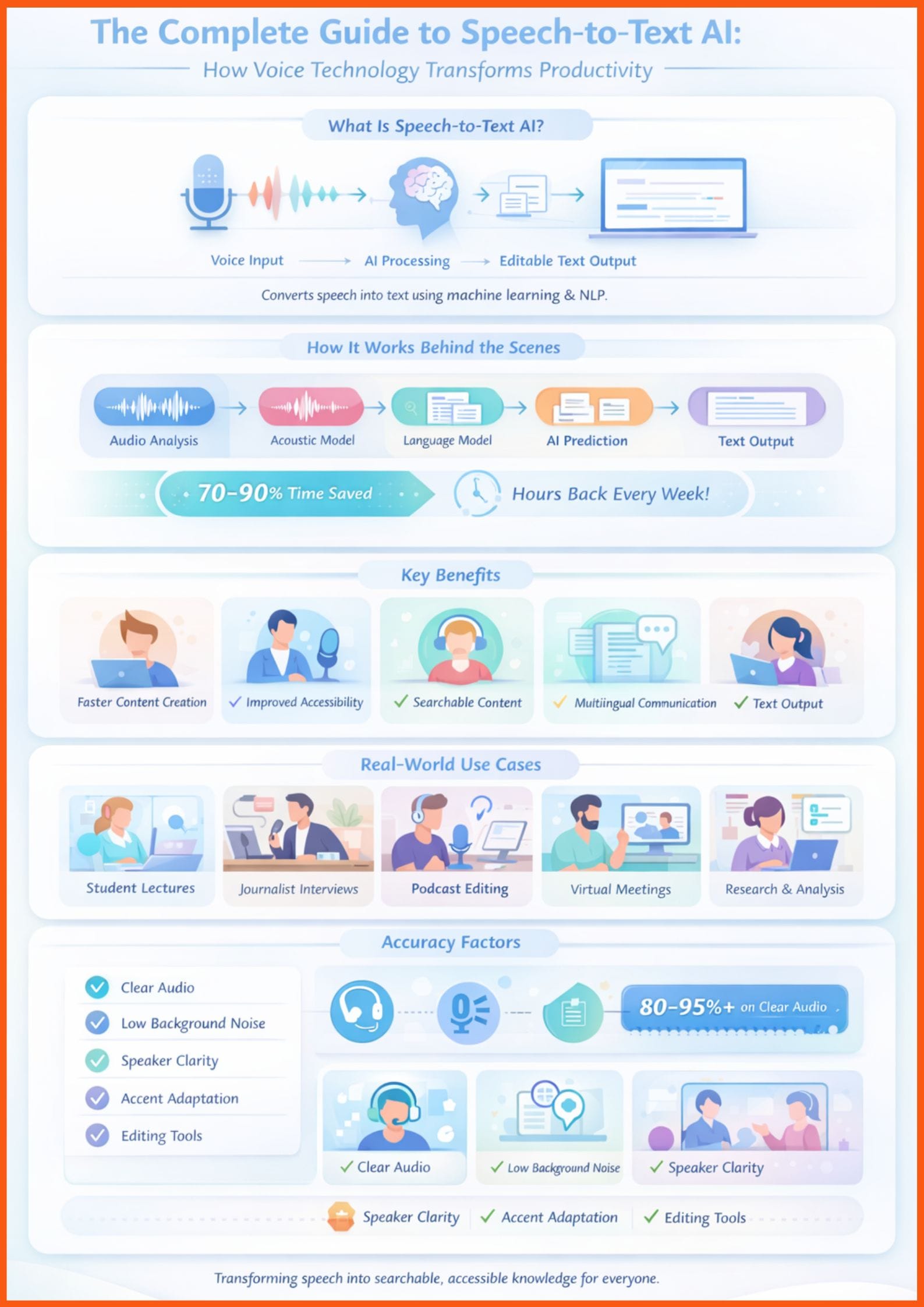
Top speech-to-text tools include Otter.ai for meetings, Rev for the highest accuracy (especially human-assisted), Descript for creators, Sonix for multilingual support, Trint for teams, and Transkriptor for budget-friendly transcription.
How accurate are speech-to-text AI tools?
Most leading speech-to-text tools deliver high accuracy (often 80–95%+) on clear audio. Accuracy can vary with background noise, accents, and audio quality, but many tools include editing features to improve results.
Can speech-to-text tools improve productivity?
Yes, by converting spoken content into editable text quickly, speech-to-text AI tools eliminate hours of manual transcription, help create captions and searchable transcripts, and streamline workflows for students, creators, and professionals.