

Top AI Tools for Spreadsheet Automation in 2026: A Complete Guide
🏆 Lists & Rankings
The introduction of AI tools has transformed spreadsheet usage patterns among users. The software handles unclean data by identifying patterns while creating basic reports from numerical information. Users can enter their requirements in simple English while the system handles the rest of the tasks. The system operates according to intelligent principles that allow it to deliver results efficiently. The process decreases the time needed for tasks while simultaneously lowering the chances of errors occurring. Teams can direct their efforts towards discovering new knowledge instead of performing data entry work. The software tools improve their performance through machine learning.
Below is a curated list of the best AI spreadsheet tools for Excel and Google Sheets, ranked for usability, features, and real-world use cases.
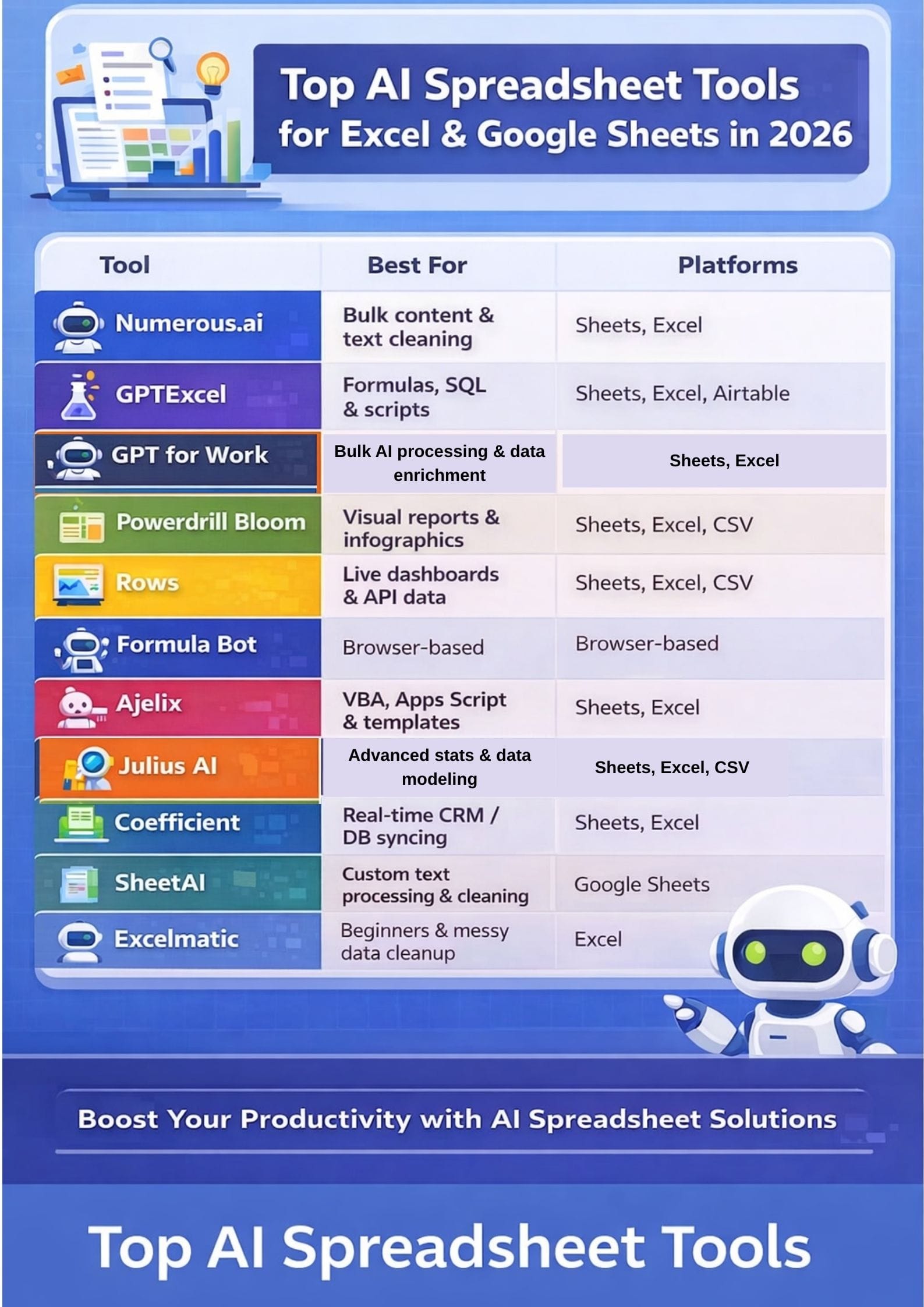
Quick Comparison: Top AI Spreadsheet Tools at a Glance
| Tool | Primary Use Case | Key Strengths | Main Limitations |
|---|---|---|---|
| Numerous.ai | Bulk content & text cleaning | Easy setup, works inside Sheets & Excel | Token limits on heavy usage |
| GPTExcel | Formula creation, SQL & scripting | Strong automation, multi-platform support | Advanced features require paid plans |
| GPT for Work | Bulk AI processing & spreadsheet agent | Multi-model support, 1,000 rows/min bulk speed | Pay-as-you-go credits may add up for heavy users |
| Julius AI | Advanced statistics & data modeling | No formulas needed, powerful visuals | Complex setup for advanced tasks |
| Powerdrill Bloom | Visual reports & infographics | High-quality charts, fast insights | No in-cell spreadsheet editing |
| Rows | Live dashboards & API data | Built-in AI, real-time integrations | Not suitable for advanced Excel macros |
| Formula Bot | Non-technical formula help | Beginner-friendly, clear explanations | Usage limits on free plans |
| Ajelix | VBA, Apps Script & templates | Script generation, ready-made templates | Performance and support delays |
| Coefficient | Real-time CRM & database syncing | Two-way sync, automated refresh | Row and refresh limits on lower plans |
| SheetAI | Text processing & data cleaning | Spreadsheet-native AI workflows | Requires external API keys |
| Excelmatic | Beginner-friendly data cleanup | Plain-English chat, strong cleaning | Performance issues reported |
Numerous.ai
Best for: Bulk text processing and cleaning directly within your spreadsheet.
Users of Numerous.ai can access ChatGPT through Google Sheets and Excel by entering a specific formula. The platform enables users to clean text while creating summaries, writing content, and developing formulas in bulk. The system requires no programming skills and does not need any API keys for operation. The solution functions as an add-on that teams can easily access. Users can type their questions in simple English to receive immediate answers, which appear directly in their spreadsheet. The system stores its results to prevent customers from having to pay for duplicate requests.
Pros
- easy installation process, which works in both Sheets and Excel
- The system operates through a single AI-style function
- system that provides excellent capabilities for handling large content projects together.
Cons
- High usage capacity will surpass their basic token restrictions
- capabilities are limited outside of Google Sheets and Microsoft Excel.
Pricing
Request for pricing (RFP)
 Muskaan Kapoor
GPTExcel
Best for: Generating complex formulas, SQL queries, and scripts.
GPTExcel serves as an AI solution that boosts your productivity when you use Excel, Google Sheets, and Airtable. The software creates, corrects, and describes formulas through basic language explanations. The program enables users to generate advanced solutions through its ability to produce SQL queries and scripts and regular expression patterns. You can chat with your spreadsheet and ask questions about your data. The system processes Excel and CSV files while it converts images into tables and creates visualizations and reports. The program offers benefits that apply to users who have different levels of expertise.
Pros
- supports Excel, Google Sheets, LibreOffice, and Airtable.
- The program provides complete automation capabilities for formulas, SQL, and scripts
- Users can use plain language to query spreadsheets through a chat-based system
Cons
- Advanced features on paid plans.
- Non-technical users face difficulties when they need to learn advanced SQL
Pricing
- Pro- $9/month
- Pro+- $18/month
GPT for Work
Best for: Bulk AI processing, content generation, and data enrichment at scale inside your spreadsheet.
GPT for Work is a full AI agent that operates directly inside Google Sheets and Microsoft Excel. Unlike simple formula tools, it reads your data, understands your intent, and executes tasks end to end from a single plain-language prompt. The agent handles bulk content generation, translation, categorization, data cleaning, web research, and enrichment across thousands of rows. It can process up to 1,000 cells per minute and reliably scale to 200,000 rows in a single run.
Users can choose from multiple AI providers, including OpenAI, Anthropic Claude, Google Gemini, Mistral, and Perplexity, without switching platforms. The tool also writes and fixes formulas, builds pivot tables and charts, and applies formatting. Teams share a pooled credit balance with no per-seat lock-in, which keeps costs predictable for spiky workloads.
Pros
- Works natively inside both Google Sheets and Microsoft Excel
- Supports multiple AI models from different providers in one interface
- Built for high-volume bulk tasks with speeds up to 10,000 results per hour
Cons
- Pay-as-you-go credit costs can grow with heavy or complex usage
- The agent model is currently limited to select providers for advanced tasks
Pricing
- Free to install with free starter credits
- Pay-as-you-go credit packs starting at $29
- Enterprise per-seat plans available on request
Julius AI
Best for: Advanced statistical analysis and predictive modeling.
Julius AI turns messy spreadsheets into clear charts, simple summaries, and smart models using plain text. You can ask questions in everyday language and get fast, visual answers. The system requires no user input for writing formulas or coding. The application operates through a chat-based interface that supports Excel, Google Sheets, and CSV file formats. The system creates charts and tables and complete reports within seconds after users upload their data. The system provides users with simple prompts that enable them to clean data and create formulas. Julius AI handles large files and supports advanced stats and forecasts.
Pros
- The application requires no technical knowledge because users can learn it immediately.
- The application can manage larger datasets
- The application enables users to work with multiple file formats
Cons
- Occasional performance issues
- The most difficult tasks require users to establish intricate configurations
Pricing
- Pro- $45/month
- Business- $450/month
- Enterprise- Contact Sales
Vivek Dev Jacob
Powerdrill Bloom
Best for: Creating visual reports, infographics, and slide decks from data.
The AI data agent Powerdrill Bloom processes messy spreadsheets to deliver clear insights within a time range of several minutes. Users can upload Excel, CSV, and Google Sheets files to receive immediate analysis results without needing to write code or create formulas. The software cleans your data while it discovers trends and relationships and shows you important performance indicators. You can ask questions in plain language, including “why” and “what if,” and get simple answers. The system generates charts, visual reports, and infographics, and PowerPoint slides that users can share.
Pros
- produces visual results that include high-quality charts
- enables users to operate through disorganized spreadsheet documents
- enables users to generate reports, conduct research, and performance metrics
Cons
- lacks complete functionality as an in-cell spreadsheet editor.
- The online workflow system requires reliable file uploads to function
Pricing
- Pro- $19.90/month
- Premium- $199.00/month
Rows
Best for: Live dashboards and real-time data integration.
Rows functions as an online spreadsheet program that includes automatic AI capabilities. The software enables users to extract data from various applications, perform data cleansing operations, and obtain rapid insights. Users can create their desired outcomes by using basic prompts, which replace the need for complex formulas and programming code. The system establishes connections with various analytics tools and advertising platforms to enable real-time data retrieval. Users have the ability to enhance tables by adding either company information or online data. The system enables users to apply text tags, conduct sentiment analysis, and generate text summaries.
Pros
- The browser-based system operates with its built-in AI spreadsheet functionality
- The system uses basic prompts instead of complex formulas
- The software functions well as a live dashboard system
Cons
- cannot fully substitute advanced Excel models and macros, and large offline documents.
- The learning process presents difficulties for users
Pricing
- Plus- $8/user/month
- Pro- $79/month+$8/user/month
- Enterprise- Contact Sales
Formula Bot
Best for: Non-experts who need quick formula and data cleaning help.
Formula Bot serves as an Excel and Google Sheets AI data analyst who processes data through basic English input. The system transforms your spoken language into operational formulas, which it subsequently describes to you. The system creates visual representations through its charting and dashboarding capabilities, which also include basic reporting features for your data. The system assists users in resolving data problems by removing unnecessary information and correcting existing mistakes. The user can easily combine information from multiple documents and various data sources through the system. The tool supports processing text content.
Pros
- A straightforward work process that enables non-experts to use its functions.
- The software provides a comprehensive solution that combines formula assistance
- cross-platform tool that supports users in Excel and Google Sheets
Cons
- The cloud-based system creates security risks
- Free users face restrictions in their usage.
Pricing
- Starter- $18/month
- Pro- $29/month
- Business- $99/month
Ajelix
Best for: VBA/Apps Script generation and pre-built templates.
Ajelix serves as an Excel and Google Sheets AI tool that enables users to create formulas and scripts and complete templates from basic text input. The tool allows users to enter their requirements, which it then converts into functional formulas. The tool provides users with an explanation of formulas through plain language. Ajelix can write and fix VBA and Apps Script. The software can convert spreadsheet documents into dashboards and financial models while generating clean outputs from brief user instructions. The system enables non-experts to accomplish their tasks more efficiently while experiencing reduced work pressure.
Pros
- Beginner friendly
- Script capabilities and pre-built templates instead of offering basic chat functions.
- Users can access Excel and Google Sheets through add-ins and web applications
Cons
- Performance issues
- Delay in support team responses
Pricing
- Lite- $20/user/month
- Pro- $100/user/month
- Max- $200/user/month
Vivek Dev Jacob
Coefficient
Best for: Enterprise-grade two-way data syncing with CRMs and Databases.
Coefficient functions as an artificial intelligence solution that transfers real-time information from your customer relationship management system, database, and business applications directly into Google Sheets and Excel. The system updates your data at predetermined times, which eliminates the need for manual copying and pasting. Your reports and dashboards always show fresh numbers. You can create pivot tables, charts, and basic summaries within a few seconds. You can create alerts that will notify you about important changes in critical metrics. Coefficient can transform email content into properly organized spreadsheet information. This process creates a single reliable data source.
Pros
- The system provides active two-way data synchronization with multiple sources
- The AI assistant provides strong capabilities to create dashboards, reports, and formulas
- The system provides strong capabilities for report scheduling and alerting
Cons
- Restricts functionality on lower plans through row limits, refresh limits, and data source limits.
- Less beneficial to those who work outside google sheet/Excel.
Pricing
- Starter- $59/month
- Pro- $119/month
- Enterprise- Contact Sales
SheetAI
Best for: Custom text processing and personalized data use cases.
SheetAI functions as an AI tool specifically designed for Google Sheets applications. You can use direct English questions to receive answers, which will appear in spreadsheet cells. The software uses basic functions to create lists and tables, while it also performs data cleaning operations. You can upload your own text and links to the system, which will use them to learn your writing style and company facts. The software enables users to connect with an API, which allows them to execute advanced operations. The smart auto-fill feature generates product descriptions and organizes items.
Pros
- The software enables users to work through a spreadsheet interface
- The system produces output that matches your specific data use case
- The application serves well for workflows that require extensive text processing and data cleaning tasks.
Cons
- The system needs users to create accounts with external AI services and access their APIs
- The use of AI would lead to increased expenses when users make heavy or intricate demands
Pricing
- Unlimited monthly- $20/month
- Unlimited yearly- $200/yearly
- Domain License- $299/year
- Token Packs- Pay as you go from $29
Excelmatic
Best for: Quick cleanup and merging of messy Excel workbooks.
Excelmatic is an AI tool that makes Excel simple. You upload your file and type what you need in plain English. It reads your data and gives you clear insights, charts, and dashboards. You do not need complex formulas or advanced skills. It can clean messy data, fix errors, and join many tables into one. It can also create formulas and build reports for you. This saves time and cuts down on copy-paste work. Instead of struggling with spreadsheets, you chat with Excelmatic. In minutes, you can download a clean, ready-to-use workbook or dashboard.
Pros
- The natural language chat system allows beginners to handle complex Excel tasks
- The system enables users to complete data cleaning, merging, and chart creation tasks
- The software operates without errors when handling multiple sheets
Cons
- Strict data protection regulations in the system make it overwhelming for some users
- Performance issues reported by some users
Pricing
- Essential- $9.90/month
- Professional- $29.90/month
- Premium- $59.90/month
Conclusion: Choosing Your AI Spreadsheet Partner
The core functions of organizations that operate with advanced technologies for their spreadsheet automation systems. The system transforms manual labor, which requires multiple hours, into work that takes only several minutes while it cleans up disorganized data and detects patterns ahead of human observation. Through plain speech, people can request answers while they see reports and models, and forecasts develop in real time. The new approach reduces time requirements while transforming the entire decision-making procedure. People shift their focus from error correction to idea evaluation and from row verification to strategic development.
FAQs
What are AI spreadsheet tools used for?
AI spreadsheet tools help clean data, create formulas, generate reports, and analyze large datasets using simple natural language commands.
Do AI spreadsheet tools replace Excel skills?
No. They reduce manual work and errors, but basic spreadsheet knowledge is still helpful for validation and advanced use cases.
Which AI spreadsheet tools are best for beginners?
Tools like Excelmatic, Formula Bot, and Julius AI are beginner-friendly and require little to no technical knowledge.
Can AI spreadsheet tools handle large datasets?
Yes. Tools such as Julius AI, Powerdrill Bloom, and Coefficient are designed to work with large files and real-time data source.