

Best AI Tools for PDF Summarization in 2026 (Fast, Accurate & Easy)
lists-rankingsAI PDF summarizers help you quickly extract key insights from long documents. Explore the best tools, compare features and pricing, and choose the right solution to save time and boost productivity.

AI tools now cut through long PDFs with ease. They find key facts, remove fluff, and give clear summaries in seconds. You can choose short summaries or deeper views based on your needs. Many tools read charts, tables, and complex documents well.
They support many file types and languages. Free and paid plans suit all users. Students, researchers, and professionals save time and effort. People can skip reading through every page of content now.
The tools enhance comprehension and efficiency during study activities and professional tasks. Trustworthiness and user-friendliness, together with powerful features, are the main factors.
Comparison Table of AI PDF Summarizer Tools: Strengths & Limitations
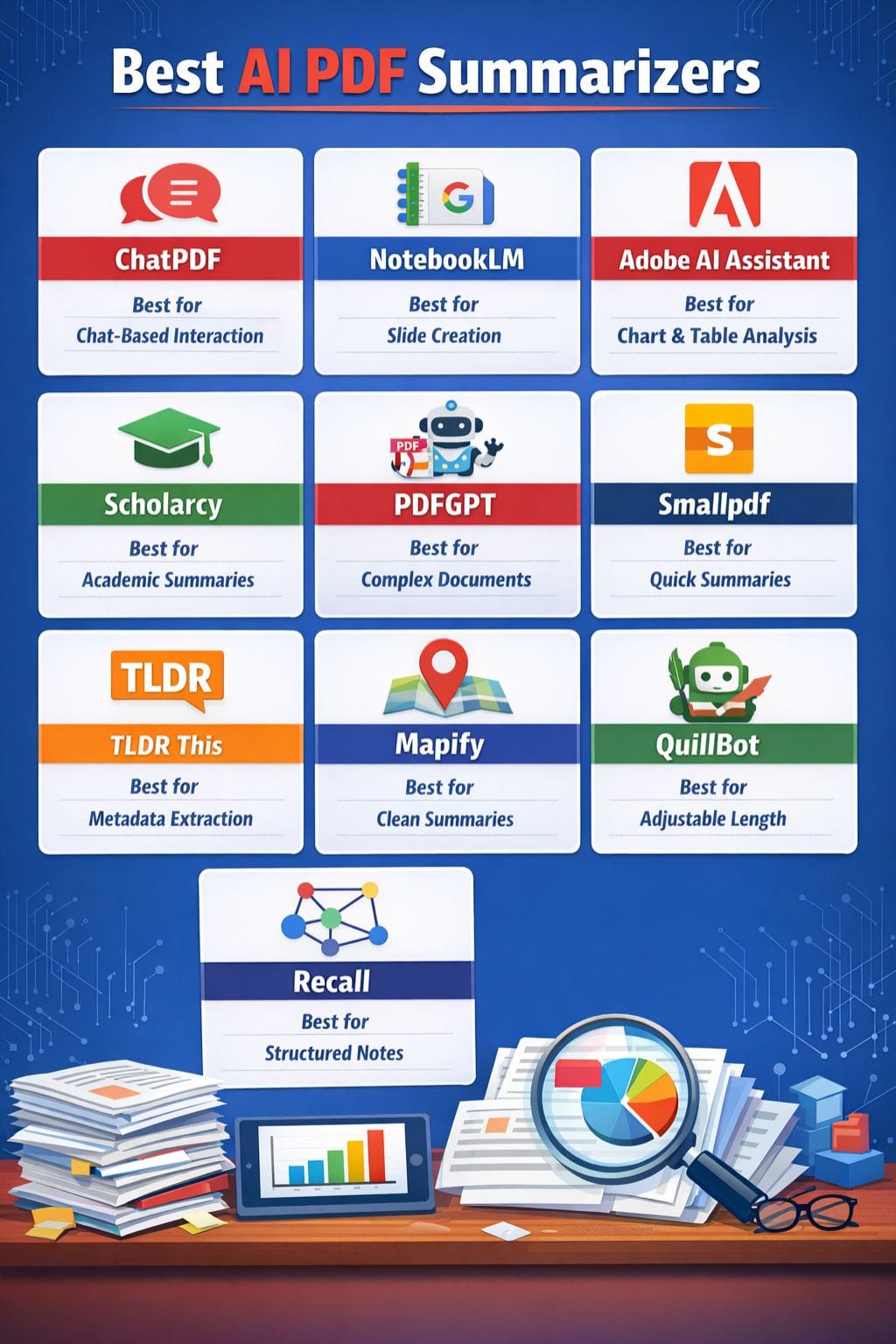
| Tool | Strengths | Limitations |
|---|---|---|
| ChatPDF | Chat-based summaries, OCR support | Limited daily usage, accuracy issues |
| NotebookLM | Slide creation, Google Drive integration | Output mismatch, restrictions |
| Adobe AI | Reads charts, voice support | English-only, size limits |
| Scholarcy | Academic summaries, flashcards | Limited free uploads |
| PDFGPT | Chat-based, handles complex docs | Performance issues |
| Smallpdf | Fast, easy, OCR | Limited free features |
| TLDR This | Unlimited summaries, metadata extraction | Bugs, weak visuals |
| Mapify | Clean summaries, chat mode | Expensive, slow for large files |
| QuillBot | Adjustable summaries | Word limit, misses details |
| Recall | Structured notes, knowledge graph | Limited free plan |
ChatPDF
The best AI tools for PDF summarising are through ChatPDF, which allows users to interact with documents via chat to get immediate responses, summaries, and essential information.
Users can quickly obtain answers to their queries while translating text and extracting information from reports. The system supports PDF document uploads, as well as image files and scanned documents, because its AI capabilities enable processing of all these content types.
The system allows users to verify their academic work because it automatically generates citations without requiring any specialized skills from them.
Pros
- Easy-to-use interface
- Instant chat responses
- Supports OCR and multiple file formats
Cons
- Limited to 2 documents/day (free plan)
- May struggle with complex content
Pricing
Plan Pricing
Plus: $3.47/month
NotebookLM
NotebookLM is one of the best free AI tools for working with PDFs. The system converts lengthy documents into straightforward presentation slides within a few seconds.
The “Revise” mode allows users to edit slide text through a single mouse click. Users can type their needs to receive immediate updates for rewriting, expanding, or shortening text. The system provides users with the capability to export documents in both PPTX and PDF formats for seamless distribution.
The tool retrieves document content directly from Google Drive while it performs rapid text scanning operations. Each notebook supports a maximum capacity of 500000 words.
Pros
- Free for extensive use
- Smart slide editing
- Google Drive integration
Cons
- Output design may differ
- Usage restrictions for heavy users
Pricing
Plan Pricing
Request for pricing (RFP)
Adobe AI Assistant
Adobe Acrobat AI Assistant functions as a leading free PDF editing tool, which enables users to summarise PDF documents.
Users can use basic chat functions to request the program to delete pages, remove text, clear comments, and delete images from their documents.
The software allows users to create electronic signatures and secure their documents through voice commands or text input. The document enables users to use chat functions, which help them discover information from charts, tables, and text content.
The program can create summaries of extended documents, which it transforms into emails and notes.
Pros
- Cited answers
- Reads charts and graphs
- Voice command support
Cons
- English only
- 120-page / 25MB limit
Pricing
Plan Pricing
Acrobrat Pro: $19.99/month
Acrobrat Studio: $24.99/month
Scholarcy
The AI tool Scholarcy provides strong PDF summarising capabilities through its services. The software generates brief flashcards from extensive documents while extracting essential information in a quick manner.
Users can easily modify summaries, add their own notes, and make selections through highlighting. The system displays strong capabilities to read both tables and images together with references.
The application supports three formats, which include PDF documents, Word documents, and online content. The software proves to be valuable for various operational requirements.
The software enables students to study more efficiently, while it helps professionals.
Pros
- Extracts key insights
- Creates flashcards
- Handles complex academic PDFs
Cons
- One document at a time (free)
- Less effective for non-academic content
Pricing
Plan Pricing
Monthly Plan: $4.99/month
 Vivek Dev Jacob
PDFGPT
PDFGPT serves as the finest PDF summarizer according to the available options. Users can manipulate text through chat prompts by hiding content, summarizing pages, extracting tables, and translating text.
You just upload your file and ask for what you need in plain language. The system operates without requiring users to perform any software installation. The system operates quickly with large files while maintaining excellent comprehension of intricate documents.
The system outperforms numerous traditional PDF solutions through its advanced capabilities. The chat-based flow provides users with a straightforward and natural experience.
Pros
- Natural chat interaction
- Fast processing
- Handles complex documents
Cons
- Performance issues reported
- Less precision in the free version
Pricing
Plan Pricing
Plus: $3.15/month
Pro: $5.26/month
Max: $8.42/month
Smallpdf
Smallpdf is an efficient AI solution that enables users to create quick PDF summaries.
The program extracts essential information within seconds, enabling users to skip full document reading. Users can upload any document to receive a basic summary, which shows essential information. Users can interact with the document through chat functions to access additional information.
The software uses its OCR capability to accurately read scanned documents, which enables users to process multiple document types. Users can apply the software for creating reports, research papers, and legal documents. The free version functions effectively.
Pros
- Quick summaries
- No login required
- OCR support
Cons
- Limited free features
- Paid plans needed for advanced use
Pricing
Plan Pricing
Pro: $10.32/month
Business: Custom
TLDR This
The browser tool provides a quick way to convert extensive articles, PDF documents, essays, and papers into understandable summary content.
It extracts essential information, which includes the author's name, publication date, visual content, estimated reading time, and important terms. The user can obtain brief, essential sentence summaries or straightforward natural summaries, which enable deeper comprehension of the content.
The system functions effectively for both rapid content inspection and detailed content assessment. The tool enables students and researchers, journalists, and busy professionals to efficiently manage their time while maintaining their understanding of essential information.
Pros
- Unlimited basic summaries
- Extracts metadata
- Natural summaries
Cons
- Occasional bugs
- Weak with complex visuals
Pricing
Plan Pricing
Pro: $9.99/month
Muskaan Kapoor
Mapify
Mapify enables users to quickly read long PDF documents because it functions as an AI tool that provides fast reading capabilities.
The system examines documents to extract essential information and main concepts, and table data within seconds. You can interact with your documents through chat to make inquiries or modify the resulting information.
The system provides essential insights that help professionals, students, and workgroups to stay focused while working. The tool keeps things simple by eliminating unnecessary disruptions. The system enables you to concentrate on your most important duties.
Pros
- Clean output
- Good free plan
- Chat-based follow-ups
Cons
- Expensive for teams
- Slower with large files
Pricing
Plan Pricing
Basic: $9.99/month
Pro: $19.99/month
Unlimited: $29.99/month
QuillBot PDF Summarizer
QuillBot’s PDF Summarizer makes long documents easy to handle. The software can process PDF documents, Word documents, and plain text files.
You can choose between essential points and an abbreviated version of the content. The slider function enables users to adjust their selection of content length.
The system displays both the total word count reduction and the most important content. Users can paste text or upload files, or they can use the Chrome extension to access web pages.
Users have multiple options to transfer content, including direct copying, pasting to other applications, or saving files as Word documents.
Pros
- Bullet & paragraph formats
- Adjustable summary length
- Easy to use
Cons
- 1,200-word limit (free)
- May miss details
Pricing
Plan Pricing
Premium: $4.17/month
Team Plan: Contact Sales
Recall
Recall turns long PDFs into clear, simple notes. It breaks content into short headings and bullet points, so you see key ideas fast.
You save time and avoid overload. It helps you build a personal knowledge base as you go. The tool links related ideas and shows them in simple graphs, which helps memory. You can edit notes with ease and chat across all saved content.
It works well on your phone too. Its strength is a clean structure and long-term recall. Many users like its speed for studying and daily work.
Pros
- Fast summaries
- Knowledge graph linking
- Great for learning
Cons
- Free plan limited
- Paid is needed for full features
Pricing
Plan Pricing
Recall: $10/month
Recall Business: Contact Sales
Vivek Dev Jacob
Pricing Comparison Table (All Tools)
| Tool | Plan Name | Pricing |
|---|---|---|
| ChatPDF | Plus | $3.47/month |
| NotebookLM | RFP | Custom Pricing |
| Adobe AI | Acrobat Pro | $19.99/month |
| Acrobat Studio | $24.99/month | |
| Scholarcy | Monthly | $4.99/month |
| PDFGPT | Plus | $3.15/month |
| Pro | $5.26/month | |
| Max | $8.42/month | |
| Smallpdf | Pro | $10.32/month |
| Business | Custom | |
| TLDR This | Pro | $9.99/month |
| Mapify | Basic | $9.99/month |
| Pro | $19.99/month | |
| Unlimited | $29.99/month | |
| QuillBot | Premium | $4.17/month |
| Team Plan | Contact Sales | |
| Recall | Individual | $10/month |
| Business | Contact Sales |
How to Choose the Right AI PDF Summarizer
Choosing the right tool depends on your needs:
- For students & research: Scholarcy, Recall
- For chat-based summaries: ChatPDF, PDFGPT
- For quick summaries: Smallpdf, TLDR This
- For presentations: NotebookLM
- For advanced features: Adobe Acrobat AI
Tip: Try 2–3 tools before deciding your go-to option.
Conclusion
AI PDF summarizers make document handling fast and efficient. They help users:
- Save time
- Improve understanding
- Focus on key insights
Free plans are great for light use, while paid plans support heavy workloads and advanced features.
The best tool depends on your workflow, whether you need speed, accuracy, or deeper analysis.
FAQs
What are the best AI tools for summarizing PDFs?
Some of the best AI tools for PDF summarization include ChatPDF, NotebookLM, Adobe Acrobat AI Assistant, Scholarcy, PDFGPT, and Smallpdf. These tools help extract key insights, generate summaries, and improve productivity.
Can AI tools summarize scanned PDF documents?
Yes, many AI tools like ChatPDF, Adobe Acrobat AI Assistant, and Smallpdf use OCR (Optical Character Recognition) to read and summarize scanned PDFs, images, and complex documents.
Are free AI PDF summarizers enough for regular use?
Free plans are suitable for light usage, such as summarizing short documents or occasional tasks. However, for large files, advanced features, and frequent use, paid plans are more effective.
How do AI PDF summarizers improve productivity?
AI PDF summarizers save time by extracting key points, reducing reading effort, and presenting information in a structured way. This helps users focus on important insights and work more efficiently.