10 Best AI Tools for LinkedIn Ads in 2026
Discover the best AI tools for LinkedIn ads in 2026, with features, pricing, drawbacks, and use cases to help you choose the right tool.

Running LinkedIn ads takes time, clear goals, and strong ad copy. The right AI tools can make the process easier by helping you write ads, create visuals, find the right audience, and track results.
They also reduce manual work, giving your team more time to focus on new ideas and better offers. Some tools help test different messages, while others improve bids and track which ads bring in leads.
Choosing the right tool depends on your goals, budget, and daily needs. This guide explores how AI can simplify ad creation, improve results.
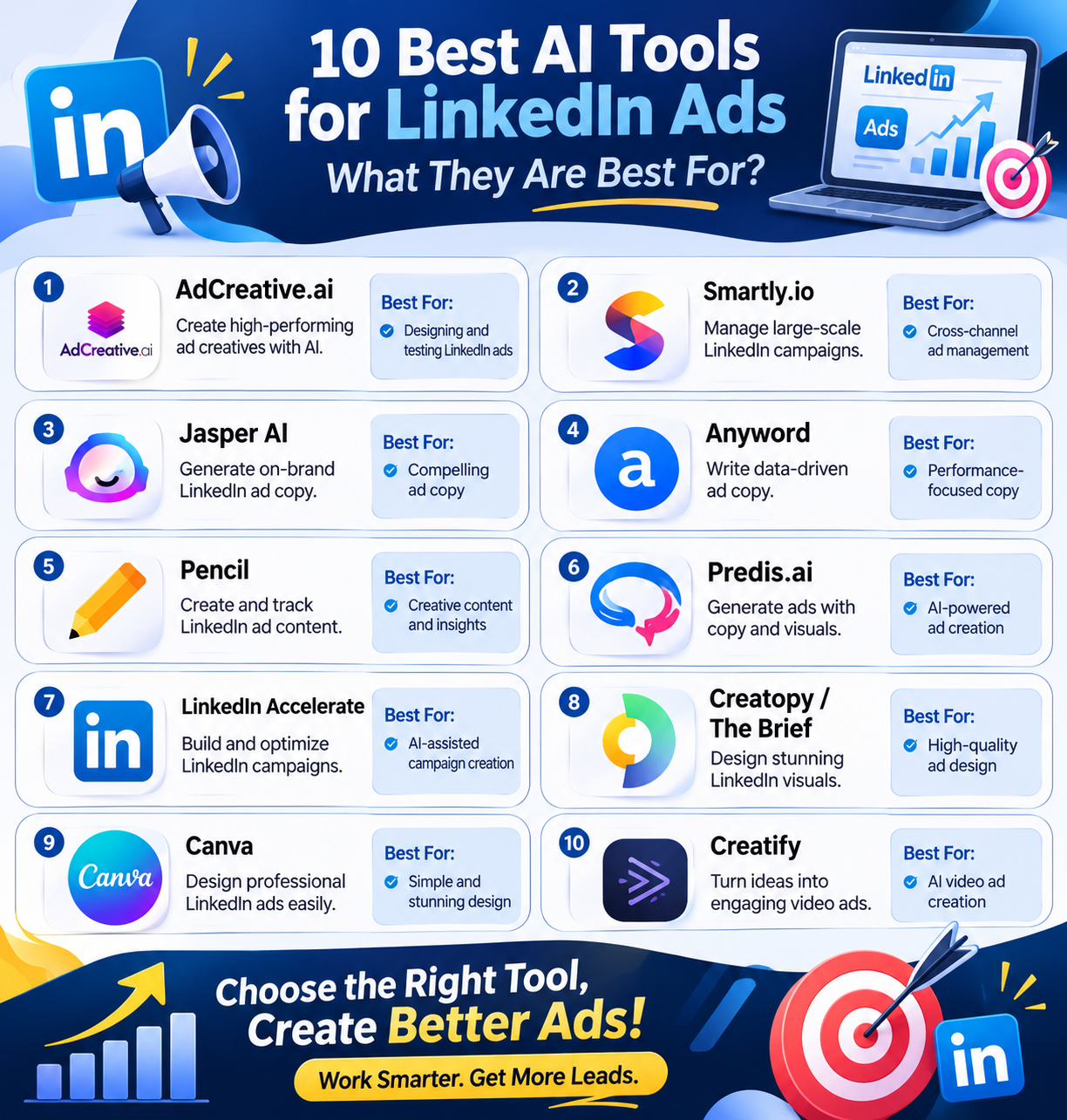
Best AI Tools for LinkedIn Ads: Quick Comparison
| Tool | Best For | Key Features | Drawbacks |
|---|---|---|---|
| AdCreative.ai | Creating and testing ad creatives | AI copy, branded images, video ads, bulk creation, creative scoring, resizing | Creative scores do not guarantee performance; monthly credits may limit heavy use |
| Smartly.io | Large-scale ad campaigns | Templates, bulk creation, AI insights, content adaptation, cross-channel reporting | Learning curve; may be excessive for simple ad needs |
| Jasper AI | Branded LinkedIn ad copy at scale | LinkedIn Ad Agent, Brand Voice, audience profiles, knowledge base, multiple ad formats | Limited brand voices and audience profiles on Pro; advanced features require Business |
| Anyword | AI ad copy and performance prediction | Performance scores, audience profiles, brand voice, custom models | Prediction scores are capped; Starter has one user seat |
| Pencil | Creating and reviewing ad content | AI text, images and videos, ad scores, bulk creation, resizing, LinkedIn results tracking | Credits expire monthly; credit limits can require upgrades |
| Predis.ai | Creating ad copy and visuals together | AI copy, images, videos, carousels, brand kits, templates, buyer-group variations | AI drafts use credits; Core has one brand and lacks auto-posting |
| LinkedIn Accelerate | AI-assisted LinkedIn campaign creation | Ad copy, audience discovery, bidding, placements, AI chat assistant, cost caps | No third-party tracking; takes time to learn and tune results |
| Creatopy / The Brief | Designing LinkedIn ad visuals at scale | Templates, copywriting, resizing, brand assets, collaboration, image and video ads | Shared editing requires Team; heavy AI use needs a higher plan |
| Canva | Easy AI-assisted ad design | Magic Design, Magic Write, Magic Media, resizing, background removal, Brand Kits | AI usage caps; AI output may not be exclusive |
| Creatify | AI-generated video ads | Product-to-video creation, scripts, voice tracks, AI actors, editing, 75+ languages | LinkedIn is not listed as a built-in ad launch channel; AI generation uses credits |
AdCreative.ai
AdCreative.ai helps teams create LinkedIn ads without spending too much time on design. It can turn a website link, product image, or short brief into ready-to-edit ad drafts.
Its features include AI-written copy, branded images, video ads, and bulk ad creation. The tool can also resize designs for LinkedIn and other platforms. Its creative scoring feature predicts which ads may perform well, while insights help teams review past results.
Users can edit each draft to fit their brand and test new ideas quickly. It works well for teams that need variety, but real ad tests remain essential.
Pros
- Saves resize work with ad sizes made for LinkedIn
- Pairs ad copy and design tools in one place
- Offers bulk creation to build more ad variants for tests
Cons
- Scores predict results; they do not prove an ad will work
- Monthly credit limits may constrain heavy use
Pricing
| Plan | Pricing |
|---|---|
| Starter Plans | $20/month |
| Professional Plans | $125/month |
| Ultimate Plans | $500/month |
Smartly.io
Smartly.io is an AI-powered tool that helps teams create and manage LinkedIn ads. It lets users turn existing images and videos into new ads without starting from scratch.
The platform offers ready-made templates, bulk ad creation, and content tailored to different job roles, markets, and languages. Its AI features help teams understand which ads perform well and use those insights to improve future campaigns.
Users can also track ads across LinkedIn and other platforms in one place. Smartly.io suits brands that run large campaigns, but its wide range of features may be too much for smaller teams.
Pros
- Turn still images into short videos for LinkedIn
- Tailor ads to roles and buying groups with reusable templates
- View results across ad channels in one dashboard
Cons
- Learning curve for new users
- Its broad set of tools may be excessive for simple ad needs—a scope-based drawback
Pricing
| Plan | Pricing |
|---|---|
| Request for Pricing (RFP) | Custom pricing |
Jasper AI
Jasper helps teams create LinkedIn ads that fit their brand and reach the right audience. Its LinkedIn Ad Agent turns a brief into copy for image, carousel, and video ads.
It can suggest hooks, key points, and calls to action for each format. The Brand Voice feature helps keep the tone consistent, while audience profiles help tailor messages to different groups.
Teams can also add company details and product facts to its knowledge base. This makes it easier to create and test several ad versions. Jasper works well for brands that need content at scale.
Pros
- Matches ad copy to your brand voice and target audience
- Shapes hooks and calls to action for three ad formats
- Has a separate agent for Message Ads and Conversation Ads
Cons
- Pro has just two brand voices and three audience profiles
- Custom agents and API access need the Business plan
Pricing
| Plan | Pricing |
|---|---|
| Pro | $69/month |
| Business | Custom Pricing |
 Vivek Dev Jacob
Anyword
Anyword is an AI writing tool that helps teams create better LinkedIn ads. It can write headlines and ad copy based on your brief. One useful feature is its performance score, which predicts how well each version might perform.
This lets you compare different drafts before launching a campaign. Brand voice settings help keep your message consistent, while audience tools tailor copy to specific roles and needs.
Paid plans include unlimited text generation, and higher plans offer models trained on past campaign data. These features help teams test ideas, but scores cannot promise more clicks, leads, or sales.
Pros
- Scores help rank ad drafts before launch
- Audience profiles tailor copy to job roles and pain points
- Custom models can learn from your past ad results on higher plans
Cons
- Unlimited writing does not mean unlimited scores; each plan caps predictions
- Starter includes just one user seat
Pricing
| Plan | Pricing |
|---|---|
| Starter | $49/month |
| Data Driven | $99/month |
| Business | Custom Pricing |
| Enterprise | Custom Pricing |
Pencil
Pencil is an AI tool that helps teams create LinkedIn ad content with ease. It can generate text, images, and videos using your brand assets. Its features include AI ad scores, bulk content creation on Pro plans, and automatic resizing for different ad formats.
By connecting your LinkedIn account, you can track clicks, ad spend, and other results. Pencil can also send images and videos to your LinkedIn media library, saving time on manual uploads.
However, you still need LinkedIn Campaign Manager to set up and launch ads. Pencil works best as a tool for creating and reviewing ads..
Pros
- Sends visuals to LinkedIn’s media library with no manual upload
- Links and results with AI insights to help guide new designs
- Makes text, images, and videos in one place
Cons
- Unused credits expire each month. Each resized format costs one credit
- Core and Growth users must upgrade or wait when credits run out
Pricing
| Plan | Pricing |
|---|---|
| Request for Pricing (RFP) | Custom pricing |
Predis.ai
Predis.ai helps teams create LinkedIn ad copy and visuals with a simple prompt or product link. It can generate headlines, calls to action, images, videos, and carousels from one place.
Its brand kits let users add logos, fonts, and colors to keep ads consistent. The tool offers templates for services, courses, hiring, and consulting. Users can edit text, replace images, or turn static ads into videos.
It can also create different ad versions for various buyer groups. This makes testing new ideas easier and faster, while reducing the time and effort needed for design.
Pros
- Creates copy and visuals in one step
- Turns still ads into videos with one click
- Makes distinct ad versions for different buyer groups
Cons
- Each AI draft uses credits, which can limit frequent tests
- Core lacks auto-posting and includes just one brand
Pricing
| Plan | Pricing |
|---|---|
| Core | $32/month |
| Rise | $79/month |
| Enterprise+ | $249/month |
Vivek Dev Jacob
LinkedIn Accelerate
LinkedIn Accelerate uses AI to help brands build and run LinkedIn ads with less work. It turns details about your brand or product into an ad set you can check and edit.
Key tools help draft ad copy, find likely buyers, set bids, and choose where ads run. An AI chat assistant offers tips as you build. You can use image, video, or document ads to drive leads, clicks, views, and sales.
Since August 4, 2026, its core build tools sit within Classic campaigns, rather than a standalone campaign type.
Pros
- Uses LinkedIn work data to help find buyers likely to act
- Lets you check and change AI drafts before launch
- Offers cost caps to help keep bids in check
Cons
- Does not support third-party tracking
- Takes about 10–14 days to learn and tune results
Pricing
| Plan | Pricing |
|---|---|
| LinkedIn Accelerate | Included with LinkedIn premium plans |
Creatopy / The Brief
Creatopy, now known as The Brief, is an AI design tool that helps teams create LinkedIn ad visuals with less effort. It supports image and video ads and offers tools for writing ad copy, editing visuals, and resizing designs.
Users can choose from over 5,000 templates and save brand assets in one place. Teams can also share templates, work together, and keep designs consistent with the Team plan.
The tool is useful for brands that need to create ads often and at scale. However, it focuses on design rather than audience targeting, bid management.
Pros
- Resize one design for use across ad formats
- Lock brand assets to keep team work on brand
- Export images and videos on every plan
Cons
- Shared editing needs Team, with at least two seats
- Heavy AI use needs a higher plan
Pricing
| Plan | Pricing |
|---|---|
| Request for Pricing (RFP) | Custom pricing |
Canva
Canva makes it easier to create LinkedIn ads with the help of AI. Magic Design turns simple prompts into ready-to-edit layouts, while Magic Write helps you draft ad copy that matches your brand’s tone.
Magic Media can create images and short videos from text prompts. You can also remove image backgrounds, resize designs for different formats, and keep logos, fonts, and colours consistent with Brand Kits.
Its drag-and-drop editor makes it easy to adjust text and visuals. Canva offers free tools with some limits, while paid plans provide more features and higher AI usage limits for regular ad creation.
Pros
- Edit AI-made layouts, text, and images in one place
- Resize and clean up many ad designs at once
- Keep a clear brand style across ad sets
Cons
- AI use has caps, even on paid plans
- Other users may get the same AI output; rights are not exclusive
Pricing
| Plan | Pricing |
|---|---|
| Pro | $18/month |
| Business | $25/month |
| Enterprise | Custom Pricing |
Vivek Dev Jacob
Creatify
Creatify helps teams make video ads for LinkedIn without a film crew. Paste a product link to turn its text and images into an ad. Its AI tools write scripts, add voice tracks, and bring AI actors to life.
You can change clips, text, and layouts in the editor. With support for over 75 languages, teams can adapt ads for new markets. Paid plans add more actors, templates, and tools to make more ads at once.
It works best as a tool to build ad content, not as a full LinkedIn ad manager.
Pros
- Turn a product link into an ad, with less prep work
- Use custom AI actors on Pro and higher plans
- Edit text, trim clips, and swap media for free after export
Cons
- LinkedIn is not listed among its built-in ad launch channels
- Fresh AI output uses credits, even when you redo a script or voice
Pricing
| Plan | Pricing |
|---|---|
| Standard | $10/month |
| Pro | $38/month |
| Max | $66/month |
How to Choose the Right AI Tool for LinkedIn Ads
The right AI tool depends on the part of LinkedIn advertising that takes the most time for your team.
| Primary Need | Recommended Tools | How They Help |
|---|---|---|
| Ad Design and Creative Testing | AdCreative.ai, Pencil, Canva, Creatopy | Create more ad variations faster and simplify creative testing. |
| Ad Copy and Messaging | Jasper AI, Anyword | Create different versions of headlines, hooks, and calls to action. |
| Large-Scale Campaigns and Cross-Channel Management | Smartly.io | Manage large campaigns and view results across different ad channels. |
| AI-Assisted Campaign Creation and Targeting | LinkedIn Accelerate | Help with ad copy, audience discovery, bidding, and ad placements. |
| Video Ad Creation | Creatify, Predis.ai | Turn ideas or product information into video ad content with less manual work. |
How AI Can Improve LinkedIn Ad Performance
AI can help reduce the manual work involved in LinkedIn advertising. It can speed up ad creation, create more variations for testing, and help teams maintain consistent branding.
However, AI-generated scores and recommendations are not guarantees of campaign success. Real ad tests are still important.
Teams should continue to track clicks, leads, ad spend, and other campaign results. Combining AI tools with human review can help businesses create better ads while keeping the messaging relevant to their audience.
Conclusion
The right AI tools can help you get more from your LinkedIn ads. They cut busywork, sharpen your message, and help you reach people who are more likely to act. But great results still need clear goals and a human touch.
Start with the tasks that slow you down most. Test what works, track your costs, and build on each win. You do not need every tool to make progress. You need the right fit for your team and goals.
Use AI to work smarter, not just faster, and turn each ad into a chance.
FAQs
What are AI tools for LinkedIn ads?
AI tools for LinkedIn ads help businesses create ad copy, visuals, videos, audience strategies, and campaign variations faster.
Which AI tool is best for LinkedIn ad design?
AdCreative.ai, Canva, Pencil, and Creatopy are useful for creating and testing LinkedIn ad designs.
Which AI tools are best for LinkedIn ad copy?
Jasper AI and Anyword can help create headlines, hooks, calls to action, and different ad copy variations.
Is LinkedIn Accelerate an AI advertising tool?
Yes. LinkedIn Accelerate uses AI to help with ad creation, audience discovery, bidding, and ad placements.
Can AI tools improve LinkedIn ad performance?
AI tools can reduce manual work and help create and test more ad variations, but actual campaign testing and performance tracking are still important.