AI Background and Texture Tools: Best Platforms for Stunning Visuals
AI background and texture tools help you turn simple ideas into high-quality visuals in seconds. Explore the best tools, features, pricing, and use cases in this complete guide.

AI background and texture tools turn simple ideas into great visuals in seconds. You can upload an image or type a short prompt like “sunset beach” or “stone wall.” The AI will remove the old background and add depth, light, and detail. You don’t need design skills.
These tools work well for product photos, social media posts, ads, and art. They also handle many edits at once, which saves time. You can export files in PNG or JPG, even in 4K. The final images look clean and natural. This helps creators focus more on ideas.
Quick Comparison Table
| Tool | Best For | Key Features | Pricing Level | Drawbacks |
|---|---|---|---|---|
| Midjourney | Artistic visuals & textures | High detail textures, remix, upscale, Discord-based | Medium–High | No free trial, Discord dependency |
| Recraft.ai | Clean product visuals | One-click edit, vector export, batch mode | Medium | Credit-based usage |
| Leonardo.ai | Game assets & 3D textures | AI canvas, PBR textures, prompt control | Low–Medium | Learning curve |
| Adobe Firefly | Professional design workflows | Photoshop integration, fill tools, 4K output | Medium–High | Expensive full access |
| Nano Banana 2 | Fast bulk creation | 14 references, ultra-wide formats, fast output | Low–High | Credit limits |
| Ideogram 3.0 | Text + visuals | Strong text rendering, style codes, batch generation | Medium–High | Face distortion issues |
| FLUX.2 Pro | Realistic outputs | 4MP rendering, strong prompt understanding | Low–Medium | Limited feature depth |
| Canva Magic Media | Beginner-friendly design | All-in-one editor, bulk create, templates | Medium | Limited credits |
| Picsart | Mobile editing | One-tap background removal, prompt-based scenes | Medium | Watermarks on free plan |
| Pacdora | E-commerce visuals | 3D engine, lighting match, templates | Medium–High | Bugs, paid features |
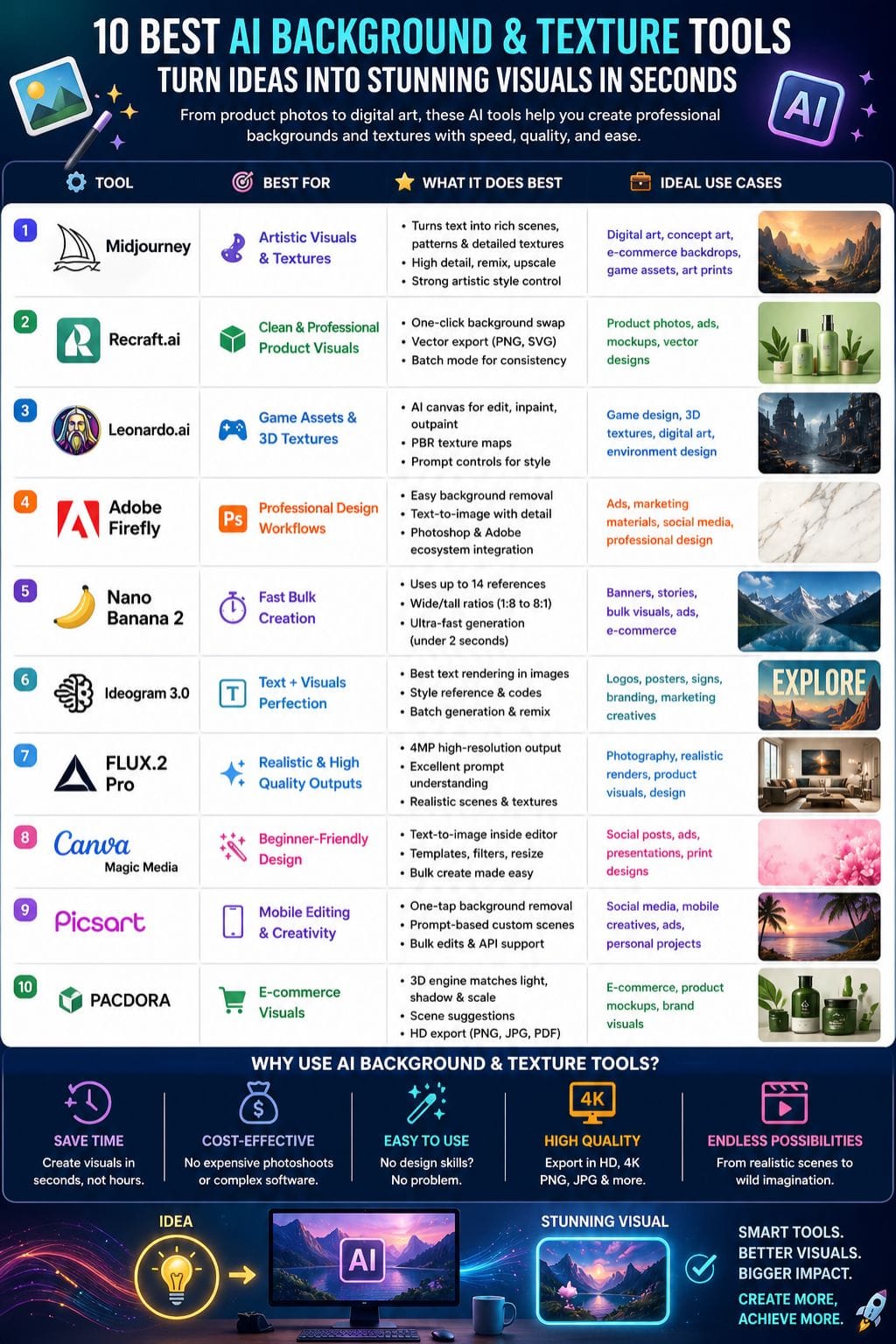
Midjourney
Midjourney excels as an AI background and texture generator. It turns text prompts into rich scenes, seamless patterns, and detailed surfaces like wood grain or marble veins.
Add parameters like tile for repeating textures or V7 for sharp V7 model outputs with better coherence, depth, and lighting. Users craft pro e-commerce backdrops, game assets, or art prints in under a minute via a Discord bot. Remix images, upscale to 4K, and blend styles for custom looks that pop. It beats rivals in artistic flair and prompt control, saving designers hours on complex visuals
Pros
- Ability to display textures at high detail levels, which create realistic visual effects.
- Enables users to create perfect size matches through its quick upscaling process and remixing capabilities.
- The community provides helpful tips, which result in better outcomes for users.
Cons
- Requires users to access the platform through Discord, which creates an inefficient experience.
- The absence of a free testing option prevents users from conducting quick evaluations.
Pricing
| Plan | Pricing |
|---|---|
| Basic | $10/month |
| Standard | $30/month |
| Pro | $60/month |
| Mega | $120/month |
Recraft.ai
Recraft.ai helps you create clean, eye-catching backgrounds from text or images. It is easy to use and fast. You can swap backgrounds with one click, remove old ones, or expand scenes beyond the frame. It also fills empty areas with smart edits. The tool gives sharp edges, rich colors, and full control over style. You can make landscapes, textures, or vector patterns in 4K.
It works well for ads, product photos, and mockups. Batch mode helps you create sets with a common theme. You can export files as PNG, SVG, or vector formats without any hassle.
Pros
- The one-click editing process delivers speedy results
- Textures and edges present clear and distinct details
- Enables users to create multiple items at once
Cons
- Limits users to paid credits, which restricts their ability to use the service without charge.
- Requires users to modify their prompts until they achieve the desired output quality.
Pricing
| Plan | Pricing |
|---|---|
| Basic | $12/month |
| Pro | $20/month |
Leonardo.ai
Leonardo.ai excels as an AI background and texture generator. It turns text prompts into vivid scenes, patterns, and 3D materials fast. Upload images to edit, remove old backgrounds, or add custom textures like stone, fabric, or gradients.
Key tools include AI canvas for inpainting, outpainting, and refining details; prompt controls for style, ratio, and quality; plus game-ready PBR texture maps from OBJ files. Users craft pro visuals for ads, products, art, and design in seconds with high-res PNG or 4K outputs. Free tier suits tests; paid plans boost speed and privacy
Pros
- Visitors to the site receive complimentary tokens
- The 3D texture tools enable designers to complete their game asset production faster than before
- Canvas editing features assist users in maintaining uninterrupted progress
Cons
- The free plan restricts the ability to maintain their privacy and edit content
- The learning process requires users to overcome a substantial difficulty level
Pricing
| Plan | Pricing |
|---|---|
| Essential | $12/month |
| Premium | $30/month |
| Ultimate | $60/month |
 Vivek Dev Jacob
Adobe Firefly
Adobe Firefly is a strong AI tool for backgrounds and textures. It finds the main subject fast and removes the old background with ease. You can add a new scene using simple prompts like “sunny beach” or “marble wall.”
The results look clean, sharp, and natural, with clear detail and good lighting. It can create 4K-quality images that feel real. You can resize images for ads or social posts in seconds. Its fill tools help you add small details like birds or fix shadows. It works well with Photoshop and online tools.
Pros
- The free version provides users with 25 credits, which they can use each month
- The paid subscription plans provide users with full commercial rights
- Users can quickly enlarge their content to any desired dimensions
Cons
- The complete functionality of the tool requires users to purchase an expensive Creative Cloud subscription
- The servers experience reduced performance during peak times
Pricing
| Plan | Pricing |
|---|---|
| Standard | $9.99/month |
| Pro | $19.99/month |
| Pro Plus | $24.96/month |
Nano Banana 2
Nano Banana 2 creates sharp AI backgrounds and textures from simple text or up to 14 reference images. It delivers clear 4K detail, rich surfaces, and bright lighting. You can choose wide or tall formats like 1:8 or 8:1, which work well for banners and stories. Editing is quick and easy.
You can change backgrounds, adjust styles, add objects, fix colors, or place text in images. It works fast, often in under two seconds, which helps with ads, e-commerce, and design work. Use 1K for quick drafts, 2K for quality output, and 4K when you need high-quality.
Pros
- Handles 14 refs for a perfect match, where no other option handles this quantity of references
- Panoramic ratios create opportunities for ultra-wide hero format development
- Pro version costs 50% less while producing twice the results at identical expense
Cons
- Requires proper prompts to achieve its best texture quality output
- The free tier of the service imposes credit limits
Pricing
| Plan | Pricing |
|---|---|
| AI Plus | $7.99/month |
| AI Pro | $19.99/month |
| AI Ultra | $249.99/month |
Ideogram 3.0
Ideogram 3.0 turns text prompts into sharp backgrounds and textures with top text rendering and style control. Upload up to three images for style reference to match colors, moods, and details like rusty metal or sunset skies.
Use Canvas Editor for inpainting, outpainting, and background swaps; generate batches for pros. It nails complex scenes, lighting, and 4.3 billion random styles, plus savable codes for repeats.
Photoreal textures shine in products and ads, with remix, upscale, and transparent PNGs. Free tier limits to slow credits; paid plans unlock speed and tools.
Pros
- The most suitable text for logo and sign backgrounds exists as the unique text
- The reference style of this design element provides better brand alignment
- Canvas tools enable users to quickly repair existing textures while they create new textures
Cons
- The people shots have facial features that appear distorted.
- Performance issues reported by users
Pricing
| Plan | Pricing |
|---|---|
| Plus | $20/month |
| Pro | $60/month |
Aniket Mandal
FLUX.2 Pro
FLUX.2 Pro turns simple text into high-quality images. It creates realistic scenes, detailed patterns, and smooth edits with ease. The tool works at 4MP and delivers sharp, clean results. Text in images looks clear and natural.
You can use many references to keep a style consistent. It is fast and easy to use. Lighting and depth feel real, like a photo. You can make images for ads, e-commerce, or design in seconds. No special skills are needed. It understands complex prompts well. The final output comes as clean 4K PNG files.
Pros
- Creates high-quality, realistic images with strong detail
- Understands complex prompts well, giving accurate outputs
- Fast generation with clean and sharp results (4MP quality)
- Good for ads, product visuals, and realistic scenes
Cons
- Fewer advanced editing tools compared to some competitors
- Limited ecosystem (no deep integrations like Adobe tools)
- May need prompt tweaking for perfect results
Pricing
| Plan | Pricing |
|---|---|
| Basic | $9.99/month |
| Standard | $19.99/month |
| Pro | $49.99/month |
Canva Magic Media
Canva’s Magic Media lets you turn simple text into rich backgrounds and textures inside the editor. Type phrases like “cozy forest path” or “metal grid,” choose a style such as 3D or watercolor, and get clear images in seconds.
The tool blends elements well and adds depth. It works for posts, ads, and print. You can edit right away with layers, filters, and resize tools, so you do not need other apps. Bulk create helps you make many images fast. It suits both beginners and pros. You can export in 4K as PNG or JPG files.
Pros
- Simple tasks produce professional outcomes within seconds
- The complete design package accelerates work processes
- The free plan allows testing of essential functions
Cons
- The free plan provides users with a restricted credit limit
- The outputs require multiple adjustments to achieve their ideal state
Pricing
| Plan | Pricing |
|---|---|
| Pro | $15/month |
| Business | $21/person/month |
| Enterprise | Contact Sales |
Picsart
Picsart is a simple AI tool for creating backgrounds and textures. Upload your photo and remove the old background with one tap. Then type what you want, like “sunset beach” or “rustic wood.” The AI builds a new scene that fits your subject. It blends edges well and adds natural light.
You get clean, high-quality images in seconds. Use it for product photos, ads, social posts, or creative work. It also supports bulk edits and API use for professionals. You don’t need design skills. The app does the heavy work for you and helps turn phone photos into studio-style photos.
Pros
- Enables users to change their background settings with a single quick action
- Provides access to an extensive collection of artificial intelligence design options
- The custom scenes that use prompt-based technology create authentic environments
Cons
- The prompts produce unpredictable results on certain occasions
- Users who export their work without payment will receive watermarked content
Pricing
| Plan | Pricing |
|---|---|
| Pro | $15/month |
| Ultra | $45/month |
| Enterprise | Custom |
Vivek Dev Jacob
Pacdora
Pacdora helps you create clean product visuals with AI. You can upload images in PNG, JPG, or WebP. The tool removes old backgrounds in seconds. It then suggests new scenes, like nature or studio setups. Its 3D engine matches light, angle, shadow, and scale to keep things real.
You can pick styles, adjust tones, crop, or resize with simple drag and drop. Export your work in HD PNG, JPG, or PDF. You do not need design skills. Pacdora is great for e-commerce, brands, and creators who want pro images fast, without using a camera or studio setup.
Pros
- One-click templates, no tweaks
- 3D technology successfully reproduces both light and depth
- High-definition content becomes ready for both printing and online viewing
Cons
- Occasional bugs
- Premium features are only available on paid plans
Pricing
| Plan | Pricing |
|---|---|
| Lite | $14/month |
| Pro | $29/seat/month |
| Business | $99/seat/month |
How to Choose the Right AI Background Tool
Choosing the right AI background and texture tool depends on your needs, budget, and skill level. If you want artistic and creative outputs, tools like Midjourney work best. For professional workflows and polished results, Adobe Firefly is a strong choice. Beginners and social media creators may prefer Canva Magic Media or Picsart due to their ease of use.
If you work in eCommerce, Pacdora and Recraft.ai help create clean product visuals quickly. For gaming or advanced textures, Leonardo.ai offers powerful features like 3D materials and canvas editing. Speed and bulk creation are important? Nano Banana 2 is a great option.
Before selecting a tool, consider:
- Your use case (ads, product photos, art, or social media)
- Budget and pricing model (subscription vs credits)
- Output quality (HD vs 4K)
- Ease of use vs advanced controls
Picking the right tool can save time, reduce costs, and improve your visual quality significantly.
Future of AI Background & Texture Tools
AI background and texture generators are reshaping how creatives and marketers build visuals. They turn simple ideas into rich scenes and detailed surfaces in seconds, with no need for complex design skills. From clean product shots to gritty sci‑fi environments, these tools adapt to almost any style or use case.
They save time, cut costs, and let teams focus more on strategy and storytelling. As AI keeps learning from real‑world images, the quality, speed, and realism of generated backgrounds and textures will only keep rising. For anyone working with visuals, using this tech is no longer a luxury.
FAQs
What are AI background and texture tools?
AI background and texture tools are software that use artificial intelligence to create, edit, or replace image backgrounds and generate realistic textures from text prompts or images.
Which AI tool is best for creating realistic backgrounds?
Tools like FLUX.2 Pro, Midjourney, and Adobe Firefly are best for realistic backgrounds due to their high-quality rendering and advanced prompt understanding.
Do I need design skills to use AI background tools?
No, most AI tools are beginner-friendly and require only simple text prompts or image uploads to generate professional visuals.
Can AI tools create 4K images?
Yes, many tools like Leonardo.ai, Canva Magic Media, and Adobe Firefly support high-resolution outputs, including 4K images.