10 Best Free AI Ad Generators to Create Ads Without Design Skills
Explore the 10 best free AI ad generators to create ad copy, images, and videos. Compare their free plans, features, and limitations to find the right tool for your brand.
10 Best Free AI Ad Generators to Create Ads Without Design Skills
Want to make great ads but lack time, cash, or design skills? Free AI ad generators can help you get started. These tools turn short prompts into ad copy, images, or videos, based on what each one offers.
Some help you write strong headlines. Others let you build bold designs or test fresh ideas.
This guide explores ten top picks to help you find the right fit for your brand. You will see what each offers for free and where limits apply. Explore your options, choose what suits your goals.
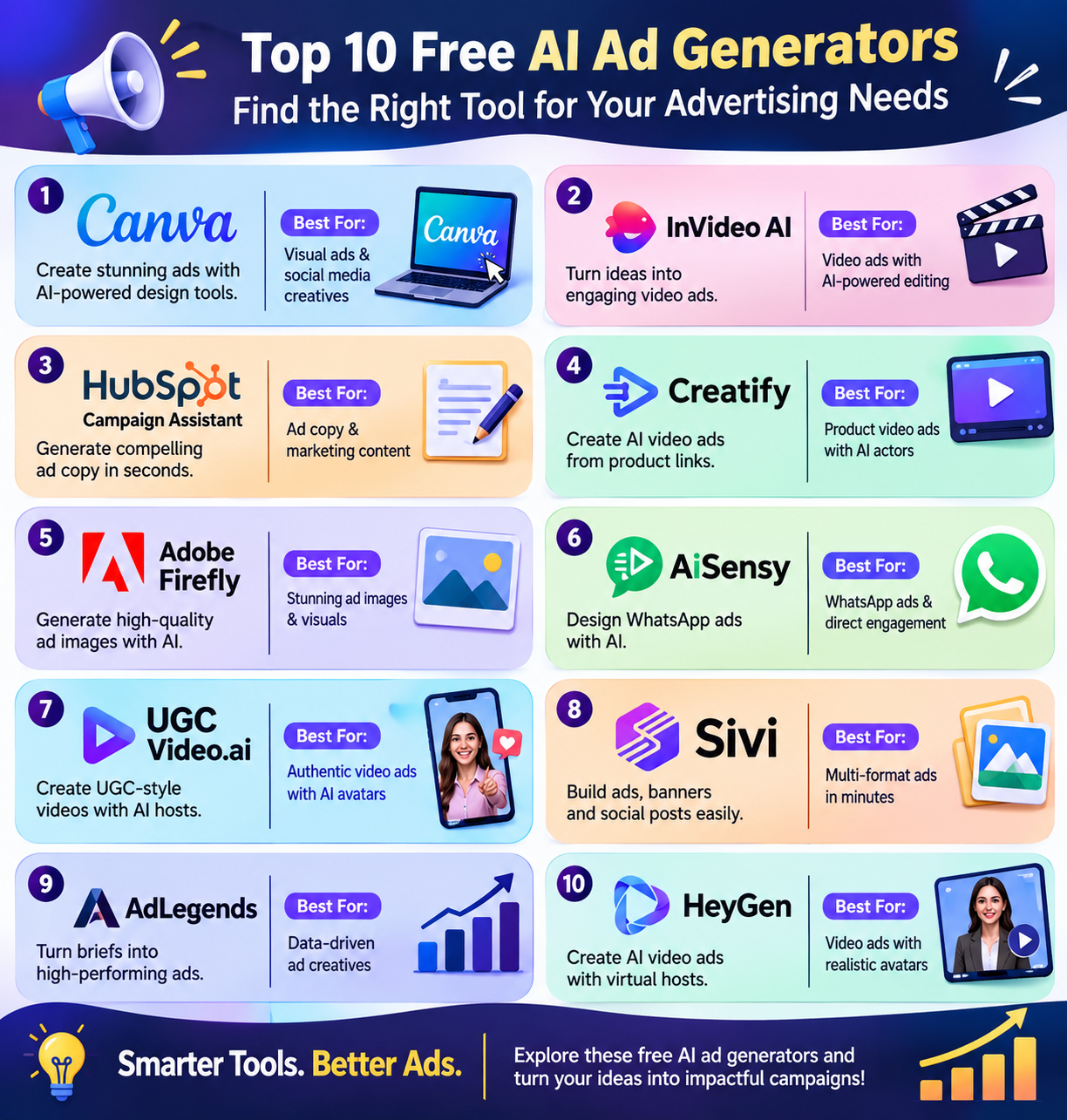
10 Best Free AI Ad Generators: A Quick Comparison
The following table compares the best free AI ad generators based on their primary use cases, features, pricing levels, and limitations.
AI avatars, Video Agent, custom avatars, multilingual video generation
Freemium
Free videos have watermarks, duration limits, and usage caps
Top 10 Best Free AI Ad Generators to Create Ads Without Design Skills
Canva
Canva is a strong pick for a top ten list of free AI ad tools. It helps you make ads with less design work. Use AI to draft text, make images, and shape designs from prompts.
Pick a template, then change fonts, colors, and photos with simple drag and drop tools. Canva Grow can turn your site link and product shots into ad drafts. You can make ads for social feeds, video sites, and print.
The free plan lets you try AI tools, but caps their use. Most Canva Grow tools and more brand features need a paid plan.
Pros
Drag and drop text and images and you can tweak ad drafts without deep design skills
Canva Grow uses your site link and product shots to build ads, which cuts setup work
Make ads for Instagram, YouTube, Facebook, and print in one place
Cons
Free access has limits, which can slow work when you need lots of ad drafts
Quick resize, full Brand Kits, and the wider stock library need a paid plan
InVideo AI
Invideo AI is a useful pick for a top ten list of free AI ad tools. It turns a short brief into a video with a script, clips, speech, music, and captions. Add your product shots and brand assets to shape the look.
You can ask the AI to change scenes or edit each clip on a timeline. It helps you make ads for TikTok, YouTube, Instagram, and Facebook. The free plan lets you test the tool, but has tight caps.
Use it to try ad ideas before you pay for more credits.
Pros
Turn your product, audience, and offer into an ad with sound and text
Trim clips, swap shots, or change their order on the timeline
Add your own product images and brand assets to guide the ad
Cons
Unused paid credits do not roll over to the next month
Starter lacks some AI models and offers only the Lite agent
HubSpot Campaign Assistant
HubSpot Campaign Assistant is a free AI ad copy tool worth a place on your top ten list. It writes ads for Google, Facebook, and LinkedIn from a short brief. Add your goal, key points, and brand tone to shape each draft.
The tool can also write emails and landing page copy, which helps keep your message clear across channels. Its simple flow suits small teams that need quick drafts without extra costs.
You can adapt the text for each platform and use it with other tools. Treat each draft as a starting point.
Pros
Turn a short brief into ad copy, so your team spends less time on a blank page
Set a writing style to help the copy match your brand’s voice
Draft emails and landing pages, too, to keep one core message across your campaign
Cons
Vague input may mean more edits
Copy creation is separate from ad publishing and tracking, which use connected ad accounts
Creatify is a useful pick for a top 10 free AI ad generators list. It turns product links into video ads with AI scripts, voices, and actors. You can use store links or upload your own clips and images.
The free plan gives you 10 credits each month. That can make up to two video ads or 20 image ads. You also get 300 AI actors, 40 ad templates, and 10 premium AI models. Its tools help you test ad ideas without a film crew.
Yet, free exports have a watermark, and longer clips can use up your credits.
Pros
Pull product details from a store link, so you have less to upload by hand
Try 300 AI actors and 40 ad templates on the free plan
Change text, trim clips, or swap media for free
Cons
Free exports carry a watermark
Ten credits cover just two standard video ads of up to 15 seconds each
Adobe Firefly
Adobe Firefly is a freemium pick for a top 10 free AI ad generators list. It helps you make ad images, product scenes, and short clips from text prompts.
Key tools include Generate Image, Generative Fill, and Generative Expand. You can add objects, swap parts of a scene, or extend an image to fit a new ad size. Its product shot tool helps place goods in fresh settings.
Free daily generations let you test ideas at no cost. Yet free use has limits. Think of Firefly as a tool to make ad assets.
Pros
Adobe permits commercial use of Firefly outputs
Add, remove, or expand parts of an image
Create new settings for product shots to use in ads, shop listings, and mockups
Cons
Video, sound, and partner AI models draw from your credit balance on paid plans
Free daily generations suit small tests
AiSensy AI Ad Creative Generator
AiSensy is a free starter tool for brands that sell through WhatsApp. It turns short prompts, logos, and product photos into ad images. Each run gives you three designs to choose from. You can change your prompt to shape the next set.
The tool sits within Ads Manager, so you can build and launch Facebook and Instagram ads in one place. These ads can send users straight to a WhatsApp chat. New users get three free runs, with no card needed.
It suits small teams that want branded ads and a clear path.
Pros
Add your logo and product photo to guide the design
Each run makes three images
Create and launch ads from one dashboard
Cons
You must link your Facebook account and WhatsApp API number to use the full ad flow
UGCVideo.ai is a freemium option for a top AI ad generators list. It turns product links, text, or images into videos with AI hosts. You can build a host, change skin tones, and add gestures.
Lip sync helps match mouth moves to speech. Ready templates help you start clips for TikTok, Instagram, and Facebook. The free plan gives you 50 credits each month, with up to two videos.
Yet free clips carry a watermark and are for personal use only. This makes the tool best for tests, not live brand ads.
Pros
Start with a product URL rather than build each scene from scratch
Change skin tones, add skin details, and choose a look that fits your brief
Lip sync and gestures help hosts do more than pose on screen
Cons
free plan bans commercial use
You must pay to remove the mark and get access to all models
Sivi AI
Sivi AI is a freemium tool to add to a top 10 free AI ad generators list. It turns short text prompts into ads, banners, and social posts. It builds the copy, images, and layout in one place.
You can edit each text block, shape, and image. Brand tools help match your logo, fonts, and colors. Sivi supports over 72 languages, though free access has limits. You can make up to four ad drafts at once to test new ideas.
The free plan gives 12 credits each month. It suits small brands that need quick ads.
Pros
Change text, images, and shapes on their own
Use your logo, colors, and fonts to give ads a shared look across posts and banners
Make up to four drafts in one run
Cons
Free users get one brand, 100 MB of space, and fewer sizes, models
Text and image tasks use credits too, so they can run out fast
AdLegends
AdLegends is worth a look for a top 10 free AI ad tools list. It turns a short brief into ad copy and images. You can make ads for Facebook, Instagram, Google, LinkedIn, and more.
Its Visual DNA tool picks up your brand’s fonts, colors, and style. AI ad personas help shape fresh ideas from your brief. You can view three ad concepts, pick one, and change the image or size.
Free credits let you test the tool before you pay. It suits small teams that want to build ads fast, but free use has limits.
Pros
Visual DNA uses your fonts and colors to help ads match your brand
Compare three concepts, then swap images or resize your chosen ad without a fresh start
Make copy and images for several ad sites in one tool
Cons
Free credits let you test it, but do not give you endless ad output
Creator, Growth, and Pro each list just one seat, which limits shared access
HeyGen is a pick for a top 10 free AI ad tools list, best suited to ads with a virtual host. It turns text into videos, so you can test a pitch without a film crew.
The free plan has over 500 stock hosts, one custom avatar, and support for over 30 languages. Video Agent helps build clips from a prompt. You can use these tools to make short brand ads and product pitches.
Yet free use has strict caps. Clips last up to one minute, carry a watermark, and have a small quota.
Pros
Stock hosts let you make a pitch without an on-site shoot
The free plan supports over 30 languages for new ad tests
One custom avatar lets you try a host made from your own image
Cons
Free clips show HeyGen’s mark, which may clash with your brand
The free plan caps each at one minute
How to Choose the Best Free AI Ad Generator for Your Business?
Choosing the right AI ad generator depends on the type of advertisements you want to create, your marketing goals, and the features available in its free plan.
Here are a few factors to consider before selecting a tool.
1. Identify Your Advertising Needs
Start by deciding what kind of advertisements you want to create. If you need social media graphics and banners, Canva and Sivi AI are useful options. For video advertisements, you can explore InVideo AI, Creatify AI, and HeyGen.
If your primary requirement is writing advertising copy, HubSpot Campaign Assistant is a good starting point.
2. Check Free Plan Limitations
Free AI ad generators often have restrictions on monthly credits, video duration, image generation, and downloads.
For example, Creatify AI offers 10 monthly credits, while Sivi AI provides 12 monthly credits. Compare these limits with your expected advertising requirements before choosing a tool.
3. Look for Brand Customization
Your advertisements should maintain a consistent brand identity. Look for tools that allow you to add your logo, brand colors, fonts, product images, and preferred writing style.
Canva, Sivi AI, and AdLegends offer features that can help maintain visual consistency across advertisements.
4. Consider Commercial Usage Rights
Not every free AI tool allows commercial use of its generated content. Some platforms may add watermarks or restrict free outputs to personal projects.
For example, UGCVideo.ai restricts free videos to personal use, while Creatify AI adds watermarks to free exports.
Always review the platform's current licensing and usage terms before using AI-generated content in paid advertising campaigns.
5. Evaluate Editing and Export Options
Generating an advertisement is only the first step. You may need to adjust its text, images, dimensions, video duration, or layout before publishing.
Choose a tool that offers enough editing flexibility and supports the formats required by your advertising platforms.
Conclusion
The best free AI ad generators help you turn fresh ideas into ads with less time and effort. They give small teams and new brands a way to start without a big budget.
Yet great ads still need a clear goal, a strong offer, and words that speak to real needs. Use these free options to test new angles, learn what works, and build on each win. Keep your message clear and your brand voice true.
You do not need to spend more to get started. Pick the right fit, take action, and let each test.
FAQs
What are free AI ad generators?
Free AI ad generators are tools that use artificial intelligence to create advertising content, such as headlines, ad copy, images, banners, and videos. They help businesses and marketers produce advertising creatives with less manual work and lower design costs.
Which is the best free AI ad generator?
The best tool depends on your requirements. Canva is useful for visual advertisements, InVideo AI and HeyGen are suitable for video ads, HubSpot Campaign Assistant helps generate ad copy, and Adobe Firefly is useful for creating AI-generated advertising images.
Can I create video advertisements using free AI tools?
Yes. Tools such as InVideo AI, Creatify AI, UGCVideo.ai, and HeyGen offer AI-powered video generation. Their free plans come with different restrictions on credits, video duration, watermarks, and commercial usage.
Are AI-generated advertisements free for commercial use?
Not always. Commercial usage rights depend on the platform and its terms. Some tools allow commercial use of generated content, while others restrict free outputs to personal projects or add watermarks. Always check the licensing conditions before publishing advertisements.
Do I need design skills to use AI ad generators?
No. Most AI ad generators are designed for users with little or no professional design experience. You can provide a text prompt, upload product images, or select a template to generate advertising creatives. Basic editing skills can still help improve the final output.