Best Image Copyright Checker AI Tools: Protect Your Visual Content Online
Image copyright checker tools help creators and brands detect misuse, track image usage, and protect visual content online using AI-powered scanning and analysis.

Image copyright checkers run scans to discover where else the images might occur and how they are used online. By this means, creators can avoid mistakes, considering the protection that their work might also get using this.
These tools combine artificial intelligence with reverse image search, metadata checks, and even pixel-level analysis, all of which are used to come up with questionable copies or edited photos.
Many of them come with add-ons for the browser, options to upload in bulk, and reports that contain a clear show of matches across the web, highlighting problem areas.
Why Image Copyright Checkers Matter
Key Benefits
- Prevent copyright violations
- Protect brand reputation
- Save legal costs
- Ensure safe publishing
Best Practice Tips
- Always verify image sources before use
- Maintain a rights database
- Use multiple tools for accuracy
- Combine AI checks with human review
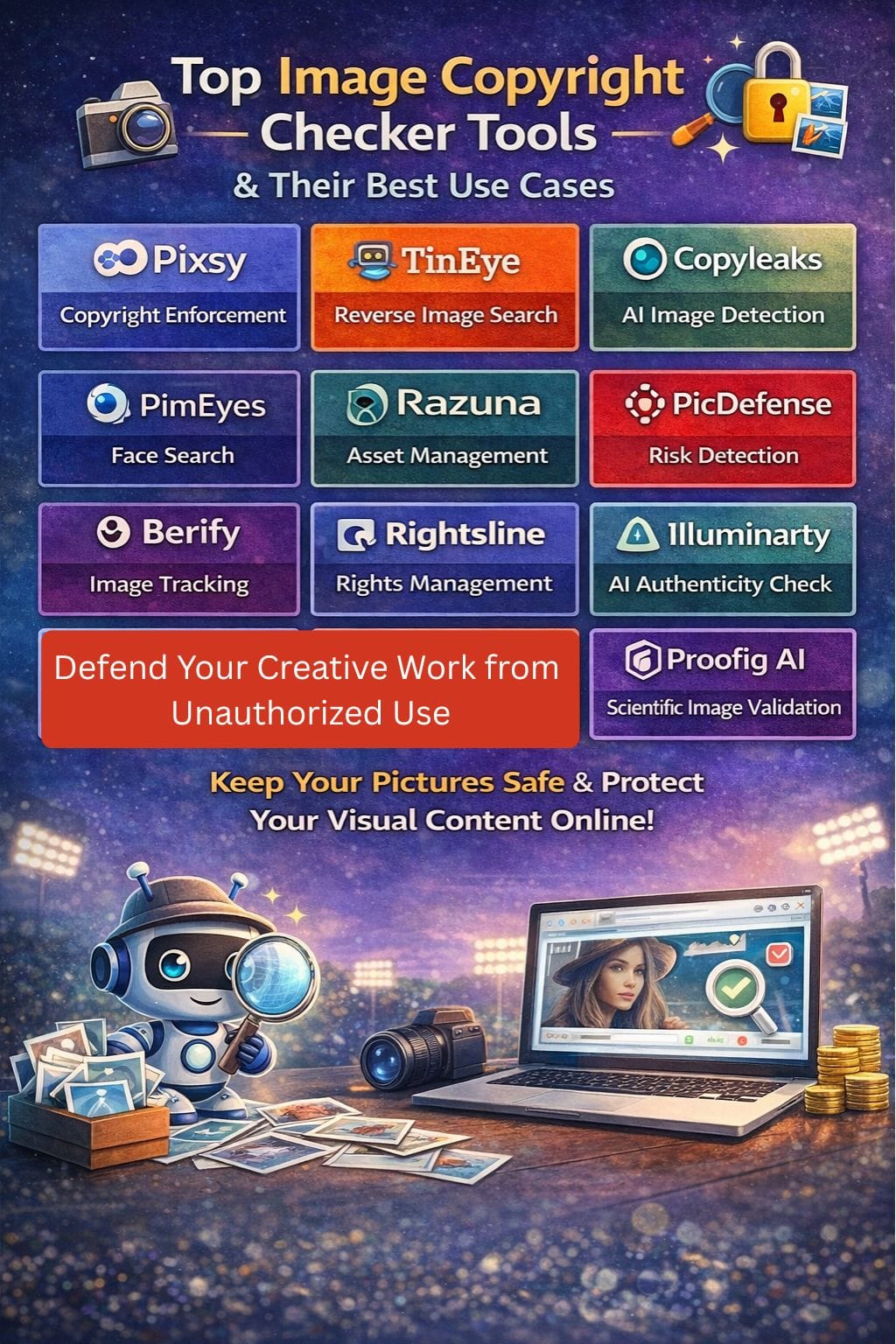
Image Copyright Tools Comparison
| Tool | Best For | Key Features | Pricing Level | Drawbacks |
|---|---|---|---|---|
| Pixsy | Copyright enforcement | AI scan + legal support | Enterprise | Revenue share |
| TinEye | Reverse image search | Image fingerprinting | Enterprise | Limited AI detection |
| Copyleaks AI | AI image detection | Pixel-level analysis | Medium | Limited license tracking |
| PimEyes | Face search | Web-wide face matching | Medium | Privacy concerns |
| Razuna | Asset management | DAM + rights tracking | Medium | Not standalone checker |
| PicDefense | Risk detection | 70B+ image database | Enterprise | Credit costs |
| Berify | Image tracking | Alerts + multi-source search | Enterprise | Limited automation |
| Rightsline | Rights management | Contract tracking | Enterprise | Complex setup |
| Illuminarty | AI authenticity check | Heatmaps + scoring | Low–Medium | No licensing data |
| Proofig AI | Scientific image validation | Microscopy analysis | Enterprise | Niche use |
Pixsy
Pixsy, with the help of artificial intelligence, is an online photo scanning service that serves as the last defense for anyone interested in possible copyright infringements of their photos.
It also allows quick actions for takedowns against alleged infringers or may facilitate litigation in multiple jurisdictions through its legal partners. Pixsy uses reverse-image searches and groups matches together so you can examine them all at once.
It's an awesome dashboard that helps keep track of cases, and you'll know how to initiate an action with just a few clicks. This makes Pixsy a well-established image protection framework.
Pros
- Online monitoring that checks up to millions of websites and clusters
- Legal enforcement supports "no win, no fee" throughout the world for many infringements.
- Simple imports from platforms like Adobe, Dropbox, and Instagram
Cons
- The web application and workflow may seem obscure or clunky
- In most successful recoveries, quite a large cut will need to be shared with the offices.
Pricing
| Plan | Pricing |
|---|---|
| All Plans | Request for Proposal (RFP) |
TinEye
TinEye shows you all the portals on which a particular image has been published online. It can detect duplicates, locate superior versions, and aid in copyright controversies.
To monitor abuses, brands employ it, whereas creators instigate for image verification. TinEye scans its images through recognition and fingerprinting, finding them at high speed through exact or similar photos.
It offers browser add-ons, bulk search, and API provisions for larger-scale teams requiring dynamic control. Strong control over privacy, such as IP whitelisting, indeed makes it fit for strict compliance requirements. Thus, it is a simple, speedy, and reliable tool for creators and brands.
Pros
- Extremely quick and effortless reverse image searching with high accuracy
- Huge privacy focus during search,
- Best used for tracing the reuse of brand and stock images
Cons
- Weak in object or face recognition
- Most specialize in static and less-edited images
Pricing
| Plan | Pricing |
|---|---|
| All Plans | Request for Proposal (RFP) |
Copyleaks AI Image Detector
Copyleaks AI Image Detector helps brands and creators catch AI-generated or copied images before they are live. This check on the image media scans all web sources, giving accurate confidence scoring to the images.
It is a fully browser-based or API-enabled tool, but it also allows bulk uploading. Ideal for review workflows within agencies, schools, and media teams. It identifies counterfeit, altered, or reused stock imagery and helps avoid risk, copyright protection, and brand maintenance.
Reports are purely understandable, thus meaning the tool can be handled even by those without technical expertise.
Pros
- Pixel-level analysis geared towards AI vs human images
- Great user dashboard along with an approving API
- In education, publishing, and enterprise compliance use cases.
Cons
- AI/authenticity testing, but full stock-license tracing is not available.
- Prime features are limited to paid tiers, which may restrain solo users.
Pricing
| Plan | Pricing |
|---|---|
| Personal | $13.99/month |
| Pro | $74.99/month |
| Enterprise | Contact Sales |
 Muskaan Kapoor
PimEyes
PimEyes is a reverse image search tool that aids one in determining where one's photos have appeared online. It crawls the internet for matches and gives links, images, and the date. This provides a facility to identify misuse or harm for creators, brands, and public figures.
You can upload a picture or utilize the webcam, followed by filtering the search. PimEyes also gives you the option to request the removal of certain unwanted results.
While it is not a full-fledged legal copyright service, it nevertheless provides robust, uncomplicated tracking for the protection of your images and online presence.
Pros
- One big positive is that it provides rapid online-scale face reverse search.
- The upload process is easy to follow
- Very useful to check for abuses of branding, influence, or identity
Cons
- Misuse can lead to privacy and ethical concerns
- It doesn't give legal copyright registration or formal legal consultancy advice
Pricing
| Plan | Pricing |
|---|---|
| Open Plus | $20.99/month |
| Protect | $22.74/month |
| Advanced | $179.99/month |
Razuna
Razuna employs artificial intelligence to help teams have command over their imagery. All these brand visuals will be kept in one safe place with easy verification of who owns a file, what rights accompany the file, and where it can be used.
It adds tags on its own, finds similar images, and even keeps clear rights info. Users can track versions, search quickly, and set up simple workflows to make sure nothing slips through.
Thus, Razuna is a strong contender for anyone needing clean image rights, seamless teamwork, and an architecture that will prevent copyright infringement.
Pros
- Powerful DAM, along with rights management
- generous free tier, and an uncomplicated "no per-user fee."
- Well-secured storage with detailed permissions and audit trails-a legal requirement.
Cons
- Not a pure standalone copyright checker
- Advanced AI and enterprise features are behind higher-tier plans
Pricing
| Plan | Pricing |
|---|---|
| Unlimited | $99/TB/month |
| Enterprise | Contact Sales |
PicDefense
PicDefense is an AI-based image copyright risk checker. It scans entire websites or uploaded files, matching them against a vast index with 70+ billion images. It utilizes EXIF data, face detection, logos, and landmark recognition to find stock photos and plagiarized images.
The tool assigns a basic risk score for each image and gives instructions on how to remedy the problem. Additionally, it provides safe alternatives or licensing pages. It helps brands, agencies, and publishers remain compliant.
With plugins, APIs, and website monitoring to intervene when needed, PicDefense ensures swift and easy ongoing copyright protection.
Pros
- Crawl from the front side and continuously monitor for everything
- An image index of more than 70 billion images
- Built-in license logging, whitelisting, and suggestion replacements
Cons
- Results are assessments of "risk," not legal decisions
- Credit-based billing may end up being quite expensive for volumes of images
Pricing
| Plan | Pricing |
|---|---|
| All Plans | Request for Proposal (RFP) |
Vivek Dev Jacob
Berify
Berify has tracked images stolen and misused by photographers, brands, and lawyers. It searches the entire web, including its index and major search engines, for exact copies and very close matches.
An immediate alert is sent if it senses something. It allows uploads for numerous images through the sitemaps, RSS feeds, or the cloud and social accounts.
It is easy to verify copyright problems, make DMCA takedowns, and manage your online reputation using Berify. Berify helps all photographers, brands, and lawyers track their images that might have been stolen or misused.
Pros
- Uses its own algorithm plus multiple external engines to find both exact and similar matches.
- Monitors images and video thumbnails over time and sends email alerts at new usages.
- Provides many import options, useful for big portfolios and websites.
Cons
- Does not perform full-case management or automated claim filing.
- Coverage of web data and depth of matching can differ greatly from region to region
Pricing
| Plan | Pricing |
|---|---|
| All Plans | Request for Proposal (RFP) |
Rightsline
Rightsline leverages AI to monitor image rights, identify license risks, and map out the ownership of assets across huge content libraries.
Such features come in very handy for media, brand, and agency environments dealing with multiple assets at scale. It ties contracts, territories, format, and date to the image, so the teams know whether a file is clear for use.
Rightsline enables audit trails and approval flows and sends alerts when terms change or expire, thus reducing legal risk and manual checking. It is, therefore, much more of a complete rights platform.
Pros
- Perfect for tracking all rights and contracts about a complex media catalog.
- Centralized rights data, a single point of reference for teams, legal, and finance.
- Greatly scales with partnerships and huge libraries for enterprises.
Cons
- More complicated and weighty than online image checking sources for smaller users.
- Time-consuming, requires support for setup and integration.
Pricing
| Plan | Pricing |
|---|---|
| All Plans | Request for Proposal (RFP) |
Illuminarty
Illuminarty is an AI image integrity tool designed to assess whether a given picture was made by AI, whether it has been altered, or whether it is simply a stolen image, helping creators, brands, and legal teams to mitigate against copyright risk.
The software scans images at the pixel level, identifying all known AI models, and highlights probable edits from face-swaps, text alterations, and added objects.
Results are presented in a lucid scoring system with accompanying heatmaps and short notes so that decisions can be made quickly by non-experts. It allows bulk checks through the API.
Pros
- The visual reports and scores are very clear and easy to read.
- Very good ability in terms of detecting AI edits and manipulations - not just full AI images.
- API and bulk options fit brands and SaaS tools that require saliva.
Cons
- It is centered on authenticity, which is why it doesn't give copyright status or licenses.
- In some cases, requires technical support to integrate the API into bigger flows.
Pricing
| Plan | Pricing |
|---|---|
| Basic | $10/month |
| Pro | $30/month |
| Enterprise | Contact Sales |
Vivek Dev Jacob
Proofig AI
Proofig AI is a fast tool that investigates research images for honesty and accuracy. It flags copied, altered, or fabricated sections of microscopy images, Western blots, and other lab visuals.
The tool assesses every little section for cloning, cuts, deletions, or AI edits. Once the images are loaded, they will be contrasted with large databases, including PubMed and in-house libraries. In a matter of minutes, a clear report is generated to indicate what has gone wrong.
This allows authors, labs, and publishers to remedy such issues before work submission and avert the downsides, mistrusts, or even retractions later.
Pros
- Excellent at picking up traces of minute alterations in images
- Self-plagiarism checks through "My Database,"
- Integrated detection for AI-generated images and fabrications for microscopy and related data.
Cons
- Focusing on scientific images and those from the biomedical field,
- As a web-based SaaS model, it requires uploading, which, for some laboratories, may raise sensitivity concerning data.
Pricing
| Plan | Pricing |
|---|---|
| All Plans | Request for Proposal (RFP) |
Final Thoughts
Their main function is transferring images from concept to screen while remaining safe under copyright regulations. Rapid scanning patterns with automatic warning detections on risky-looking but unknown images help teams create and publish visual works more quickly and with less worry.
It mitigates concerns for missing concealed rights issues. However, they won't necessarily replace human judgment or legal help; rather, they will offer a strong, preliminary check: When used effectively, they can convert copyright review from a slow, painful task into a quick, built-in guardrail.
While they don’t replace legal advice, they make copyright protection faster, smarter, and scalable.
FAQs
What are image copyright checker tools?
Image copyright checker tools are AI-powered platforms that scan the internet to find where images are used and help detect unauthorized copies or misuse.
How do image copyright tools work?
They use reverse image search, metadata analysis, and pixel-level detection to identify duplicates, edits, or similar images across the web.
Why should brands use copyright checker tools?
Brands use these tools to protect their visual assets, avoid legal risks, and ensure all images used in marketing are properly licensed.
Are these tools enough for legal protection?
No, these tools provide initial detection and monitoring, but legal advice or action may still be required for full copyright protection.