Best AI Tools to Create Realistic Human Faces for Branding
AI face generator tools are transforming branding by creating realistic human faces without costly photoshoots. Discover the best tools, features, and use cases in this complete guide.

The black magic of AI can produce images of human faces that look just like real photographs. Thus, brands can use these AI-generated faces to cook up unique avatars without investing money in models and photo shoots.
Ultimately, deep learning works on skin, light, and facial emotion. Hence, all the teams can align the tone of each face with their branding and the style of the audience.
From advertising to packaging to virtual influencers, marketers are employing these faces to keep all visuals fresh and diverse.
Ethical Considerations & Best Practices
While AI-generated faces offer speed and cost advantages, brands must follow ethical guidelines:
Key Considerations
- Transparency: Avoid misleading audiences with fake identities
- Consent: Do not replicate real individuals without permission
- Bias Control: Ensure diversity and fairness in generated faces
- Brand Authenticity: Avoid overuse that feels artificial
Best Practice Tip: Create clear brand guidelines for AI-generated visuals; covering tone, diversity, realism level, and usage limits.
AI Face Generator Tools Comparison
| Tool | Best For | Key Features | Pricing Level | Drawbacks |
|---|---|---|---|---|
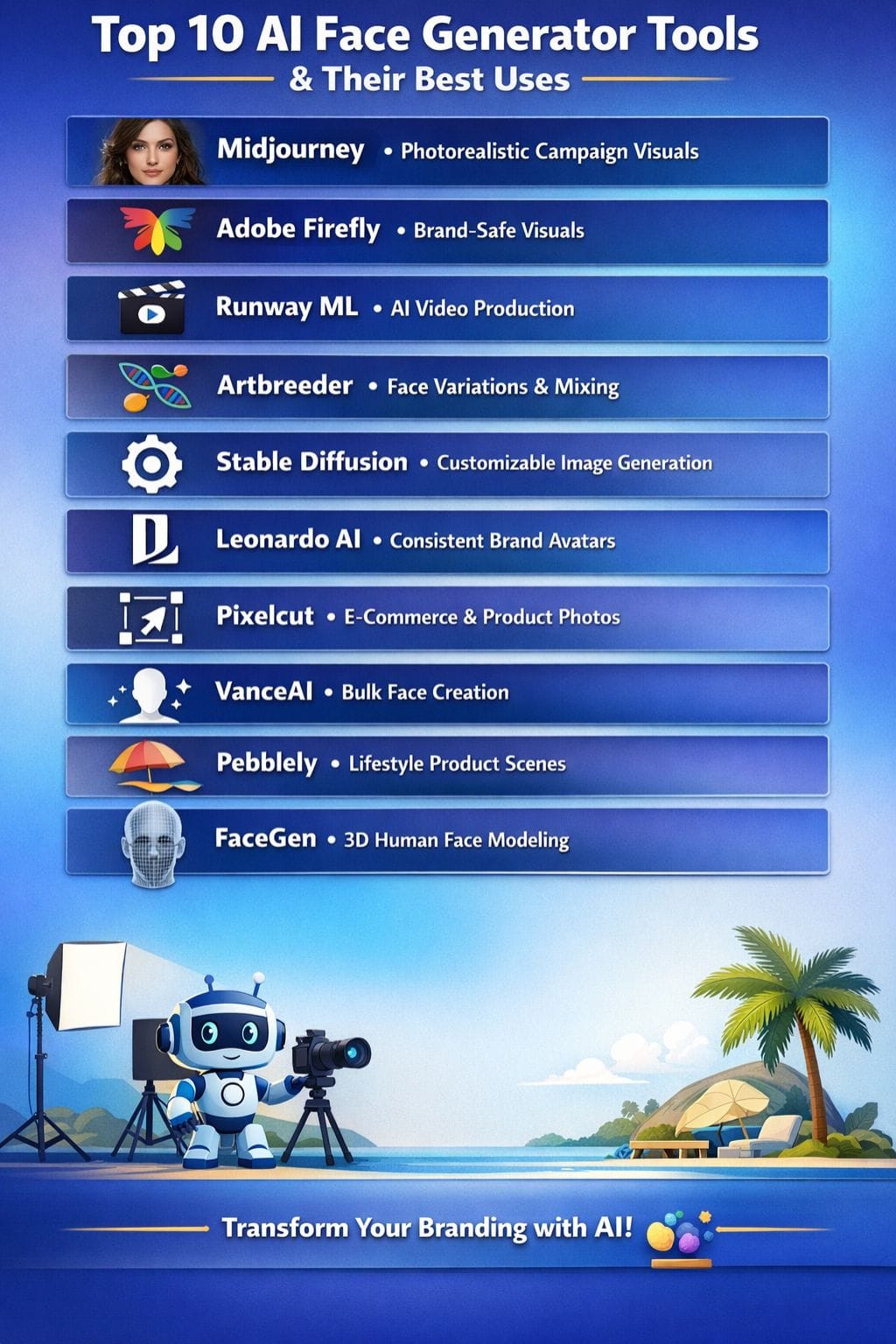
| Midjourney | Photorealistic campaign visuals | High-res images, style consistency | Medium | Legal concerns, text issues |
| Adobe Firefly | Safe branded content | Photoshop integration, generative fill | Medium | Credit complexity |
| Runway ML | Video + storytelling | End-to-end creative workflow | High | Expensive credits |
| Artbreeder | Face variations & experimentation | Genetic sliders, remixing | Low | Trial & error needed |
| Stable Diffusion | Customization & control | Open-source, SDXL quality | Low–Medium | Requires expertise |
| Leonardo AI | Brand consistency | Style presets, custom models | Medium | Learning curve |
| Pixelcut | E-commerce visuals | Background removal, presets | Low–Medium | Can feel inauthentic |
| VanceAI | Bulk generation | Enhancement + generation tools | Low | Complex interface |
| Pebblely | Product branding | Scenes, shadows, templates | Medium | Not face-focused |
| FaceGen | 3D face creation | 3D models, sliders | High | Outdated UI |
Midjourney
Midjourney is, without a doubt, among the best AI image tools for creating realistic human faces from short prompts, style cues, or photographs. It is employed by brands for advertisements, campaigns, and social posts.
It provides high-resolution images in short order. Teams can keep styles in sync using references. They could explore countless looks, moods, and ages like a moodboard.
This way, brands can test ideas in minutes rather than weeks. Results come back in rapid cycles, aiding swifter decision-making. Designers do heavy retouching on the images in tools like Photoshop.
Pros
- High-quality photorealistic faces
- Strong style consistency
- Faster idea testing
Cons
- Legal and copyright concerns
- Issues with text and fine details
Pricing
| Plan | Pricing |
|---|---|
| Basic | $10/month |
| Standard | $30/month |
| Pro | $60/month |
| Mega | $120/month |
Adobe Firefly
Adobe Firefly is a safe tool for people who want realistic human faces and portraits created from short text prompts or reference images. It can work well for ads, social media, and personal branding.
The user can easily define the age, style, lighting, mood, and expression associated with the image. Firefly has features enabling image editing from one image to another, along with generative fill techniques to regulate the skin, clothing, and background within the same natural light and depth.
It runs directly in the browser and works smoothly with Photoshop and Adobe Express.
Pros
- Easy prompt-based creation
- Strong realism in skin and features
- Seamless Adobe integration
Cons
- Credit system confusion
- Needs manual tweaks
Pricing
| Plan | Pricing |
|---|---|
| Standard | $9.99/month |
| Pro | $19.99/month |
| Premium | $199.99/month |
Runway ML
Runway ML is an ambitious AI platform, one that opens new doors in producing real videos and images to create human faces and characters. It tells stories in advertisements and social content for brands without complex heavy production.
Models feature high visual res, excellent style control, and consistent characters in scenes. Teams have text prompts or image prompts by which they are supposed to design their characters and keep them in uniform over time.
Built-in editing moves one from idea to final asset in a single place. This means that Runway ML could attract marketers, agencies, and studios.
Pros
- lifelike human characters and faces with models fine-tuned for expressive motion
- Strong character consistency
- End-to-end workflow
Cons
- Expensive credits
- No ready templates
Pricing
| Plan | Pricing |
|---|---|
| Standard | $15/user/month |
| Pro | $35/user/month |
| Unlimited | $95/user/month |
| Enterprise | Contact Sales |
 Vivek Dev Jacob
Artbreeder
Artbreeder is a simple AI image tool that brands do not even need to devote time to creating realistic but artificial images of human faces.
However, advanced users could easily blend and edit images through easily operable sliders for age, mood, style, and ethnicity.
Its unique genetic mix system allows teams to evolve portraits while maintaining a consistent image for those portals. This enables markets to form many versions before getting to the one final face. The platform provides options for high-resolution exports targeting ads, social media, and brand stories.
Pros
- Excellent photo-realism regarding the development of visualizations
- Great for experimentation
- Community-driven inspiration
Cons
- Limited free tier
- Trial and error required
Pricing
| Plan | Pricing |
|---|---|
| Starter | $8.99/month |
| Advanced | $18.99/month |
| Champion | $38.99/month |
Stable Diffusion
As an advanced text-to-image generator, Stable Diffusion facilitates brands' creation of authentic-looking human faces. Clean head shots or strong and stylized images for campaigns can be created.
The brands can further tune the model to maintain consistency in colors, mood, and style, ensuring that all images are on-brand across advertisements, social media, or product pages.
The model can either run on local systems or in the cloud, with full control given to the team over data and workflow. With SDXL and subsequent versions, the quality of the image has increased once more, and the skin texture looks more realistic.
Pros
- Absolutely, open-source and highly customizable
- Delivers amazing sizes in non-identical, photoreal quality faces for advertisements
- Runs with consumer GPUs or through APIs for an economical shoot
Cons
- Production of high-quality faces can become taxing without a paid cloud plan.
- Risk of getting imbalances or off-brand results if the prompts are generic
Pricing
| Plan | Pricing |
|---|---|
| Pro | $20/month |
| Max | $40/month |
Leonardo AI
Leonardo AI is facilitating the effective use of lifelike human faces for branding and marketing efforts. This is achieved with minimal, short text prompts that convert into realistic, high-quality portraits for ads, social media, and product campaigns.
It offers photorealistic modes and ready-made style presets, which also allow the user to train their custom models. Teams can maintain face continuity across logos, banners, and story visuals using brand-safe controls.
Save brand styles, modify lighting and expression, and boost images for print. Such files can also be exported into web and video formats.
Pros
- High-end photorealistic faces that work for premium branding.
- Robust style controls (lighting, mood, camera look) with presets for quick runs.
- Available on web and mobile, with real-time canvas and editing tools.
Cons
- Token complexity
- Learning curve
Pricing
| Plan | Pricing |
|---|---|
| Apprentice | $12/month |
| Artisan | $30/month |
| Maestro | $60/month |
Vivek Dev Jacob
Pixelcut
In just a few minutes, Pixelcut's advanced AI creates hyper-realistic human faces, lifestyle models, and branded portraits. Brands can generate faces based on text prompts or conduct virtual photo shoots - with functions for background removal and scene editing via generative fill.
There are no limits: any look, age, or ethnicity, without hiring models or setting up shoots. All the faces are royalty-free and commercially safe, allowing teams to test ads and content quickly and at scale.
Available for web and mobile, with ready presets for e-commerce and social media, Pixelcut offers ease of use for beginners.
Pros
- Virtual models, lifestyle scenes, and AI product images can be on-brand.
- Easy workflow: background remover, cleanup.
- Fast iteration for branding tests
Cons
- Overuse will cause the branding to feel inauthentic
- Limits on paid plans based on credits can constrain heavy daily use.
Pricing
| Plan | Pricing |
|---|---|
| Pro | $10/month |
| Pro+ | $30/month |
| Max | $60/month |
VanceAI
Brands benefit from working with VanceAI, which, using AI methods, generates human-looking faces and portraits at an industrial scale. VanceAI improves, edits, and generates people from a few images, a simple text, or a music prompt.
The tools remove noise, sharpen details, balance skin tones, and improve lighting while keeping faces realistic. Instead of setting up a studio and hiring a crew, brands get clean, consistent visuals from this generator.
With a profile, selfie, and person generator, along with background control, marketers can quickly try out different looks for their audiences.
Pros
- AI tool for faces, portraits, avatars, and product images in one place
- Flexibility up to and including fine-tuning in aging, posing, feeling, and skin tone
- The credit-based system works across 20+ enhancement and generation features
Cons
- Web interface and many feature names can feel complex for new users
- Validation from humans is still needed to specify brand fit
Pricing
| Credits | Pricing |
|---|---|
| 100 | $4.95 |
| 200 | $7.95 |
| 500 | $12.95 |
| 1000 | $17.95 |
Pebblely
Pebblely offsets the dullness of simple product shots by endowing their appearance with genuine warmth and life, and branding. Backgrounds are removed in seconds, with products placed in 40+ ready-made scenes.
Smart shadows and reflections make each product look as though it lives and breathes on set. The teams can create images in bulk, reuse templates, and match colors to brand guidelines with ease, making for a perfectly aligned aesthetic throughout a website, ads, and social media.
Small and growing brands can hence rapidly and affordably test ideas, launch campaigns, and scale creative work through faster workflows.
Pros
- Speedy and efficient background removal
- lifestyle shots in advertisements, social posts, and listings for the e-commerce brand.
- Consistent visual branding through bulk generation, templates
Cons
- Not so great when it comes to custom characters or faces.
- Volumes can be pretty expensive for a team of just a few.
Pricing
| Plan | Pricing |
|---|---|
| Basic | $19/month |
| Pro | $39/month |
Vivek Dev Jacob
FaceGen
With FaceGen, you create life-like 3D human faces either from photos or random seeds. This is beneficial in branding, mascots, and character-based campaigns. The users can manipulate age, sex, ethnicity, and facial expression through simple sliders.
This tool automatically exports clean models and textures ready for design, video, and software. It works best if you have a very clear, well-lit photo, both front and side, which will ensure a strong likeness and very natural skin detail.
FaceGen thus minimizes the redundancy of repeated photoshoots for brands. It is possible to maintain consistent and reusable human visuals.
Pros
- Creating 3D faces from single or multiple photos is very strong.
- Subtle sliders for adjustable control over age, race, and expression.
- Natural skin tone blending, color-matching textures.
Cons
- Interface feels somewhat old and technical, almost dated.
- Need to highly depend on reference photos for quality results.
Pricing
| Plan | Pricing |
|---|---|
| Pro | $130 (one-time) |
Final Thoughts
AI gives brands the power to let their teams depict faces that would normally be very costly in production or would require a long time to get off the ground.
Each of these tools looks different, but they all take quick ideas and make them into characters that can spin a story or sell a product.
Not only do they test ideas rapidly, provide privacy in the process, and open the doors to new markets, but used right, they also save a lot of both time and money. However, they require a set of clear guidelines and ethical standards.
FAQs
What are AI face generator tools?
AI face generator tools are software platforms that use artificial intelligence to create realistic human faces from text prompts, images, or presets. They help brands design avatars, models, and visuals without photoshoots.
Which AI tool is best for creating realistic human faces?
Tools like Midjourney, Adobe Firefly, and Stable Diffusion are among the best for creating highly realistic human faces. The best choice depends on your needs—branding, customization, or ease of use.
Are AI-generated faces safe for commercial use?
Yes, many tools offer commercially safe outputs, but brands must check licensing terms. Some tools also raise legal and copyright concerns, so it’s important to follow proper guidelines and ethical practices.
How do brands use AI-generated faces in marketing?
Brands use AI-generated faces in advertisements, social media, packaging, and even virtual influencers. These tools help create diverse visuals quickly while reducing production costs.