Best AI Infographic & Visual Design Tools: Create Stunning Graphics in Seconds
Explore top AI infographic tools that turn text and data into stunning visuals instantly. Compare features, pricing, and find the best tool for your needs.

Modern AI tools can help create clean, on-brand visuals in seconds by anyone. Short prompts, text, or data can be easily converted into radiant illustrations or infographics.
Drag-and-drop open editors and smart templates adapt to your content. Numerous platforms have combined AI text help, charts, maps, and brand kits to ensure consistency across any design.
Teams work in real-time, making rapid edits while proceeding to export in web or social formats. Colors, icons, and fonts can be switched to suit your story. It is the easiest, fastest, and sharpest solution a designer might provide for a layperson.
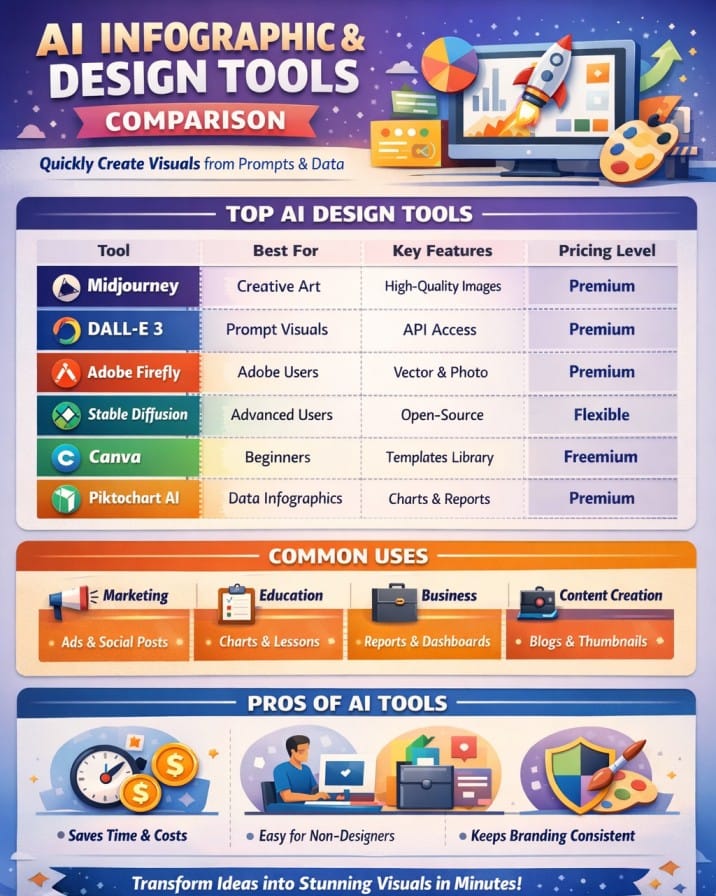
Best Use Cases for AI Infographic Tools
AI infographic tools are widely used across industries:
- Marketing → Campaign visuals, ads, social media posts
- Education → Charts, presentations, learning materials
- Business → Reports, dashboards, pitch decks
- Content Creation → Blogs, YouTube thumbnails, infographics
Tip: Combine AI image tools (like Midjourney) with design tools (like Canva) for best results.
AI Infographic Tools Comparison
| Tool | Best For | Key Features | Pricing Level | Drawbacks |
|---|---|---|---|---|
| Midjourney | Creative visuals | High-quality AI images, concept art | Premium | Complex interface |
| DALL·E 3 | Prompt-based visuals | Accurate layouts, API access | Premium | Safety restrictions |
| Adobe Firefly | Adobe users | Image + vector generation | Premium | Limited free credits |
| Stable Diffusion | Advanced creators | Open-source, customizable | Flexible | Learning curve |
| Recraft | Vector design | SVG export, vectorizer | Premium | Complex controls |
| Canva | Beginners & teams | Templates, Magic AI tools | Freemium | Limited advanced control |
| Piktochart AI | Data infographics | Charts, reports, templates | Premium | Watermarks on free plan |
| Visme AI | Business visuals | Brand kits, charts, templates | Premium | Learning curve |
| Venngage AI | Marketing visuals | Brand kit, accessibility tools | Premium | Limited free plan |
| Snappa | Quick graphics | Templates, resizing | Affordable | Limited features |
Midjourney
Midjourney is an advanced AI image tool that can process short prompts and turn them into stunningly clear visuals, creating almost powerful art, icons, and scenes that can serve as excellent main images for infographics.
It provides superb concept art, branded graphics, and marketing images with little effort: from idea to fully polished work in just a few minutes.
Midjourney will not set up graphs and text as an entire infographic maker, but it integrates beautifully with designing tools. From there, you could create characters, backgrounds, and art to personalize the way any data story stands out.
Pros
- High-quality artistic visuals
- Great for branding & presentations
- Commercial usage allowed
Cons
- Complex interface
- Hard to maintain consistency
Pricing
| Plan | Pricing |
|---|---|
| Basic | $10/month |
| Standard | $30/month |
| Pro | $60/month |
DALL·E 3
DALL·E 3 creates powerful modern images and straightforward infographics from brief textual prompts. However, anyone can even make more appealing images without the skills needed for graphic design.
Along with this, the objects are put well in their respective places, creating a clear layout for presentations, reports, and campaigns. This smooth integration of chat applications and APIs ensures that users can access this for quick idea generation or bulk content needs.
It also minimizes the necessary time spent on concepts for the teams while being quick on the uptake when testing ideas.
Pros
- Strong prompt understanding
- Easy to use
- API access
Cons
- Safety restrictions
- Can be costly
Adobe Firefly
Adobe Firefly is an exemplary AI design tool that can convert basic prompts, sketches, or photos into slick visuals in just a matter of minutes.
Since it works with Adobe applications, designers can quickly go from ideas to finished work. Firefly can easily produce images, vectors, fill in blanks, and switch between colors, enabling teams to experiment with a range of styles before selecting one.
It makes it so easy to create mood boards, social posts, slides, and campaign graphics straight out of the Adobe environment. Boards, presets, and Creative Cloud links allow one to create all these items.
Pros
- Deep Adobe integration
- High customization
- Strong community
Cons
- Limited free credits
- Requires Adobe ecosystem
Pricing
| Plan | Pricing |
|---|---|
| Standard | $9.99/month |
| Pro | $9.98/month |
| Premium | $199.99/month |
 Vivek Dev Jacob
Stable Diffusion
Stable Diffusion unquestionably ranks among the best AI tools for generating pin-sharp images and clean infographics representations from short prompts. It is capable of turning raw ideas into neat and highly-detailed paintings in no time.
With so many models and plug-ins available, creators have the freedom to choose their desired style and layout. Easy controls and prompt modifications assist with color, shapes, and structures for purposes such as marketing, education, or product use.
The process for infographic sketches is to map an icon scene layout, which is later refined into vector tools.
Pros
- Open-source
- Highly customizable
- Privacy-friendly
Cons
- Steep learning curve
- Needs extra editing
Pricing
| Plan | Pricing |
|---|---|
| Pro | $20/month |
| Max | $40/month |
Recraft
Recraft takes a breath of creativity over a short prompt and generates crisp vectors, icons, and illustrations that remain clean on a small and large scale. Recraft is an excellent tool for website, mobile application, or infographics creation.
The styles can be selected from presets or one can create their style. These styles may also be modified with respect to color, layout, and detail on a large open canvas. One may export designs in any of the formats: SVG, PNG, or JPG, or even Lottie. Recraft comes with a free vectorizer that exports old PNGs and JPGs.
Pros
- It's able to produce authentic vector images, raster images
- Built-in vectorizer, upscaling tool, and background-toucher
- App/browser-based workspace plus mobile apps
Cons
- Images from the free plan become public and do not have a commercial license
- More complex controls and features are desktop-first
Pricing
| Plan | Pricing |
|---|---|
| Pro | $12/month |
| Teams | $69/month |
Canva
Canva can easily be crowned the best AI designing tool to create quick illustrations and infographics from mere prompts, text, and data to form sequined visual outputs in minutes for marketers, founders, teachers, and teams.
There are no steep learning curves involved, as even newbies develop clean, branded charts, diagrams, and social-ready graphics through Magic Studio AI features, a drag-and-drop editor, and a huge template and asset library.
It has built-in collaboration, cloud storage, and exports for print and digital: making it capable of fitting into classrooms, startups, and enterprises willing to scale rapidly and with a visual impact.
Pros
- Beginner-friendly
- Huge template library
- AI-powered features
Cons
- Limited advanced controls
- Output inconsistency
Pricing
| Plan | Pricing |
|---|---|
| Pro | $15/month |
| Business | $20/month |
Vivek Dev Jacob
Piktochart AI
Piktochart AI brings form and guided visual production to busy teams that need neat infographics, reports, and slide-ready visuals without hiring a designer.
Type any topic, upload text, or just cut and paste data and AI provides another model, an icon, and a graph in a few seconds so you may devote more time on the story, not pixels.
It is a browser-based editor, in the form of templates and brand tools that allow marketers, educators, and non-profit organizations to keep all graphics in line with their messages and on-brand, while cutting off hours.
Pros
- Fast infographic creation
- Chart tools
- Easy editor
Cons
- Watermarks on free plan
- Limited interactivity
Pricing
| Plan | Pricing |
|---|---|
| Pro | $29/month |
| Business | $49/month |
Visme AI
Visme AI turns rough ideas or data into beautifully polished and on-brand visuals within minutes. The option to begin with either a prompt or a template is available.
From there, users can easily drag and drop in their prepared images and Chart Types or utilize AI assistants to change their text or spreadsheets into clear visual representations-audience-friendly infographics, slides, and graphics.
Teams can keep their designs consistent with brand settings and ready-to-use layouts. Any work done can be exported for web, print, or HTML5. A simple tool for marketers, trainers, and small teams that serve the business need.
Pros
- Strong branding tools
- AI design assistance
- Rich media library
Cons
- Paid features required
- Learning curve
Pricing
| Plan | Pricing |
|---|---|
| Starter | $29/month |
| Pro | $59/month |
Venngage AI
Venngage AI is a smart design program that can easily convert short prompts and raw data into amazing infographics, reports, and visuals within minutes for everyone. The drag-and-drop editor is very easy to use.
It also provides suggestions for layouts, colors, fonts, and copies. It also generates charts from the data provided by the user, thus simplifying complex ideas through visualization.
Business, educational, and marketing professionals can rely on it to create clear and powerful stories without having any design skills at all. Venngage AI is best for making sharp visual content, bringing information to you quickly.
Pros
- AI infographic generator
- Branding tools
- Accessibility features
Cons
- Limited free plan
- Expensive for small teams
Pricing
| Plan | Pricing |
|---|---|
| Premium | $19/month |
| Business | $49/month |
Rishi Mundra
Snappa
Snappa is a rapid web-based graphic design tool built specifically for creators who want quick, polished illustrations, infographics, and social graphics in a matter of minutes and not in hours.
With the drag-and-drop editor, pre-designed infographic templates, and a large stock photo library, non-designers can turn ideas into great-looking visuals with little or no learning curve.
Designs can also be repurposed using smart resizing and preset dimensions across blogs, ads, and social portals, thus saving time for small teams or solopreneurs. This great tool fast and easy to work with truly makes Snappa a wise choice.
Pros
- Very easy to use
- Quick templates
- Great for beginners
Cons
- Limited advanced features
- Smaller template library
Pricing
| Plan | Pricing |
|---|---|
| Pro | $15/month |
| Team | $30/month |
Conclusion
Artificial Intelligence image generator tools and infographics are now transforming bold and clear narration of raw texts with data into stories of astonishing minutes instead of days.
By eliminating menus with complications, they become available to anybody for a straightforward design on sharp charts, icons, and layouts through a few prompts and adjustments.
It makes the team work, reduces design costs, and keeps every visual in line with a specific brand across channels. Compared to the increasing density and loudness of content, what these tools do is make the message really simple, visual, and hard to ignore.
FAQs
What are AI infographic tools?
AI infographic tools are platforms that use artificial intelligence to convert text, data, or prompts into visual content like charts, illustrations, and infographics. They help users create professional designs quickly without advanced design skills.
Which AI tool is best for creating infographics?
Tools like Canva, Piktochart AI, and Visme AI are among the best for creating infographics because they offer templates, drag-and-drop editors, and AI-powered design suggestions.
Can AI tools generate complete infographics automatically?
Yes, many AI tools can generate complete infographics from text or data inputs. Platforms like Piktochart AI and Venngage AI can automatically create layouts, charts, and visuals within seconds.
Are AI infographic tools suitable for beginners?
Yes, most AI infographic tools are beginner-friendly. Tools like Canva and Snappa are especially easy to use due to their simple interfaces and pre-designed templates.