Best AI Sketch to Image Tools: Turn Drawings into Realistic Images Instantly
Discover the best AI sketch to image tools that transform rough drawings into realistic visuals in seconds. Compare features, pricing, and use cases for creators and teams.

In a matter of seconds, these AI instruments transform simple sketches into realistic images. Using their intelligent image modeling, they add color, light, and detail while preserving the outline completely.
It could be a quick outline turned into a sharply depicted, lifelike scene or product idea for artists, designers, and makers. Most of these tools allow you to drag-and-drop sketches, choose styles, input prompts, and then get fairly quick output.
They even allow some real-time tweaking of images. From concept art to building plans, they can take weeks to turn into final views.
Use Cases of AI Sketch-to-Image Tools
These tools are transforming multiple industries:
- Architecture → Convert floor plans into realistic buildings
- Fashion → Turn sketches into model-ready outfits
- Gaming → Create characters and environments
- Marketing → Visualize product ideas quickly
- Art & Design → Speed up concept creation
Tip: Use prompt refinement + style presets to get better results faster.
AI Sketch-to-Image Tools Comparison
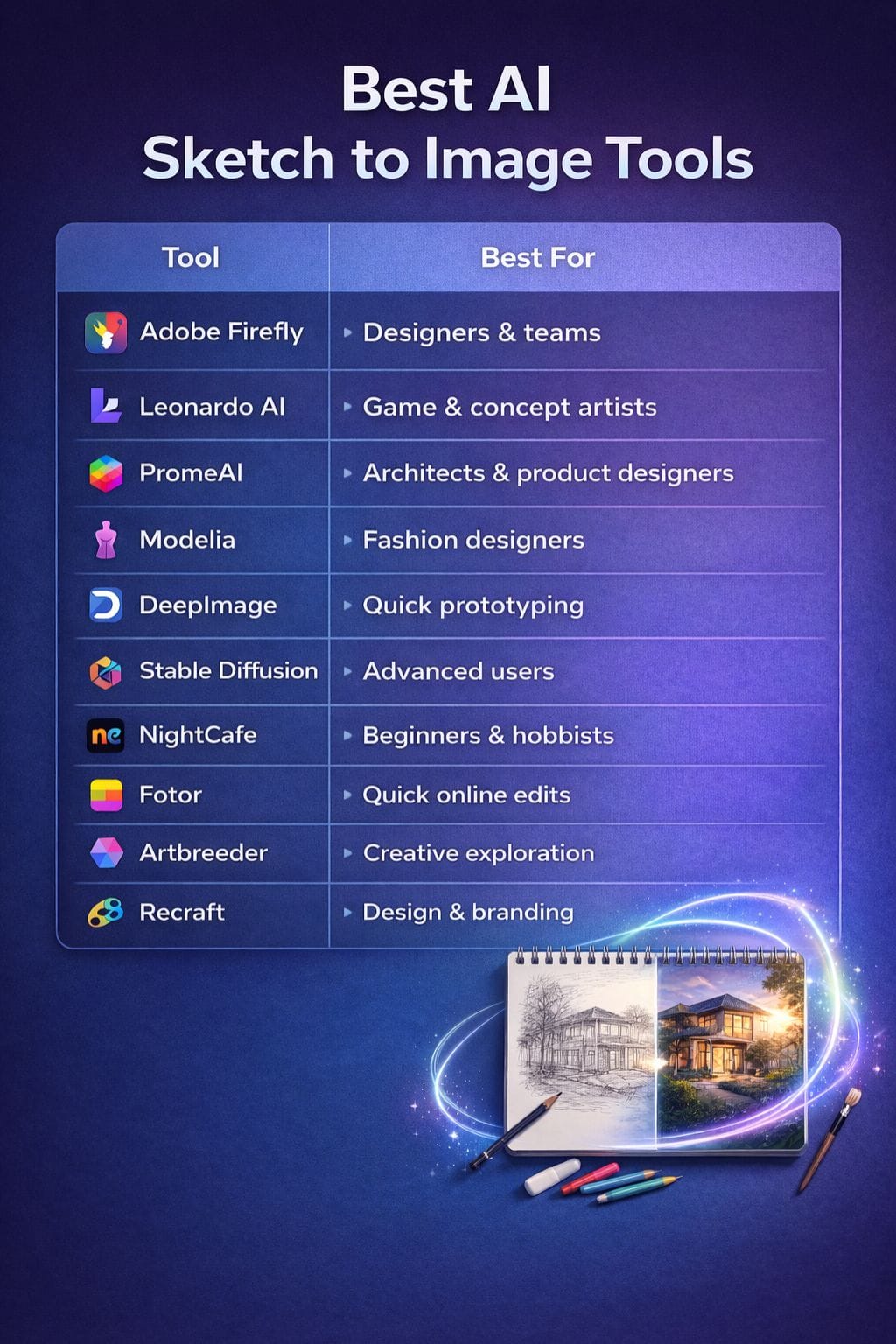
| Tool | Best For | Key Features | Pricing Level | Drawbacks |
|---|---|---|---|---|
| Adobe Firefly | Designers & teams | Sketch-to-image, Adobe integration | Premium | Subscription required |
| Leonardo AI | Game & concept artists | Diffusion models, upscaling | Freemium | Limited free credits |
| PromeAI | Architects & product designers | Style presets, scene rendering | Premium | Coin-based system |
| Modelia | Fashion designers | Fabric rendering, lookbook visuals | Credits | Limited to apparel |
| DeepImage | Quick prototyping | Fast rendering, simple UI | Flexible | Limited control |
| Stable Diffusion | Advanced users | Open-source, ControlNet | Flexible | Setup complexity |
| NightCafe | Beginners & hobbyists | Community, styles | Credits | Slow results |
| Fotor | Quick online edits | Art styles, high-res output | Freemium | Credit limits |
| Artbreeder | Creative exploration | Slider-based editing | Credits | Less precision |
| Recraft | Design & branding | Vector + raster export | Premium | Learning curve |
Adobe Firefly
Adobe Firefly is among the best AI tools that quickly transform rough sketches into clean, realistic images in a matter of seconds.
It is aimed at designers, artists, and teams wanting fast yet polished graphics without a heavy tool or the need to go through many complex steps. The sketch-to-image feature can read simple lines and apply detail, color, and lighting to them with great ease.
This allows for easy guidance of the final look through short text prompts, while the browser setup allows one to go for impromptu use from anywhere.
Pros
- Easy workflow
- High-quality outputs
- Adobe ecosystem
Cons
- Subscription needed
- Learning curve
Pricing
| Plan | Pricing |
|---|---|
| Standard | $9.99/month |
| Pro | $9.98/month |
Leonardo AI
Leonardo AI transforms quickly burnt rough sketches into clear and richly imagined images, respecting all the fetishes of your layout.
It uses powerful diffusion models and simple tools for styling so anyone can describe mood, light, and texture in plain words. Simply upload the sketch, add a prompt, and iterate on various versions until it feels right.
It also provides fast upscaling, background tools, and character features for game art, brands, and product shots. On-demand cloud rendering with templates allows you to evolve from concept to final art seamlessly. From novice creators to professional studios, anybody can use it.
Pros
- Fast rendering
- Great for games & art
- Strong community
Cons
- Limited free credits
- Usage restrictions
Pricing
| Plan | Pricing |
|---|---|
| Apprentice | $12/month |
| Artisan | $30/month |
| Maestro | $60/month |
PromeAI
PromeAI takes your coarse sketches and realistically renders them in a few clicks. It is a perfect solution for quick visual proof of an idea for architects, product designers, and artists alike.
One uploads sketches or 3D views, chooses a style with lighting and scenes, adds a short prompt, and within seconds, there is a crisp image. The tool honors your layout and perspective as per the draft.
With a multitude of style presets, scene templates, and straightforward controls, you get to test numerous looks in no time. High-resolution outputs are suitable for client decks and mood boards.
Pros
- Beginner-friendly
- Rich templates
- High-quality output
Cons
- Coin system
- Paid features
Pricing
| Plan | Pricing |
|---|---|
| Base | $19/month |
| Standard | $39/month |
| Pro | $79/month |
 Vivek Dev Jacob
Modelia
Modelia's Sketch to Image tool helps fashion designers convert simple sketches to clean, realistic photos in minutes by adding fabric texture, folds, and bright natural lighting, making the result look ready for a lookbook or online store.
The studio works via any browser, and uploads can be made from any medium, either paper or a tablet.
Designers can easily pick poses and backgrounds under a credit-based cost system, which allows easy team creation of a few tests or even a full campaign. It has great visual support for brands without having to invest in hefty shoots.
Pros
- Fashion-specific realism
- Easy interface
- Free starter credits
Cons
- Limited use cases
- Occasional bugs
Pricing
| Plan | Pricing |
|---|---|
| Basic | $29.99/month |
| Pro | $85/month |
| Credits | From $12 |
DeepImage Doodle Enhancer
DeepImage Doodle Enhancer converts a humble sketch into a clean, polished image in a matter of seconds.
Color, lighting, and texture are added while preserving the original lines-the more excellent application of the tool in concept art, product idea, or just quick drafts for a client or team.
This tool is comparatively fast and does not hinder usability because of its neat layout. They are easy; even a beginner gets satisfactory results instantly. At the same time, some scope is left for the advanced user to manipulate style or detail.
Pros
- Fast results
- Easy to use
- Great for drafts
Cons
- Limited control
- Variable output
Pricing
| Plan | Pricing |
|---|---|
| Pay-as-you-go | $7.99+ |
| Subscription | $9/month |
Stable Diffusion
Stable Diffusion transforms simple sketches into fully elaborated and beautifully realistic pictures. It uses image-to-image tools and ControlNet to get your lines straight and add color, texture, and light.
It may be run on a home GPU or in the cloud, and multiple easy UIs are available. The rendering can go from photorealistic to soft brushes. As models are open and easy to tune, you may very well control the output with the help of some strong prompts.
It is an excellent tool for artists, creator-hackers, and hobbyists to quickly convert rough drafts into clear visual ideas.
Pros
- Open-source
- Highly customizable
- High quality
Cons
- Complex setup
- Requires GPU
Pricing
| Plan | Pricing |
|---|---|
| Pro | $20/month |
| Max | $40/month |
Niku Mandal
NightCafe
NightCafe is a highly popular AI art tool that can turn simple sketches into beautiful, detailed images in seconds.
It uses powerful diffusion models with a “sketch to image” feature, which maintains the essence of your lines and layout while adding light, depth, and texture.
You upload your drawing, choose the style or model, tune some parameters, and let the AI finish up your artwork. It is fantastic for concept art, product mockups, and spontaneous creative ideas. NightCafe also has a very active community with galleries and daily challenges.
Pros
- Easy for Beginners
- Wide Variety and Models:
- An active community that inspires practice and discovery via challenges.
Cons
- Moments of Waiting and Slow Results
- No API and few advanced controls compared to some of the pro tools.
Pricing
| Plan | Pricing |
|---|---|
| Hobbyist | $9.99 |
| Enthusiast | $19.99 |
| Artist | $49.99 |
Fotor
It makes use of Fotor's sketch-to-image tool that uses AI to turn very simple lines into real and clear art in a few seconds. Arguably, it is one of the best online tools that converts rough outlines into neat images.
You can make a choice among styles such as anime, game art, watercolor, and oil painting.
A really nifty sketch is output as a crisp, high-resolution image, ready to be posted on social, shared with clients, or added to your portfolio. This feature is very easy to use
Pros
- Seamless sketch upload
- High resolution exports for printing
- Wide range of artistic styles
Cons
- Credit usage may restrict heavy users
- Results depend on the sketch quality upload
Pricing
| Plan | Pricing |
|---|---|
| Pro | $8.94/month |
| Pro+ | $20.13/month |
Artbreeder
Artbreeder transforms simple sketches into strong, realistic images with sliders that are very easy to navigate. So, for instance, you would just take a rough drawing, mix it with 'genes' that come with the site, and steer the look toward faces, places, or even concept art.
This works from your browser and is very fast for exploring ideas. Change shape, color, and style almost without effort. Great for moodboards, roughs, or early design work.
The large community library helps you find new styles and blend them into your own.
Pros
- Easy controls
- Creative variations
- Community assets
Cons
- Less precise
- Limited detail control
Pricing
| Plan | Pricing |
|---|---|
| Starter | $8.99 |
| Advanced | $18.99 |
| Champion | $38.99 |
Rishi Mundra
Recraft
Recraft is an AI design tool that transforms simple drawings, ideas, or short prompts into clean and realistic-looking images within mere seconds. It is perfect for doing product mockups, logo designs, and illustrations quickly.
The AI understands the prompts well enough to produce sharp photo types or smooth vector art. You can remove the background, upscale images, or place designs into mockups-all within a single browser window.
Recraft lets you export in SVG, PNG, JPG, and Lottie format. You can save color palettes and style presets as well to keep a uniform look across your projects.
Pros
- High realism
- Multiple formats
- Branding tools
Cons
- Learning curve
- Free images may be public
Pricing
| Plan | Pricing |
|---|---|
| Pro | $12/month |
| Teams | $69/month |
Conclusion
Tools designed to convert sketches into realistic images allow a bold new chapter in the field of visual works.
They accelerate the process of idea-testing, reducing the cost and helping both novice and seasoned creators to examine many possibilities with the least amount of effort.
A simple sketch can develop into a richly detailed and life-like scene that gives equal clarity to clients and teams, making decisions more quickly and unequivocally. As these systems continue to mature, they will not replace human tastes but rather emerge as strong and credible partners in the creative process.
FAQs
What are AI sketch to image tools?
AI sketch to image tools are platforms that use artificial intelligence to convert simple sketches or drawings into realistic images. They enhance outlines by adding color, lighting, textures, and details while keeping the original structure intact.
Who should use AI sketch to image generators?
These tools are ideal for artists, designers, architects, product creators, and marketers who want to quickly turn ideas into visual concepts without spending hours on manual design work.
Do AI sketch to image tools require design skills?
No, most tools are beginner-friendly. Users can upload a sketch, choose styles, and add prompts to generate high-quality images without advanced design knowledge.
Are AI sketch to image tools free?
Many tools offer free plans or trial credits, but advanced features like high-resolution exports, faster rendering, and premium styles are usually available in paid plans.