
Best AI Video Generators in 2026: Adobe Creative Cloud vs Runway, Kling and Luma
Adobe Creative Cloud Pro puts Firefly's AI video generation in the same subscription as Premiere, Photoshop and 20+ apps. Here is how it compares with Runway, Kling and Luma on price and commercial use.
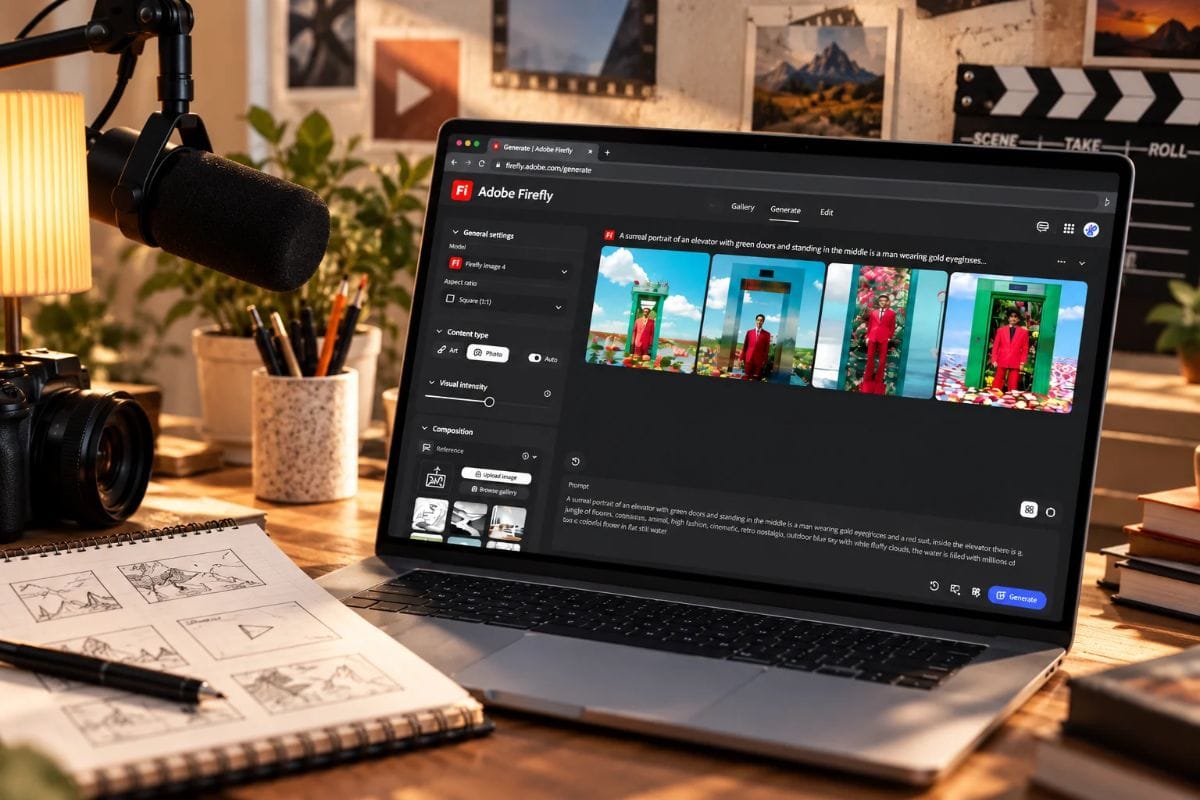
Short answer: Adobe Creative Cloud Pro is the best way to make AI video in 2026 for creators who publish commercial work. It puts Adobe Firefly, whose own models are trained on licensed Adobe Stock and public domain content, in one subscription with 20+ apps including Premiere and Photoshop, so you can generate a clip and finish it in the same account. Runway, Kling and Luma are available inside Firefly as partner models.
That is my pick for creators who sell or publish their videos. If you only want to experiment with one model, the other tools in the table are worth a look.
What is Adobe Creative Cloud?
Adobe Creative Cloud is Adobe's subscription for creative software, with apps, web services and resources for photo, design, video and PDF work. Creative Cloud Pro, the individual plan, includes 20+ apps, and Adobe's plan page names Photoshop, Illustrator, Premiere, After Effects, InDesign and Acrobat Pro among them.
Adobe Firefly is Adobe's generative AI app for creators, used to generate video, images and audio from text prompts or photos, and available on the web and in a mobile app. It comes with Creative Cloud Pro, which includes unlimited access to standard AI image and vector features, including Text to Image and Generative Fill, plus 4,000 monthly generative credits for premium features like Text to Video, according to Adobe.
For video creators, the useful part is the workflow. Generate a clip in Firefly, cut it in Premiere (video editing and production), add animated graphics and effects in After Effects, and polish thumbnails in Photoshop or Illustrator. Adobe Express covers quick social posts. All of it sits under one account.
What is the best AI video generator in 2026?
I compared each tool on free access, price, commercial-use terms and fit with a creator's editing workflow, using the vendors' own pages and published pricing guides.
| Tool | Free access | Paid price | Commercial-use note | Best for |
|---|---|---|---|---|
| Adobe Creative Cloud Pro (with Firefly) | Firefly free generations | ₹999/mo now, ₹2,714 regular | Firefly's own models use licensed data | Video plus editing |
| Runway | One-time credits, watermarked | About $12 to $15/mo | Paid plans remove watermark | Model experiments |
| Kling | Free output watermarked | About $6 to $10/mo | Free output not for commercial use | Quick social clips |
| Google Veo | Limited access | AI Plus ₹399/mo | Check Google's terms | Everyday clips |
Runway, Kling and Google prices come from published guides and launch coverage, not the vendors' pricing pages, so confirm them before you pay.
How do I make a video from text with AI?
These steps use Adobe Firefly, and other tools follow the same pattern. Our list of top AI text-to-video generators covers the rest.
- Open Firefly on the web or in the mobile app and choose Generate Video.
- Describe the scene in a sentence or two: the subject, the action, the camera move and the light. Keep one idea per clip.
- Choose a model, either Firefly's own video model or a partner model such as Runway, Kling or Luma.
- Generate, review the clip, and rerun with one change at a time.
- Download the clip and finish it in Premiere, which is part of Creative Cloud Pro, or your usual editor. Firefly outputs include Content Credentials that show AI was used.
How do I turn a photo or a script into a video with AI?
For a photo, use Generate Video from Image: upload the picture, then describe the movement you want, such as a slow push-in or drifting clouds. See our comparison of image-to-video AI tools for alternatives. For a script, split it into scenes of a few seconds each, because Firefly plans count video in 5-second clips. Generate each scene as its own prompt, keep the style words the same across prompts so the clips match, and assemble them in Premiere. Add titles and effects in After Effects, and use Firefly's text to speech, music and sound effects for a voiceover and soundtrack. This approach suits a YouTube explainer or a short promo, where each scene carries one clear idea.
What is the best AI video generator for beginners?
Start with the web or mobile version of Adobe Firefly, which is included on every plan. The free generations let you test prompts without paying. Video uses credits on paid plans, and once you want to edit as well as generate, Creative Cloud Pro puts the editing apps in the same subscription.
Which AI video generator is safe for commercial use?
Check this before you pick.
Adobe says its Firefly models are commercially safe because they are trained on licensed Adobe Stock content and public domain content, and that Firefly outputs include Content Credentials indicating AI was used. That is useful when a client or brand asks where a clip came from.
One caveat: that claim covers Firefly's own models. Runway, Kling and Luma are available inside Firefly as partner models but come from other companies, so choose the model deliberately and check Adobe's terms before using partner output in client work.
How do AI video generators compare on price?
| Plan | Price a month | What you get | Monthly credits |
|---|---|---|---|
| Creative Cloud Pro, current offer | ₹999 | 20+ apps and Firefly | 4,000 |
| Creative Cloud Pro, regular price | ₹2,714 | 20+ apps and Firefly | 4,000 |
| Firefly Standard | ₹797.68 | Firefly only | 2,000 |
| Firefly Pro | ₹1,596.54 | Firefly only | 4,000 |
| Firefly Pro Plus | ₹3,990.76 | Firefly only | 10,000 |
| Firefly Premium | ₹15,965.40 | Firefly only | 50,000 |
Prices are in rupees including GST, as Adobe lists them for individual plans. At the current offer price, Creative Cloud Pro costs less each month than Firefly Pro and lists the same 4,000 monthly credits, and it adds 20+ apps. At the regular ₹2,714 it costs more than Firefly Pro, so the offer is where the bundle makes the most sense. Standard image features, including Generative Fill, are unlimited, while Text to Video and partner models use credits. Credit use varies by model, so the number of videos varies too, and Adobe's plan comparison puts 4,000 credits at up to 40 five-second videos.
Black Friday offer: Creative Cloud Pro at ₹999 a month
Adobe's Black Friday offer runs from 13 November 2026, 8:30 PM IST, to 28 November 2026, 8:30 PM IST. It takes 63% off Creative Cloud Pro for individuals, which is ₹999 a month for 12 months. Creative Cloud Pro for teams is 55% off for 12 months, and the Student and Teacher Edition is 71% off at ₹199 a month for 12 months.
Offer terms apply.
Which AI video generator should you pick?
- Creators who sell or publish their videos: Adobe Creative Cloud Pro, with Firefly to generate, Premiere to edit and Content Credentials on the output.
- YouTubers turning scripts into scenes: Creative Cloud Pro, generating one scene at a time in Firefly and assembling in Premiere.
- Short-form creators making Reels and Shorts: start on the free generations, then step up to Creative Cloud Pro once you edit every week.
- Editors and designers who already pay for Creative Cloud: check how many Firefly credits your plan includes.
- Teams: Creative Cloud Pro for teams, which is 55% off for 12 months in the current offer.
- Students and teachers: the Student and Teacher Edition, if you qualify.
- Hobbyists experimenting with models: try Runway or Kling on their free tiers, and see our roundup of top AI video generator tools.
FAQs
What is the best AI video generator in 2026?
Adobe Creative Cloud Pro is the best pick for creators who publish commercial work. It bundles Firefly, whose own models are trained on licensed Adobe Stock and public domain content and whose outputs carry Content Credentials, with 20+ apps including Premiere and Photoshop.
Is there a free AI video generator?
Yes. Adobe Firefly's Free plan gives free generations across image, video and audio, with limits on usage and models that refresh every day.
Which AI video generator is safe for commercial use?
Adobe says Firefly's own models are commercially safe because they are trained on licensed Adobe Stock and public domain content. That claim covers Firefly's own models, not partner models such as Runway, Kling and Luma, so check Adobe's terms for those.
What does Adobe Creative Cloud Pro include?
Adobe lists 20+ apps, including Photoshop, Illustrator, Premiere, After Effects, InDesign and Acrobat Pro. It also includes Firefly, with unlimited access to standard AI image and vector features such as Text to Image and Generative Fill, and 4,000 monthly generative credits for premium features like Text to Video.
How much does Adobe Creative Cloud Pro cost in India?
Adobe lists Creative Cloud Pro at ₹2,714 a month including GST on an annual plan billed monthly. Adobe's current offer takes individual plans to ₹999 a month for the first 12 months. Firefly-only plans start at ₹797.68 a month.
What are the newest AI video generators in 2026?
Adobe Firefly now includes partner video models such as Runway, Kling and Luma alongside Firefly's own video model, so you can compare several of the newest generators inside one app.