Best AI Schema Generators in 2026
Explore the top AI schema generators of 2026 that turn plain text into database schemas, ER diagrams, and SQL instantly. Compare features, pricing, and best use cases to choose the right tool for faster database design.


AI schema generators turn simple text into clean database designs or SEO markup in seconds. It recognises ordinary speech patterns to recommend suitable database components, including tables and keys, indexes, and links.
It provides users with immediate access to ready-made SQL and JSON-LD and straightforward diagrams.
The process, which used to require several hours, now needs only a few minutes. The tools implement established database design standards through their normalization features, which enable operation in both PostgreSQL and MySQL databases.
The drag-and-drop interface enables beginners to work while it provides intelligent system feedback.
Why AI Schema Generators Matter
AI schema generators reduce:
- Manual design work
- Database errors
- Development delays
They improve:
- Team collaboration
- Database accuracy
- Deployment speed
AI Schema Generator Comparison Table
| Tool | Best For | Key Features | Pricing Level | Drawbacks |
|---|---|---|---|---|
| Structa | Fast database design | Natural language schema generation | Mid | Free plan limits |
| SQL Database Modeler | Collaborative diagramming | AI diagram creation | Premium | Usage overage costs |
| dbdiagram.io | Code-first schema design | DBML support | Mid | Visual-first users may struggle |
| Cloudairy | Visual schema creation | Multi-diagram support | Affordable | Complex edits need refinement |
| Diagramming AI | Fast ERDs | Auto normalization | Low | Needs manual adjustments |
| DrawSQL | Team collaboration | Schema flaw detection | Premium | Free plan restrictions |
| QuickDBD | Rapid text-to-schema | Fast ERD generation | Affordable | Paid feature lock |
| Prisma Schema | Type-safe development | Auto migrations | Mid | Prisma ecosystem lock-in |
| Xano | No-code backend creation | Auto API generation | Premium | Best for full backends |
| Chat2DB | Multi-database schema design | ERD + SQL generation | Mid | Learning curve |
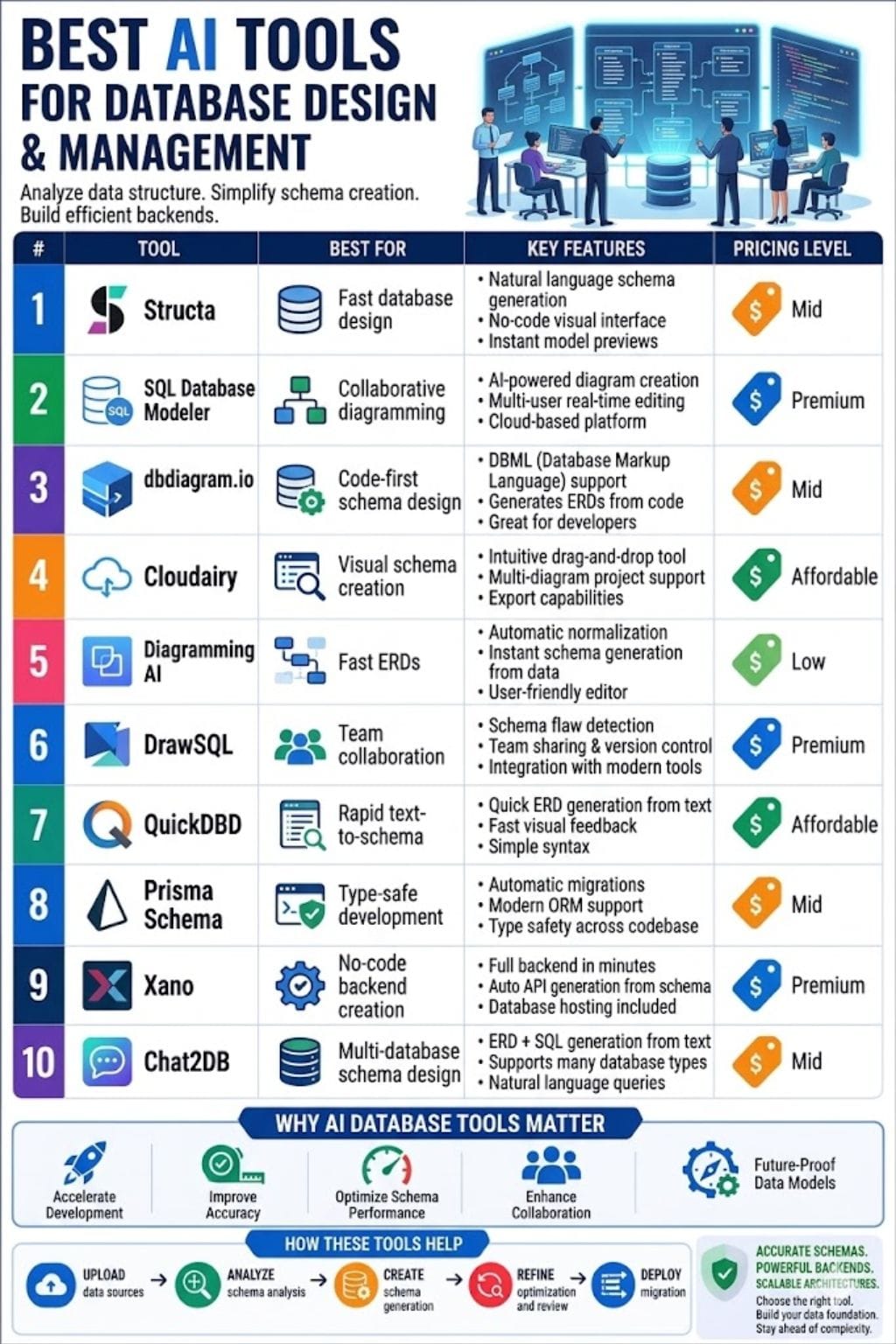
Top AI Schema Generator Tools
Structa
Structa turns plain English into ready-to-use database designs in minutes. It creates database objects through your input of "marketplace with buyers and sellers," which includes tables, keys, links, indexes, and timestamps.
Users can edit content through drag and drop while viewing complete ER diagrams. The program generates exportable SQL and Prisma and migration files for PostgreSQL, MySQL, and additional databases.
The AI checks for errors and suggests fixes. It uses version control to track updates, which allows users to deploy their work to Supabase through a single button click.
Pros
- Natural language processing in seconds
- Drag-and-drop visual editor
- SQL and Prisma export
Cons
- Free plan limited to 3 schemas
- Limited SQL dialect support
Pricing
| Plan | Pricing |
|---|---|
| Weekly | $4.99/week |
| Pro | $19/month |
| Lifetime | $299 one-time |
SQL Database Modeler
Eraser.io is a powerful AI tool that turns simple text into clear diagrams. It enables users to produce ERDs, system designs, and database schemas in a matter of seconds.
The application generates tables, keys, and flows based on your written requirements. The canvas provides users with an infinite workspace that they can modify at any time.
Users can make design changes by using AI tools or by writing custom code. It offers GitHub integration for VS Code users and enables teams to collaborate on projects in real time.
Pros
- Infinite collaborative workspace
- AI-assisted editing
- Markdown support
Cons
- Slower on large updates
- Extra API costs
Pricing
| Plan | Pricing |
|---|---|
| Starter | $15/member/month |
| Business | $45/member/month |
| Enterprise | Contact Sales |
dbdiagram.io
dbdiagram.io platform functions as a code-first schema tool which transforms DBML code into understandable ER diagrams and fast SQL output. The AI assistant enables users to develop schemas through natural language, which they use to create, modify, and enhance their database schemas.
The tool recommends superior data types and indexes, and constraints as better options. It enables instant collaboration among team members, who can effortlessly share work and produce outputs in PNG, PDF, and SQL formats.
It meets developer requirements by providing fast performance and basic operational functions.
Pros
- Fast DBML workflow
- AI schema assistance
- Easy exports
Cons
- Public visibility limits
- Less visual for beginners
Pricing
| Plan | Pricing |
|---|---|
| Personal Pro | $14/month |
| Team | $100/month |
| Custom | Custom Pricing |
 Vivek Dev Jacob
Cloudairy AI Sequence Diagram Generator
Cloudairy AI Sequence Diagram Generator stands as the top AI tool for creating schema designs. It converts basic text or programming code into precise visual representations within a few seconds.
You can make sequence diagrams, ERDs, UML diagrams, and database schemas without any difficulties. The design system uses intelligent automatic layout functions together with conventional UML design elements.
It enables users to modify diagrams while they can upload code for immediate visual results. It enables users to create exports in SQL format and Visio format. All team members can collaborate from a single shared workspace.
Pros
- Fast text-to-diagram generation
- Easy customization
- Supports multiple diagram types
Cons
- Complex edits need work
- Some performance issues
Pricing
| Plan | Pricing |
|---|---|
| Starter | $10/member/month |
| Business | $16/member/month |
| Enterprise | Contact Sales |
Diagramming AI
Diagramming AI tools create strong schemas through their diagramming capabilities. The software transforms plain text into visual diagrams, which include ER diagrams, UML diagrams, and database mapping diagrams within seconds.
The AI makes tables, fields, and keys and links from your system description. It maintains its organized structure through automatic normalization processes. You can export SQL with ease.
Diagram editing can be done by multiple users who work simultaneously. Users can quickly move and modify elements through drag-and-drop functionality. The tools decrease manual tasks while making design processes faster.
Pros
- 80% faster design
- Error detection
- SQL and PNG export
Cons
- Domain-specific rules missing
- Manual refinements needed
Pricing
| Plan | Pricing |
|---|---|
| Lite | $3/month |
| Starter | $6/month |
| Pro | $14/month |
DrawSQL
DrawSQL serves as an advanced AI solution that enables users to create database designs. It transforms basic text into precise ER diagrams within a time frame of seconds.
It evaluates your schema to identify missing indexes and other potential problems. Users can create tables through a user-friendly interface, which allows them to drag and drop elements.
The real-time collaboration feature enables teams to work together, which results in reduced work duplication and faster project completion. It enables users to transfer data between MySQL, PostgreSQL, and SQL Server through its SQL import and export functions.
Pros
- AI schema analysis
- Easy drag-and-drop
- Real-time collaboration
Cons
- Free private diagram limits
- No Snowflake export
Pricing
| Plan | Pricing |
|---|---|
| Starter | $19/month |
| Growth | $59/month |
| Large | $179/month |
Vivek Dev Jacob
QuickDBD
QuickDBD provides users with an AI solution that rapidly transforms unformatted text into structured database visualizations.
It creates ERDs, keys, and indexes for MySQL and PostgreSQL and other databases through table and link inputs.
Users have the ability to export their work as SQL files, PDF documents, image files, or document files through a single click option. Teams can share links and edit documents simultaneously while working together in real time.
The software enables users to operate it through their web browser without requiring any software installation.
Pros
- Very fast
- Real-time team editing
- Free basic plan
Cons
- Paid advanced features
- Support delays
Pricing
| Plan | Pricing |
|---|---|
| Pro | $14/month |
Prisma Schema
Prisma Schema helps developers turn plain text prompts into clear and safe database models for SQL or MongoDB. It employs a basic domain-specific language to establish data elements, their relationships, and the database structure.
It produces client applications, database migrations, and documentation through automatic generation. AI tools assist in building models, speeding up ERD creation and setup.
It provides full TypeScript safety throughout its entire software development process. The application enables you to view database schemas, generate sample data, and export validation rules that function like Zod or Joi.
Pros
- Auto migrations
- TypeScript support
- Instant updates
Cons
- Limited large-scale flexibility
- Prisma-only ecosystem
Pricing
| Plan | Pricing |
|---|---|
| Starter | $10/month |
| Pro | $49/month |
| Business | $129/month |
Xano
Xano stands as a top AI schema generator in no-code backends. It transforms simple English requests into complete PostgreSQL database schemas, which include tables, fields, relationships, and indexes within a time frame of seconds.
The main functionalities of the tool are to provide AI optimization assessment together with instant CRUD API development and database schema version tracking, and users can create visual diagrams and use them for team collaboration.
Users describe apps naturally; AI handles normalization and migrations while auto-generating scalable endpoints for MVPs to enterprise apps. It reduces development time.
Pros
- Auto API generation
- Version control
- Natural language support
Cons
- Better for full backend systems
- SQL knowledge preferred
Pricing
| Plan | Pricing |
|---|---|
| Essential | $99/month |
| Pro | $249/month |
| Custom | Contact Sales |
Vivek Dev Jacob
Chat2DB
Chat2DB stands as a top AI schema generator. It rapidly converts natural language input into three distinct outputs, which are SQL queries, visual ER diagrams, and optimized schemas.
The program provides automatic schema recommendations together with simultaneous user collaboration, integrity verification, and query enhancement capabilities, and compatibility with more than 24 database systems, including MySQL and PostgreSQL.
Users easily create tables while debugging code and constructing dashboards. The tool reduces design time while increasing precision and supporting teams that range from beginners to expert users. It performs exceptionally well when transforming text into task sequences.
Pros
- Supports 24+ databases
- Live collaboration
- AI schema suggestions
Cons
- Learning curve
- Edge cases need manual fixes
Pricing
| Plan | Pricing |
|---|---|
| Starter | $9/user/month |
| Pro | $25/user/month |
| Team | $40/user/month |
How to Choose the Right AI Schema Generator
- For Beginners: Choose QuickDBD
- For Developers: Choose Prisma Schema
- For No-Code Teams: Choose Xano
- For Fast Visual Design: Choose Structa
- For Large Team Collaboration: Choose DrawSQL
Future of AI Database Design
AI Schema Generators transform data professionals' work through their ability to create structured schemas from raw concepts in a fast and intelligent manner.
It eliminates continuous data entry work because AI can identify patterns while constructing tables and establishing connections between fields through its advanced logical capabilities.
The team achieves faster project delivery while reducing mistakes and saving them multiple hours of work. The tools organize data in a world that experiences information overload, while they provide users with operational capabilities.
The solution creates understandable data while it enhances team collaboration to produce measurable business outcomes.
FAQs
What are AI schema generators?
AI schema generators are software tools that convert plain text descriptions into structured database schemas, ER diagrams, SQL code, and related database models. They use artificial intelligence to automate table creation, relationships, keys, indexes, and normalization.
Which is the best AI schema generator in 2026?
The best AI schema generator depends on your needs. Structa is ideal for fast visual schema design, Prisma Schema is best for developers using TypeScript, DrawSQL works well for team collaboration, and Xano is excellent for no-code backend creation.
Can beginners use AI schema generators?
Yes, many AI schema generators are beginner-friendly. Tools like QuickDBD, Structa, and Cloudairy offer simple drag-and-drop interfaces and natural language prompts that make database design accessible without advanced technical knowledge.
Why are AI schema generators important for developers?
AI schema generators save time, reduce database design errors, improve normalization, and speed up development workflows. They help teams quickly turn ideas into production-ready database structures, making application development faster and more efficient.