Best AI Tools for Freelance Graphic Designers in 2026
Discover the best AI tools for freelance graphic designers. Compare features, pricing, pros, and cons of tools for design, automation, contracts, productivity, and client management.

From first sketch to final payment, smart assistants now sit beside you at every step of your freelance journey. They help you turn rough ideas into sharp visuals, test layouts in minutes, and keep your style steady across clients.
They sort feedback, track versions, and cut dull, repetitive tasks so you can stay in flow. You can log hours, send quotes, and draft contracts without leaving your screen.
Even invoices, follow-ups, and tax notes can run on quiet autopilot. With this new toolkit, you design more, stress less, and get paid faster.
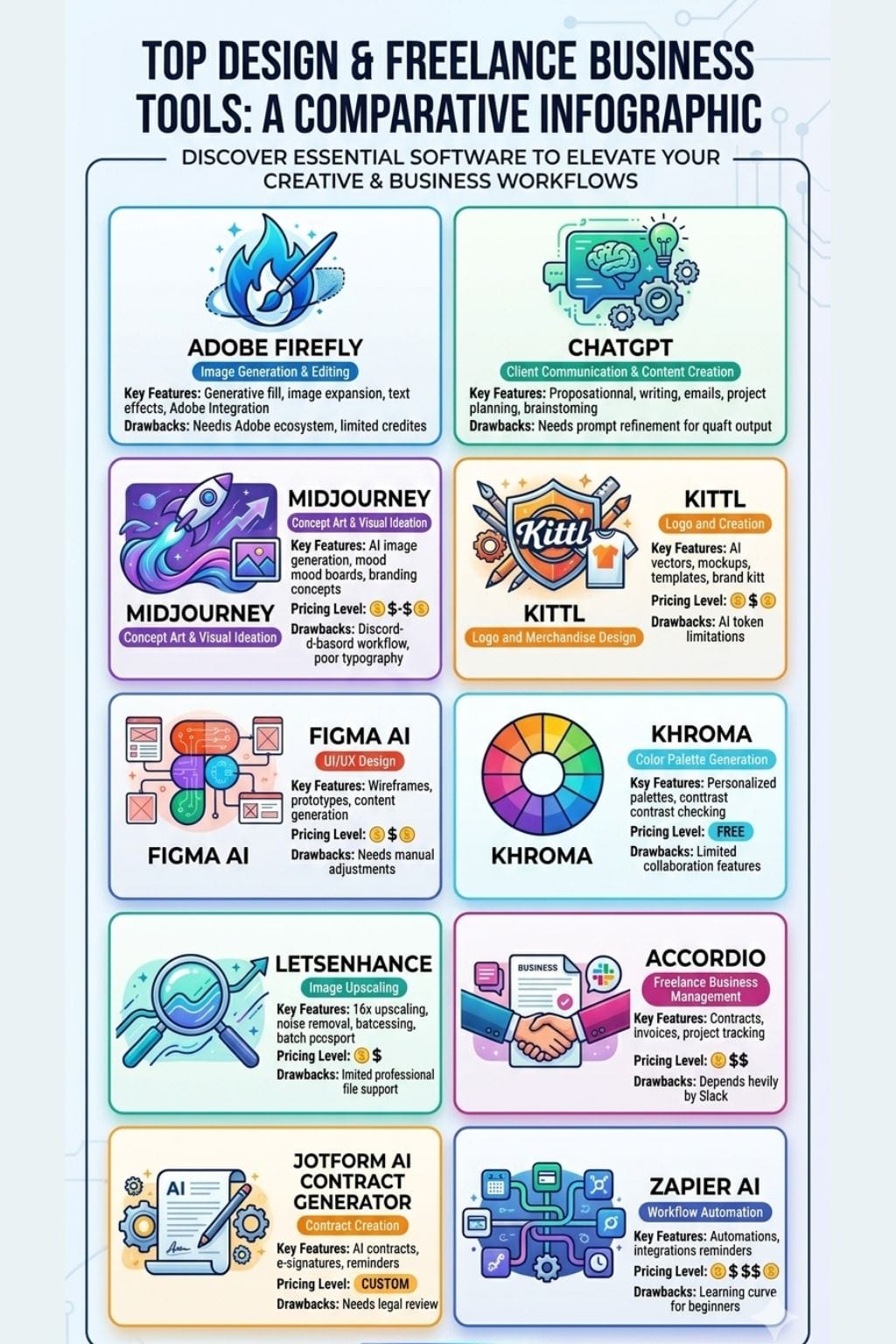
AI Tools for Freelance Graphic Designers: Comparison Table
| Tool | Best For | Key Features | Pricing Level | Drawbacks |
|---|---|---|---|---|
| Adobe Firefly | Image generation & editing | Generative fill, image expansion, text effects, Adobe integration | $$ | Requires Adobe ecosystem, limited credits |
| ChatGPT | Client communication & content creation | Proposal writing, emails, project planning, brainstorming | $-$$$ | Needs prompt refinement for quality output |
| Midjourney | Concept art & visual ideation | AI image generation, mood boards, branding concepts | $$-$$$$ | Discord-based workflow, poor typography |
| Kittl | Logo and merchandise design | AI vectors, mockups, templates, brand kits | $$ | AI token limitations |
| Figma AI | UI/UX design | Wireframes, prototypes, content generation | $-$$ | Needs manual adjustments |
| Khroma | Color palette generation | Personalized palettes, contrast checking | Free | Limited collaboration features |
| LetsEnhance | Image upscaling | 16x upscaling, noise removal, batch processing | $ | Limited professional file support |
| Accordio | Freelance business management | Contracts, invoices, project tracking | $$ | Depends heavily on Slack |
| Jotform AI Contract Generator | Contract creation | AI contracts, e-signatures, reminders | Custom | Needs legal review |
| Zapier AI | Workflow automation | Automations, integrations, payment reminders | $$-$$$$ | Learning curve for beginners |
Adobe Firefly
Adobe Firefly helps freelance graphic designers create work faster. It uses AI to turn text prompts into images, effects, and design ideas. Designers can remove objects, change backgrounds, extend images, and try new styles in a few minutes.
Firefly works inside Adobe apps like Photoshop, Illustrator, and Express, which makes the design process smooth. It also creates text effects for eye-catching headlines and graphics.
A key benefit is that its AI models are trained on Adobe Stock, public domain content, and open-license data. This helps reduce copyright concerns and makes the generated content safer for commercial client projects.
Pros
- Speeds up ideation and revisions, cutting retouching and layout time from hours to minutes
- Tight integration with core Adobe apps reduces app hopping and keeps assets in one ecosystem
- Safer for client work due to curated training data and commercial-use focus
Cons
- Requires an Adobe ID and works best if you are already in the Adobe subscription stack
- Generative credits can run out fast for heavy daily users, adding cost pressure
Pricing
| Plan | Pricing |
|---|---|
| Firefly Standard | $9.99/month |
| Firefly Pro | $19.99/month |
| Firefly Pro Plus | $34.97/month |
ChatGPT
ChatGPT is a useful tool for freelance designers. It helps from the first client message to the final invoice. You can turn unclear briefs into simple action plans and get new ideas in seconds.
It helps write emails, social media captions, proposals, and brand stories. You can also adjust the tone to match different clients and audiences. ChatGPT checks grammar, improves writing, and organizes your work.
It can create task lists, project plans, and checklists to keep work on track. When used well, it feels like a reliable assistant that is always ready to help and save time.
Pros
- Saves time on admin, research, and writing, so you can design more
- Great for solo freelancers who need a “second brain” for ideas and structure
- Works across devices and fits into almost any workflow
Cons
- Output can sound generic without strong prompts and edits
- Not a replacement for visual tools or your own design judgment
Pricing
| Plan | Pricing |
|---|---|
| Go | INR 399/month |
| Plus | INR 1,999/month |
| Pro | INR 10,699/month |
Midjourney
Midjourney helps freelance graphic designers create strong visual ideas from simple prompts. It can turn rough concepts into artwork, mockups, and brand visuals within minutes.
Designers can test different styles, layouts, and creative directions without spending hours sketching. The platform offers controls for aspect ratio, image quality, and visual style, helping maintain a consistent look across projects.
It is useful for building mood boards, packaging concepts, product visuals, and marketing assets. By speeding up early design work, Midjourney gives designers more time to focus on creativity, client needs, and refining the final design.
Pros
- Rapid idea generation for branding, campaigns, and pitches
- Great for client-ready mood boards and direction options
- An active, creative community for inspiration and prompt tips
Cons
- Runs mainly via Discord, which some find clunky
- Weak at clean typography and accurate text in designs
Pricing
| Plan | Pricing |
|---|---|
| Basic | $10/month |
| Standard | $30/month |
| Pro | $60/month |
| Mega | $120/month |
 Ria Puneyani
Kittl
Kittl is an easy online design tool for freelance graphic designers. It helps you go from an idea to a finished design in one place. You can create logos, social media posts, brand assets, and print-ready products without switching between apps.
AI tools help you make images, remove backgrounds, turn artwork into vectors, and improve image quality. The Infinite Canvas lets you plan ideas and manage multiple designs at once.
Brand kits keep client fonts and colors organized. Kittl also offers templates, mockups, and fonts. You can export projects in PNG, JPEG, SVG, or PDF formats.
Pros
- All-in-one platform reduces tool switching across concept, design, and export
- Strong for merch, logos, and print-on-demand thanks to vector and high-res exports
- Clear commercial licensing and full rights on paid plans
Cons
- AI tokens can add extra cost for heavy users
- Commercial reproduction is capped on mid-tier plans, pushing some users to higher tiers
Pricing
| Plan | Pricing |
|---|---|
| Pro | $16/editor/month |
| Expert | $38/editor/month |
| Max | $70/editor/month |
Figma AI
Figma’s AI tools help freelance designers work faster and stay organized. With a short prompt, you can create app or website layouts in minutes. The AI can build first drafts, suggest content, and turn screens into simple prototypes.
It also cleans up layers and file names, making projects easier to manage and share with clients. Built-in writing tools can rewrite, translate, or generate copy when needed.
Visual search and background removal make it easy to reuse assets. For solo designers, this means less busy work, faster delivery, and more time to focus on design and client needs.
Pros
- Huge time savings on wireframes, states, and routine edits
- Keeps files organized, which clients and devs love
- Great for breaking creative blocks and testing many directions fast
Cons
- Outputs can feel generic and still need strong art direction
- Prototype links and layouts sometimes need manual fixing
Pricing
| Plan | Pricing |
|---|---|
| Collab Seat | $5/month |
| Dev Seat | $15/month |
| Full Seat | $20/month |
Khroma
Khroma learns your taste in color and turns it into an endless stream of palettes, gradients, and type combos that fit real client work.
You pick a set of favorite swatches, and its AI builds a private library of schemes you can search, filter, and test on mockups in seconds.
It shows contrast scores, hex and RGB data, and styles your choices as text, images, and UI shots, so brand systems stay sharp and on brief. For a freelance designer, that means less guesswork, faster approvals, and a more polished, consistent portfolio.
Pros
- Learns your personal style and generates palettes tailored to your taste
- Built-in WCAG contrast checks support accessible, client-ready designs
- Ideal for freelancers who need fast, on-brand palettes for many clients
Cons
- Too many options can cause decision fatigue
- Limited advanced controls and no documented collaboration tools
Pricing
| Plan | Pricing |
|---|---|
| Free | Free |
Ashwini
LetsEnhance
LetsEnhance helps freelancers improve low-quality images fast. It can sharpen blurry files, remove noise, fix colors, and increase image size by up to 16 times. This is useful when clients send small logos, old scans, or artwork that needs better quality.
The batch upload feature saves time when working on many files at once, such as social media graphics, brand assets, or product images. Since it runs in a web browser, you can use it from anywhere.
It also offers different settings for photos, digital art, and product shots, helping you create clean, sharp images.
Pros
- Very easy to use, no complex setup or learning curve
- Upscales up to 16x while keeping strong detail and sharp edges
- Batch processing saves time on large sets of client images
Cons
- Limited support for pro formats like TIFF and RAW
- Higher-quality and bulk features sit behind paid tiers
Pricing
| Plan | Pricing |
|---|---|
| Starter | $9/month |
| Pro | $24/month |
Accordio
Accordio is an AI tool built for freelance graphic designers. It turns rough project notes into clear proposals, contracts, and invoices in minutes. It helps manage tasks, track time, and collect payments in one place.
Designers can set project scope, revision limits, usage rights, and kill fees with ease. Milestones and payments stay linked to deliverables, which helps avoid unpaid extra work.
Clients can review and sign documents online through a simple portal. The AI learns your rates and terms over time, reducing admin work and giving you more time to focus on design and client projects.
Pros
- Replaces several tools by unifying contracts, time, tasks, and payments
- Templates tailored for creatives and freelancers, not generic legal boilerplate
- AI learns your standard rates, packages, and terms over time
Cons
- Depends on Slack; not a fit for teams that do not use it as a daily hub
- Limited use beyond onboarding and employee programs compared with broad HR suites
Pricing
| Plan | Pricing |
|---|---|
| Legend | $39/month |
Jotform AI Contract Generator
Jotform’s AI Contract Generator helps freelance graphic designers create clear contracts in minutes. Just enter a few details, and the tool builds a contract that fits your project.
You can add work scope, deadlines, and payment terms with ease. Once created, you can reuse and edit the same contract for future clients, which saves time. Built-in e-signatures make approval quick and simple.
The platform also stores contracts securely and sends reminders when action is needed. With status tracking and useful integrations, you can spend less time on paperwork and more time on design.
Pros
- Fast, AI-guided contract drafting from plain-language prompts
- Ready-made freelance and creative contract templates you can adapt
- E-sign workflows with automated reminders and status tracking
Cons
- AI output still needs a careful legal and business review
- Contract generation limits depend on your plan tier
Pricing
Request for pricing (RFP)
Vivek Dev Jacob
Zapier AI
Zapier AI helps creative teams automate routine work. It connects design, client, and finance tools so tasks move smoothly from one step to the next.
New project briefs can flow from forms to project boards, files can be stored automatically, and clients can receive updates in chat. It can also create invoices after project approval, track payments, and send friendly reminders for overdue bills.
AI features help draft emails, summarize feedback, and organize tasks based on content. With support for over 6,000 apps, a visual workflow builder, templates, and secure access controls.
Pros
- Saves hours weekly by automating admin, follow-ups, and file handoffs
- Fits almost any stack thanks to thousands of integrations
- Easy to start with templates, yet powerful for complex flows
Cons
- Can feel complex for beginners with many apps and paths
- Misconfigured Zaps can cause noisy emails or errors
Pricing
| Plan | Pricing |
|---|---|
| Professional | $29.99/month |
| Team | $103.50/month |
| Enterprise | Contact Sales |
How to Choose the Right AI Tool for Your Freelance Design Business
Not every freelancer needs every AI tool. The right choice depends on your workflow, client requirements, budget, and design specialization.
| If You Need | Recommended Tool |
|---|---|
| AI Image Generation | Adobe Firefly, Midjourney |
| Client Communication | ChatGPT |
| UI/UX Design | Figma AI |
| Brand Color Systems | Khroma |
| Image Enhancement | LetsEnhance |
| Contracts and Invoices | Accordio, Jotform AI Contract Generator |
| Business Automation | Zapier AI |
Benefits of Using AI Tools as a Freelance Graphic Designer
- Reduce repetitive design tasks
- Create concepts and mockups faster
- Improve client communication
- Automate contracts and invoicing
- Maintain consistent branding
- Increase productivity and profitability
- Deliver projects faster without sacrificing quality
Final Thoughts
When you weave these smart helpers into your day, your freelance studio starts to run like a real firm. They help spark ideas, shape layouts, clean files, manage tasks, and chase payments while you stay in the flow of the work you love.
You answer briefs faster, present clearer options, and hit deadlines with less stress. Clients see sharp visuals, smooth handoffs, and tidy invoices, so trust grows with each project. Used well, these tools do not replace your eye or taste.
They give your creative skills more reach, speed, and power.
FAQs
What are the best AI tools for freelance graphic designers?
Popular AI tools for freelance designers include Adobe Firefly, ChatGPT, Midjourney, Kittl, Figma AI, LetsEnhance, and Zapier AI for design, productivity, and business management.
Can AI tools replace freelance graphic designers?
No. AI tools assist with ideation, automation, and repetitive tasks, but creativity, strategy, and client communication still require human expertise.
Which AI tool is best for creating design concepts?
Midjourney and Adobe Firefly are among the best tools for generating visual concepts, mood boards, and creative design ideas from text prompts.
How can AI help freelance designers save time?
AI can automate image editing, content creation, project management, contracts, invoicing, and client communication, allowing designers to focus on creative work.
Are AI-generated designs safe for commercial use?
Many platforms, including Adobe Firefly, offer commercially safer outputs through curated training data, but designers should always review licensing terms before client use.