

Best AI Tools for Spreadsheets (Clean Data, Faster Insights)
ToolsExplore top AI spreadsheet tools that turn raw data into insights. From automation to visualization, find the best tools to save time and boost productivity.

The AI tools for spreadsheets transform messy tables into understandable stories that people can follow. It provides rapid data-cleaning capabilities while detecting problems in the initial stages of the process.
It detects repeating patterns while it detects unusual data values. You can ask in plain terms and get formulas right away. Charts appear in seconds, not hours. The tools show trends through their summary, which helps users understand the results.
Automation manages the processes of sorting and tagging while it performs format changes. This reduces the amount of work that people need to do.
AI Spreadsheet Tools Comparison
| Tool | Best For | Key Features | Pricing Level | Drawbacks |
|---|---|---|---|---|
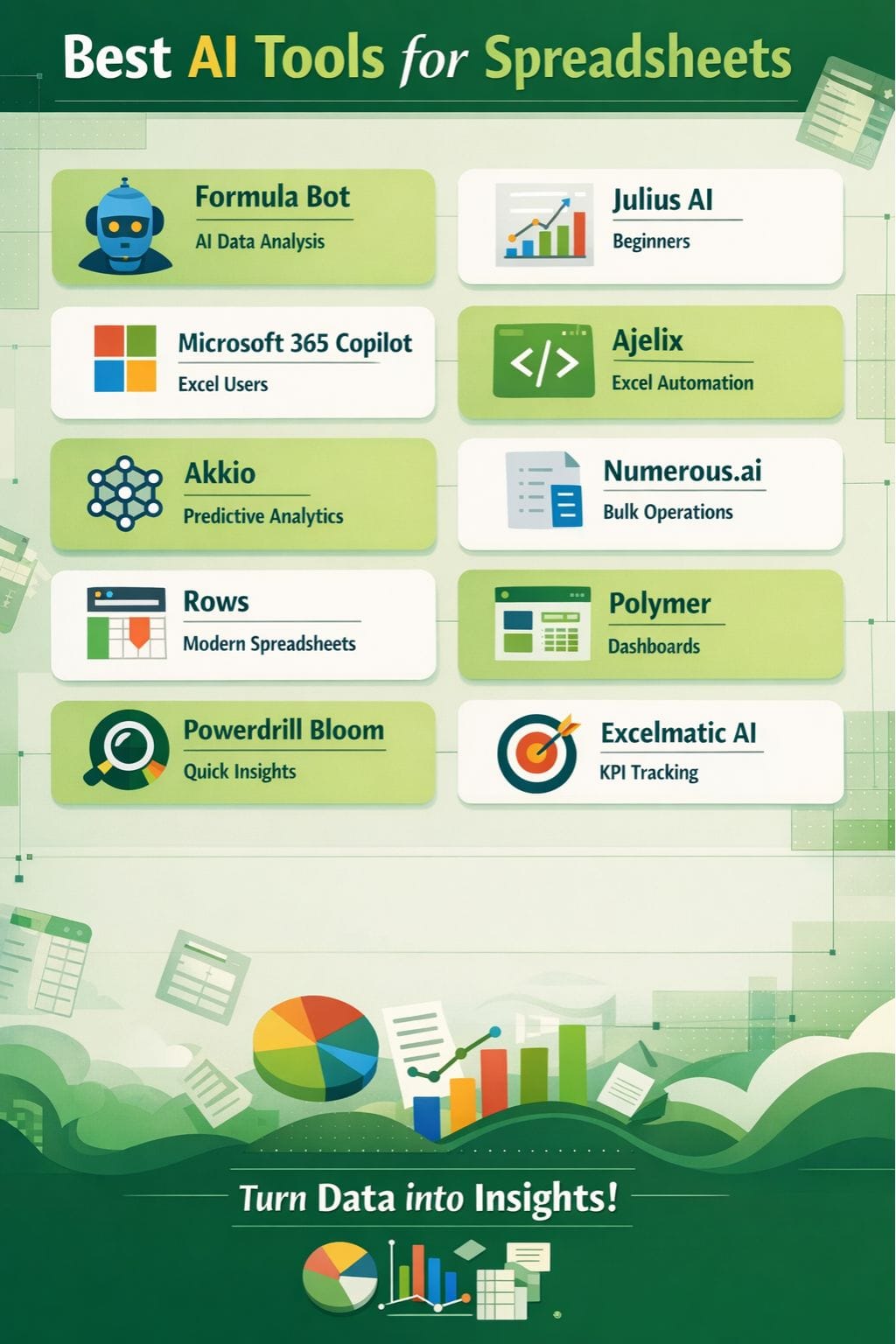
| Formula Bot | AI data analysis | Chat-based analysis, multi-source data | Medium | Input dependent, limited advanced features |
| Julius AI | Beginners | Charts, forecasts, simple prompts | Low–High | Struggles with complex data |
| Microsoft 365 Copilot | Excel users | Voice commands, automation | Medium | Subscription required |
| Ajelix | Excel automation | Formula + code generation | Medium | Learning curve |
| Akkio | Predictive analytics | No-code ML models | High | Needs clean data |
| Numerous.ai | Bulk operations | Text analysis, automation | High | Expensive at scale |
| Rows | Modern spreadsheets | AI + APIs + dashboards | Low–High | Learning curve |
| Polymer | Dashboards | Visual analytics, tagging | Medium–High | Limited modeling |
| Powerdrill Bloom | Quick insights | Auto cleaning, charts | Medium | Accuracy issues |
| Excelmatic AI | KPI tracking | Forecasting, reports | Low–Medium | Bugs, limited free version |
Formula Bot
Formula Bot functions as an AI data analyst, which enables users to interact with their spreadsheets through chat by translating their English inquiries into visual displays and tabular data, analytical models, and written insights that work with both Excel and Google Sheets in a matter of seconds.
The software enables users to clean and transform untidy data while merging multiple data sources, monitoring key performance indicators, conducting web and media metric analysis, and performing sentiment analysis and keyword analysis on text documents, all through a unified platform.
It provides users with pre-built templates for rapid project initiation.
Pros
- Easy-to-use chat interface
- Enables users to access multiple data sources while handling bigger files
- Protects its data through strong security measures
Cons
- The quality of the output depends on the accuracy of the input provided
- Advanced features are restricted to higher-tier plans
Pricing
| Plan | Pricing |
|---|---|
| Pro | $29/month |
| Max | $55/month |
Julius AI
Julius AI helps you turn raw spreadsheets into clear answers, charts, and forecasts using simple chat prompts. The program enables users to work with data because they need no training in mathematics or programming.
The program enables anyone to perform data cleaning and table restoration work while finding insights through direct language use. The software can access multiple spreadsheet tabs, and it can process both complete datasets and incomplete datasets.
Users can make visual content and conduct basic statistical analysis to find trends through the program's built-in functions. The user can export their completed work.
Pros
- Beginner-friendly tool
- Creates effective visual representations together with summary reports and forecast models
- Enables users to handle multiple data formats, including spreadsheets and CSV files
Cons
- Fails to interpret complex documents or extremely large documents
- Limited ability to create specialized mathematical functions
Pricing
| Plan | Pricing |
|---|---|
| Plus | $20/month |
| Pro | $45/month |
| Business | $450/month |
| Enterprise | Contact |
Microsoft 365 Copilot
The chat-based intelligence feature of Microsoft 365 Copilot enables users to handle data cleaning and formula creation, and trend identification through voice commands instead of using manual interface methods.
It identifies mistakes and duplicate entries while it creates standardized formats and provides charting, summarizing, and what-if testing solutions throughout extensive workbooks. It generates formulas and pivot-style views and natural-language explanations that users can use to create forecasts, customer segments, and budget comparisons.
It operates within your current Microsoft 365 setup, which enables you to conduct analysis and reporting and automation across your sheets, emails, and documents.
Pros
- Complete functionality for Excel users through its direct links to all Excel table elements
- Provides companies with advanced capabilities to clean data, identify trends
- Natural-language prompts reduce the need to learn complex formulas
Cons
- The product requires users to have a Microsoft 365 subscription
- Produces inaccurate summaries
Pricing
| Plan | Pricing |
|---|---|
| Starting @ | $25.33/user/month |
 Vivek Dev Jacob
Ajelix
Ajelix is an AI assistant for Excel and Google Sheets that helps people work with data fast. The software processes disorganized files through its formula construction feature, which uses understandable language to describe its work.
Users can enter their requests through typing, and it will generate formulas, VBA, and Apps Script from their input. Ajelix also creates templates, dashboards, and reports for planning and analysis. The software provides file translation functions alongside its support for multiple languages.
Users can use the chat-style helper to analyze data and correct mistakes while they automate processes.
Pros
- Dedicated Excel and Sheets support, which includes built-in add-ons
- The workspace enables users to create their own formulas and code
- Assists users who lack expert knowledge
Cons
- Learning curve for new users
- The free version has limitations
Pricing
| Plan | Pricing |
|---|---|
| Pro | $20/user/month |
| Expert | $50/user/month |
| Business | $100/user/month |
Akkio
Akkio transforms spreadsheets into interactive predictive models, dashboards, and visual displays, which enable analysts to create quick future-oriented decisions in sales and marketing and finance work through automated processes.
It starts with data from sheets or tabular sources, which it cleans through natural language processing to build machine learning models that predict results while showing crucial factors.
Users can investigate data through chat-based requests while they create automatic reports, which enable them to share knowledge with their teams within a few minutes instead of taking days. The company provides no-code artificial intelligence solutions.
Pros
- Predictive models through no-code methods, which use spreadsheet data
- Natural language commands enable quick, automatic data cleaning
- Complete visualizations through its multiple chart options
Cons
- Operates most effectively when users provide clean and organized data
- Does not work well for AI use cases that require immediate decision-making
Pricing
| Plan | Pricing |
|---|---|
| RFP | Request for pricing |
Numerous.ai
Numerous.ai provides Excel and Google Sheets users with direct AI access, which enables them to clean data, write formulas, and perform text analysis through basic prompts instead of needing to use advanced functions.
It automatically performs multiple tasks, which include item categorization, cell formatting, message summarization, and content creation for product tags and SEO writing. It functions as a vanishing tool that users activate through their custom functions across all spreadsheet operations.
It enables users to create complete spreadsheets based on brief descriptions, which allow them to execute formula operations.
Pros
- Functions properly in both Excel and Google Sheets
- Simple function-based prompts enable operating the tool easily
- Operates efficiently for large-scale operations that require mass product tagging
Cons
- Expensive for users who need to operate it at high volume
- Complex computations on large datasets need special setup procedures
Pricing
| Plan | Pricing |
|---|---|
| RFP | Request for pricing |
Vivek Dev Jacob
Rows
Rows functions as an AI-first spreadsheet, which enables users to enter plain language into cells for data cleaning and chart creation, and instant insight generation without needing to use complex formulas or programming code.
It creates direct connections with live data sources such as APIs and analytics tools, which automatically refresh data while an AI Analyst processes vast datasets to generate summaries, classifications, and data transformations within seconds.
It enables users to work together during live sessions while accessing predefined templates and transforming tabular data into dashboard displays, which enable quick reporting and decision-making processes.
Pros
- Easy-to-use interface that guides users through its functions by using AI prompts
- Strong API connections together with analytics software and public databases
- An AI Analyst delivers insights and summaries together with text classification capabilities
Cons
- Users need to overcome a learning barrier
- Experiences temporary slowdowns when it handles extremely large data sets
Pricing
| Plan | Pricing |
|---|---|
| Plus | $8/user/month |
| Pro | $79/month + $8/user |
| Enterprise | Contact |
Polymer
Polymer transforms basic spreadsheets into interactive dashboards and reports, which understandably present information.
The software enables users to browse data from CSV files, Excel documents, Google Sheets, and API connections. The AI recommends suitable chart types while detecting patterns and trends that remain hidden to the user.
You can find data through tagging and searching within two seconds after filtering the information. Users can update layouts immediately without requiring any programming skills. Polymer enables people to comprehend numerical information more quickly, which leads to improved decision-making abilities.
It transforms traditional table formats into visual displays.
Pros
- Enables users to set up through a basic process of uploading spreadsheets
- Provides powerful search and filter, and tag functions
- Enable users to connect multiple data sources
Cons
- Not suited for complex model development
- AI capabilities and extended data storage options exist within the premium pricing packages
Pricing
| Plan | Pricing |
|---|---|
| Starter | $50/month |
| Pro | $100/month |
| Teams | $250/month |
Powerdrill Bloom
Powerdrill Bloom AI-first tool transforms disorganized spreadsheet data into visual stories that need almost no configuration work.
It lets users upload Excel or CSV files, which it transforms into cleaned data through its verification and exploration processes. It identifies patterns and connections between different data elements while detecting important metrics within just a few seconds.
It provides users with simple results, which include charts and projections, and brief written summaries through their basic question-asking process. Bloom presents data about previous outcomes, but it shows users emerging possibilities and their potential future effects.
Pros
- Provides effective automatic cleaning capabilities for Excel files and CSV files
- Creates business-ready visual content through its automatic generation of charts
- Offers a user-friendly natural language interface
Cons
- Can produce incorrect results because it struggles to interpret complex questions
- Needs to develop additional integrations for new file formats
Pricing
| Plan | Pricing |
|---|---|
| Pro | $19.90/month |
| Premium | $199/month |
Vivek Dev Jacob
Excelmatic AI
Excelmatic AI transforms Excel into an intelligent assistant for your work needs. The program analyzes your spreadsheets to extract understanding about your data content.
It performs rapid cleanup of disorganized data rows while it swiftly corrects all identified problems. Users can pose questions by using basic language that resembles conversation.
It discovers patterns in your data while it highlights major findings. It generates visualizations and basic reports within a time frame of seconds. You can monitor your key performance indicators with complete relaxation. It demonstrates its ability to forecast upcoming results.
Pros
- Easy-to-use interface
- Can process both large files and multi-sheet workbooks
- Supports business users who require dashboards, KPIs, and forecast tools
Cons
- The free version blocks access to advanced features
- Occasional bugs
Pricing
| Plan | Pricing |
|---|---|
| Essential | $9.90/month |
| Professional | $29.90/month |
| Premium | $59.90/month |
How to Choose the Right AI Spreadsheet Tool
Choosing the right tool depends on your needs:
- For beginners: Julius AI, Excelmatic AI
- For Excel users: Microsoft 365 Copilot, Ajelix
- For automation & bulk work: Numerous.ai, Formula Bot
- For dashboards & visualization: Polymer, Rows
- For predictive analytics: Akkio
Final Thoughts
The AI transforms unspoken numerical sequences into an intelligent partnership. The tool eliminates tedious cleanup work while creating your requested formulas. It identifies patterns that exist before you start your search.
The material transforms into visual charts and understandable narratives that all people can comprehend. Your week regains hours. Your attention now moves from specific cells to different decision paths.
It can manage operations at a scale that exceeds human capacity while remaining simple for newcomers to understand. It needs proper evaluation processes to prevent users from establishing unwarranted confidence.
FAQs
What are AI tools for spreadsheets?
AI tools for spreadsheets are software that use artificial intelligence to clean data, generate formulas, create charts, and provide insights using simple language commands. They help users analyze data faster without needing advanced technical skills.
Which AI spreadsheet tool is best for beginners?
Julius AI and Excelmatic AI are great for beginners because they offer simple interfaces, chat-based prompts, and easy data visualization without requiring coding or advanced knowledge.
Can AI tools automatically clean spreadsheet data?
Yes, most AI spreadsheet tools can automatically detect errors, remove duplicates, fix formatting issues, and organize messy data, saving significant time and effort.
How do AI spreadsheet tools improve productivity?
AI spreadsheet tools automate repetitive tasks like sorting, tagging, and formula creation. They also provide quick insights and visualizations, helping users make faster and better decisions.