10 Best AI Tools for YouTube Ads in 2026
Discover AI tools for YouTube ads that help with video creation, scripts, voiceovers, editing, and campaign management. Compare features, drawbacks, and pricing.

Creating YouTube ads that grab attention takes good ideas, clear messages, and engaging videos. The right AI tools can make this process faster and easier. They help write scripts, add voiceovers, edit clips, and create different versions of an ad.
Some tools also help manage bids and reach the right audience. From the opening hook to the final call to action, AI can save time and reduce the effort needed to create ads.
This guide explores the features to look for when choosing a tool that fits your goals, stays within your budget.
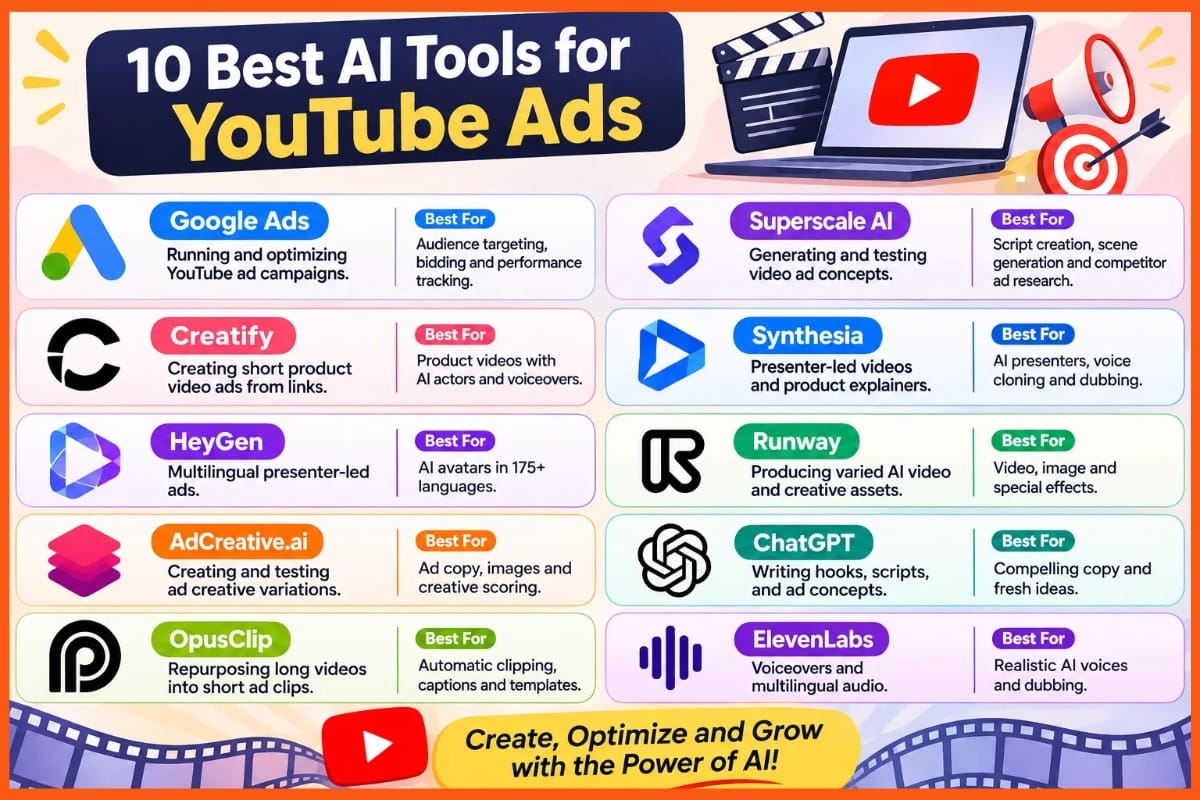
Comparison Table: Best AI Tools for YouTube Ads
| Tool | Best For | Key Features | Drawbacks |
|---|---|---|---|
| Google Ads | Running and optimizing YouTube ad campaigns | Audience targeting, automated bidding, video campaign formats, performance tracking | Some video changes are enabled by default; conversion-based bidding requires tracking setup |
| Superscale AI | Generating and testing video ad concepts | Script and scene creation, voiceovers, captions, competitor ad research, clip replacement | Seedance chat videos use a vertical 9:16 format; starter credits limit output |
| Creatify | Creating short product video ads from links | Product page import, AI actors, voiceovers, multilingual support, built-in editor | YouTube is not listed as a direct ad launch channel; Standard has task and video-length limits |
| Synthesia | Presenter-led videos and product explainers | AI presenters, voice cloning, dubbing, lip sync, script-to-video tools | Stock avatars need written consent for paid ads; several features share credits |
| HeyGen | Multilingual presenter-led ads | AI avatars, voice features, 175+ languages and dialects, team workspace options | Video, voice, and translation features share credits; some editing tools require higher plans |
| Runway | Producing varied AI video and creative assets | Video, image, music, voiceover, sound-effect generation, brand kits | Credits can run out quickly; Standard and Pro credits do not roll over |
| AdCreative.ai | Creating and testing ad creative variations | Ad copy, images, short videos, creative scoring, competitor ad review | Exports use credits; entry plan is limited to one brand and one user |
| ChatGPT | Writing hooks, scripts, and ad concepts | Script variations, copy refinement, visual ideation, file-based data review | Outputs need human review and real ad testing; features vary by plan |
| OpusClip | Repurposing long videos into short ad clips | Automatic clipping, captions, subject framing, AI B-roll, brand templates, aspect ratios | Virality scores do not predict paid ad returns; some tools require Pro |
| ElevenLabs | Voiceovers and multilingual audio | AI voices, voice cloning, voice changer, dubbing, text-based speech editing | Free plan lacks paid-ad usage rights; speech generation uses credits |
Google Ads
Google Ads is one of the top AI tools for running YouTube ads. It uses AI to help brands reach the right viewers and manage their bids. Video Reach campaigns help brands connect with more people, while Video View campaigns focus on getting more views.
You can target audiences based on age, location, and interests. The platform also offers tools to create video ads using images and logos. You can track views, clicks, and sales to measure results.
With flexible budgets and clear campaign goals, Google Ads helps brands manage, review, and improve their YouTube advertising campaigns.
Pros
- Run ads in feeds, within videos, and on Shorts from one platform
- AI can resize and trim clips, so you need not make each version by hand
- Choose bid tools that focus on views, sales, or the value of sales
Cons
- Video changes are on by default in supported campaigns
- Sales-based bid tools need conversion tracking, which adds setup work
Google Ads Pricing
| Plan or pricing model | Pricing |
|---|---|
| Ad campaigns | Request for Pricing (RFP) / flexible advertising budget |
Superscale AI
Superscale AI helps turn simple briefs into video ads. It can write scripts, create scenes, add voiceovers, and include captions. You can also combine AI clips with real product shots to make ads feel more natural.
The tool can study competitor ads and suggest ideas for new campaigns. It works well for YouTube Shorts, as its Seedance chat videos use a vertical format.
Users can edit scenes, replace clips, and export finished ads. It is a useful choice for teams that want to test new ideas and product demos. However, it is not restricted to YouTube.
Pros
- The agent can study rival ads before it writes, so ideas need not start from scratch
- Add product shots or app screens to show the real item while AI builds other scenes
- Replace a weak clip without making the whole video again, where those controls are offered
Cons
- Chat makes 9:16 clips, not 16:9 videos, hence limits its fit for wide YouTube ads
- Starter covers about eight if you spend all credits on that format
Superscale AI Pricing
| Plan | Pricing |
|---|---|
| Starter | $49/month |
| Advanced | $99/month |
| Pro | $199/month |
| Scale | $399/month |
| Enterprise+ | $799+/month |
Creatify
Creatify AI helps online brands turn product links into short video ads. It can write scripts, add AI actors, and create voiceovers with little effort. Users can also edit text, clips, and scenes using its built-in editor.
With support for over 75 languages, it helps brands reach new markets. Paid plans remove watermarks, while higher plans offer custom avatars and more templates.
Creatify is useful for teams that want to create ads quickly and test different ideas without hiring a film crew. However, YouTube is not listed as a direct ad launch channel.
Pros
- Pull product images and text from sites like Amazon or Shopify. This cuts down on manual uploads
- Pro includes three custom avatars and 1,500 AI actors, so teams can try new faces and styles
- Change text, trim clips, or swap scenes after export without spending more credits
Cons
- Its direct ad launcher lists Meta, TikTok, and AppLovin, not YouTube
- Standard runs one task at a time and caps videos at two minutes
Creatify Pricing
| Plan | Pricing |
|---|---|
| Standard | $10/month |
| Pro | $38/month |
| Max | $66/month |
 Vivek Dev Jacob
Synthesia
Synthesia helps brands turn written scripts into videos using AI presenters and voices. It is a useful choice for YouTube ads, product demos, and short sales videos. Its features include voice cloning, video dubbing, lip sync, ready-made templates, and tools to create video drafts.
Brands can also create a custom presenter and update scripts without filming again. This saves time and helps teams make videos in different languages while keeping a consistent brand style.
However, stock AI presenters cannot be used in paid YouTube ads without written consent. For paid campaigns, use a custom presenter with the required consent.
Pros
- A personal avatar can present new scripts, so your host need not film each update
- Dubbing and lip sync help you reuse one video in other languages
- Turn a script, slide deck, or document into a video draft
Cons
- Stock avatars need written consent for paid ads.
- Video, dubbing, and surveys draw from shared credits.
Synthesia Pricing
| Plan | Pricing |
|---|---|
| Starter | $14/month |
| Pro | $59/month |
| Enterprise | Contact Sales |
HeyGen
HeyGen is an AI video tool that helps brands create YouTube ads using virtual hosts. You can choose a ready-made avatar or create one with your own face and voice. Its voice features let you make videos without filming a live presenter.
With support for over 175 languages and dialects, it also helps brands reach people in different markets. You can edit scripts to test new hooks, offers, and calls to action. Paid plans offer more features and fewer limits.
HeyGen works well for brands that want presenter-led ads, but costs may rise as video needs grow.
Pros
- You can change the script without filming each ad again
- Support for over 175 languages and dialects lets you make local versions of an ad
- The Business plan adds a shared workspace, brand kit, and asset library for team use
Cons
- Video, voice, and translation tools share a credit pool
- Tools to edit and proofread translated scripts sit on higher plans, not Creator
HeyGen Pricing
| Plan | Pricing |
|---|---|
| Creator | $29/month |
| Pro | $49/month |
| Business | $149/month |
| Enterprise | Contact Sales |
Runway
Runway is worth considering for YouTube ads because it offers a wide range of video and creative tools.
It lets you create AI videos, images, music, voiceovers, and sound effects in one place. You can use it to make short ad clips and test new ideas. Paid plans remove watermarks and support video upscaling to 4K.
The Pro plan also includes brand kits and custom voice cloning to help keep ads consistent. You can run several tasks at once, which saves time. However, each new clip uses credits, so costs can add up quickly.
Pros
- Make video, images, music, and voice tracks without a stack of separate tools
- A brand kit and one custom voice clone help give ads a shared look and sound
- Standard allows five video and image tasks at once
Cons
- Standard’s 625 monthly credits cover just 52 seconds of Gen-4.5 video
- Standard and Pro credits do not roll over
Runway Pricing
| Plan | Pricing |
|---|---|
| Standard | $12/month |
| Pro | $28/month |
| Max | $76/month |
Vivek Dev Jacob
AdCreative.ai
AdCreative.ai is a helpful choice for anyone looking for AI tools for YouTube ads. It can turn text and product images into short videos with less effort.
You can add your brand details, text, and calls to action to match your campaign. The tool also helps write ad copy and rates designs before you launch an ad.
Teams can create several versions at once and test which ones work best. You can also review competitor ads for ideas. Its main benefit is speed, as it brings many ad tasks into one place.
Pros
- Make product clips from images, or use AI avatars for ads with a presenter
- Create many ad drafts, then spend credits only when you download them
- Keep work in one place: Build ad copy, images, and videos with the same tool
Cons
- Unlimited drafts do not mean unlimited exports
- The entry plan allows just one brand and one user
AdCreative.ai Pricing
| Plan | Pricing |
|---|---|
| Starter | $39/month |
| Professional Plans | $249/month |
| Ultimate Plans | $999/month |
ChatGPT
ChatGPT earns a place in a YouTube ads toolkit through its writing and idea tools. It helps draft hooks, short scripts, titles, and clear calls to action. Give it your product facts, target group, and brand tone to shape each draft.
You can ask for fresh ad angles or new versions to test. Its image tools can help sketch visual ideas, while file uploads let you review shared ad data.
Use it to plan and refine ads, not as proof of what will sell. Check each claim, edit the copy, and use your ad results.
Pros
- Turn one brief into several hooks and scripts for ad tests
- Share sample copy to help keep new drafts close to your voice
- Create rough ad images to show the look you want before production
Cons
- Drafts and data summaries still need human review and real ad tests
- Access to uploads, images, and other tools varies by plan
ChatGPT Pricing
| Plan | Pricing |
|---|---|
| Go | $8/month |
| Plus | $20/month |
| Pro | $100/month |
OpusClip
OpusClip turns long videos into short clips for YouTube ad use. It finds key scenes, adds captions, and keeps the main subject in frame. You can turn demos, talks, and client stories into fresh ad cuts.
Brand templates help you match fonts, colors, and logos across clips. AI B-roll adds extra shots, while trim tools let you shape each cut. The tool also scores clips for their chance to spread.
This helps you pick ideas to test, but does not prove ad results. Its main strength is reusing footage, so you still need to check each hook.
Pros
- Make several cuts from one demo or client story
- Save fonts, colors, and logos in templates, then apply them across clips
- Switch between tall, square, and wide formats to reuse footage in more placements
Cons
- The virality score rates a clip’s chance to spread, not its paid ad return
- AI B-roll, the post scheduler, and pro editing exports sit in the Pro tier
OpusClip Pricing
| Plan | Pricing |
|---|---|
| Starter | $15/month |
| Pro | $29/month |
| Business | Contact Sales |
Vivek Dev Jacob
ElevenLabs
ElevenLabs helps turn ad scripts into natural, lifelike speech. Its voice tools let you choose a speaker, clone your own voice, or create a new one from a short prompt.
You can adjust the pace and tone to match your message, whether it is a quick sales pitch or a calm brand story. Its dubbing feature helps adapt ads for different markets and languages.
The voice changer can give recordings a new sound, while Studio lets you edit spoken words by changing the text. These features help teams test ad ideas, keep a consistent brand voice.
Pros
- Voice cloning lets you reuse a familiar voice across ad scripts and markets
- The voice changer keeps the tone and delivery of your source clip
- Edit words in Studio to change speech without a new recording
Cons
- The free plan lacks rights for paid ad use
- Each new speech run uses credits, so more ad drafts draw from your cap
ElevenLabs Pricing
| Plan | Pricing |
|---|---|
| Starter | $1/month |
| Creator | $11/month |
| Pro | $99/month |
How to Choose the Right AI Tool for YouTube Ads
The best tool depends on which part of the ad process takes the most time. Before choosing a subscription, consider your main goal, video format, team workflow, and expected output.
| Main Goal | Recommended AI Tool | What It Helps With |
|---|---|---|
| Campaign management | Google Ads | Audience targeting, bidding, and campaign performance tracking. |
| Scripts and ad ideas | ChatGPT | Drafting hooks, calls to action, and different script versions. |
| AI-generated videos and ad variations | Superscale AI, Creatify, Runway, AdCreative.ai | Creating video assets and generating ad variations. |
| Presenter-led videos | Synthesia, HeyGen | Creating videos with AI presenters. |
| Voiceovers and localization | ElevenLabs | Generating speech and dubbing videos into different languages. |
| Repurposing existing footage | OpusClip | Turning longer videos into shorter clips. |
| Checking subscription value | Compare plans across tools | Reviewing credits, export limits, video length, watermark rules, and commercial-use rights—not just the monthly price. |
Prices and plan features can change, so confirm current details with each provider before subscribing. AI-generated content should also be reviewed for accuracy, brand fit, usage rights, and platform requirements.
Conclusion
The best AI tools can help you make YouTube ads with less stress and more ease. But great ads still need a clear goal, a strong hook, and a message that feels real.
Choose tools that fit your needs, save you time, and let your brand shine. Start small, test fresh ideas, and learn from each ad you run. Let AI help with the hard work while you keep control of the story.
You do not need to do more to stand out. You need to make each second count.
FAQs
What are AI tools for YouTube ads?
AI tools for YouTube ads help businesses create scripts, voiceovers, video clips, creative variations, and campaign plans. Some also support audience targeting, bidding, and performance tracking.
Which AI tool is best for creating YouTube ad videos?
The right choice depends on the type of video you need. Superscale AI, Creatify, Runway, and AdCreative.ai support video creation, while Synthesia and HeyGen focus on presenter-led videos.
Can AI help write YouTube ad scripts?
Yes. ChatGPT can help draft hooks, scripts, titles, and calls to action. Review the output and test different versions to learn what works for your audience.
Can AI tools manage YouTube ad campaigns?
Google Ads supports YouTube campaign management, audience targeting, bidding, and performance tracking. Other tools in this guide focus mainly on creating ad assets.
What should I check before paying for an AI ad tool?
Check the monthly price, credit limits, export rules, supported video formats, watermark policy, commercial-use rights, and whether the tool can publish directly to your preferred ad platform.