Best AI Video Ad Generators in 2026
Explore the best AI video ad generators in 2026 for creating UGC ads, product videos, AI avatar content, social media ads, and creative variations faster.


AI video ad generators turn simple ideas into polished videos in minutes. You can start with a short prompt, product details, or a campaign goal. The system then creates scenes, voiceovers, captions, music, and visuals that fit your message.
This makes ad creation faster, easier, and less costly for brands of all sizes. Teams can test many versions for different audiences, platforms, and offers without a full production crew.
These tools also help keep ads fresh, clear, and on-brand. From social clips to product promos, AI video ads help marketers move from concept to campaign with far less effort.
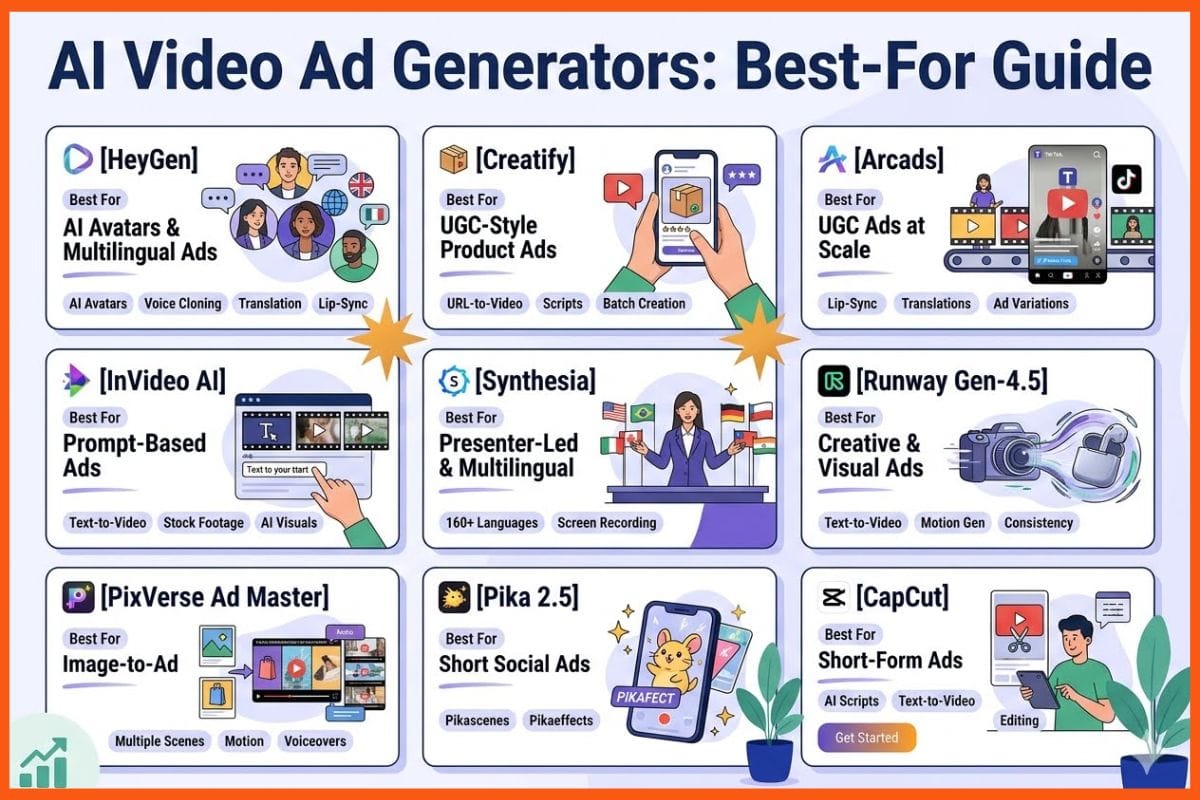
Best AI Video Ad Generators at a Glance
| AI Video Ad Generator | Best For | Key Features | Drawbacks |
|---|---|---|---|
| HeyGen | AI avatar and multilingual ads | AI avatars, voice cloning, translation, lip-sync, captions, 4K exports on selected plans | Avatars can feel less natural; advanced videos can use more credits |
| Creatify | UGC-style product video ads | Product URL-to-video, AI actors, scripts, hooks, batch creation, competitor ad tracking | Credit-based generation; AI actors and scripts need review |
| Arcads | UGC-style ads at scale | AI actors, voices, lip-sync, translations, remixing, ad variations | Some performances may feel less human; weaker for hands-on product use |
| Topview AI | Ecommerce and social ad creation | Product URL-to-video, AI avatars, voices, scripts, TikTok Ad Library, multilingual videos | Credit costs can increase with revisions; template variety can feel repetitive |
| InVideo AI | Prompt-based video ads | Text-to-video, stock footage, AI visuals, voiceovers, captions, resizing | Requires review of claims, spelling, timing, and tone |
| Synthesia | Presenter-led and multilingual ads | AI avatars, 160+ languages, voice options, captions, templates, screen recording | Limited emotional and gesture control; avatars can feel generic |
| Runway Gen-4.5 | Creative product and visual ads | Text-to-video, image-to-video, motion generation, scene consistency | Short clips often require editing; logos and text may need correction |
| PixVerse Ad Master | Quick product image-to-ad creation | Product images, multiple scenes, AI talent, motion, voiceovers, captions | Better for short ads; claims and logos may need refinement |
| Pika 2.5 | Eye-catching short social ads | Pikascenes, Pikadditions, Pikaswaps, Pikatwists, Pikaffects, Pikaframes | Short standard outputs; lower-tier plans have resolution and feature limits |
| CapCut | Short-form social ads | AI scripts, text-to-video, avatars, voiceovers, captions, templates, editing | AI writing needs review; complex ads need manual editing |
HeyGen
HeyGen is an AI video ad generator that helps turn scripts, prompts, images, and product ideas into polished videos. It is useful for teams that want to create ads, product explainers, social media clips, and different versions of the same campaign without setting up a shoot.
Users can choose from stock or custom avatars, generate videos from text, clone voices, and translate videos into different languages. It also supports AI dubbing, lip-sync, templates, captions, and high-quality exports, including 4K on selected plans.
With its wide language support, HeyGen is a practical choice for brands running campaigns across multiple markets.
Pros
- Realistic AI avatars can present an ad without a camera, actor, studio, or reshoots
- Translation and lip-sync tools help reuse one campaign in many markets
- Custom avatars and voice clones can support a consistent brand face and tone
Cons
- AI avatars can still feel less natural than a skilled on-camera creator
- Credit use can make advanced video types costly at scale
HeyGen Pricing
| Plan | Pricing |
|---|---|
| Creator | $29/month |
| Pro | $49/month |
| Business | $149/month |
| Enterprise | Contact Sales |
Creatify
Creatify is an AI video ad platform built for marketers, ecommerce teams, and agencies. It helps users turn a product URL, images, or a simple brief into short video ads in minutes.
Users can create different versions of an ad, test new hooks, and add AI actors, voiceovers, scripts, and captions. The platform also offers ready-made templates, different video formats, and batch creation for faster testing.
Higher plans support custom avatars, while Pro users get competitor ad tracking and paid ad launching tools. For larger teams, Creatify offers team seats, brand spaces, and API access.
Pros
- Make several hooks and creative angles from one product page
- The tool focuses on performance ads rather than general video editing
- Pro includes up to 1,500 AI actors and custom-avatar options
Cons
- Every generation uses credits, so revisions can raise the true cost
- AI actors and scripts may need manual checks to match brand tone
Creatify Pricing
| Plan | Pricing |
|---|---|
| Starter Plans | $39/month |
| Pro | $99/month |
| Enterprise | Contact Sales |
Arcads
Arcads is an AI video ad platform that helps brands create UGC-style ads without hiring creators or setting up shoots. You can add a script, pick an AI actor and voice, and generate a video with natural lip-sync and gestures.
The platform also lets you create different versions of an ad to test hooks, scripts, and actors at scale. It supports voice options, subtitles, translations, and localised videos for different markets.
You can also remix, extend, refine, and upscale existing ads. Arcads is built for teams that need to produce and test social ads quickly.
Pros
- Higher plans reportedly include over 1,000 AI actors
- Adapt a winning ad for different languages and markets
- Lower production burden: It can cut the need for creators, cameras, and editing crews
Cons
- Some voices or performances can still feel less human
- Talking-head ads work better than hands-on product use
Arcads Pricing
| Plan | Pricing |
|---|---|
| Request for Pricing (RFP) | Contact Sales |
 Vivek Dev Jacob
Topview AI
Topview AI is an AI-powered video ad generator built for ecommerce sellers, agencies, and social media marketers. It can create short UGC-style ads using a product URL, images, a script, or even a reference ad.
The platform can write scripts, choose clips, add AI voices, captions, music, and avatars, and format videos for platforms like TikTok and Instagram. It also has a TikTok Ad Library that helps users find active ad styles and get ideas for their own campaigns.
Topview AI is best suited for quickly testing different hooks and ad concepts.
Pros
- Lets users use winning ad references to shape a new creative concept
- Includes 2,000+ avatars and voices on paid tiers, plus custom avatars and voice cloning
- Creates scripts, voiceovers, captions, and multilingual variants in one workflow
Cons
- Credit-based use can become costly when many takes or re-generations are needed
- AI avatar lip sync and template variety may feel uneven or repetitive
Topview AI Pricing
| Plan | Pricing |
|---|---|
| Pro | $29/month |
| Business | $75/month |
| Ultra | $120/month |
InVideo AI
InVideo AI is a prompt-based video ad generator that helps you create video ads without needing a full production team. You simply enter your idea, offer, target audience, and preferred platform, and it creates a draft for you.
The video can include scenes, stock footage, AI-generated visuals, music, captions, and voice-overs. You can then edit the script, replace visuals, adjust the voice, and add your brand style.
It also lets you resize videos for platforms like Instagram, TikTok, YouTube, and Facebook. The biggest advantage is speed, making it useful for social ads, product promotions, explainers, and UGC-style content.
Pros
- Supports rapid testing of many hooks, offers, and ad angles
- Paid plans allow exports without an InVideo watermark
- Useful for solo marketers and small teams with short deadlines
Cons
- You still need to review claims, spelling, timing, and brand tone
- Strong ads need a clear brief; vague prompts often give weak results
InVideo AI Pricing
| Plan | Pricing |
|---|---|
| Plus | $20/month |
| Max | $100/month |
| Generative | $200/month |
| Elite | $1,000/month |
Synthesia
Synthesia is an AI video tool that helps you create polished ad videos without cameras, actors, or a studio.
You simply write or paste your script, choose an AI avatar and voice, and build your video with scenes, brand assets, subtitles, music, and screen recordings. It supports more than 160 languages and voices, making it easy to create ads for different markets.
You can also use templates, import PowerPoint files, export videos as MP4s, and work with your team. Synthesia is a good fit for product explainers, social media ads, and sales videos.
Pros
- AI avatars make presenter-led ads fast to produce
- Strong language and voice coverage helps with global ad versions
- Built-in captions improve silent mobile viewing
Cons
- Fine control over emotion, gestures, and timing is limited
- Repeated avatar use may make ads feel generic
Synthesia Pricing
| Plan | Pricing |
|---|---|
| Basic | INR 999/month |
| Creator | INR 3,999/month |
| Enterprise | Contact Sales |
Vivek Dev Jacob
Runway Gen-4.5
Runway Gen-4.5 is a powerful AI video tool that helps marketers create polished ad videos from simple text or image prompts. It produces short clips with realistic motion, strong scene consistency, and good control over the final output.
This makes it useful for product launches, social media ads, fashion content, lifestyle videos, and quick creative tests. Marketers can explore different ideas and visual styles before investing in a full production.
Gen-4.5 works best as a fast creative tool rather than a complete replacement for live shoots. It is part of Runway’s wider creative platform.
Pros
- Helps teams explore many campaign ideas before committing to a shoot
- Image-to-video can animate a product still, key visual, or pack shot
- Good prompt control can reduce manual editing time
Cons
- Short clips may need editing to form a full ad
- Fine brand details, text, logos, and hands can still need correction
Runway Gen-4.5 Pricing
| Plan | Pricing |
|---|---|
| Standard | $15/month |
| Pro | $35/month |
| Max | $95/month |
| Enterprise | Contact Sales |
PixVerse Ad Master
PixVerse Ad Master is an AI video ad tool that helps businesses create product ads quickly. You upload a product image and add a short brief with details such as key selling points, mood, or style.
The tool then turns it into a polished ad with multiple scenes, product shots, AI-generated talent, motion, voiceover, and subtitles. It is useful for paid social campaigns, product launches, and short-form content.
You do not need to write complex prompts or have video editing skills. This makes it a simple option for small teams that want to create good-looking ad drafts.
Pros
- One image and a few product details can produce a complete ad
- It suits marketers who do not know video editing or prompt design
- Voiceover and captions reduce separate production steps
Cons
- It is best for brief social ads, not long brand films
- Teams may need to refine claims, captions, pacing, or logos
PixVerse Ad Master Pricing
| Plan | Pricing |
|---|---|
| Request for Pricing (RFP) | Contact Sales |
Pika 2.5
Pika 2.5 is an AI video ad generator designed for quick, eye-catching social media ads. It can turn text prompts or images into short 5- or 10-second videos, with up to 1080p quality on paid plans.
Marketers can create scenes, add or replace products, change actions, and apply visual effects. Its main tools include Pikascenes for creating scenes, Pikadditions for adding people or objects, Pikaswaps for replacing elements, Pikatwists for changing actions, and Pikaffects for creative effects.
Pikaframes lets users control how a video starts and ends by using two images.
Pros
- Strong ad-ready editing tools let you add, swap, or alter a product in an existing clip
- The free plan includes Pika 2.5 access, 80 monthly credits, 480p output, and no-watermark downloads
- Paid plans support commercial use, all listed resolutions, and faster queues
Cons
- standard text-to-video and image-to-video outputs are 5 or 10 seconds, so longer ads need editing outside Pika
- The Basic plan limits Pika 2.5 to 480p and lacks advanced tools such as Pikaframes
Pika 2.5 Pricing
| Plan | Pricing |
|---|---|
| Standard | $8/month |
| Pro | $28/month |
| Fancy | $76/month |
Vivek Dev Jacob
CapCut
CapCut is an AI video ad generator that helps brands create short ads quickly. You can start with an idea, script, or product images and turn them into ready-to-edit videos.
It offers AI script writing, text-to-video, voiceovers, avatars, captions, music, templates, and simple editing tools. With over 5,000 ad templates, it gives small teams many options for social media content. Ads can also be resized for platforms such as TikTok, Instagram, and YouTube.
The free version works well for basic projects, while paid plans offer more AI tools, premium assets, and export options.
Pros
- Write, generate, edit, caption, and export from one workspace
- Strong for short-form social ads where speed matters most
- Large template library makes it easy to follow current visual styles
Cons
- AI writing can miss product facts, brand tone, or legal claims
- Complex brand films still need manual editing and original footage
CapCut Pricing
| Plan | Pricing |
|---|---|
| Request for Pricing (RFP) | Contact Sales |
How to Choose the Best AI Video Ad Generator
The right AI video ad generator depends on the type of ads you want to create and how much control your team needs.
| Use Case | Best AI Video Ad Generators | Why They Are Useful |
|---|---|---|
| UGC-style product ads | Creatify, Arcads | Useful for AI actors, hooks, scripts, and creative variations |
| AI avatar ads | HeyGen, Synthesia | Good for presenter-led videos, multilingual campaigns, and consistent AI avatars |
| Ecommerce ads | Creatify, Topview AI, PixVerse Ad Master | Helps turn product information or images into short advertising creatives |
| Creative visual experiments | Runway Gen-4.5, Pika 2.5 | Useful for visual concepts, motion, effects, and image-to-video generation |
| Quick social media videos | InVideo AI, CapCut | Helps create, edit, caption, and resize short-form ads quickly |
Tips for Creating Better AI Video Ads
AI tools can make video production faster, but the quality of the final ad still depends on the brief and creative direction.
- Start with one clear campaign goal.
- Define your target audience before generating the video.
- Give the AI clear product information and selling points.
- Test multiple hooks instead of relying on one version.
- Keep important messages easy to understand.
- Review AI-generated claims, captions, visuals, and voiceovers.
- Add your brand assets, tone, and visual identity.
- Create different versions for different platforms.
- Test short versions before investing in longer creatives.
- Use human review before publishing paid advertising.
Final Thoughts
AI video ad generators are changing the way brands create and share stories. They help teams turn simple ideas into engaging videos in less time and at a lower cost. This makes it easier to test new ideas, reach different audiences, and keep content fresh across social media and other channels.
But AI alone cannot make a great ad. Brands still need clear goals, honest messages, and creative thinking. The best results come when people use AI as a tool, not a replacement for human judgment.
When used well, these tools help small teams compete.
FAQs
What are AI video ad generators?
AI video ad generators are tools that use artificial intelligence to create video ads from prompts, scripts, product images, URLs, or campaign details. They can generate scenes, voiceovers, captions, music, avatars, and other creative elements.
What is the best AI video ad generator in 2026?
The best tool depends on your needs. Creatify and Arcads are useful for UGC-style ads, HeyGen and Synthesia for AI avatar videos, while Runway and Pika 2.5 are better suited to creative visual experiments.
Can AI create product video ads?
Yes. AI video ad generators can turn product images, product URLs, descriptions, or simple briefs into short product advertisements. Tools such as Creatify, Topview AI, and PixVerse Ad Master are designed for this type of workflow.
Can AI video ads replace professional video production?
AI video tools can reduce the need for cameras, actors, studios, and production crews for many types of ads. However, professional production can still be valuable for high-budget campaigns, complex storytelling, and campaigns that require real people or products.
Are AI video ads good for social media?
Yes. Many AI video ad generators are designed for short-form content on platforms such as Instagram, TikTok, YouTube, and Facebook. They can also create different versions and formats for testing.
Which AI video ad generator is best for UGC ads?
Creatify and Arcads are strong options for UGC-style ads because they support AI actors, scripts, voices, hooks, and multiple creative variations.
Which AI video ad generator is best for AI avatars?
HeyGen and Synthesia are useful choices for AI avatar ads. Both support presenter-style videos, voices, and multilingual content.
Can AI create multiple versions of the same ad?
Yes. Many AI video ad generators let marketers create variations using different hooks, scripts, actors, voices, visuals, languages, or formats. This can make creative testing faster.