Top 10 AI Tools for Business Analysts to Boost Decision-Making
Explore the best AI tools for business analysts that enhance decision-making, automate reporting, and turn complex data into simple, actionable insights for faster business growth.

AI tools for business analysts are transforming how businesses utilize data. Helps identify trends, highlight risks, and provide insight into new opportunities, all at lightning speed. Analysts can create dashboards and reports without any coding skills.
These tools are user-friendly, very fast, and easy to integrate with other systems. Big data does not necessitate big skills anymore. Crystal-clear charts and smart hints help teams react quickly.
As numerous companies adopt a data-driven approach, leveraging such tools becomes increasingly indispensable. They minimize reaction time and contribute to reasoned decisions. Well-placed, these tools will help during faster product evolution and serendipitous product iteration. Easy access transforms data into action-based metrics.
Future of AI Business Analysis Tools
The future of AI business analysis tools is shifting toward:
- Fully conversational analytics (chat with data)
- Predictive decision-making
- Automated business intelligence workflows
- Real-time enterprise insights
- Deep integration with business ecosystems
As AI becomes more advanced, tools will not just show data, they will recommend actions, predict risks, and optimize strategies automatically.
Comparison Table of Top AI Business Analysis Tools
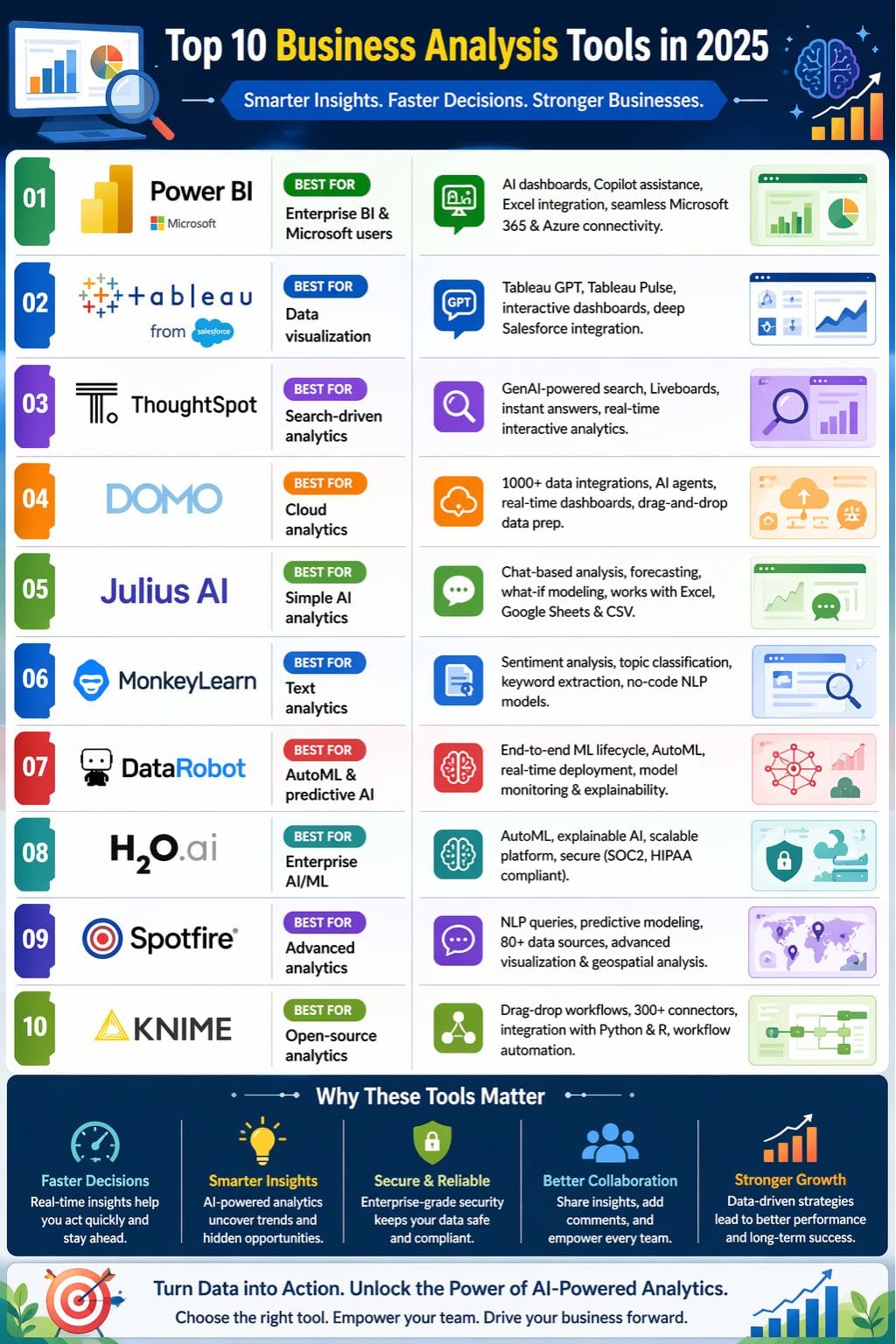
| Tool | Best For | Key Features | Pricing Level | Drawbacks |
|---|---|---|---|---|
| Power BI | Enterprise BI & Microsoft users | AI dashboards, Copilot, Excel integration | Low–Mid | Windows/Azure dependency |
| Tableau | Data visualization | Tableau GPT, Tableau Pulse, Salesforce integration | Mid–High | Setup complexity |
| ThoughtSpot | Search-driven analytics | GenAI search, Liveboards | High | Expensive |
| Domo | Cloud analytics | 1000+ integrations, AI agents | High | Learning curve |
| Julius AI | Simple AI analytics | Chat-based analysis, forecasting | Low–Mid | Minor bugs |
| MonkeyLearn | Text analytics | Sentiment analysis, NLP models | Mid | Web-only |
| DataRobot | AutoML & predictive AI | End-to-end ML lifecycle | High | Expensive |
| H2O.ai | Enterprise AI/ML | AutoML, explainable AI | High | Complex pricing |
| Spotfire | Advanced analytics | NLP queries, predictive models | High | Learning curve |
| KNIME | Open-source analytics | Drag-drop workflows, 300+ connectors | Low–High | Limited visuals |
Power BI
In the business analysis tools requirements for 2026, one of the finest offerings is Microsoft Power BI, which brings Artificial Intelligence and smart insights as part of every aspect of decision-making.
Users can build dashboards, and any questions can be asked in plain English to receive prompt responses without needing to write code. Power BI with Copilot AI is a transition to chat-based assistance, revealing trends and suggesting visuals.
Its deep integration with Microsoft 365 enables the creation of live dashboards and provides security by ensuring that controls are strong. The latest updates enable easy teamwork, high-speed processing of large data, and superior security.
Pros
- Simple drag-and-drop and plain English queries for all
- Seamless within Microsoft 365, Excel, Azure, and Teams
- Affordable entry price and scalable offerings for all business sizes
Cons
- Only suited for Windows and Azure
- Learning curve for beginners
Pricing
| Plan | Pricing |
|---|---|
| Power BI Pro | $14/user/month |
| Premium Per User | $24/user/month |
| Embedded | Variable |
Tableau
Tableau GPT is changing the business analytics tools space in 2026 and is really making those analytic tools for businesses smart and really easy to use. Tableau GPT lets users question, chart, and uncover patterns in plain language-no complex setup involved.
Now, an automated, personalized insight into their workflow is provided by Tableau Pulse, through perks that each user gets to benefit from. A fast data prep, smart suggestions, with visual clarity help analysts and business teams go from data to insight in a matter of minutes. Deep Salesforce integration, agile dashboards, and top-rated security keep data safe, and decisions are made fast.
Pros
- No coding needed.
- Fast automated data preparation and cleaning.
- Large user community and good learning support.
Cons
- Requires careful setup/governing of data at the onset.
- Very heavy visualizations can become sluggish on extremely large datasets.
Pricing
| Plan | Pricing |
|---|---|
| Tableau RFP | Custom Pricing |
ThoughtSpot
ThoughtSpot is a company that provides business analytical tools that are simple and direct. Its AI allows users to ask questions without the need for coding or setup, and instead provides instant interactive charts.
GenAI-powered Spotter and SpotIQ are designed to identify trends, find anomalies, and pose relevant subsequent questions. This means that business teams can be equipped to proceed very quickly from data to addressing action. Liveboards provide real-time dashboards with easy embeddability, strong security, and full cloud integration.
A simple way to collaborate: share links, comment, and always work on verified data. With ThoughtSpot, anyone can do performance analysis or strategy in order to make better business decisions in less time.
Pros
- Real-time Liveboards help very much in speedily analyzing performances interactively.
- Easy sharing, collaborative commenting, and role-based access to data.
- Strong security, compliance, and multi-cloud, multi-source support.
Cons
- Entry-level price is costlier than the competitors.
- Dashboard structuring can be a constraint for larger enterprises.
Pricing
| Plan | Pricing |
|---|---|
| Essentials | $25/user/month |
| Pro | $50/user/month |
| Enterprise | Custom |
 Vivek Dev Jacob
Domo
Domo redefining the approach of a team towards AI usage in business analysis tools is what this cloud-first company does. By using Domo, you can integrate and unify over 1000 data sources with cloud capabilities that provide real-time dashboards for rich AI-powered analysis and data-prep drag-and-drop coding.
Built-in AI agents will automate workflows, identify trends, make predictions, and speed along the data sources that impact an organization's performance analysis. Self-service tools allow users to generate personalized reports or apps while sharing and working securely throughout the company.
ModelOps, magic ETL, and mobile access mean that business professionals get insights anywhere, anytime. Domo's flexible architecture fits any size: a startup or one of the Fortune 50.
Pros
- Highly collaborative- easy sharing, addition of comments,
- Mobility and high cloud integration for analyses on the go.
- Powerful, no-code data prep for business users.
Cons
- Takes longer with those large datasets
- Steep learning curve for some advanced features
Pricing
| Plan | Pricing |
|---|---|
| RFP | Custom Pricing |
Julius AI
Julius AI stands out because it is user-friendly, powered by Artificial Intelligence, an awesome tool for business analysis, making data intelligible to everybody. Users can now ask questions through natural language chat, making contact with their data - no formulas or codes involved.
Julius takes care of the cleaning, statistical analysis, and instant visualization of data, allowing teams to make decisions quickly. Other business advanced analysis instruments, like forecasting and what-if modeling, enable users to develop scenarios and test strategies.
Integrates seamlessly with Excel, Google Sheets, and CSV files, while security and collaboration features allow safe and team-based analysis. Julius AI can extract important trends and make business decisions based on them in terms of data.
Pros
- Integrates with Excel, Google Sheets, and CSV
- Adaptive learning for better clarity over time
- Flexible templates and batch here for repeated analysis
Cons
- The new platform has random formatting bugs
- Complex pricing for high-volume teams
Pricing
| Plan | Pricing |
|---|---|
| Plus | $20/month |
| Pro | $45/month |
| Enterprise | Custom |
MonkeyLearn
MonkeyLearn is the leader in AI business analysis software because it provides a platform driven by AI for text analytics and strategy. It enables teams to rapidly convert messy data from reviews, email, or social postings into clean insights.
Users build custom machine learning models using a no-code, drag-and-drop studio, which they can use to send functions like sentiment analysis, topic classification, and keyword extraction into action. MonkeyLearn does a thorough job of automating the cleaning, labeling, and visualization part, so that anyone-not just data scientists-can sweep up trends and performance gaps.
Certain setup templates and integrations with BI systems and apps (Google Sheets, Salesforce, Zapier) mean you can now slip in AI-powered analysis for business decisions.
Pros
- Friendly interface for any user from the business.
- Enables global data source analysis.
- Real-time performance dashboards, scalable as your business grows.
Cons
- Advanced customizations can require more training and setup.
- No mobile app, a web-only platform.
Pricing
| Plan | Pricing |
|---|---|
| RFP | Custom |
Yash Gupta
DataRobot
DataRobot presents teams with robust, automatic analysis tools for business choices such as performance analysis and strategy. Users can create machine learning models without any required skills - no code or data science background required with an AutoML platform.
It provides fast and easy no-code time series features for forecasting and scenario analysis. It covers the entire lifecycle of artificial intelligence, from data preparation as well as feature engineering to very fast, real-time deployment and monitoring of models.
Strong security, rich governance, and seamless cloud scaling help businesses move from data to insight in minutes instead of months. It makes collaboration, clear explanations of models, and support for any industry easier to make smart decisions.
Pros
- Fast results, shrinks project time, and hikes accuracy
- Real-time, scenario modeling, and explainable AI for business users.
- Collaboration tools, visual controls, and guided workflows for teams.
Cons
- High initial price barrier that deters small organizations from using it.
- Advanced customizations require technical expertise
Pricing
| Plan | Pricing |
|---|---|
| RFP | Custom |
H2O.ai
H2O.ai shines as one of the foremost business analysis tools that utilize predictive and generative AI to allow better decisions to be made faster and more confidently. Its platform automates machine learning (AutoML) and applies explainable AI with the entire lifecycle of AI data preparation, modelling, deployment, and monitoring being done in a no-code or low-coding manner.
On large-scale as well as strategic analysis, planning, and scenario testing, H2O.ai is good for business performance. Its cloud platform is scalable, secure (SOC2, HIPAA compliant), and runs on-prem, hybrid, or managed cloud.
Intuitive interfaces and powerful collaboration make business users more accessible to advanced analysis tools for all teams while enabling robust feature engineering.
Pros
- No-code/Low-code for business users and analysts.
- Able to scale for both small businesses and big, complex enterprise data.
- You can trust it with business-critical sensitive data (SOC2, HIPAA).
Cons
- It's not very intuitive for deep custom modeling user.
- Pricing structure and feature access are not transparent,
Pricing
| Plan | Pricing |
|---|---|
| RFP | Custom |
Spotfire
Spotfire is a premier tool for business analysis that synchronizes advanced analytics and artificial intelligence with outstanding visualization to enable better and quicker decision-making by enterprises.
With the Spotfire Copilot, business users can pose questions in natural language and obtain insights instantaneously-without any coding. Data wrangling, predictive analysis, and real-time dashboards are at your disposal to unearth trends while carrying out performance analysis or strategy.
Spotfire connects to over 80 data sources, supports geospatial analysis, and enables teams to work together through secure, role-based sharing. It is ready for cloud or on-premises use with compliance and governance and supports built-in R/Python to create customized models, hence furnishing business users with a complete analysis tool.
Pros
- Custom dashboards, real-time analytics, and predictive modeling.
- Natural language queries and analysis are supported.
- Cohorts with annotation, sharing, and analytic applications are present.
Cons
- Learning curve for new users
- For advanced customization, it requires technical skill.
Pricing
| Plan | Pricing |
|---|---|
| RFP | Custom |
Muskaan Kapoor
KNIME
Knime, one of the leading business intelligence tools, merges business capability with above exploration tools, with a no-code drag-and-drop interface. It enables data blending and preparation, workflow automation, and predictive model building-all without a single line of code.
Knime connects to over 300 data sources (on-premises, cloud, API), integrates it with Python and R, and supports an array of machine-learning use cases concerning text and image analytics; thereby facilitating cooperation, tracking of workflow changes, and enabling the automation of performance analysis and strategic business decisions.
Knime delivers simple yet powerful analytics for all business analysts over real-time dashboards and modular nodes that can scale up to enterprise volumes.
Pros
- No-code workflow builder-easy to use for non-programmers.
- Visual debugging and reusable workflows with strong community support.
- Secure collaboration, versioning, and access controls.
Cons
- Visualizations and dashboards are less flexible than premium BI tools.
- Some integrations require plugins/advanced setup.
Pricing
| Plan | Pricing |
|---|---|
| Team | $99/month |
| Business Hub | $39,900/year |
Conclusion
Transforming business analysis tools powered by AI are reshaping the way organizations plan, measure, and adapt. Today's business analysis tools break down barriers between people and data, enabling teams to clearly see trends, predict risks, and immediately identify growth opportunities.
They remove the nuisance of administrative tasks, offer powerful insights, and enable any business performance analysis and strategy option to be made with ease by the business user-whoever that may be.
With real-time reporting, tight integration, and high security, these tools help businesses remain agile and resilient in rapidly changing markets. In a world where data drives every decision, being proficient in modern business analysis tools will determine how quickly one converts information into actionable insight.
FAQs
What are AI tools for business analysts?
AI tools for business analysts are software that use artificial intelligence to analyze data, find patterns, and generate insights to support better business decisions.
How do AI tools help business analysts?
They help by automating data analysis, creating visual reports, predicting trends, and saving time on manual tasks, so analysts can focus on decision-making.
Do business analysts need coding skills to use AI tools?
No, most modern AI tools are user-friendly and do not require coding. They come with drag-and-drop dashboards and easy visual interfaces.
Which is the biggest benefit of using AI tools in business analysis?
The biggest benefit is faster and more accurate decision-making, as AI tools quickly process large data sets and highlight key insights.