Best AI Tools for Automated Ad Reporting in 2026
Discover the best AI tools for automated ad reporting. Compare features, pricing, pros, and cons to find tools that simplify campaign reporting and deliver faster marketing insights.

AI tools for automated ad reporting make campaign data easier to understand and use. They collect results from different channels, track key metrics, and build reports without the need for manual spreadsheets.
Marketers can quickly see which ads are working, where money is being wasted, and what needs attention. These tools can also send alerts when costs, clicks, leads, or sales change suddenly.
Simple dashboards make it easy to share results with clients and managers. By handling routine reporting tasks, AI tools save time and reduce errors. This gives marketing teams more time to improve ads, adjust targeting.
Best AI Tools for Automated Ad Reporting
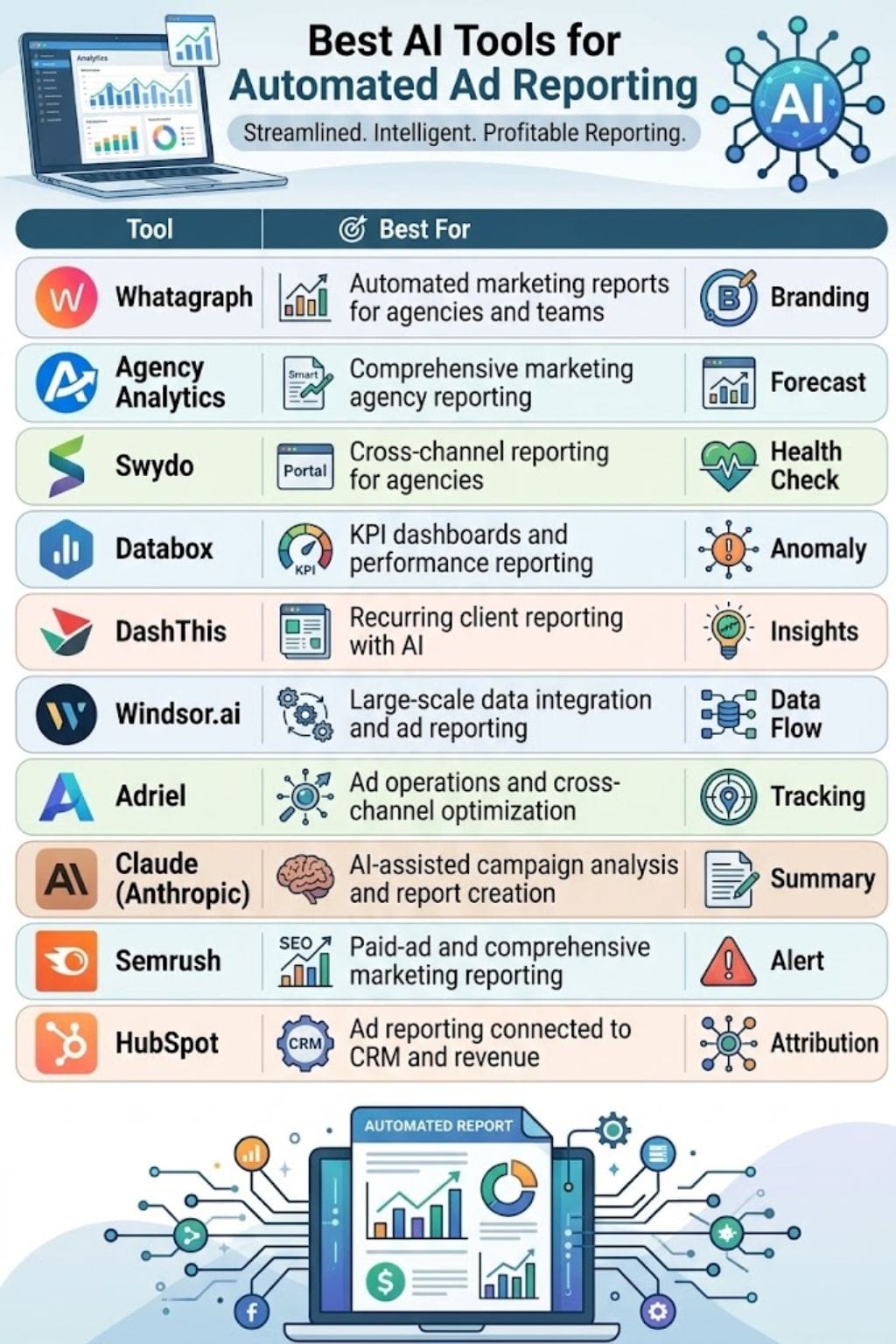
| AI Ad Reporting Tool | Best For | Key Features | Drawbacks |
|---|---|---|---|
| Whatagraph | Automated marketing reports for agencies and in-house teams | AI report creation, IQ Summary, IQ Chat, data blending, custom metrics, goals, alerts, branded reports | Source credits and premium integrations can increase costs |
| AgencyAnalytics | Marketing agency reporting | 85+ integrations, Smart Reports, AI insights, alerts, anomaly detection, forecasts, white-label dashboards | Costs can rise with clients and add-ons |
| Swydo | Cross-channel reporting for agencies and marketers | AI report creation, AI summaries, goals, data-source health checks, client portals, white-label reports | AI usage is credit based |
| Databox | KPI dashboards and performance reporting | Genie AI, live dashboards, goals, alerts, forecasting, anomaly detection, custom metrics | Advanced features require paid plans |
| DashThis | Recurring client reporting | AI Insights, scheduled reports, dashboard templates, 34+ integrations, white-label reporting | Deeper AI analysis requires the Pro add-on |
| Windsor.ai | Data integration and automated ad reporting | 350+ data sources, data blending, API, scheduled sync, BI and warehouse connections | Data-warehouse limits and metric setup require attention |
| Adriel | Ad operations and cross-channel reporting | 650+ sources, AI Agent, dashboards, alerts, budget tracking, creative insights, white-label reports | May be more than needed for basic ad reporting |
| Claude (by Anthropic) | AI-assisted campaign analysis and report creation | Projects, Artifacts, connectors, trend analysis, client-ready summaries | Data access and usage need careful management |
| Semrush | Paid-ad and marketing reporting | AI summaries, scheduled reports, Google Analytics and Search Console connections, white-label reports | Advanced reporting features require higher-tier plans |
| HubSpot | Ad reporting connected to CRM and revenue data | CRM integration, custom reports, marketing automation, retargeting, multi-touch attribution | Feature set may be too broad for basic ad reporting |
Whatagraph
Whatagraph is an AI-powered marketing reporting platform built for agencies and in-house teams. It brings advertising and marketing data into branded reports, dashboards, and client updates, reducing the time spent on manual reporting.
Users can create reports with AI prompts, including layouts, metrics, widgets, and visuals. Its IQ Summary turns performance data into simple insights, while IQ Chat lets users ask questions about results and time periods.
The platform also supports data blending, custom metrics, goals, alerts, and brand themes. Reports can be shared through live links or automated PDF emails, with custom branding and unlimited users.
Pros
- Teams can create or revise reports without building each widget by hand
- White-label reports, scheduled PDFs, and custom branding
- AI summaries and chat help non-analysts understand campaign results faster
Cons
- One connected data account uses one source credit
- Premium integrations, API access, advanced destinations, and IQ+ on premium plans
Pricing
| Plan | Pricing |
|---|---|
| Max | $812/month |
| Prime | Custom Pricing |
AgencyAnalytics
AgencyAnalytics is an AI-powered reporting platform built for marketing agencies. It connects with more than 85 marketing tools and brings data into one place through dashboards and client reports.
Its AI features help teams ask questions about account data, explain changes in key metrics, and create report notes. Smart Reports can build reports using connected channels, while scheduled delivery saves teams from doing the same work each month.
The platform also includes goals, alerts, anomaly detection, benchmarks, and forecasts to help agencies spot issues early. White-label dashboards, client portals, custom branding, API, and MCP support make it easy.
Pros
- Turns raw marketing metrics into plain-language client updates with less manual writing
- One report can combine SEO, paid ads, social, email, and web analytics data
- Smart Reports speed up first-draft report creation from connected data sources
Cons
- Costs can rise as an agency adds clients, campaigns, or add-ons
- Setup takes time when reports need custom metrics, templates, and many connected accounts
Pricing
| Plan | Pricing |
|---|---|
| Monthly Plan | $25/client/month |
Swydo
Swydo is an AI-powered reporting platform built for agencies and marketers. It brings data from advertising, SEO, social media, and analytics tools into one place, making it easier to create clear client reports and dashboards.
Its AI can build or update reports using simple prompts, write easy-to-understand summaries, highlight important changes, and answer questions about campaign performance.
Users can also track goals, combine different metrics, schedule reports, and share results through secure client portals. With more than 38 integrations, including major advertising platforms and Google Sheets, Swydo helps teams reduce manual reporting work and deliver consistent, professional reports.
Pros
- One plan includes unlimited clients, users, dashboards, and reports
- Data-source health checks can alert teams when an integration fails
- It supports white-label reports, client portals, reusable templates, and combined cross-channel metrics
Cons
- Data quality still depends on each linked platform and its available metrics
- AI usage is credit based, so heavy use may require paid extra credits after the monthly allowance
Pricing
| Plan | Pricing |
|---|---|
| Monthly Plan | $69/month |
 Vivek Dev Jacob
Databox
Databox is an AI-powered reporting platform that helps teams bring marketing and ad data into one place. It connects with tools like Facebook Ads, Google Analytics 4, HubSpot, and other cloud platforms.
Users can build live dashboards, track KPIs, set goals, and monitor campaign performance without relying on spreadsheets. Its Genie AI analyst can answer questions in plain language and provide quick performance summaries.
Databox also supports scheduled reports, alerts, scorecards, custom metrics, forecasting, and anomaly detection. For agencies, features such as sub-accounts and cross-client reporting make it easier to manage multiple clients and share clear, repeatable reports.
Pros
- Prebuilt integrations and dashboard blocks reduce reporting build time
- Genie helps users ask questions about live metrics instead of exporting data first
- Agency tiers support many users, client sub-accounts, templates, and cross-client reporting
Cons
- Forecasting, broader collaboration, and agency controls require paid plans
- AI summaries are only as reliable as the connected accounts, attribution setup, and metric definitions
Pricing
| Plan | Pricing |
|---|---|
| Analyst | $89/month |
| Team | $249/month |
| Custom | Contact Sales |
DashThis
DashThis is a marketing reporting platform built for agencies and teams that need to create clear, regular reports without spending hours collecting data. It pulls campaign results from different channels into branded dashboards and uses AI to explain what the numbers mean.
Its AI Insights feature highlights wins, problems, opportunities, and key takeaways. The Pro plan also allows users to ask questions through chat and add business context.
Teams can schedule reports, clone dashboards, and combine data from multiple sources. With 34+ integrations, templates, widgets, CSV uploads, and white-label options, DashThis is well suited for recurring client reporting.
Pros
- Saves agency time with reusable templates and scheduled reporting
- Makes client reporting easier through white-label dashboards and branded sharing
- Includes basic AI analysis on all plans, so teams can spot performance changes faster
Cons
- AI insights are largely preset; deeper custom AI analysis needs the Pro add-on
- Teams needing highly custom analysis may find the AI layer limited
Pricing
| Plan | Pricing |
|---|---|
| Individual | $54/month |
| Professional | $164/month |
| Business | $324/month |
| Standard | $499/month |
Windsor.ai
Windsor.ai is a no-code data platform that helps teams automate ad and marketing reports. It connects with more than 350 data sources, including Google Ads, Meta Ads, GA4, TikTok, LinkedIn Ads, Shopify, and CRM systems.
The platform brings data from different channels into one clean and usable format. Users can send this data to tools such as Looker Studio, Power BI, Google Sheets, and BigQuery. Reports can be refreshed daily or hourly, making it easier to track performance without manual work.
Windsor.ai also supports data blending, an API, and Windsor MCP for AI-based analysis.
Pros
- Works with BI tools, spreadsheets, databases, and data warehouses
- No-code setup can speed up report delivery
- Scheduled syncs reduce manual exports and copy-paste work
Cons
- Data-warehouse use may involve monthly active row limits and possible overage fees
- Data blending still needs careful metric rules; software cannot fix poor campaign naming or tracking
Pricing
| Plan | Pricing |
|---|---|
| Basic | $23/month |
| Standard | $118/month |
| Plus | $299/month |
| Professional | $598/month |
| Enterprise | Contact Sales |
Vivek Dev Jacob
Adriel
Adriel is an AI-powered ad operations and reporting platform built for marketing teams and agencies. It brings data from more than 650 advertising, analytics, CRM, ecommerce, SEO, and social sources into one workspace.
Teams can create live dashboards, automate reports, track KPIs, set alerts, and combine data from different channels. Its AI Agent helps users spot changes, answer questions, and track campaign goals. Adriel also provides creative-level insights to compare ad performance and identify what works.
Users can manage budgets and campaign settings across channels. With automated, white-label reporting, Adriel helps teams save time and deliver clear, client-ready insights.
Pros
- It can centralize data far beyond paid ads, including CRM, email, ecommerce, SEO, and social data
- White-label dashboards and reports can help agencies present branded results
- Real-time dashboards, alerts, and pacing reduce the need for manual spreadsheet checks
Cons
- Data mapping, metric choices, and dashboard design need care
- A team that only needs a basic Google Ads or Meta Ads report may find the broader platform unnecessary
Pricing
| Plan | Pricing |
|---|---|
| Starter | $500/month |
| Professional | $1,000/month |
| Enterprise | Custom Pricing |
Claude (by Anthropic)
Claude can be a useful AI partner for automated ad reporting. It can review exported campaign data, find key trends, explain changes, write clear client-ready summaries, and help create report templates.
You can use Projects to store brand guidelines, KPIs, and previous reports so the work stays consistent. Connectors can also bring in relevant work information, while Artifacts can create editable dashboards, documents, slides, and simple reporting tools.
For better results, provide clean data exports from Google Ads, Meta Ads, or your BI platform. Before sharing any report with a client, always have a person check important figures.
Pros
- Projects keep each client’s goals, tone, KPI definitions, and reporting rules together
- Artifacts can turn analysis into an editable dashboard, document, slide deck, or interactive report tool
- Connectors can use approved work apps to add useful business context to reports
Cons
- Connector access must be set up and governed carefully, especially for client data
- Usage limits and token costs can rise when you upload large, frequent data sets or run agent-style workflows
Pricing
| Plan | Pricing |
|---|---|
| Pro | $17/month |
| Max | From $100/month |
| Team | Contact Sales |
Semrush
Semrush can automate paid-ad reporting by pulling campaign and competitor data into scheduled reports. Its AI summaries turn complex metrics into clear insights, making it easier to track changes in spend, clicks, conversions, and overall campaign results.
It is useful for agencies and in-house marketing teams that need regular, branded PDF reports and client updates. Users can schedule reports daily, weekly, or monthly and connect Google Analytics and Search Console.
Pro Reports also offers third-party integrations, white-label branding, link sharing, custom domains, and AI summaries. Google and Meta ad support, campaign recommendations, and competitor research add further value.
Pros
- Combines Semrush marketing data with core Google analytics data in one scheduled report
- Produces AI summaries, so stakeholders can scan results without reading every chart
- Supports white-label reports, useful for agencies serving several clients
Cons
- Full external integrations, white labeling, and hourly scheduling require the higher Pro Report tier
- AI summaries may miss business context, tracking errors, or unusual campaign events; review them before sending
Pricing
| Plan | Pricing |
|---|---|
| Request for Pricing (RFP) | Contact Sales |
Vivek Dev Jacob
HubSpot
HubSpot helps businesses automate ad reporting by connecting paid campaigns with CRM, website, and revenue data in one place. It gives teams a clear view of ad performance, traffic, leads, costs, and conversions.
Its CRM integration also shows how ad interactions influence contacts and deals, making it easier to track the buyer journey. Businesses can create custom reports, analyze campaigns, and use AI tools to find patterns and improve targeting.
HubSpot also supports retargeting, lead follow-up, and marketing automation. For larger teams, its Enterprise plan offers multi-touch revenue attribution, helping businesses understand how different marketing activities contribute to revenue.
Pros
- Combines reporting, email, landing pages, forms, and workflows in one system
- Supports shared dashboards for marketing and sales teams
- Enterprise users gain customer-journey analytics and multi-touch attribution
Cons
- The feature set may feel too broad for teams that only need simple ad dashboards
- Enterprise onboarding adds a major first-year cos
Pricing
| Plan | Pricing |
|---|---|
| Request for Pricing (RFP) | Contact Sales |
How to Choose an AI Tool for Automated Ad Reporting
The right automated ad reporting tool depends on the channels you use, the amount of data you manage, and how much reporting work you want to automate.
Consider these factors before choosing a platform:
1. Number of Advertising Channels
If you run campaigns across Google Ads, Meta Ads, TikTok, LinkedIn, and other platforms, look for a tool that can bring multiple sources into one dashboard.
2. Reporting Automation
Scheduled reports, automated PDFs, live dashboards, and alerts can reduce repetitive reporting work. These features are especially useful for agencies managing reports for several clients.
3. AI Analysis
AI summaries and AI assistants can turn campaign metrics into plain-language insights. They can help teams understand sudden changes in spend, clicks, leads, or conversions.
4. Data Integrations
Check whether the platform supports the advertising, analytics, CRM, ecommerce, and other tools you already use. More integrations can make cross-channel reporting easier.
5. White-Label Reporting
Agencies may need branded dashboards, reports, client portals, custom domains, and scheduled emails. These features can make client communication more consistent.
6. Data Accuracy
Automation does not remove the need for clean tracking. Campaign naming, attribution settings, conversion tracking, and metric definitions should be checked before relying on automated reports.
7. Pricing and Scalability
Compare pricing based on the number of clients, data sources, users, reports, and AI usage you expect. A low starting price may change as reporting requirements grow.
Final Thoughts
AI-powered automated ad reporting turns scattered campaign data into clear, fast insights. It cuts manual work, reduces errors, and helps teams act before money is wasted. Marketers can track results in one place, spot weak ads, and shift budget toward what works.
Reports become easier to read, share, and trust. This saves time for better planning, stronger ideas, and smarter testing. As ad channels grow more complex, automated reporting is no longer a nice extra.
It is a practical way to improve speed, focus, and return on spend. Teams that use it well can make sharper decisions.
FAQs
What are AI tools for automated ad reporting?
AI tools for automated ad reporting collect campaign data from different advertising and marketing platforms, organize key metrics, and create reports with less manual work. They can also provide summaries, alerts, dashboards, and performance insights.
What are the best AI tools for automated ad reporting?
Popular AI tools for automated ad reporting include Whatagraph, AgencyAnalytics, Swydo, Databox, DashThis, Windsor.ai, Adriel, Claude, Semrush, and HubSpot.
How do AI ad reporting tools save time?
These tools automate tasks such as collecting campaign data, updating dashboards, creating reports, scheduling emails, and identifying important performance changes. This reduces the need for manual spreadsheets and repetitive reporting tasks.
Can AI ad reporting tools combine data from multiple platforms?
Yes. Many AI ad reporting tools connect data from platforms such as Google Ads, Meta Ads, Google Analytics, TikTok, LinkedIn, CRM systems, and ecommerce platforms. This allows marketers to view cross-channel performance in one place.
What should you consider when choosing an AI ad reporting tool?
Consider the advertising channels you use, available integrations, reporting automation, AI features, data accuracy, white-label options, scalability, and pricing. The right tool should match your reporting needs and the amount of campaign data you manage.