10 Best AI Tools for Creating Product Videos in 2026
Turn product photos and ideas into eye-catching videos without a studio or expensive production crew. Discover 10 AI tools that make product video creation faster and easier.

AI tools for creating product videos help brands turn ideas, images, and product details into polished visual stories in less time. They can generate scenes, add voiceovers, create captions, animate still images, and match video styles to a campaign goal.
This makes high-quality content easier to produce without large crews, costly shoots, or advanced editing skills. Marketers can quickly test new messages, tailor videos for different audiences, and publish across social channels, websites, and ads.
The result is faster production, stronger product appeal, and more chances to capture attention, explain value, and drive action.
Best AI Tools for Creating Product Videos
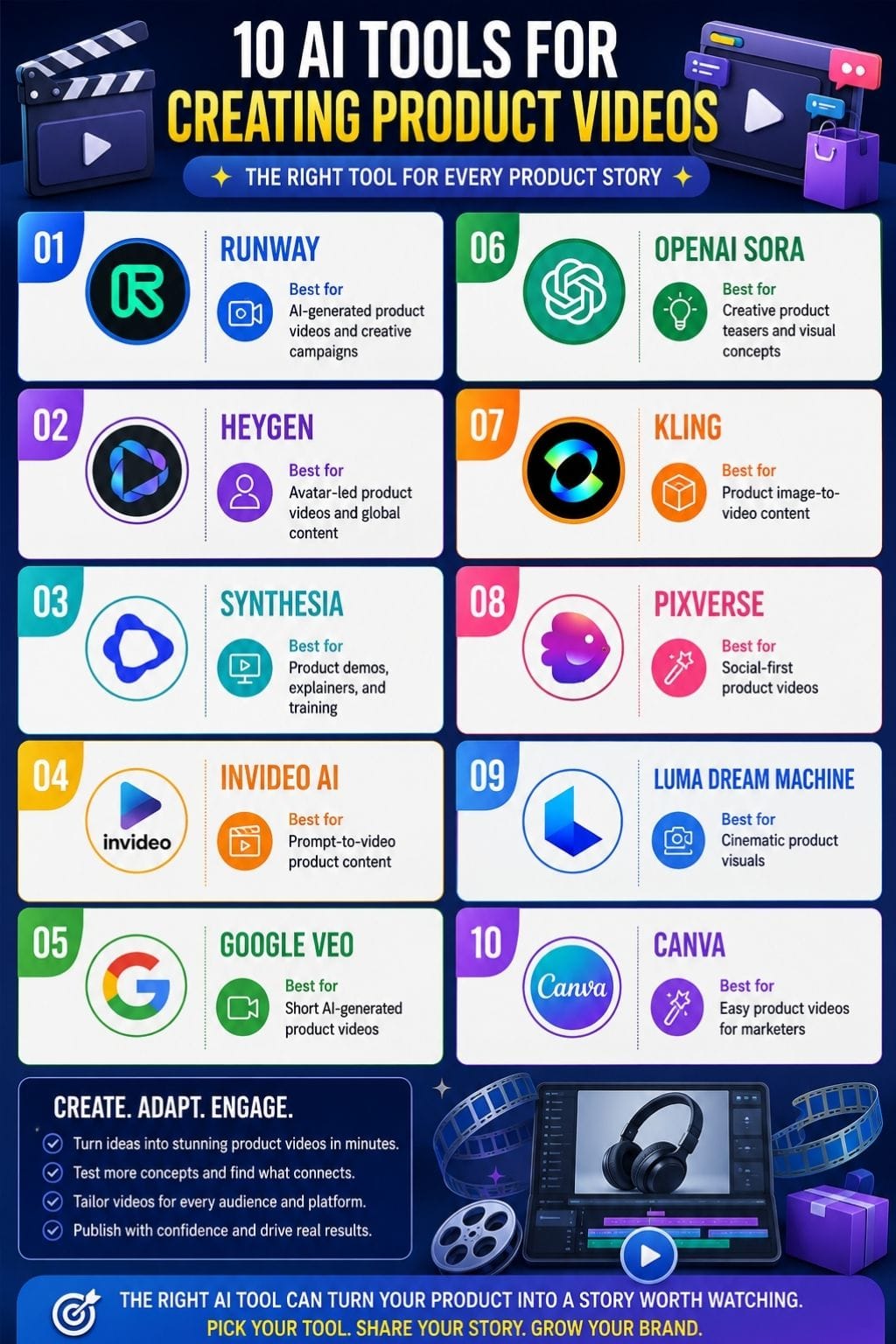
| Tool | Best For | Strengths | Limitations |
|---|---|---|---|
| Runway | AI-generated product videos and creative campaigns | Video generation, editing, camera control, workflows | Short clips need editing and sequencing |
| HeyGen | Avatar-led product videos and global content | AI avatars, voiceovers, translation, Brand Kit | Less flexible than a dedicated video editor |
| Synthesia | Product demos, explainers, and training | AI presenters, screen recording, multilingual videos | Monthly video limits can restrict frequent production |
| InVideo AI | Prompt-to-video product content | AI scenes, voiceovers, captions, music, editing | Credits and generation limits can be difficult to predict |
| Google Veo | Short AI-generated product videos | Text-to-video, image animation, camera movements, audio | AI scenes may not accurately represent real products |
| OpenAI Sora | Creative product teasers and visual concepts | Text/image-to-video, imaginative scenes, multiple formats | Short clips may not replace complete product demos |
| Kling | Product image-to-video content | Product photo animation, camera control, multi-shot video | Exact brand compliance can be difficult |
| PixVerse | Social-first product videos | Templates, effects, image animation, multiple styles | Product details and text can look incorrect |
| Luma Dream Machine | Cinematic product visuals | Camera movements, keyframes, loops, API | Multiple attempts can use credits quickly |
| Canva | Easy product videos for marketers | Templates, AI tools, editing, Brand Kit | Less suitable for complex or high-end brand films |
Runway
Runway is an AI video platform that helps you create polished product videos from text, images, or existing footage. It is useful for product launches, ads, social media clips, and concept videos when you need strong visuals without a full production setup.
You can turn text prompts into video, animate product images, edit footage, and control camera movement and scene action. Its Act-Two feature can transfer a person’s expressions and movements to an AI character.
Runway also offers voice generation, lip sync, upscaling, and high-resolution exports. Paid plans include video models, editing tools, workflows, and watermark-free exports.
Pros
- Fast way to test many product concepts before a costly shoot
- Strong for stylized launches, mood films, and social-first ads
- Combines generation, editing, and workflow tools in one platform
Cons
- Short clips still need editing and sequencing for a complete commercial
- Free access is limited and includes watermarked output
Pricing
| Plan | Pricing |
|---|---|
| Standard | $15/month |
| Pro | $35/month |
| Max | $95/month |
| Enterprise | Contact Sales |
HeyGen
HeyGen is an AI video tool that helps you create professional product videos without needing to film yourself. You can turn a script, product details, or a simple prompt into a polished video with AI avatars and natural-sounding voiceovers.
It also lets you create custom digital twins, record your screen, and use ready-made templates to speed up production. Teams can use HeyGen to make product demos, launch videos, how-to guides, and sales content.
It supports brand tools and video translation in more than 175 languages. Videos can be exported in 1080p, while higher plans also support 4K quality.
Pros
- Strong multilingual translation and lip-sync tools support global launches
- Fast script-to-video workflow suits demos, onboarding, and feature updates
- Brand Kit and team tools help keep videos on-brand
Cons
- Fine video editing is less flexible than a dedicated editor
- Product claims, technical demos, and translated scripts still need human review
Pricing
| Plan | Pricing |
|---|---|
| Creator | $29/month |
| Pro | $49/month |
| Business | $149/month |
| Enterprise | Contact Sales |
Synthesia
Synthesia is an AI video platform that helps you create professional product videos without cameras, actors, or a studio. You simply write your script, choose an AI presenter, add screen clips, and create a polished product demo.
It works well for product launches, feature explainers, onboarding videos, and help content. This can save small teams a lot of time and effort.
Key features include AI avatars, text-to-video templates, AI voices in many languages and accents, screen recording, and support for PowerPoint, images, videos, and music. You can also add captions, share videos, embed them, download MP4 files.
Pros
- Good for making the same demo for many markets
- Screen capture and avatar narration work well together
- Strong option for repeatable training and support videos
Cons
- Monthly video limits may constrain frequent production
- Product footage still needs careful planning and editing
Pricing
| Plan | Pricing |
|---|---|
| Basic | INR 999/month |
| Creator | INR 3999/month |
| Enterprise | Contact Sales |
 Singh Anusha
InVideo AI
InVideo AI is an AI video tool that turns a product brief, script, or prompt into a ready-to-edit product video. It can write scenes, add stock clips or AI visuals, create voiceovers, subtitles, music, and transitions.
This makes it useful for product launches, ads, explainers, and social posts. You can also edit through chat prompts, such as “make this shorter” or “use a brighter tone.”
It supports AI avatars and voice clones, which can help brands make repeatable videos at scale. Review each result before publishing, as AI visuals and narration can need fixes.
Pros
- Conversational editing can speed up small changes for non-editors
- Supports brand-scale work with avatars, voice clones, storage, and team options
- Gives access to several generative-video models through its platform
Cons
- AI credits and generation limits can be hard to predict on larger projects
- Output may need manual fixes for product accuracy, on-screen text, and scene fit
Pricing
| Plan | Pricing |
|---|---|
| Plus | $20/month |
| Max | $100/month |
| Generative | $200/month |
| Elite | $1000/month |
Google Veo
Google Veo is an AI video tool from Google that helps create short product videos from text prompts or reference images. It can turn product shots, ideas, and campaign concepts into polished videos for ads, demos, and product launches without the need for long filming sessions.
You can create videos from simple prompts, animate product images, and add dialogue, sound effects, and background audio.
Veo also supports camera moves such as close-ups, pans, tracking shots, and aerial views. Its vertical 9:16 format works well for Reels, Shorts, TikTok, and mobile ads.
Pros
- Creates many ad angles from one brief
- Can add sound and visuals in one generation
- Useful for short social-first campaigns
Cons
- AI scenes may not match real product behavior, size, or materials
- Brand, legal, and usage checks remain essential
Pricing
| Plan | Pricing |
|---|---|
| Request for Pricing (RFP) | Custom Pricing |
OpenAI Sora
OpenAI Sora is an AI video tool that helps you create short product videos from text prompts, images, or video ideas. It can be used for product teasers, feature demos, lifestyle clips, and social ads without the need for a full film shoot.
You can describe the product, setting, camera angle, movement, and mood, then create several versions to find the best result. Sora also supports image-to-video creation, portrait and landscape formats, and short clips for social media and websites.
Sora 2 Pro offers higher-resolution video options. Before publishing, always check logos, labels, hands, and product details for mistakes.
Pros
- Strong for imaginative scenes that would be costly to film
- Helpful for early product campaigns, storyboards, and pitch videos
- Lets small teams make visual drafts with few tools
Cons
- Short clips may not replace a full product demo or live footage
- Commercial use needs careful brand, rights, and disclosure review
Pricing
| Plan | Pricing |
|---|---|
| Request for Pricing (RFP) | Custom Pricing |
Vivek Dev Jacob
Kling
Kling AI is a generative video tool that helps you create short product videos using text prompts, product photos, and reference images.
It can turn a simple product photo into a smooth video, making it useful for ads, product teasers, social media, demos, and explainers. You can guide camera movement, object motion, and the overall scene with prompts.
Kling also supports multi-shot videos, audio, dialogue, ambience, and lip sync in selected modes. Its newer VIDEO 3.0 workflows can create videos up to 15 seconds long, with 1080p or 4K output on eligible plans.
Pros
- Turns static catalog photos into ad-like motion clips fast
- Strong image-to-video workflow for product-led campaigns
- Supports references, which can help preserve product identity
Cons
- Prompt skill matters; vague motion prompts often give weak results
- It is less suited to long product films or exact brand compliance
Pricing
| Plan | Pricing |
|---|---|
| Standard | $6.99/month |
| Pro | $25.99/month |
| Premier | $64.99/month |
| Ultra | $127.99/month |
PixVerse
PixVerse is an AI video tool that helps turn text prompts, product images, and short clips into engaging product videos. You can animate product photos, pick different styles, add camera movements, and create multiple versions quickly.
It offers templates and visual effects that make it easier to create polished content for ads, social media, product teasers, and ecommerce. Styles range from cinematic to animated looks, giving brands more creative options.
PixVerse also supports different video quality levels, including higher-resolution exports. Paid plans allow parallel video generation, which helps teams test several ideas at once.
Pros
- The free tier offers signup and daily credits for testing
- Make different moods, angles, and motion styles from one asset
- Paid plans remove watermarks and add higher resolution
Cons
- The Basic plan has a watermark and lower output quality
- Fine product details, text on labels, and hands can look wrong
Pricing
| Plan | Pricing |
|---|---|
| Request for Pricing (RFP) | Custom Pricing |
Luma Dream Machine
Luma Dream Machine is an AI video tool that helps turn text prompts, product images, and reference clips into short, engaging videos. It can create ad-style scenes, animate product images, and add camera moves such as zooms, pans, and tracking shots.
You can also use keyframes to control how a scene starts or ends, extend clips, and create loops for social media. Some workflows also support AI-generated audio. Its API can help automate video creation at scale.
For product marketing, it works well for social ads, landing pages, and quick campaign ideas.
Pros
- Camera language is simple. Prompts can describe a close-up, orbit, or tracking move
- It supports both Luma and selected third-party models in its paid offering
- It is strong for mood-led visuals, such as beauty, fashion, food, and tech launches
Cons
- Short clips often need several attempts, which can use credits quickly
- You may need editing tools for exact cuts, approved typography, legal copy, and brand consistency
Pricing
| Plan | Pricing |
|---|---|
| Request for Pricing (RFP) | Custom Pricing |
Vivek Dev Jacob
Canva
Canva is an easy AI tool for making product videos fast. It blends templates, stock media, and simple AI tools in one browser editor. You can turn a product idea, image, or short prompt into scenes, then add text, music, voiceovers, and brand assets.
Its drag-and-drop timeline suits ads, demos, reels, and launch clips. Magic Media can make short video shots, while Magic Design helps build layouts. Resize tools adapt one video for many social channels.
Canva works best for polished, short marketing videos, not high-end film work. It is useful for small brands that need quick, on-brand content.
Pros
- Very low learning curve; most users can edit without video skills
- Combines AI, templates, stock clips, graphics, and editing in one place
- Brand Kit helps keep logos, colors, and fonts consistent
Cons
- AI writing can miss product facts, brand tone, or legal claims
- Complex brand films still need manual editing and original footage
Pricing
| Plan | Pricing |
|---|---|
| Pro | $18/month |
| Business | $25/month |
| Enterprise | Contact Sales |
How to Choose the Best AI Product Video Generator
The right AI product video tool depends on what you want to create, how often you need videos, and how much control you want over the final result.
For Creative Product Videos
Runway, Sora, Google Veo, Kling, PixVerse, and Luma Dream Machine are useful when you want visually creative scenes, product animations, and social-first concepts.
For Avatar Product Videos
HeyGen and Synthesia are better suited to videos that need an AI presenter, voiceover, product explanation, or multilingual narration.
For Fast, Beginner-Friendly Video Creation
Canva and InVideo AI are useful for marketers who want templates, simple editing, AI generation, and quick social content without advanced video skills.
For Ecommerce Product Images
Tools such as Kling, Runway, PixVerse, and Luma Dream Machine can help turn static product images into motion-based content and ad concepts.
Tips for Creating Better Product Videos With AI
AI can speed up video production, but the quality of the final result depends on the product information, assets, and instructions you provide.
- Start with clear product images and accurate product details.
- Define the target audience and campaign objective.
- Describe the desired visual style and mood.
- Specify camera movements and scene requirements.
- Keep important product features consistent across scenes.
- Add your brand colors, fonts, logos, and other brand assets where supported.
- Create multiple versions to test different hooks and messages.
- Check product labels, logos, text, hands, and other AI-generated details.
- Review voiceovers, captions, claims, and translations before publishing.
- Use real product footage when exact product accuracy is critical.
Why Use AI Tools for Product Videos?
AI-powered video creation is changing how products are shown, shared, and sold. It helps teams turn simple ideas into clear, polished videos with less time, cost, and effort.
Brands can test more stories, tailor messages for each audience, and keep content fresh across every channel.
The real value is not just speed. It is the freedom to focus on the product, the customer, and the story that matters.
Used with care, these tools make strong product videos possible for more people. That means better demos, faster launches, and clearer reasons for customers to choose what you offer.
FAQs
What are AI tools for creating product videos?
AI product video tools turn text, product images, scripts, or existing footage into videos for ads, social media, ecommerce, and product launches.
Which is the best AI tool for creating product videos?
Runway, HeyGen, Synthesia, InVideo AI, Sora, Kling, and Canva are popular options, depending on your video style and production needs.
Can AI create product videos from images?
Yes. Several AI video tools can animate product images, add movement, create scenes, and turn static visuals into engaging video clips.
Can AI product video tools create videos for social media?
Yes. Many tools can create short videos in formats suitable for platforms such as Instagram Reels, YouTube Shorts, TikTok, and other social channels.
Are AI-generated product videos ready to publish?
Not always. Review the final video for product accuracy, logos, text, voiceovers, claims, branding, and other details before publishing.