Best AI Explainer Video Tools: Create Videos Faster Without Editing Skills
AI explainer video tools simplify video creation by turning ideas into professional content using automation, templates, and AI features, making them ideal for marketing, training, and scalable content production.


The AI explainer tools convert thoughts into simple videos quickly. Even someone lacking editing expertise could use one of them. You only need to provide a little prompt for the instrument to put together a neat script, scenes, voiceovers, and subtitles.
Most of the platforms typically feature templates, stock clips, drag and drop timelines, and automatic branding, which keeps your colors and fonts on target.
In addition, a few tools have avatars, countless languages, and quick translations for making global content somewhat easier for their teams.
Result: Lower costs, faster production, and scalable video creation
Quick Comparison of AI Explainer Video Tools
| Tool | Best For | Key Features | Pricing Level | Drawbacks |
|---|---|---|---|---|
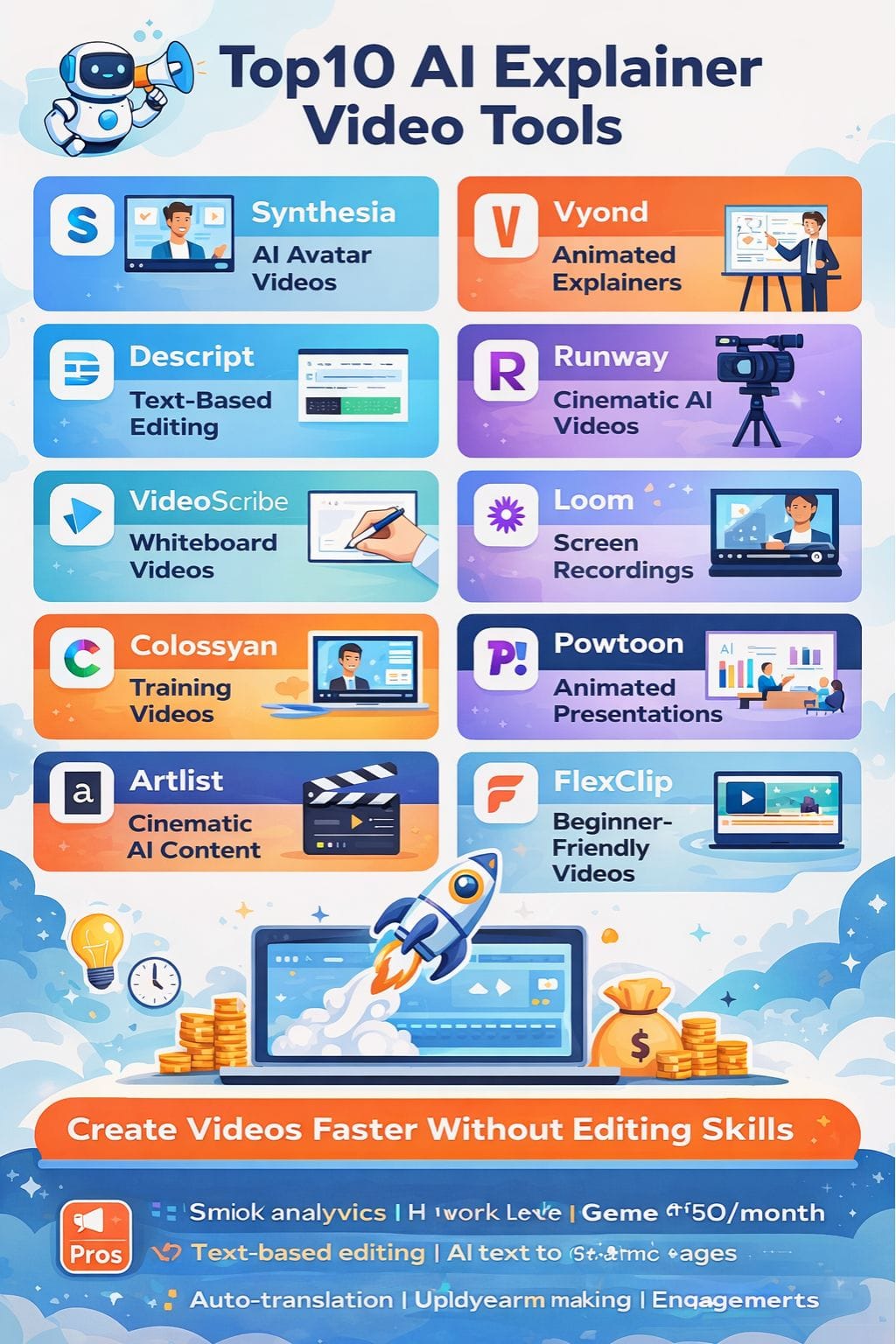
| Synthesia | AI avatar videos | 140+ languages, avatars, templates | Medium–High | Avatars may feel less expressive |
| Vyond | Animated explainers | Full customization, timeline editor | High | Complex for beginners |
| Descript | Text-based editing | Auto transcription, voice cloning | Medium | AI credits can get expensive |
| Runway | Cinematic AI videos | Gen AI video, advanced editing | Medium–High | Learning curve, inconsistent results |
| VideoScribe | Whiteboard videos | Hand-drawn animations | Medium | Limited advanced controls |
| Loom | Screen recordings | Auto summaries, quick sharing | Low–Medium | Basic editing only |
| Colossyan | Training videos | AI avatars, multilingual | Medium–High | Limited free plan |
| Powtoon | Animated presentations | Templates, branding tools | Medium | Limited customization |
| Artlist | Cinematic AI content | Stock + AI generation | Low–Medium | Advanced tools cost more |
| FlexClip | Beginner-friendly videos | 8000+ templates, AI tools | Low | Watermark on free plan |
How AI Explainer Tools Improve Content Strategy (NEW SECTION)
AI video tools are not just about speed—they improve content strategy and ROI:
- Faster go-to-market for campaigns
- Consistent branding across videos
- Localization at scale (multi-language content)
- Higher engagement through visual storytelling
- Reduced dependency on production teams
This makes them ideal for marketing, training, onboarding, and product demos
Synthesia
Using Synthesia means that you can make a video professionally out of any simple text. It does not require a camera, studio, or actors. Also, it can select from many lifelike avatars and speak in one of the 140 languages.
The platform gives clean templates and easy screen recording tools to build demos, training clips, or quick company updates in minutes. Teams can collaborate, keep every video on-brand, and track the views simply using analytics.
Updates take just a few clicks. Companies have been using Synthesia to save time and money and make stress-free videos at scale
Pros
- Easy for non-editors
- Lifelike avatars
- 1-click translation
Cons
- Avatars may feel less human
- Advanced features are expensive
Pricing
| Plan | Pricing |
|---|---|
| Starter | $18/month |
| Creator | $64/month |
| Enterprise | Contact Sales |
Vyond
Vyond is an AI video-making software that enables teams to make neat little explainer videos in quick time. In minutes, one can convert a script, prompt, or document into a ready animation.
The AI engine makes the first draft in one click. After that, every scene is editable inside a full timeline editor. Change characters, actions, and styles to fit with your brand.
Vyond has huge asset libraries, great text-to-speech, and flawless lip-sync. It can also handle video translation into different languages. This makes it handy for training, onboarding, and product explainer videos.
Pros
- Fast prompt-to-video
- Full creative control
- 80+ language support
Cons
- Overwhelming for beginners
- Too complex for casual users
Pricing
| Plan | Pricing |
|---|---|
| Starter | $99/month |
| Professional | $199/month |
| Enterprise | Contact Sales |
Descript
Descript allows the transformation of rough ideas into clear explainer videos by editing footage in a documentary style and then layering in AI for scripting, voice, and polishing.
You could paste a script, or you could record, and the tool would auto-transcribe, remove filler words, correct the audio, and assist you by cutting through text deletion.
Templates, stock media, screen recording, and auto-captions enable the swift shipping of training clips, products, or social clips effectively. The AI can draft scripts, clone your voice, generate avatars, and translate or dub into a plethora of languages.
Pros
- Text-based editing
- Auto transcription
- All-in-one workflow
Cons
- Watermark on free plan
- AI credits cost extra
Pricing
| Plan | Pricing |
|---|---|
| Hobbyist | $24/month |
| Creator | $35/month |
| Business | $65/month |
| Enterprise | Custom |
 Rishi Mundra
Runway
Runway's keeping product ideas--even the rough ones--transformed into cinema-ready explainer videos by rapid text-to-video conversion, intelligent editing, and lavish effects, so teams can storyboard, prototype, and polish content in one place.
Its Gen-4 and Gen-3 strategies allow for smooth movement, great lighting, and homogenous characters, and background removal or object erasing and frame interpolation make postproduction as comfortable for beginners as for seasoned pros.
Cloud rendering, an enlarging template ecosystem, and an API make it suited for solitary creators, studios, or brands wanting high-end visuals fast. Its Gen-4 and Gen-3 models provide smooth motions and strong lighting.
Pros
- High-quality visuals
- Advanced editing
- Scalable platform
Cons
- Learning curve
- Inconsistent outputs
Pricing
| Plan | Pricing |
|---|---|
| Standard | $15/month |
| Pro | $35/month |
| Unlimited | $95/month |
| Enterprise | Contact Sales |
VideoScribe
VideoScribe is an application that produces a whiteboard-style explainer video, which turns complex messages into simple, hand-drawn stories in just a few minutes.
The software is designed to cater to marketers and educators, small businesses that want quick, quality explainers without large studio budgets. Drag-and-drop editor, extensive image and music libraries, templates, and some AI-assisted tools are just a few of the capabilities that the program has to offer.
Users can record their voice or upload a voiceover, include text, then export to several ubiquitous formats for YouTube, websites, and social media campaigns.
Pros
- Easy drag-and-drop
- Engaging hand-drawn style
- Rich media library
Cons
- Limited customization
- No 4K for long videos
Pricing
| Plan | Pricing |
|---|---|
| Lite | $22.42/month |
| Core | $33.04/month |
| Max | $41.30/month |
Loom
Loom excels as a leading AI explainer video tool for converting rapid screen recordings into polished video messages, complete with auto-generated titles, chapters, and summaries that save hours of editing and note-taking.
Its AI suite can help remove filler words, generate written documents and action items from your video, and create calls to action for the viewer so they know what to do next.
For teams, this is a very quick way to present walkthroughs, bug reports, and training clips without meetings, helping to move the work forward with minimal back and forth.
Pros
- Instant recording
- Auto summaries
- Easy sharing
Cons
- Basic editing
- Occasional bugs
Pricing
| Plan | Pricing |
|---|---|
| Business | $18/month |
| Business + AI | $24/month |
| Enterprise | Contact Sales |
Rishi Mundra
Colossyan
Colossyan is a leading AI explainer video maker that can transform text into human avatar videos in a matter of minutes for various uses such as training, onboarding, or product walkthroughs.
This tool creates realistic presenters, and it offers multilingual voiceovers and automatic translation to make one script serve multiple countries. Built-in templates, an AI script assistant, and real-time preview make it easy for non-editors to pull together high-quality clips quickly.
The project's interactive elements and scenario-based flows keep it all engaging for viewers. All team members can work on a single workspace, easily reusing scenes and scaling content.
Pros
- Realistic avatars
- 70+ languages
- Great for eLearning
Cons
- Limited free plan
- Learning curve
Pricing
| Plan | Pricing |
|---|---|
| Starter | $27/month |
| Business | $88/month |
| Enterprise | Contact Sales |
Powtoon
Powtoon is the industry leader in AI-driven animation scripting and slide layout for creating explainer videos in less than an hour and distraction-free presentations.
It can turn scripts or documents into millions of engaging stories with its classic animation, browsing, and intelligent automation mechanics. Its AI could extract important information from text to form scenes, voiceovers, and even avatars, while the classic drag-and-drop studio allows teams to tune every frame with characters, icons, and further branded templates.
Built-in captions, translations, and simple sharing make it suitable for all training, marketing, and educational use cases.
Pros
- Beginner-friendly
- Strong templates
- Good branding tools
Cons
- Limited customization
- Occasional bugs
Pricing
| Plan | Pricing |
|---|---|
| Lite | $49/month |
| Professional | $99/month |
Artlist
Artlist is a great AI-based explainer video-making software that blends generative AI along with a huge library of stock clips, music, and templates. It transforms simple prompts or images into nice, short, and polished videos within minutes.
It allows you to change the styles, implement smooth camera moves, and enforce on-brand visuals. Furthermore, you can have AI voiceovers, sound effects, and plug-and-play templates for ads, demos, and training videos. The result eliminates the need for huge teams or complicated software.
With plans that accommodate flexibility and grant full commercial rights, it's ideally suited for freelancers and agencies.
Pros
- AI + stock integration
- Commercial licensing
- High-quality visuals
Cons
- Advanced tools cost more
- Learning curve
Pricing
| Plan | Pricing |
|---|---|
| Music & SFX | $9.99/month |
| AI Suite | $9.42/month |
| Artlist Max | $31.99/month |
Muskaan Kapoor
FlexClip
FlexClip is a web-based AI explainer video maker that allows anyone to convert scripts, URLs, or slides into short, concise videos through drag-and-drop editing, AI text-to-video, templates, and stock media.
AI video generator, script writer, text-based editing, auto subtitles, PPT/PDF-to-video, product URL-to-video, 8,000+ templates, and a huge royalty-free library are some of the tools FlexClip provides.
Projects are all saved in the cloud, timelines are easy to navigate, and many one-click formats are perfect for social clips, training snippets, and marketing explainers. It also supports multi-resolution export suitable for quick-draft to high-end brand video production.
Pros
- Easy to use
- 8000+ templates
- All-in-one toolkit
Cons
- Watermark on free plan
- Minor performance issues
Pricing
| Plan | Pricing |
|---|---|
| Plus | $11.99/month |
| Business | $19.99/month |
Conclusion
AI explainer video tools have changed the game for teams on how to brainstorm, train a user, and sell products. Instead of rough ideas being made clear and sharp in minutes, they are churning out average ideas into crisp and clear stories in a matter of minutes.
Cost and stress-free replacements for long edits have come into place, and smart automation allows shipping of a professional-quality video minus a crew or studio.
Through rich templates, quick text-to-video, and built-in branding, they scale from a single launch video to an entire library of materials across markets and languages.
FAQs
What are AI explainer video tools?
AI explainer video tools are platforms that use artificial intelligence to turn text, prompts, or ideas into videos. They automatically generate scripts, visuals, voiceovers, and subtitles, making video creation fast and easy.
Which AI explainer video tool is best for beginners?
Tools with simple drag-and-drop editors, templates, and text-to-video features are best for beginners. They require little to no editing skills and help create videos quickly.
How do AI video tools help businesses?
AI video tools help businesses save time and cost by automating video production. They improve marketing, training, and communication by creating professional-quality videos at scale.
Can AI tools create videos in multiple languages?
Yes, many AI video tools support multiple languages, offering features like translation, dubbing, and multilingual voiceovers, making it easier to create global content.