10 Best AI Tools for Trade Schools to Improve Learning and Classroom Efficiency (2026)
Discover the best AI tools for trade schools in 2026. Compare features, pricing, pros, and cons of top AI software that helps improve teaching, student learning, grading, content creation, and school management.

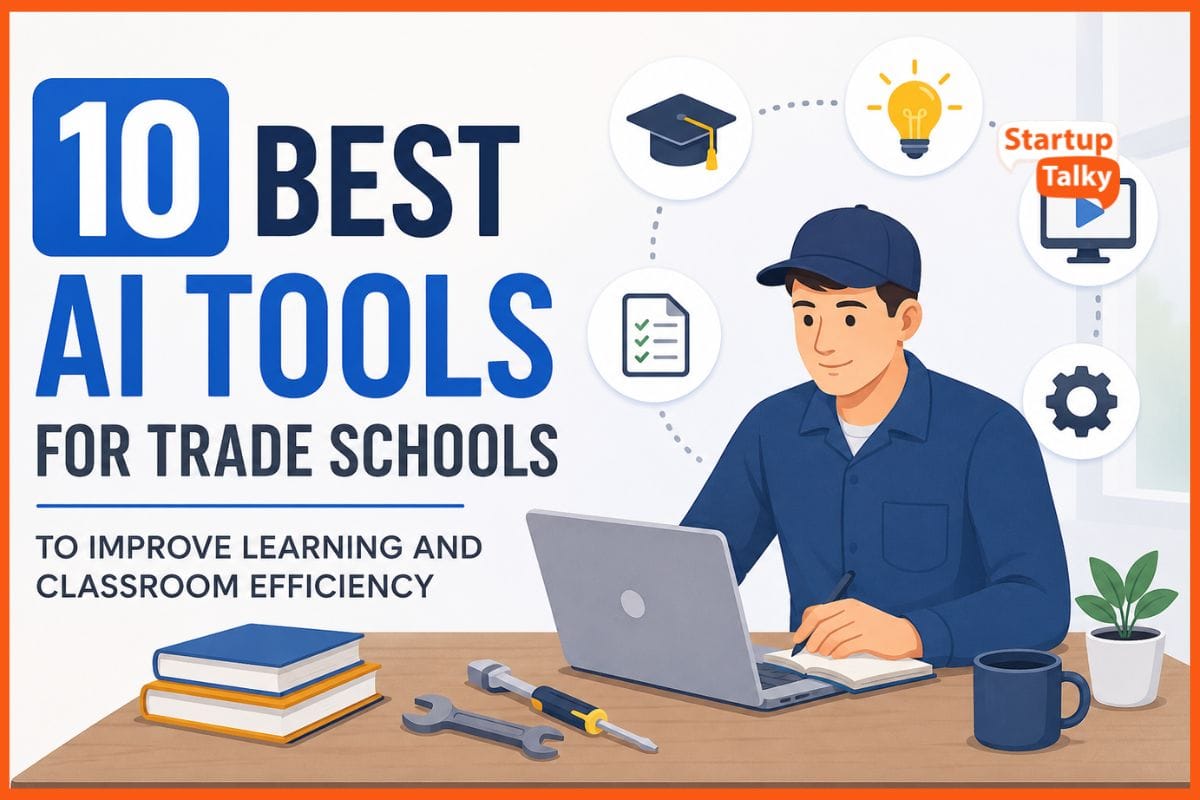
AI can help trade schools make learning more practical and useful. Students can practice skills through virtual labs and guided simulations before working with real tools. They get instant feedback, which helps them learn from mistakes in a safe setting. Teachers can easily track progress, identify students who need extra support, and create practice plans that fit each learner.
AI also reduces time spent on paperwork, giving instructors more time to teach. Beyond the classroom, it can improve admissions, career guidance, and student outreach by turning data into simple insights.
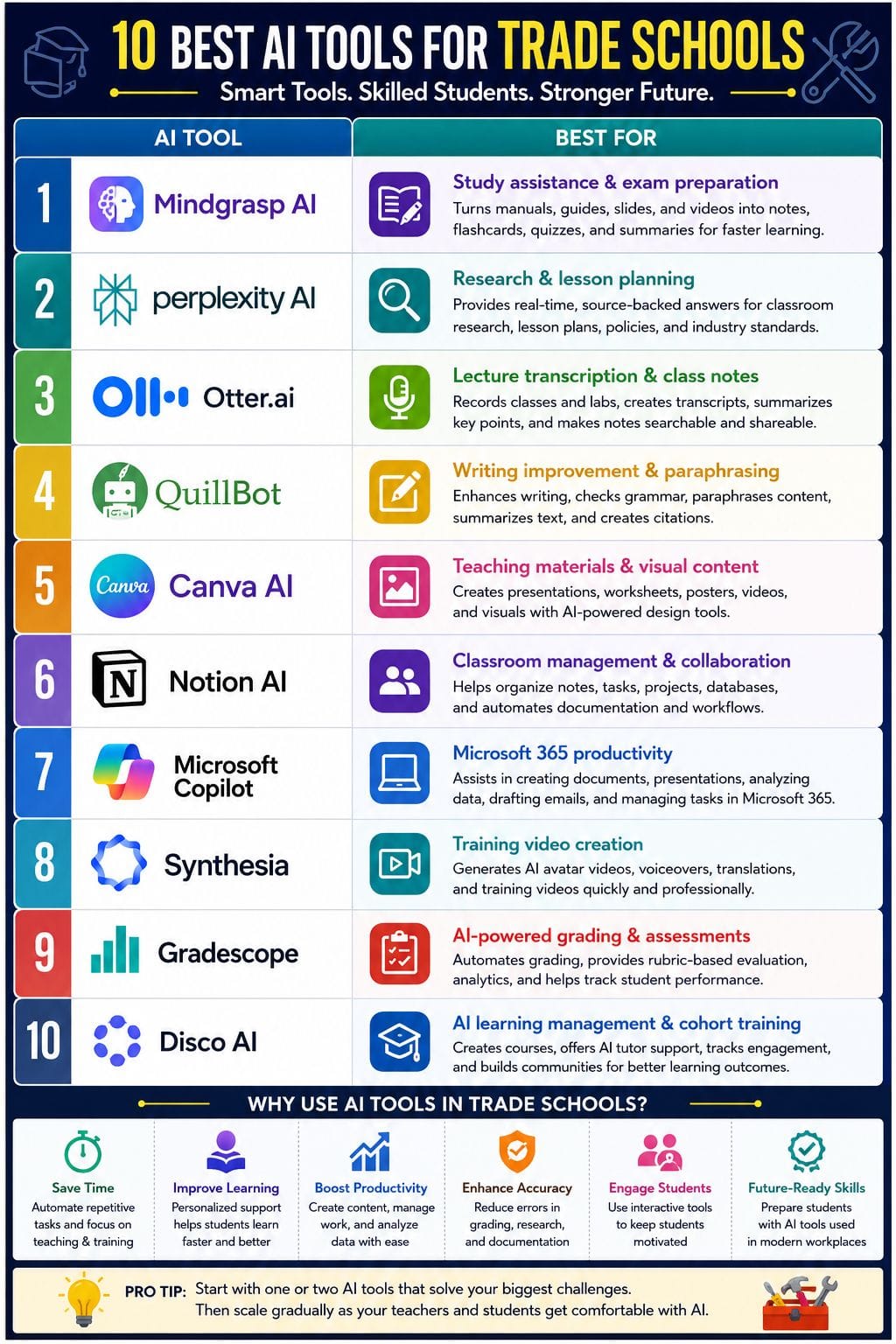
| AI Tool | Best For | Key Features | Pricing Level | Main Drawbacks |
|---|---|---|---|---|
| Mindgrasp AI | Study assistance & exam preparation | AI summaries, flashcards, quizzes, note generation, video and document analysis | Affordable | Depends on uploaded content quality and focuses mainly on theory-based learning. |
| Perplexity AI | Research & lesson planning | Real-time web search, cited answers, document summaries, policy research | Moderate | Requires effective prompts and institutional plans can become expensive. |
| Otter.ai | Lecture transcription & meeting notes | Live transcription, AI summaries, speaker identification, searchable notes | Affordable | Accuracy may vary in noisy workshops and advanced features require paid plans. |
| QuillBot | Writing improvement & paraphrasing | Paraphrasing, grammar checker, summarizer, citation generator, translator | Custom Pricing | Overuse may reduce writing skills and outputs still require review. |
| Canva AI | Teaching materials & visual content | Magic Write, Magic Design, AI image generation, presentations, videos | Moderate | Advanced AI features are limited on free plans. |
| Notion AI | Classroom management & collaboration | AI writing, databases, project management, meeting notes, task automation | Moderate | Requires initial setup and AI features are limited on free plans. |
| Microsoft Copilot | Microsoft 365 productivity | Lesson creation, document drafting, data analysis, PowerPoint generation, Teams integration | Premium | Best suited for schools already using Microsoft 365. |
| Synthesia | Training video creation | AI avatars, multilingual voiceovers, video templates, screen recording | Moderate | Interactive learning features require additional LMS platforms. |
| Gradescope | AI-powered grading & assessments | AI-assisted grading, rubrics, analytics, online assessments, programming evaluation | Custom Pricing | Initial setup takes time and some AI grading features are limited. |
| Disco AI | AI learning management & cohort training | Course generation, AI tutor, learner engagement, communities, analytics | Premium | English-only interface and steeper learning curve for administrators. |
Mindgrasp AI: Best AI Study Assistant for Trade School Students
Mindgrasp AI helps trade school students learn faster by turning long manuals, safety guides, slides, and training videos into easy notes, flashcards, quizzes, and practice questions.
Students can upload their study materials and get clear summaries that are simple to review before classes, labs, or exams. This gives them more time to focus on hands-on skills instead of reading large amounts of theory.
Teachers can keep course content in one place, making it easier for students to find what they need. With its browser extension and mobile app, Mindgrasp AI works smoothly in classrooms, workshops, and training labs.
Pros
- Built specifically for students, so outputs match how learners actually study
- Handles mixed media (docs, audio, video) common in trade programs
- Integrates with typical campus platforms, lowering friction for instructors and IT teams
Cons
- Focuses on theory and content digestion
- Depends on the quality of uploaded materials
Mindgrasp AI Pricing
| Plan | Price |
|---|---|
| Basic | $9.99/month |
| Scholar | $12.99/month |
| Premium | $14.99/month |
Perplexity AI: Best AI Research Tool for Trade Schools
Perplexity AI helps trade schools save time and work smarter. It gives fast, clear answers by combining live web search with powerful AI, while showing sources users can verify.
Teachers can use it to plan lessons, create course material, research policies, and prepare class activities. Staff can quickly review regulations, summarize manuals, and draft reports or emails.
Students can research topics, compare industry standards, and solve real-world problems with reliable information. The simple interface makes it easy for anyone to use, even without technical skills. Perplexity AI works as a practical assistant for classrooms, workshops, labs.
Pros
- Source-backed answers build research habits and reduce misinformation in technical fields
- Supports teachers, administrators, and students with one shared, consistent platform
- Enterprise plans add compliance, user management, and stronger data protections
Cons
- Needs clear prompts and human review, which may require staff training time
- Institutional plans add per-seat costs that smaller trade schools must justify
Perplexity AI Pricing
| Plan | Price |
|---|---|
| Perplexity Pro | $17/month |
| Enterprise Pro | $34/month |
| Enterprise Max | $271/month |
Otter.ai: Best AI Tool for Lecture Transcription and Class Notes
Otter.ai helps trade schools capture every word in class, lab, or shop sessions as live notes students can search, share, and review on any device. It records lessons, adds real-time captions, tags speakers, and auto-summarizes key points so learners can focus on hands-on work instead of frantic note-taking.
Instructors can sync it with online meeting tools, attach slides to transcripts, and reuse sessions as training content.
This makes complex demonstrations, safety briefings, and assessments easier to revisit, cuts repeat explanations, and supports accessibility for diverse learners who need clear, accurate, and consistent lecture records.
Pros
- Very low‑cost, always‑on support that can fill gaps between or before human therapy
- Voice or text mode makes it easy to use in private or on the go
- Structured CBT flows with mood tracking and homework build real skills over time
Cons
- Not a licensed therapist and not approved as a medical device, so care is limited
- Crisis support is routed to hotlines rather than handled in‑app
Otter.ai Pricing
| Plan | Price |
|---|---|
| Pro | $8.49/user/month |
| Business | $24/user/month |
| Enterprise | Contact Sales |
 Vivek Dev Jacob
QuillBot: Best AI Writing Assistant for Trade Schools
QuillBot helps trade schools improve writing, learning, and classroom materials in one easy online workspace. Students can rewrite safety guides, assignments, and project reports while keeping the original meaning clear.
They can also check grammar, create summaries, add citations, translate text, and avoid accidental plagiarism. Teachers can improve lesson notes, handouts, rubrics, and feedback in less time. They can also turn long manuals or policy documents into short, easy-to-read summaries for class.
With clear writing suggestions and useful editing tools, QuillBot helps both students and instructors produce accurate, readable, and well-organized work with greater confidence every day.
Pros
- Simple interface that suits non-technical learners
- Strong paraphrasing with multiple style modes
- Built-in grammar, summarizer, and citation tools
Cons
- Heavy use can weaken students’ own writing skills if unchecked
- Paraphrasing can still need human review for accuracy
QuillBot Pricing
| Plan | Price |
|---|---|
| Custom Pricing | Request for Pricing (RFP) |
Canva AI: Best AI Design Tool for Educational Content Creation
Canva AI helps trade schools create professional learning materials quickly, even if staff have little design experience. Teachers can turn lesson notes into presentations, worksheets, posters, or short videos in minutes.
AI tools suggest layouts, write first drafts, and generate images, making content creation much easier. Magic Write helps prepare lesson text and handouts, while Magic Design and Magic Media create visuals and short clips from simple prompts.
Magic Switch lets schools resize, translate, and reuse the same content across different formats. Canva for Education also offers classroom templates and teaching tools, helping schools deliver consistent, engaging.
Pros
- Very low learning curve for non-designers
- All-in-one hub for visual communication
- Strong education focus with free access for many schools and classroom safety controls
Cons
- Free education plans may cap some advanced AI usage, pushing heavy users to paid tiers
- Complex, media-heavy projects may still need specialist tools beyond Canva’s AI suite
Canva AI Pricing
| Plan | Price |
|---|---|
| Pro | $18/month |
| Business | $25/month |
| Enterprise | Contact Sales |
Notion AI: Best AI Workspace for Classroom and Project Management
Notion gives trade schools one simple place to manage classes, labs, and daily work. Its AI can turn rough notes into clear summaries, create lesson plans, and keep tasks, schedules, and checklists up to date.
Teachers can organize attendance, projects, assessments, and class records in shared databases. AI also helps write rubrics, emails, and reports in minutes, saving valuable time. Students can keep notes, build study guides, and track projects from one workspace.
With everything in one system, schools spend less time switching between tools, reduce paperwork, improve teamwork, and keep every class and workshop.
Pros
- All-in-one hub for courses, projects, and operations
- AI summaries for lessons, meetings, and reports save staff time
- Flexible templates work for labs, apprenticeships, and short-term programs
Cons
- Setup and workspace design need one “power user” on staff
- AI features are limited on the free plan and need paid add-ons for scale
Notion AI Pricing
| Plan | Price |
|---|---|
| Plus | $12/member/month |
| Business | $24/member/month |
| Enterprise | Custom Pricing |
Vivek Dev Jacob
Microsoft Copilot: Best AI Productivity Tool for Microsoft 365 Users
Microsoft Copilot helps trade schools work faster by bringing AI into the Microsoft apps they already use every day. Teachers can create lesson plans, quizzes, slides, rubrics, and checklists in less time.
Staff can write emails, summarize manuals, log incidents, organize events, and prepare reports with ease. Students can get help with writing, research, coding, and study tasks without leaving Word, Excel, PowerPoint, or Teams.
Copilot can also analyze data, create charts, summarize meetings, and suggest follow-up actions. By fitting into existing workflows, it saves time, reduces repetitive work, and helps teachers, staff, and students stay focused on learning.
Pros
- Reduces prep time for lesson plans, handouts, and presentations
- Helps non-technical faculty use AI through simple prompts in familiar apps
- Supports students with 24/7 tutoring-like help across subjects
Cons
- Requires strong change management and guardrails to avoid over-reliance by students
- Best value appears when the school is already deep into Microsoft 365
Microsoft Copilot Pricing
| Plan | Price |
|---|---|
| Microsoft 365 Copilot | INR 2,495/user/month |
| Microsoft Copilot Studio | Request for Pricing (RFP) |
Synthesia: Best AI Video Generator for Trade School Training
Synthesia helps trade schools turn lesson scripts into short, clear training videos with virtual instructors and voiceovers in many languages, ideal for safety demos, lab walk-throughs, SOPs, and equipment briefings.
It lets teachers reuse slides, add captions, and update modules fast, so content stays current without studio gear or on-camera talent. This works well for blended and flipped classes, where students watch step-by-step videos before hands-on labs.
With governance controls and templates, schools can keep branding tight while giving staff a simple way to build consistent video lessons at scale
Pros
- Cuts video production time and cost by removing cameras, studios, and actors
- Supports 160+ languages, helpful for diverse trade school cohorts and multilingual safety training
- Easy for non‑technical instructors to create and update content
Cons
- Videos often need a separate LMS for quizzes or branching scenarios
- Most advanced training features sit in higher tiers, which may strain smaller school budgets
Synthesia Pricing
| Plan | Price |
|---|---|
| Starter | INR 1,499/month |
| Creator | INR 4,649/month |
| Enterprise | Contact Sales |
Gradescope: Best AI Grading Tool for Trade Schools
Gradescope helps trade schools grade paper, hands-on, and online tests faster and with more consistency. AI groups similar answers, making grading quicker while keeping scores fair.
It can also grade multiple-choice, bubble-sheet, programming, and some online questions automatically. Teachers can update rubrics at any time, and changes apply across all graded work. Students can upload photos or scans from their phones and receive clear feedback that shows where they lost marks.
Built-in reports help instructors track class performance, compare results across groups, and find skill gaps. This saves time and creates a simple, accurate, and data-driven grading process.
Pros
- Cuts grading time dramatically (often up to 80%), freeing instructors for teaching and lab prep
- Works well for STEM, code, and calculation-heavy tasks common in trades.guides
- Centralizes grading for large sections and multi-campus programs with shared rubrics
Cons
- AI-assisted answer grouping is limited to certain assignment and question types.guides
- Setup, training, and rubric design can feel complex for first-time users or small programs
Gradescope Pricing
| Plan | Price |
|---|---|
| Custom Pricing | Request for Pricing (RFP) |
Rishi Mundra
Disco AI: Best AI Learning Platform for Vocational and Trade Schools
Disco AI is an AI-powered learning platform built for trade schools and vocational training. It helps schools create digital academies, manage student cohorts, and keep apprentices engaged from the start.
Its AI can build course outlines, learning paths, and draft lessons in minutes, giving instructors more time for practical training and coaching. The Ask AI assistant provides 24/7 support by answering questions based on the school's own course content.
Predictive engagement tools help spot students who may be falling behind, while built-in communities and live events encourage peer learning. With automation, integrations, and branded mobile-friendly academies.
Pros
- Cuts curriculum design time from weeks to hours with AI-generated programs and content
- Strong social learning and cohort focus, ideal for hands-on, peer-driven trade training
- Context-aware learner support reduces instructor Q&A load while keeping help aligned to your courses
Cons
- English-only interface limits use in multilingual or non-English training markets
- Learning curve for admins moving from simple LMS tools to Disco’s richer AI features
Disco AI Pricing
| Plan | Price |
|---|---|
| Organization | $499/month |
| Enterprise | Custom Pricing |
How to Choose the Right AI Tool for Your Trade School
When selecting an AI tool for your trade school, consider these key factors:
- Identify your needs: Choose a tool based on whether you need help with teaching, student learning, grading, administration, or content creation.
- Look for ease of use: Pick software that is simple for both teachers and students to learn.
- Check integrations: Ensure the tool works with your existing LMS, Microsoft 365, Google Workspace, or other education platforms.
- Compare pricing: Evaluate free plans, paid subscriptions, and enterprise options to find one that fits your budget.
- Review AI features: Look for capabilities like content generation, research, note-taking, grading, video creation, or analytics based on your requirements.
- Prioritize security: Choose platforms with strong data privacy and security features to protect student and school information.
- Test before buying: Use free trials or demos to see if the tool meets your school's needs before making a long-term investment.
Final Thoughts
AI gives trade schools a chance to do more than keep up with change. It can turn workshops, labs, and classrooms into places where learning and testing happen at the same time. Teachers can quickly spot skill gaps, track progress, and improve safety.
Students get fast feedback and can practice, make mistakes, and learn without fear. When used well, AI also cuts routine work, lowers costs, and helps teachers focus on hands-on learning.
It can make training more accessible for students with different needs and backgrounds. Schools that embrace AI today will help build the skilled, confident workforce.
FAQs
What are AI tools for trade schools?
AI tools for trade schools are software applications that use artificial intelligence to support teaching, student learning, grading, content creation, research, and administrative tasks, helping schools improve efficiency and learning outcomes.
Which is the best AI tool for trade school students?
The best AI tool depends on your needs. Mindgrasp AI is great for studying and exam preparation, Perplexity AI excels at research, while Otter.ai helps students capture lectures and review class notes.
Can AI replace teachers in trade schools?
No. AI is designed to assist teachers, not replace them. It automates repetitive tasks, provides personalized learning support, and saves time, allowing instructors to focus more on practical training and student engagement.
How do I choose the right AI tool for my trade school?
Choose an AI tool based on your school's goals, budget, ease of use, integration with existing systems, security, and the features you need, such as grading, lesson planning, research, or video creation.