Best AI UGC Video Tools in 2026: 10 Tools for Creating UGC Videos
Explore the best AI UGC video tools in 2026 for creating creator-style videos, product ads, social content, and multilingual videos faster.

AI UGC video tools help brands create natural, creator-style videos at speed and scale. They use AI to turn simple ideas, scripts, product images, and campaign briefs into short videos that feel native to social feeds.
Teams can test new hooks, voices, scenes, and messages without long shoots or large creator budgets. This makes content faster to produce and easier to adapt for many audiences.
Marketers can use these tools for ads, product demos, reviews, and social posts. The result is a steady flow of fresh video content built for attention, trust, and action.
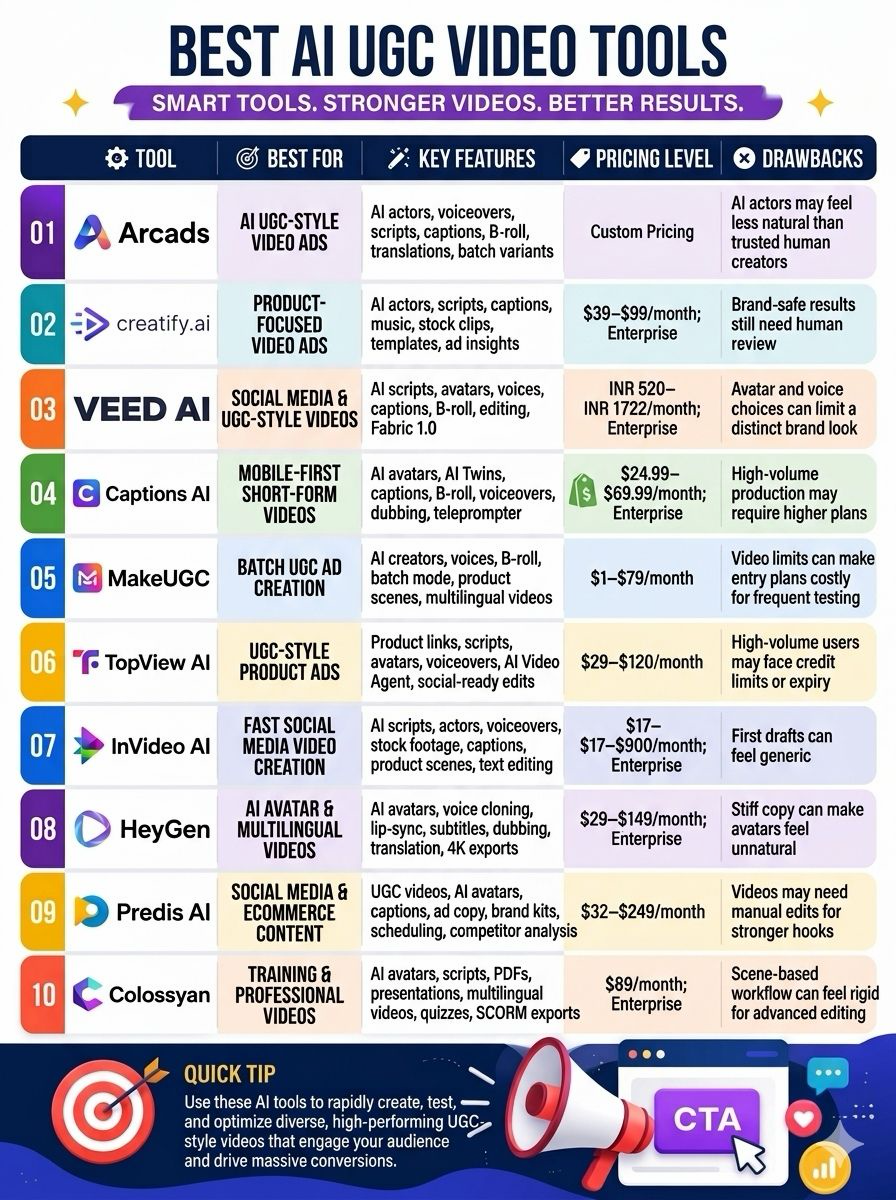
Quick Comparison of the Best AI UGC Video Tools
| Tool | Best For | Key Features | Pricing Level | Drawbacks |
|---|---|---|---|---|
| Arcads | AI UGC-style video ads | AI actors, voiceovers, scripts, captions, B-roll, translations, batch variants | Custom pricing | AI actors may feel less natural than trusted human creators |
| Creatify | Product-focused video ads | AI actors, scripts, captions, music, stock clips, templates, ad insights | $39–$99/month; Enterprise | Brand-safe results still need human review |
| VEED AI | Social media and UGC-style videos | AI scripts, avatars, voices, captions, B-roll, editing, Fabric 1.0 | INR 520–INR 1722/month; Enterprise | Avatar and voice choices can limit a distinct brand look |
| Captions AI | Mobile-first short-form videos | AI avatars, AI Twins, captions, B-roll, voiceovers, dubbing, teleprompter | $24.99–$69.99/month; Enterprise | High-volume production may require higher plans |
| MakeUGC | Batch UGC ad creation | AI creators, voices, B-roll, batch mode, product scenes, multilingual videos | $1–$79/month | Video limits can make entry plans costly for frequent testing |
| TopView AI | UGC-style product ads | Product links, scripts, avatars, voiceovers, AI Video Agent, social-ready edits | $29–$120/month | High-volume users may face credit limits or expiry |
| InVideo AI | Fast social media video creation | AI scripts, actors, voiceovers, stock footage, captions, product scenes, text editing | $17–$900/month; Enterprise | First drafts can feel generic |
| HeyGen | AI avatar and multilingual videos | AI avatars, voice cloning, lip-sync, subtitles, dubbing, translation, 4K exports | $29–$149/month; Enterprise | Stiff copy can make avatars feel unnatural |
| Predis AI | Social media and ecommerce content | UGC videos, AI avatars, captions, ad copy, brand kits, scheduling, competitor analysis | $32–$249/month | Videos may need manual edits for stronger hooks |
| Colossyan | Training and professional videos | AI avatars, scripts, PDFs, presentations, multilingual videos, quizzes, SCORM exports | $89/month; Enterprise | Scene-based workflow can feel rigid for advanced editing |
Arcads
Arcads is an AI tool that helps brands create short UGC-style video ads without hiring or filming real creators. You simply add a script, pick an AI actor and voice, and generate videos for paid social campaigns.
The platform offers a library of actors, lip-synced speech, captions, B-roll, music, translations, and batch variants for testing different ad ideas. Higher plans also include custom actors, voice tools, workflows, and API access.
Arcads is useful for brands that need to create many ad variations quickly. However, it cannot fully replace the trust, personality, and natural product experience.
Pros
- Large library of AI actors gives teams more casting choice
- Batch output helps test many hooks, actors, and scripts at speed
- Localizes ads into 30+ languages with synced speech and captions
Cons
- AI actors may feel less real than a trusted human creator
- Output still needs review for brand tone, product claims, and lip-sync errors
Arcads Pricing
| Plan | Pricing |
|---|---|
| Request for Pricing (RFP) | Request for Pricing |
Creatify
Creatify is an AI video tool that helps brands, agencies, and online sellers create short ad videos quickly. It can turn a product idea into a ready-to-use video with AI actors, scripts, captions, music, stock clips, and other AI-generated content.
Users can edit their videos, make changes, and export them for platforms like TikTok, Instagram, Facebook, and YouTube. Creatify also offers different ad templates to help users test multiple ideas faster.
It supports many languages and offers custom avatars on higher plans. Pro users also get competitor ad tracking, ad-launch tools, and support for videos.
Pros
- Strong ad focus, not just avatar videos
- Large AI actor library for varied audience fit
- Built-in ad insights and competitor research on Pro
Cons
- Brand-safe results still need human review
- Starter limits videos to two minutes and one seat
Creatify Pricing
| Plan | Pricing |
|---|---|
| Starter | $39/month |
| Pro | $99/month |
| Enterprise | Contact Sales |
VEED AI
VEED AI is a browser-based tool that helps you create UGC-style videos without filming yourself. You can write your own script or use AI to generate one, then pick an avatar, voice, language, captions, and camera angles.
The videos can be used for product demos, customer-style testimonials, ads, and social media content. You can also edit the video in VEED by adding product images, logos, text, calls to action, and AI-generated B-roll.
Its Fabric 1.0 feature can even make a still image speak. VEED AI is useful for marketers who want to test ad ideas quickly.
Pros
- Replace footage, add overlays and CTAs, and include branded product visuals after generation
- Fabric 1.0 lets a mascot, product image, or custom spokesperson speak
- Useful for producing several ad concepts without arranging shoots or creators
Cons
- Avatars may lack the trust and natural emotion of genuine customer-made UGC
- Avatar choice, voice quality, and camera variation can constrain a distinct brand look
VEED AI Pricing
| Plan | Pricing |
|---|---|
| Creator | INR 520/user/month |
| Pro | INR 1068/user/month |
| Studio | INR 1722/user/month |
| Enterprise | Contact Sales |
 Vivek Dev Jacob
Captions AI
Captions AI is a mobile-first video platform that helps creators and brands make short-form videos quickly. It can turn simple talking-head clips, scripts, or selfies into polished UGC-style content.
Users can add animated captions, auto-edit videos, create AI avatars and AI Twins, generate voiceovers and B-roll, and translate or dub videos into other languages. It also offers lip-sync, eye-contact correction, noise removal, video resizing, and a built-in teleprompter.
Captions AI is mainly useful for social media ads, creator content, product demos, and multilingual videos. Its biggest advantage is speed, making video creation easier for people without advanced editing skills.
Pros
- Mobile-first workflow suits fast TikTok, Reels, and Shorts production
- AI Edit can add cuts, zooms, captions, transitions, sound effects, and B-roll from raw footage
- AI Twin and avatar tools let a creator make script-led videos without filming each version
Cons
- Output quality depends heavily on the source clip, script, prompt, and chosen template
- Teams may need a larger Scale or Enterprise plan for high-volume ad production
Captions AI Pricing
| Plan | Pricing |
|---|---|
| Max | $24.99/month |
| Scale | $69.99/month |
| Enterprise | Custom Pricing |
MakeUGC
MakeUGC is an AI-powered UGC video tool built for brands, agencies, and creators. It helps users turn simple scripts into short, creator-style ads without the need for filming.
You can choose AI creators, generate realistic voices, add product scenes, and create B-roll to make videos feel more natural. The platform supports over 35 languages, making it useful for testing ads in different markets.
Its batch mode helps teams create multiple versions quickly, while product-in-hand scenes add a more authentic feel. Higher plans also include PDF-to-video, Video Agent tools, and HD, 2K, or 4K exports for more flexible content creation.
Pros
- Batch Mode helps teams test many hooks and scripts at once
- Its AI creator library supports fast audience and market tests
- Multi-language output can speed up ad localization
Cons
- AI creators may still feel less real than a strong human UGC creator
- Video limits can make the entry plans costly for frequent testing
MakeUGC Pricing
| Plan | Pricing |
|---|---|
| Pro | $1/month |
| Startup | $59/month |
| Growth | $79/month |
TopView AI
TopView AI is an AI UGC video tool for making short, creator-style product ads. It can turn a product link, image, or brief into a script, voiceover, avatar-led video, and social-ready edit.
Its AI Video Agent plans the ad, builds scenes, selects assets, and uses hooks designed for TikTok-style pacing. Users can test avatars, voices, product visuals, and ad angles without filming a real creator.
It suits ecommerce teams, agencies, and brands that need many ad variants fast. Results still need human review to keep claims, tone, lip-sync, and brand details accurate.
Pros
- Built for UGC-style ads, rather than generic slideshow videos
- Converts product inputs into a near-complete ad workflow: concept, script, scenes, voice, and edit
- Lets teams test several hooks, creator styles, and product stories before paying for live creator work
Cons
- Free output is limited and may include a watermark, so it is best for testing only
- High-volume teams may face credit expiry or limits, depending on the plan
TopView AI Pricing
| Plan | Pricing |
|---|---|
| Pro | $29/month |
| Business | $75/month |
| Ultra | $120/month |
Vivek Dev Jacob
InVideo AI
InVideo AI is a useful tool for brands that want to create social media videos quickly. It can turn a simple brief into a ready-to-edit video with scripts, AI actors, voiceovers, stock footage, captions, and product scenes.
This makes it useful for short ads, product explainers, TikToks, Reels, and paid social campaigns. Its text-based editing also makes it easy to change parts of a video without needing advanced editing skills.
However, the first version may not always be perfect. You still need to give clear prompts, check the facts and claims, and make some edits before publishing the final video.
Pros
- Offers text-based editing: type a change instead of rebuilding the video on a timeline
- Combines traditional stock-video editing with generative video tools, giving teams more fallback options
- Includes a large stock-media library and AI voices across 50+ languages and accents
Cons
- First drafts may feel generic
- AI actors can look less credible than real customer footage for brands
InVideo AI Pricing
| Plan | Pricing |
|---|---|
| Plus | $17/month |
| Max | $85/month |
| Generative | $170/month |
| Elite | $900/month |
| Enterprise | Contact Sales |
HeyGen
HeyGen is an AI video platform that helps brands create UGC-style videos without filming every creator. You can write a script, choose an AI avatar, add a voice, and create a video in minutes.
It offers stock and custom avatars, AI voices, voice cloning, lip-sync, templates, screen recording, subtitles, dubbing, and video translation in 175+ languages. Higher plans also support up to 4K exports and team workspaces.
This makes HeyGen useful for product demos, social media ads, tutorials, onboarding, and global campaigns. However, the quality depends on the script and avatar.
Pros
- Make several ad hooks or scripts without booking actors, shoots, or editors
- Translate one campaign into many languages while keeping the same on-screen presenter
- Use stock talent for quick work or create a branded avatar for repeat content
Cons
- Stiff copy can make even a good avatar feel unnatural
- Teams should check claims, pronunciation, gestures, and visual details before publishing
HeyGen Pricing
| Plan | Pricing |
|---|---|
| Creator | $29/month |
| Pro | $49/month |
| Business | $149/month |
| Enterprise | Contact Sales |
Predis AI
Predis.ai is an AI-powered content and social media platform built for marketers, eCommerce brands, and small teams. It helps users create social media content with less time and effort.
You can give it a simple prompt, product image, or product link, and it can generate UGC-style videos, AI avatars, voiceovers, captions, ad copy, and ready-to-post designs. The platform also includes editing tools, brand kits, post scheduling, and competitor analysis.
It supports major platforms such as Instagram, Facebook, TikTok, and Reels. By bringing content creation, editing, and social publishing into one workspace, Predis.ai makes managing social media simpler.
Pros
- Lets teams create, resize, edit, schedule, and publish content in one tool
- Supports brand kits for more consistent colors, fonts, and messaging
- Useful for ecommerce teams that need many ad variations for testing
Cons
- Short-form marketing videos may still need manual edits for stronger hooks and brand accuracy
- The Core plan does not include auto-posting
Predis AI Pricing
| Plan | Pricing |
|---|---|
| Core | $32/month |
| Rise | $79/month |
| Enterprise+ | $249/month |
Vivek Dev Jacob
Colossyan
Colossyan is an AI video platform that helps businesses create training, onboarding, and internal learning videos quickly. Instead of filming people, users can turn scripts, documents, or presentations into videos with AI avatars and voiceovers.
The platform supports multiple scenes and offers both ready-made and custom avatars. Videos can also be translated into different languages, making it useful for global teams. Users can add quizzes and branching scenarios to make training more interactive.
Colossyan also supports SCORM exports for use with learning management systems. Overall, it is best suited for companies that need consistent, professional training content at scale.
Pros
- SCORM export supports delivery and tracking in compatible LMS platforms
- Converts PDFs, PowerPoint files, and scripts into video drafts
- Supports multilingual video creation and automated translation
Cons
- Advanced tools, such as broader SCORM access, SSO, and API support, may require Enterprise pricing
- The scene-based workflow may feel rigid for creators who need detailed timeline editing or cinematic control
Colossyan Pricing
| Plan | Pricing |
|---|---|
| Professional | $89/month |
| Enterprise | Contact Sales |
How to Choose the Best AI UGC Video Tool
The best AI UGC video tool depends on the type of content you create, the number of videos you need, and how much control you want over the final output.
| Use Case | Recommended Tools | Best For |
|---|---|---|
| UGC-Style Ad Testing | Arcads, Creatify, MakeUGC, TopView AI | Creating multiple ad concepts, hooks, actors, and product stories quickly. |
| Social Media Content | VEED AI, Captions AI, InVideo AI, Predis AI | Creating short-form videos for TikTok, Instagram, Facebook, and YouTube. |
| AI Avatars & Multilingual Videos | HeyGen | Creating AI presenter videos with voice cloning, dubbing, and multilingual support. |
| Training & Business Videos | Colossyan | Creating professional training, onboarding, internal communication, and learning content. |
What to Consider Before Choosing
Before selecting a tool, compare:
- AI creator and avatar quality: Check whether the available creators match your target audience and brand.
- Video generation limits: High-volume ad testing can require larger plans or more credits.
- Languages: Check whether the tool supports the languages and markets you need.
- Editing features: Look for captions, B-roll, CTAs, product images, music, and resizing options.
- Brand controls: Brand kits, custom avatars, and reusable templates can help maintain consistency.
- Export quality: Check whether HD, 2K, or 4K exports are available on your plan.
- Testing capabilities: Batch creation and multiple variations are useful for performance marketing.
- Human review: Always review AI-generated videos for product claims, pronunciation, tone, visuals, and overall accuracy.
Final Thoughts
AI UGC video tools are changing how brands tell stories. They make video faster, cheaper, and easier to produce. Teams can test new ideas, tailor messages, and reach more people without large crews or long shoots.
The best results still need a clear goal, strong writing, and an honest voice. These tools do not replace human judgment. They help people spend less time on routine work and more time on ideas that matter.
As demand for short, personal video grows, smart use of AI can give brands a real edge.
FAQs
What are AI UGC video tools?
AI UGC video tools use artificial intelligence to create creator-style videos from scripts, prompts, product images, or campaign ideas without requiring traditional video shoots.
What is the best AI UGC video tool in 2026?
The best tool depends on your needs. Arcads, Creatify, MakeUGC, and TopView AI are useful for UGC-style ad creation, while HeyGen is useful for AI avatars and multilingual videos.
Can AI UGC tools create videos for social media?
Yes. Tools such as VEED AI, Captions AI, InVideo AI, and Predis AI can create short-form videos for platforms including TikTok, Instagram, Facebook, and YouTube.
Can AI UGC tools create product videos?
Yes. Several AI UGC tools can turn product images, links, or descriptions into product-focused videos with AI creators, scripts, voiceovers, and scenes.
Are AI UGC videos suitable for advertising?
Yes. AI UGC videos can be used to test different hooks, scripts, creators, product messages, and ad concepts before scaling campaigns.
Can AI UGC video tools create multilingual videos?
Yes. Many tools support multiple languages, AI voices, dubbing, and translation. HeyGen is particularly useful for multilingual AI presenter videos.
Are AI UGC videos as authentic as real creator videos?
AI-generated videos can look natural, but they may not always have the same authenticity as videos recorded by real creators. Human review and editing can improve the final result.
How much do AI UGC video tools cost?
Pricing varies by platform and plan. Some tools offer free or low-cost plans, while advanced features, higher video limits, and enterprise capabilities usually cost more.