Best AI Thumbnail Makers for YouTube (2026 Guide)
AI thumbnail makers help creators design eye-catching YouTube thumbnails in seconds using templates, automation, and smart design features, no design skills needed.

Eyecatchers dissimilar in design, like no other, but still uncomplicated, have been invented by the fast and simple-to-use AI thumbnail makers.
Offering several template designs, drag-and-drop editing, and speedy generation of visuals out of text or video prompts, the artificial intelligence thumbnail makers clear backgrounds, detect faces, build colors, and transfer fonts for clear reading. Adding batch production capabilities, brand kits, and on-the-go previews keeps a similar look.
Defined by speed and ease, these tools help create bold images from ideas to excite clicks and views. In fact, these tools allow quick neck breaking by making an attractive thumbnail.
Tips to Create High-CTR Thumbnails
Even with AI tools, strategy matters. Here’s how to improve clicks:
1. Use bold text: Keep it short (3–5 words) and readable.
2. Focus on faces: Facial expressions increase engagement.
3. High contrast colors: Bright colors stand out in feeds.
4. Keep consistency: Use the same style for branding.
5. Test variations: Use A/B testing (like Superside) to find what works best.
AI Thumbnail Tools Comparison
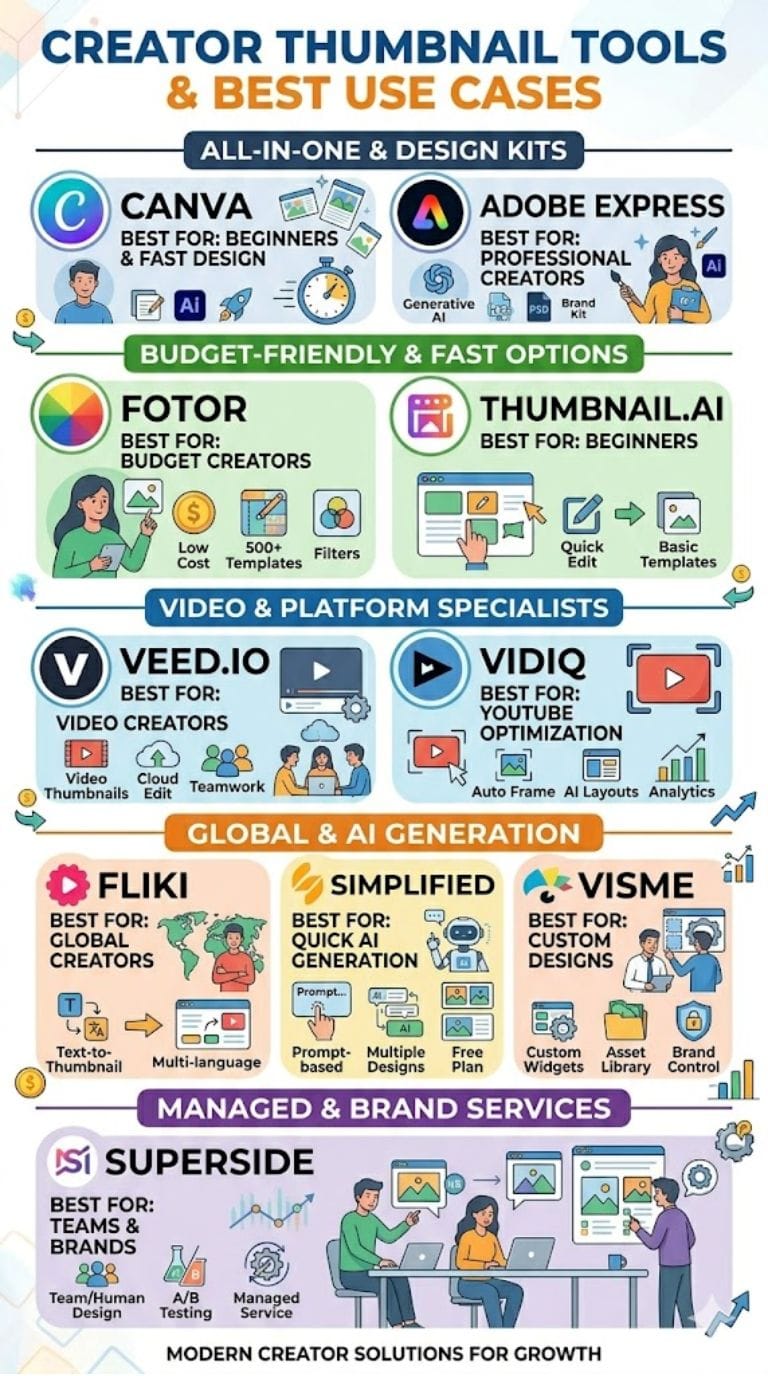
| Tool | Best For | Key Features | Pricing Level | Drawbacks |
|---|---|---|---|---|
| Canva | Beginners & fast design | Templates, AI editing, background remover | Medium | Limited free AI use |
| Adobe Express | Professional creators | Generative AI, PSD support, brand kits | Medium | Premium features locked |
| Fotor | Budget creators | 500+ templates, filters, AI tools | Low | Watermarks in free plan |
| VEED.io | Video creators | Cloud editor, AI thumbnails, collaboration | High | Limited free templates |
| VidIQ | YouTube optimization | Auto frame selection, AI layouts | Medium | Limited customization |
| Fliki | Global creators | Text-to-thumbnail, multi-language | Medium | Watermark in free plan |
| Visme | Custom designs | Templates, widgets, assets | High | Limited AI generation |
| Simplified | Quick AI generation | Prompt-based thumbnails, templates | Medium | Watermarks |
| Superside | Teams & brands | AI + human design, A/B testing | High | No DIY editor |
| Thumbnail.ai | Beginners | Templates, quick editing | Custom | Limited controls |
Canva
AI Thumbnail Maker by Canva turns simple ideas into beautiful YouTube images within minutes.
It uses some smart presets and text prompts to allow new designs to be created and for users to either choose a preset, add their own captions, invoke instant background removal, and just finish up the details with easy-to-use effects.
Now create fast, AI-tweak, and get a preview of the result: All in an easy drag-and-drop editor for all. Cloud access, a rich library, and safe design features from Canva all allow creators of any skill set to make thumbnails quickly and fun.
Pros
- Smart templates
- Easy drag-and-drop
- Fast background removal
Cons
- Limited free AI usage
- No exclusive designs
Pricing
| Plan | Pricing |
|---|---|
| Pro | $15/month |
| Business | $20/month |
| Enterprise | Contact Sales |
Adobe Express
Adobe Express fast-tracks the design process for YouTube thumbnails. You can either choose from a beautiful collection of templates or create a prompt for the AI program to generate a design for you.
With just one click, you can change your background and add special effects to impress your audience. You can modify the fonts or colors to suit your style preferences; you can even bring in your own photographs and edit PSD and AI files. Stock images from a massive library are also available.
With Brand Kits, you can ensure that all of your videos look great.
Pros
- Generative AI
- PSD/AI file support
- Brand kits
Cons
- Premium locked features
- Limited free exports
Pricing
| Plan | Pricing |
|---|---|
| Premium | $9.99/month |
| Firefly Pro | $19.99/month |
| Teams | $4.99/person/month |
| Enterprise | Contact Sales |
Fotor
Fotor also makes use of AI technology through an instant lens for creating eye-catching designs for YouTube thumbnails.
With text-to-image generation, more than 500 templates, and drag-and-drop tools, anyone, whether experienced or a beginner, can create bold and attractive thumbnail designs. Fotor gives you your own background, offers an easy color change, and lets you choose unique font styles.
Fun stickers, an AI background remover, and handy filters, too, are present. Even the free version has export quality high enough to make a quick start possible without spending money. Fotor is a smart choice for vloggers.
Pros
- 500+ templates
- AI editing tools
- Easy filters
Cons
- Watermarks
- Limited collaboration
Pricing
| Plan | Pricing |
|---|---|
| Pro | $3.99/month |
| Pro+ | $8.33/month |
 Vivek Dev Jacob
VEED.io
Veed AI thumbnail maker is to help creators create amazing YouTube images and that too without wasting much time. Just let it know your requirements and it would churn out clean, good-to-go designs in seconds.
Changing the background, colors, and fonts is a matter of easy edits. The tool works in-browser with instant previews as you create. Besides, it links up with your videos and saves everything to the cloud. The final thumbnail can be downloaded right away.
Veed makes it fast and easy, perfect for those who want pro-level thumbnails without the usual stress of designing them.
Pros
- AI thumbnail generation
- Cloud-based editing
- Collaboration tools
Cons
- Limited templates
- Requires signup
Pricing
| Plan | Pricing |
|---|---|
| Lite | $24/month |
| Pro | $55/month |
| Enterprise | Contact Sales |
VidIQ
VidIQ states that their AI thumbnail generator allows users to get high-quality thumbnails very quickly. The generator will select the most suitable frame from your video and will also suggest appropriate colors and nifty fonts.
Just drag and drop your clip into the software and provide it with a really imposing headline, and that is pretty much it: you can leave the rest to the tool to assemble a premium thumbnail.
It makes use of intelligent layout technology, facial detection, and very easy techniques to ensure your video will stand out from the pack.
Pros
- Auto frame selection
- AI suggestions
- Easy editing
Cons
- Limited customization
- Expensive advanced plans
Pricing
| Plan | Pricing |
|---|---|
| Boost | $19/month |
| Coaching + Boost | $199/month |
Fliki
Fliki's smart thumbnail maker lets you design bold, striking images for YouTube in a matter of minutes. You simply enter a prompt, and the tools give you suggestions for layouts, designs, and colors to use.
A vast library of photographs and other graphical elements are available to choose from. The drag-and-drop editor is very convenient, requiring no design skills whatsoever. Edits are swift and can be downloaded immediately, producing clean and crisp thumbnails.
Since Fliki has multi-language support, one can grab the attention of viewers across borders. It has been created to help build a strong clickable thumbnail.
Pros
- Text-to-thumbnail
- Drag-and-drop
- 80+ languages
Cons
- The free plan puts a watermark
- Browser lag
Pricing
| Plan | Pricing |
|---|---|
| Standard | $28/month |
| Premium | $88/month |
| Enterprise | Custom |
Vivek Dev Jacob
Visme
Visme makes easy YouTube thumbnail creation, even without design skills. Just pick a template, answer some quick questions, and Visme will suggest interesting layout ideas.
Simple drag-and-drop operation and a few mouse clicks let you change the colors or add text. Use your own photos or choose from millions of assets to make your thumbnail stand out.
The interface is clean and untangled, so work can be done quickly without hassle, and on-top of-it-all-these make the image but for thumbnails in seconds and hop it right up for upload on YouTube.
Pros
- Large template library
- AI guidance
- Visual widgets
Cons
- Limited AI generation
- Download limits
Pricing
| Plan | Pricing |
|---|---|
| Starter | $29/month |
| Pro | $59/month |
| Enterprise | Contact Sales |
Simplified
AI thumbnail creator of Simplified is ready to create an eye-catching YouTube image within a minute's time. Simply type the title of your video, a topic, or even a vibe-the AI gives some bold layouts, clear text, and strong colors.
You are free to drag, drop, and quickly edit anything by using easy tools and a wide variety of templates.
An all-niche application helps you keep an even look without the tension of design-Automatic. Day or once a month, it makes working simple and helpful towards growth on your channel.
Pros
- Fast AI generation
- Easy editing
- Beginner-friendly
Cons
- Watermarks
- Paid team features
Pricing
| Plan | Pricing |
|---|---|
| Pro | $29/month |
| Business | $79/month |
| Growth | $199/month |
| Enterprise | Contact Sales |
Superside
Superside's AI thumbnail maker combines intelligent technology with real design capabilities in creating impressive, specific YouTube thumbnails.
It uses machine learning to give optimal, attention-grabbing suggestions for simple layouts, colors, and styles. After that, a human designer goes through each thumbnail, making them more professional and unique.
You can check out various iterations and fit the tool into your workflow for best results; it is designed both for the individual creator and for teams who want professional images without spending hours or much effort. It makes growing a YouTube channel very fast, easy, and far more effective.
Pros
- A/B testing
- Managed service
- Workflow integration
Cons
- No DIY editor
- Long-term commitment
Pricing
Request for Proposal (RFP)
Vivek Dev Jacob
Thumbnail.ai
Thumbnail.ai is a very effective and handy app for YouTube creators who want the best, striking thumbnails without having to deal with a lot of designing pressure.
It uses intelligent templates, quick word prompts, and one-click edits to build stunning images within seconds. The interface is clear, user-friendly and speedily built for performance.
Even newbies can create strong, professional-looking thumbnails, resulting in better hits and a stronger appearance for their channels. Download your design instantly and import hours of time every week. Just try it free, and as needed upgrade.
Pros
- Easy templates
- Fast editing
- Beginner-friendly
Cons
- Limited controls
- Smaller stock library
Pricing
Request for Proposal (RFP)
Final Takeaway
YouTube AI thumbnail creators are now providing creators with exciting design tools in their own hands, empowering you to turn your ideas into bright, clickable graphics with just a prompt.
Enhancing your visuals has given your video a professional look, allowing you to accomplish the job in a snap.
Quick styles can be set with these tools, allowing you to play with great pictures, provide apt text, and thus a large amount of room in which to imprint your particular self, even if you have never laid your hands on the fine art of design.
FAQs
What are AI thumbnail makers?
AI thumbnail makers are tools that use artificial intelligence to create YouTube thumbnails from text prompts, images, or video clips. They automate design tasks like background removal, color selection, and layout creation, making thumbnail design fast and easy.
Which AI thumbnail tool is best for beginners?
Tools like Canva, Fotor, and Simplified are best for beginners because they offer simple drag-and-drop editors, ready-made templates, and easy AI features that require no design experience.
How do AI thumbnail tools improve click-through rate (CTR)?
AI thumbnail tools improve CTR by creating visually appealing designs using bold colors, clear fonts, and optimized layouts. Some tools also suggest high-performing styles and allow A/B testing to find the most engaging thumbnail.
Can I create thumbnails for free using AI tools?
Yes, many AI thumbnail tools offer free plans with basic features. However, free versions may include watermarks, limited templates, or restricted AI usage, while paid plans unlock advanced features and higher-quality exports.