10 Best Free AI Tools for Solopreneurs to Grow Their Business in 2026
Discover the 10 best free AI tools for solopreneurs to automate writing, marketing, design, research, meetings, and workflows. Compare features, pricing, pros, cons, and find the right AI tools to save time, reduce costs, and grow your business faster in 2026.

Free AI can help a one-person business work smarter without adding extra costs. It can help you plan your services, write emails and marketing copy, create social media posts, design simple graphics, and answer common customer questions at any time.
It also helps organize data, track tasks, and find useful trends so you can make better decisions with less effort. Instead of spending hours on routine work, you can focus on building your business, talking to customers, and testing new ideas. For a solopreneur, free AI is like having a reliable teammate who works around the clock.
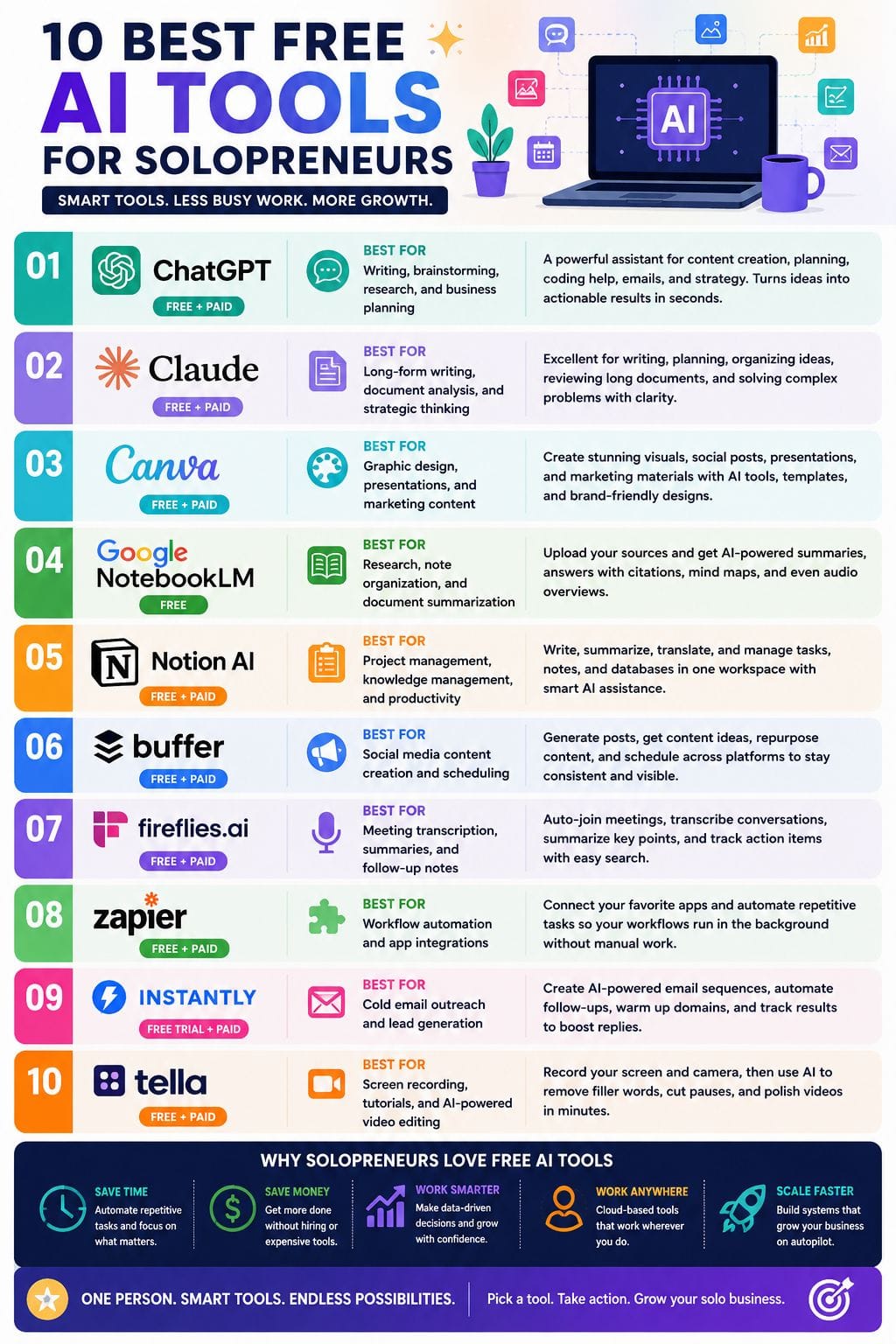
| Tool | Best For | Key Features | Pricing Level | Drawbacks |
|---|---|---|---|---|
| ChatGPT | Writing, brainstorming, planning | Content creation, research, coding help, workflows | Free + Paid | Needs good prompts; facts require checking |
| Claude | Long documents & reasoning | Projects, Skills, long-context analysis | Free + Paid | Limited web access |
| Canva | Design & marketing graphics | Templates, AI images, presentations, Brand Kit | Free + Paid | Templates can look generic |
| Google NotebookLM | Research & document analysis | Source citations, summaries, audio overviews | Free | No live web search |
| Notion AI | Knowledge management | Writing, databases, AI agents, summaries | Free + Paid | Best inside Notion ecosystem |
| Buffer AI Assistant | Social media marketing | Caption writing, scheduling, repurposing | Free + Paid | Works best within Buffer |
| Fireflies.ai | Meeting notes | Recording, transcripts, summaries, search | Free + Paid | Accuracy varies by audio quality |
| Zapier | Automation | Workflow automation, AI actions, app integrations | Free + Paid | Complex workflows need experience |
| Instantly | Cold email outreach | Email sequences, CRM, analytics | Paid (Free Trial) | Email-focused only |
| Tella | Video creation | Screen recording, AI editing, filler removal | Free + Paid | Limited advanced editing |
ChatGPT
Best for: Writing, brainstorming, research, and business planning
ChatGPT is a flexible assistant for solo founders, helping with ideas, writing, planning, and light tech work in one place. It can draft emails and sales pages, outline courses, generate social posts, and tidy your copy.
You can use it to map offers, build systems, and break big goals into small steps. It also helps with research, gives example prompts, and explains code so you ship faster.
With a clear brief and a few good examples, it turns vague thoughts into usable output, making your one‑person business feel less lonely and more focused.
Pros
- Handles writing, research, and brainstorming in one chat
- Easy to use, no setup or training needed
- Learns your tone when you give good examples
Cons
- Output can sound generic without tight prompts
- Needs your judgment for facts and strategy
Claude
Best for: Long-form writing, document analysis, and strategic thinking
Claude is an AI assistant that helps solo founders get more done. It can write, plan, organize ideas, and solve problems with clear and simple answers. You can use it to draft emails, create offers, build workflows, review long documents, and even handle light coding tasks.
Its Projects and Skills features help keep work, notes, and client information in one place, making it easier to stay organized. Instead of switching between different tools, you can manage many daily tasks in one workspace.
For a solo entrepreneur, Claude works like a reliable second brain that helps you stay focused.
Pros
- Very natural, human‑like writing
- Strong reasoning and long‑context document handling
- Useful “skills” and workflows for small business ops
Cons
- No full, open web browsing built in
- Onboarding and advanced setup can feel complex for some users
Canva
Best for: Graphic design, presentations, and marketing content
Canva’s AI tools make it easy for solopreneurs to turn rough ideas into professional content in just a few minutes. You can create social media posts, presentations, and marketing materials without needing design skills.
Smart templates, AI image generation, instant resizing, and brand-friendly layouts help you work faster while keeping your content consistent. This means you can test different headlines, visuals, and campaign ideas with less effort and lower cost.
Instead of spending hours on design or hiring a professional for every project, you can focus on sharing your message, reaching more people, and growing your business with confidence.
Pros
- Simple drag‑and‑drop editor for fast design
- Strong library of templates for common business needs
- Built‑in brand kit to keep colors and fonts aligned
Cons
- Output may look generic if you skip brand settings
- Heavy use of templates can reduce visual uniqueness
 Vivek Dev Jacob
Google NotebookLM
Best for: Research, note organization, and document summarization
Google NotebookLM helps solopreneurs organize information from PDFs, documents, websites, videos, and notes in one place. Instead of searching through many files, users can ask questions and get clear answers based only on their own sources.
Every response includes citations, making it easy to check the original information. It can also create simple summaries, brainstorm ideas, prepare client-ready content, build mind maps, and generate audio or video overviews.
This helps users understand complex topics faster, save time on research, and reuse their knowledge for meetings, proposals, content creation, and daily business tasks with greater confidence and accuracy.
Pros
- Source-grounded answers with clear citations for trust
- Handles many formats and connects insights across up to 50 sources
- Audio and video overviews make complex content easy to grasp
Cons
- No live web search; it only knows what you upload
- Needs careful setup of notebooks to shine
Notion AI
Best for: Project management, knowledge management, and productivity
Notion AI gives solopreneurs one place to write, plan, and manage their work. It helps create first drafts, improve writing, summarize long notes, and pull out key action items from meetings or ideas.
It can also translate content, making it easier to work with people across different languages. Instead of switching between many apps, you can handle notes, tasks, and databases in the same workspace.
Its built-in AI agents take care of routine jobs like meeting notes and repeat tasks, saving time each day. This lets you spend less time on admin work and more time growing your business.
Pros
- Deep context from your own workspace, so outputs match your projects
- Strong mix of writing, editing, and summarizing tools in one place
- AI blocks and agents turn notes into real tasks and updates
Cons
- Credits and plan limits can be confusing for new users
- Best value shows up when you already live in Notion every day
Buffer AI Assistant
Best for: Social media content creation and scheduling
Buffer’s AI Assistant makes it easier for solopreneurs to create social media posts without spending hours writing. You can enter a simple idea, and it turns it into a post that is ready to publish.
It also helps you come up with new content ideas, reuse older posts, adjust the tone for different platforms, and shorten long text into clear captions. This keeps your content fresh and your posting schedule consistent.
Instead of worrying about what to write next, you can focus on growing your business. It works like a reliable part-time copywriter that is always available.
Pros
- Simple, no‑training setup
- Built into scheduling and publishing
- Strong at repurposing long content
Cons
- Tied to one social tool
- Risk of similar‑sounding captions over time
Rishi Mundra
Fireflies.ai
Best for: Meeting transcription, summaries, and follow-up notes
If you spend a lot of time on client calls, Fireflies.ai can save you hours every week. It joins your meetings automatically, records the conversation, and creates clear transcripts, summaries, and action items.
Instead of searching through notes or recordings, you can find past discussions with a simple question. It also connects with many task management and CRM tools, making follow-ups much easier.
For solopreneurs, it acts as one central place for meeting notes, ideas, and decisions. This means less time spent on admin work and more time focused on serving clients, building your business.
Pros
- Saves hours of manual note‑taking after client and sales calls
- Searchable transcripts make it easy to find any moment or decision
- Auto‑joins major video platforms, so setup is quick for solo users
Cons
- Accuracy can dip with overlapping voices or strong accents
- Some of the best analytics and automation sit behind higher tiers
Zapier
Best for: Workflow automation and app integrations
Zapier helps solo founders connect the apps they use every day, so routine work happens automatically. It can capture new leads, move data between tools, send updates, and even use AI to sort information or draft content.
Instead of doing the same tasks over and over, you can build one workflow that runs in the background. This saves time and reduces mistakes.
The free plan gives you enough tasks to test your most important workflows before paying for a subscription. For a one-person business, Zapier acts like a quiet assistant, keeping your tools connected.
Pros
- Easy to start, even with no tech skills
- Connects thousands of apps you already use
- Adds AI steps for summary, tags, and light content
Cons
- AI actions stay basic; deep logic needs other tools
- Complex flows are harder to debug for new users
Instantly
Best for: Cold email outreach and lead generation
Instantly is a cold email and outreach platform built for solo founders and small teams. It helps you reach more prospects without spending hours on manual work.
You can create AI-powered email sequences, send campaigns, automate follow-ups, and track replies from one dashboard. It also includes basic CRM features, so you can manage leads without switching between different tools.
You can warm up email domains, test campaigns, and improve deliverability to increase your chances of getting replies. Instead of doing outreach every day, Instantly helps you build a repeatable system that works in the background.
Pros
- Simple workflow for cold email at scale
- AI helps write and tweak sequences fast
- Built‑in tracking for opens, clicks, and replies
Cons
- Best suited for email‑driven businesses
- Needs good list data to work well
Rishi Mundra
Tella
Best for: Screen recording, tutorials, and AI-powered video editing
Tella is an easy-to-use screen recorder and video editor powered by AI. It helps solopreneurs create clean, professional videos without spending hours editing. You can record your screen, your webcam, or both at the same time.
After recording, Tella uses AI to remove filler words, cut long pauses, and fix small mistakes with just a few clicks.
This saves time and keeps your videos clear and engaging. It is a great choice for tutorials, product demos, online courses, and sales videos. Think of Tella as a simple video studio that works right in your browser.
Pros
- Fast AI cleanup of filler words and awkward pauses
- Great for tutorials, onboarding, and product demos
- Works on web, desktop, and via Chrome extension
Cons
- Fewer advanced editing options than heavy tools
- Not built for complex, multi‑track productions
How to Choose the Right AI Tool for Your Solo Business
This adds topical authority and helps readers decide which tools fit their needs.
- Choose ChatGPT or Claude if writing is your biggest task.
- Pick Canva for marketing graphics and presentations.
- Use NotebookLM when you work with large documents or research.
- Choose Notion AI if your business runs inside Notion.
- Pick Buffer AI for consistent social media posting.
- Use Fireflies.ai if you spend hours in client meetings.
- Choose Zapier when repetitive work slows you down.
- Use Instantly for cold email outreach.
- Pick Tella if you regularly create tutorials or product demos.
Final Thoughts
Free AI gives solopreneurs more than speed; it gives them room to think. It can cut busy work, sharpen messages, and show which moves bring real results. With the right mix, one person can run research, content, support, and analytics at a level that once needed a team. Yet tools are only half the story.
The real power comes when you pair them with a clear offer and bold action. Treat these systems as quiet partners, not magic tricks, and your solo business can grow faster, with less stress, and more control.
FAQs
What are AI tools for solopreneurs?
AI tools help solo business owners automate writing, marketing, customer support, research, design, scheduling, and repetitive tasks.
Which is the best free AI tool for solopreneurs?
ChatGPT is one of the most versatile free AI tools because it supports writing, planning, brainstorming, coding assistance, and business strategy in one place.
Can I run my business using only free AI tools?
Yes. Many solopreneurs can handle content creation, research, social media, meeting notes, design, and automation using free plans. As your business grows, upgrading to paid plans may unlock more features and higher usage limits.
What AI tool is best for marketing?
Canva, Buffer AI Assistant, and ChatGPT work well together for creating graphics, writing posts, and planning marketing campaigns.
Which AI tool is best for productivity?
Notion AI and Zapier are excellent productivity tools because they help organize work, automate repetitive tasks, and keep projects moving efficiently.