Best AI Marketing Analytics Tools: Track, Predict & Optimize Campaigns in Real Time
Discover top AI marketing analytics tools that help track performance, predict trends, and optimize campaigns with real-time insights and automation.

All your marketing data is being tapped into, and changes are being tracked in real time. Trends appear at the moment they start. Reports that would have taken hours now come almost instantaneously, with clear visuals to aid team discussions and action.
Smart dashboards highlight what is working, alert to slippage, and suggest the next best action. They provide real insights across every channel and predict what is likely to happen.
They take large data sets and convert them into actions you can implement. With natural language search, drag-and-drop configuration, and easy sharing, any team can maximize results.
How to Choose the Right AI Marketing Tool
Choosing the right tool depends on your goals:
- For startups: Google Analytics, Databox
- For agencies: Whatagraph, AgencyAnalytics
- For enterprise: Smartly.io, Insider, Albert AI
- For growth & automation: HubSpot, Fibr AI
Focus on:
- Integration needs
- Budget
- Ease of use
- Level of automation
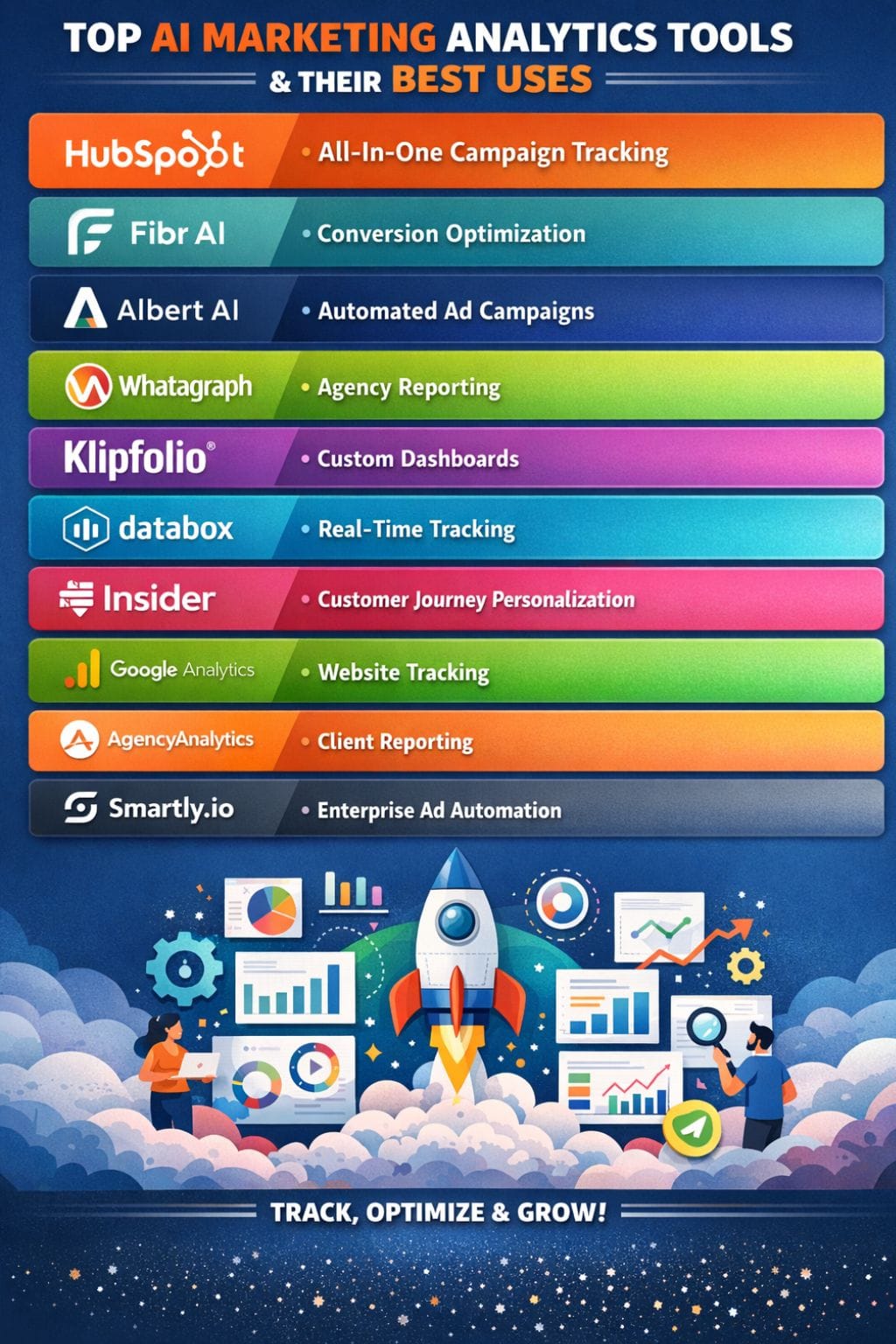
Quick Comparison Table
| Tool | Best For | Key Features | Pricing Level | Drawbacks |
|---|---|---|---|---|
| HubSpot | All-in-one campaign tracking | AI insights, predictive scoring, automation | Mid–High | Limited AI in free plan |
| Fibr AI | Conversion optimization | Auto A/B testing, personalization | High | Complex UI |
| Albert AI | Automated ad campaigns | Self-learning optimization | High | Steep learning curve |
| Whatagraph | Agency reporting | Visual dashboards, AI summaries | Mid–High | Connector issues |
| Klipfolio | Custom dashboards | Advanced charts, integrations | Mid | No AI insights |
| Databox | Real-time tracking | 100+ integrations, mobile dashboards | Mid–High | Expensive scaling |
| Insider | Customer journey personalization | Predictive analytics, automation | High | Complex workflows |
| Google Analytics | Website tracking | Free, ML insights, funnel tracking | Low–Free | Complex setup |
| AgencyAnalytics | Client reporting | White-label dashboards | Low–Mid | Data sync lag |
| Smartly.io | Enterprise ad automation | Creative testing, ML optimization | High | Complex setup |
HubSpot
HubSpot is one of the best tools for tracking a campaign's progress. It provides quick insights through clean, simple dashboards. Its intelligent system monitors key metrics, identifies trends, and recommends improvements.
It also minimizes manual work by automating the reporting process. HubSpot AI combines predictive scoring, visibility into the customer journey, and an assistant that shows you what to do next. It can even create content on demand.
The tool allows any team to work faster, make better decisions, and scale results effortlessly. The entire experience is simple, fast, and user-friendly.
Pros
- Instant performance summaries
- Predictive lead scoring
- Content automation
Cons
- Manual exports needed
- Limited AI in the free plan
Pricing
| Plan | Pricing |
|---|---|
| RFP | Custom |
Fibr AI
It analyses our campaign information by a self-operating Fibr AI, thereby automating annual growth in real A/B testing, checking in performance all day long, landing pages personalized for every visitor, and so on.
Their AI agents run amok by adjusting web content, targeting the right audience for ads, and building reports. No coding or skills in development are needed.
This enables marketers to increase conversion rates faster than ever, customize campaigns according to the local market, and gain direct insights from audience data. Fibr makes the visitor's journey to the customer smooth and seamless.
Pros
- Continuous A/B testing
- Personalized landing pages
- Easy editor
Cons
- Complex interface
- Data lag issues
Pricing
| Plan | Pricing |
|---|---|
| Starter | $479/month |
| Enterprise | Contact Sales |
Albert AI
Basically, Albert AI automates pretty much everything when it comes to managing a digital campaign- budget use, ad targeting, creative changes, and reporting. The self-learning engine scans massive data sets, modifies plans in real time, and discovers the right audience for each advertisement across the major channels.
It actually allows marketers to solve things quickly, make better audience picks, and very clear forecasts that eliminate guesswork.
Albert's primary functions involve taking the dull tasks out of a team's processes to enable them to focus more strategically rather than just getting things done.
Pros
- Full automation
- Self-learning AI
- Cross-channel optimization
Cons
- Complex for beginners
- Platform dependency
Pricing
| Plan | Pricing |
|---|---|
| RFP | Custom |
 Alan Joseph
Whatagraph
A data analyst tool developed for digital agencies is Whatagraph. The program collects data from various channels, advertising, email, web, and social media, and collates it neatly into client-ready dashboards. It allows teams to visualize results and discover problems in seconds.
The AI helps with intelligent summaries of campaigns and chat insights. No technical knowledge is required to create reports super-fast with its drag-and-drop builder. With visuals, templates, and scheduled reports, Whatagraph turns elaborate tracking into easy updates.
Whatagraph reduces manual activities for agencies and marketing professionals while discovering wins and opportunities.
Pros
- 50+ integrations
- AI summaries
- Easy reporting
Cons
- Connector glitches
- Manual fixes needed
Pricing
| Plan | Pricing |
|---|---|
| Start | $286/month |
| Boost | $724/month |
| Max | Custom |
Klipfolio
With over 130 platform integrations into clear and sharp dashboards, Klipfolio has made it so simple to track campaign performance. Pull these data sources to make custom reports in minutes and share what you have created with your team.
Its tools convert the raw and sometimes spreadsheet-like data into easy visualizations that explain KPIs, trends, and goals at a glance. Drag and drop to build, schedule your reports, and wide integrations-all make it a worthy contender for data-driven marketers.
But you might still have to set up manual activity and time to make your first dashboards.
Pros
- Powerful chart customization with complex formulas.
- Scheduled and PDF reporting for teams, with share links.
- Unlimited users in most plans.
Cons
- With large datasets, reports can be slow.
- No true AI-based summary or insight functionality.
Pricing
| Plan | Pricing |
|---|---|
| RFP | Custom |
Databox
Databox is an aggregating tool that integrates campaign data from over 100 different platforms, ads, web, email, and social, into clear and easy-to-use dashboards created with simple drag-and-drop tools.
Its AI generates quick summaries and forecasts, along with benchmarks and clean visuals that update in real time. Databox essentially puts an end to manual reporting, sets up goal-tracking, and empowers teams to check performance on the go, giving decision-makers visibility, early identification of trends, and fast responses.
A simple setup means there are no spreadsheets to keep open for six hours or so.
Pros
- Real-time tracking
- Mobile access
- Strong integrations
Cons
- Expensive scaling
- Setup complexity
Pricing
| Plan | Pricing |
|---|---|
| Professional | $159/month |
| Growth | $399/month |
| Premium | $799/month |
Rishabh Rathi
Insider
Insider converts campaign data into clear actions for growth; integrating artificial intelligence personalization, predictive analytics, and omnichannel tools in simple, sharp dashboards. Marketers get to track every touch point: web, email, SMS, and social, building automated journeys that can adapt with each user.
Reports load fast, and the in-depth segments boost engagement, conversion, and ROI. Its self-optimizing systems learn what works and keep teams ahead of the game.
Built to scale, the self-automatic features of Insider are powered by easy workflows that transform raw numbers into results that are actionable right away.
Pros
- Predictive analytics
- Real-time automation
- Strong segmentation
Cons
- Complex workflows
- Limited flexibility
Pricing
| Plan | Pricing |
|---|---|
| RFP | Custom |
Google Analytics
Even today, Google Analytics can easily be touted as the most powerful tool for tracking campaigns.
Be it visitation data, funnels, engagement stats, or even AI insights and cross-platform tracking that derive visitor insights in a single click, it brings together a complete picture of what marketers are entitled to know about their customers online.
Google Analytics enables marketers to identify where users drop out of a targeted process, compare traffic sources, set up conversions, and view results in one convenient location. The latest version, GA4, incorporates machine learning to predict trends and map complete customer journeys.
Pros
- Free model
- ML insights
- Funnel tracking
Cons
- Complex setup
- Data sampling issues
Pricing
| Plan | Pricing |
|---|---|
| RFP | Custom |
AgencyAnalytics
With AgencyAnalytics, your channels, SEO, ads, social, and email are all brought together in one clean dashboard. You can track live numbers and send reports, automated and ready for your client, with ease.
The drag-and-drop builder, white-label tools, and 80+ integrations make it easy to set up for agencies and freelancers. Higher plans have AI to do quick summaries and goal tracking across accounts so you can find trends early and act with conviction.
Whether you're managing a handful of campaigns or hundreds, AgencyAnalytics frees you from manual work and keeps all your results unified.
Pros
- White-label reports
- Easy dashboards
- Automated reports
Cons
- Data sync lag
- Limited integrations
Pricing
| Plan | Pricing |
|---|---|
| Freelancer | $41.30/month |
| Agency | $125.30/month |
| Agency Pro | $244.30/month |
| Enterprise | Custom |
Rishabh RathiSmartly.io
Smartly.io provides a clear landscape of advertising campaigns, allowing teams to seamlessly create, launch, and track ads across Meta, TikTok, Snapchat, and other platforms using its automated tools.
Smartly's intelligent algorithm will conduct tests on headlines and visuals in real-time, eliminating the weak versions while forecasting what is next to work best. Thus, it saves money and maximizes sales for large teams.
With all creative assets, budgets, reports, and approvals in one place, marketing teams can expedite their work and stay on the same page. Good forecasts and automated triggers for performance.
Pros
- Real-time optimization
- Creative testing
- Predictive modeling
Cons
- Complex setup
- Not beginner-friendly
Pricing
| Plan | Pricing |
|---|---|
| RFP | Custom |
Final Thoughts
AI-powered tools reshape the entire way of running campaigns by making sense of huge data piles practically instantaneously.
They quickly detect trends, deliver precise results, and make it fast and simple for teams to adapt and cut dead weight while growing returns. Expert analysis converts raw data into clear, powerful insights such that decisions are made based on what is seen, not what's guessed.
These types of tools keep the strategy sharpened and campaigns strong by providing real-time alerts, instant reporting, and also future-oriented forecasts to make sure all marketing moves yield better results and continuous growth.
FAQs
What are AI marketing analytics tools?
AI marketing analytics tools are platforms that use artificial intelligence to track, analyze, and optimize marketing campaigns in real time. They help identify trends, predict outcomes, and provide actionable insights across channels.
Which AI tool is best for campaign tracking?
Tools like HubSpot and Google Analytics are best for campaign tracking because they offer real-time dashboards, performance insights, and detailed customer journey analysis.
How do AI tools improve marketing performance?
AI tools improve performance by automating reporting, identifying trends early, optimizing campaigns in real time, and suggesting the next best actions based on data.
Are AI marketing tools suitable for small businesses?
Yes, many tools like Databox and Google Analytics offer affordable or free plans, making them suitable for startups and small businesses looking to scale efficiently.