Best Open-Source Threat Intelligence Tools for Creative Teams in 2026
Discover the best open-source threat intelligence tools for 2026. Compare features, pricing, and use cases for tools like MISP, OpenCTI, TheHive, VirusTotal, and more to help creative teams improve security without slowing workflows.

Creative teams need security that keeps up with fast, shared work. Good open-source threat tools cut noise and catch risky links or files early. They turn scattered signals into clear steps so teams know what to do.
They also support teamwork, so designers, writers, and marketers stay focused without losing sight of real risks. Security feels less like a block and more like a steady support.
Work moves faster, handoffs stay clean, and teams make better calls. In the end, projects stay safe without slowing down the creative flow or disrupting how people work together each day.
Why Creative Teams Need Threat Intelligence Tools
Creative teams often work with:
- Shared files
- External collaborators
- Cloud-based assets
- Public campaign links
- Brand-sensitive content
This creates exposure to phishing, malware, fake domains, and impersonation attacks.
The right threat intelligence platform helps teams:
- Detect risks early
- Protect digital assets
- Reduce manual checking
- Improve decision-making
- Keep projects moving securely
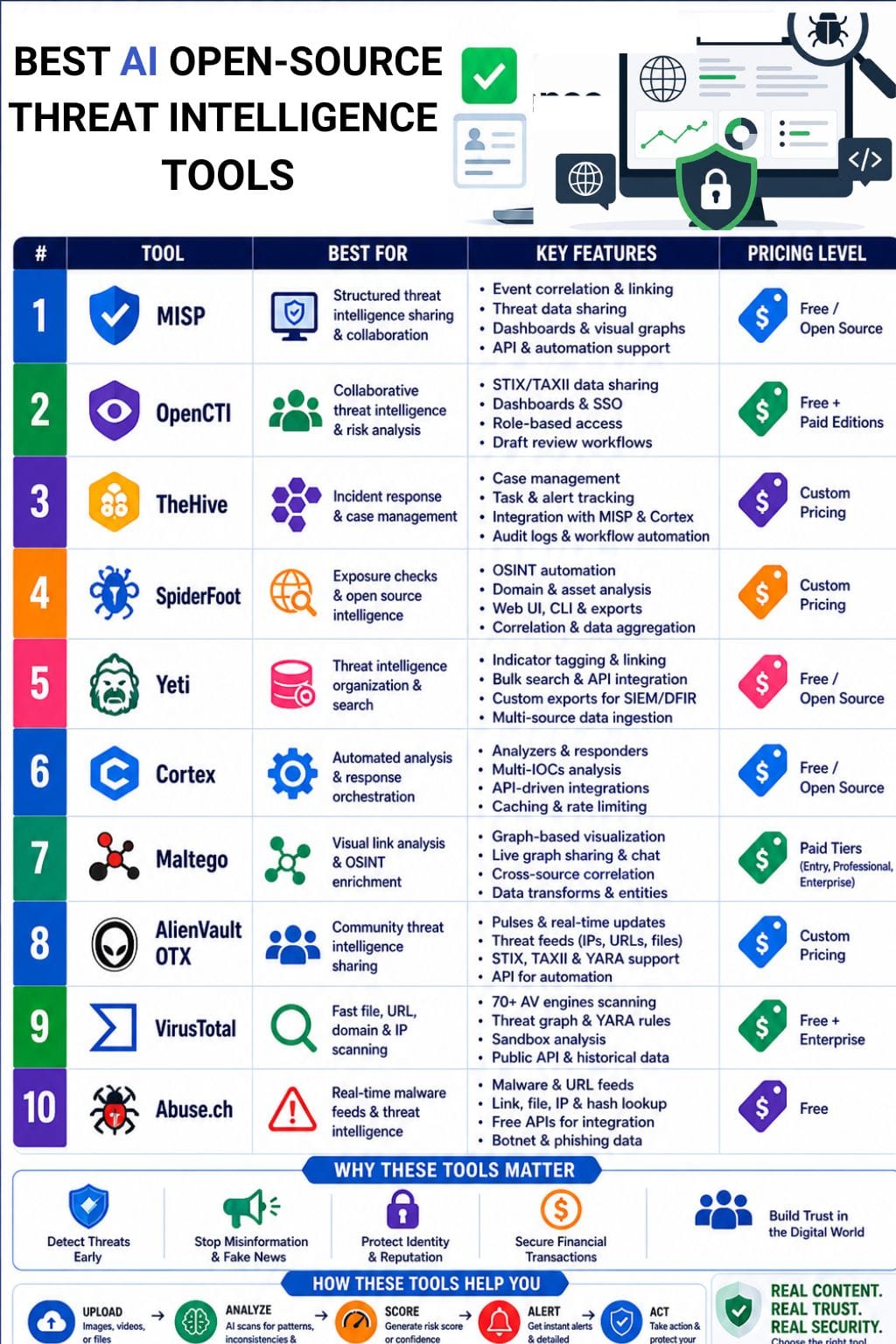
Threat Intelligence Tools Comparison Table
| Tool | Best For | Key Features | Pricing Level | Drawbacks |
|---|---|---|---|---|
| MISP | Structured threat sharing | Event correlation, automation, dashboards | Free/Open Source | Complex setup |
| OpenCTI | Collaborative intelligence analysis | STIX/TAXII support, dashboards, SSO | Free + Paid editions | Needs feed maintenance |
| TheHive | Incident response workflows | Case management, task tracking | Custom pricing | Learning curve |
| SpiderFoot | Exposure checks | OSINT automation, domain analysis | Custom pricing | Can produce noisy results |
| Yeti | Threat data organization | Bulk search, API integration | Free/Open Source | Requires tuning |
| Cortex | Automated analysis | Analyzers, responders, integrations | Free/Open Source | Needs broader ecosystem |
| Maltego | Visual link analysis | Graph intelligence, collaboration | Paid tiers | Free version limited |
| AlienVault OTX | Community intelligence sharing | Pulses, APIs, threat feeds | Custom pricing | Mixed signal quality |
| VirusTotal | Fast file/link scanning | 70+ AV engines, sandbox | Free + Enterprise | Rate limits |
| Abuse.ch | Real-time malware feeds | Free APIs, malware databases | Free | Limited enterprise features |
MISP
MISP is a solid tool for creative teams that need one place to gather and share threat data. It helps turn raw signals into clear insights. Teams can link related events, sort data with ease, and share it using simple rules.
This keeps working fast and smoothly. It offers a flexible model to store indicators and context. Teams can control who sees what. It also supports event links, data enrichment, and basic automation.
Visual graphs and dashboards make review quick. With API support and standard formats, MISP fits well with other tools and systems.
Pros
- Strong collaboration for distributed teams
- Good for structured, reusable intelligence
- Fits both technical and non-technical reporting
Cons
- Can feel complex for first-time users
- Needs setup and upkeep to run well
Pricing
| Plan | Pricing |
|---|---|
| Community | Free/Open Source |
OpenCTI
OpenCTI is a good fit for creative teams that want clear and fast insight into risk without heavy setup. It brings all threat data into one place and connects indicators with actors and campaigns.
Teams can share data using STIX and TAXII formats with ease. It also improves teamwork with role-based access and simple dashboards. Users can see what matters without confusion.
New updates offer a cleaner interface, better control with single sign-on, and smooth draft review flows. This helps teams work faster, stay aligned, and make better decisions without extra effort or complex tools slowing them down.
Pros
- Improves correlation, context, and decision-making
- Supports collaboration across security and non-security teams
- Open source, so it can be used without an upfront license cost in the Community Edition
Cons
- Best value comes when someone maintains feeds and workflows
- Advanced enterprise features may require paid editions
Pricing
| Plan | Pricing |
|---|---|
| Community | Free |
| Enterprise | Request free trial |
TheHive
TheHive is a solid open-source tool for teams that need quick case handling and clear tracking. It keeps alerts, observables, and tasks in one place, so small teams can work fast without losing context.
Teams can collaborate in real time on cases, tasks, and indicators of compromise. It connects well with MISP and Cortex to add data and automate steps. The platform also supports structured task flow with alerts, imports, and easy triage. Every action is logged, which helps with tracking and trust.
It is simple, flexible, and works well for teams that want speed, clarity, and control.
Pros.
- Flexible and customizable workflows
- Good integrations that reduce manual work
- Scales well for larger environments
Cons
- Learning curve may be steep at first
- Community-driven support can slow troubleshooting
Pricing
| Plan | Pricing |
|---|---|
| Enterprise | Request for pricing |
 Vivek Dev Jacob
SpiderFoot
SpiderFoot is a simple tool for quick threat checks. It gathers open data from many sources and shows clear results. Teams can see exposed assets, risky domains, and strange activity in one place.
It works with a web app, command line, and easy exports, so sharing is fast. Creative teams can use it to protect brand assets and spot leaks early. It cuts down manual work and saves time.
You do not need great skills to use it. The setup is quick, and the output is easy to read. Overall, it helps teams stay aware.
Pros
- Web UI and command-line support.
- Strong correlation and export options.
- Useful for exposure checks, brand monitoring, and incident triage.
Cons
- Can feel technical for non-security users.
- Results may need filtering to reduce noise.
Pricing
| Plan | Pricing |
|---|---|
| Enterprise | Request for pricing |
Yeti
Yeti helps creative teams understand threats fast, without heavy steps. It keeps all data in one place, like indicators, threats, and campaigns.
It pulls in data from many sources and adds context on its own. Teams can tag, sort, and link threats to review them quickly. It also supports bulk search, simple graphs, and API use for smooth teamwork.
You can export data in custom formats for tools like SIEM and DFIR. Since it is open source, teams can change it to fit their needs. It has no license cost, so it is easy to adopt.
Pros
- Free and open source, with room to customize
- Good for collaboration because it unifies scattered threat data
- Helps analysts move faster by reducing manual lookup work
Cons
- Needs setup and tuning to get the most value from it
- Best results depend on steady data curation and use
Cortex
Cortex is an open-source tool that helps teams check and understand security data fast. It looks at items like links, files, domains, IPs, and hashes. It runs many checks on them and gives clear results.
This helps teams act quickly and reduce manual work. It comes with built-in analyzers and responders to add data or take action. Its API makes it easy to connect with other tools and workflows.
Teams can manage access with roles and use it across many users. It also saves results and controls usage with caching and rate limits.
Pros
- Easy integration with TheHive and other tools
- Good fit for teams that need fast, shared triage
- Open-source flexibility supports custom analyzers and workflow
Cons
- Best value appears when paired with a broader security stack
- It is more response-focused than a full end-to-end intelligence suite
Pricing
| Plan | Pricing |
|---|---|
| Community | Free/Open Source |
Apoorva Bajj
Maltego
Maltego helps creative teams work fast with open-source intelligence. It maps links between people, domains, files, and accounts in one clear view.
This makes it easy to spot fake sites, impersonation, leaks, and hidden campaign links early. Teams can share work live, chat, and add rich data without slowing down.
Designers, marketers, and editors can work with security teams in a smooth way. It keeps everyone on the same page. Maltego is best for work that needs speed, clear context, and simple handoffs. It turns scattered clues into a single picture.
Pros
- Strong graph-based visual analysis for quick pattern spotting
- Live graph sharing and chat support team work
- Good for OSINT enrichment and cross-source correlation
Cons
- The free Community edition is limited compared with paid plans
- Advanced collaboration and data access may need higher tiers
Pricing
| Plan | Pricing |
|---|---|
| Entry | $3,450/year |
| Professional | $8,625/year |
| Enterprise | Contact Sales |
AlienVault OTX
AlienVault OTX is a community platform for sharing threat data. It helps teams find bad IPs, domains, URLs, and files. Users can turn this data into quick action. The platform uses pulses to share threat details.
It also gives real-time updates on new risks. Teams can search and explore data with simple tools. It helps check links and protect brand assets. This keeps work safe and smooth.
OTX supports common formats like STIX, TAXII, and YARA. It also offers API access for easy use. Overall, it is a simple tool that helps teams stay alert and act fast.
Pros
- Large community input improves threat coverage
- Easy sharing helps non-security teams stay aware
- Fits well with open workflows and rapid collaboration
Cons
- Signal quality can vary because community data is mixed
- It may need other tools for a deeper response and automation
Pricing
| Plan | Pricing |
|---|---|
| Enterprise | Request for pricing |
VirusTotal
VirusTotal is a simple and powerful tool for threat checks. It scans files, links, IPs, and domains using over 70 antivirus engines. It also stores results in a shared database.
Teams can search past data, use YARA rules to find threats, and view links between items in graph form. It has an API for easy automation and a sandbox to test files safely.
Creative teams use it to check assets, find phishing risks, and review content fast. It needs little setup and fits well into daily work. It helps teams make quick and safe decisions about content and security.
Pros
- performs rapid assessments using various testing machines
- provides users with no-cost access to both its application programming interface and its publicly available database
- Graphical representations of data demonstrate links between different threat elements
Cons
- The bulk work process becomes slower because of different rate limits
- requires verification for all instances that show false positive results
Pricing
| Plan | Pricing |
|---|---|
| Public | Free |
| Enterprise | Custom pricing |
Vivek Dev Jacob
Abuse.ch
Abuse.ch feeds are a top choice in open threat intelligence. They give real-time data on malware, bad URLs, and botnets. The platform is built on a trusted community. It offers free APIs for quick checks. You can scan links, files, hashes, IPs, and domains in one place. It also helps you find malware samples and block risky URLs. Teams use it to check links, assets, and uploads fast. It is easy to use and needs little setup. This helps teams stay safe while working on campaigns. It is simple, fast, and very useful for daily security needs.
Pros
- The new community data improves the speed of threat detection
- The basic API works with team tools that include SIEM systems
- Free access to essential feeds enables small teams to operate without any costs
Cons
- Limited platform support compared with bigger rivals
- Some advanced enterprise tools are less mature than competitors
Pricing
| Plan | Pricing |
|---|---|
| Community | Free |
How to Choose the Right Threat Intelligence Tool for Creative Teams
When selecting a threat intelligence platform, creative teams should evaluate:
Team Skill Level
Choose simpler tools like:
- VirusTotal
- SpiderFoot
- AlienVault OTX
If your team lacks dedicated security specialists.
Collaboration Needs
For distributed creative workflows, prioritize:
- MISP
- OpenCTI
- TheHive
Visualization Requirements
If visual analysis matters, choose:
- Maltego
- OpenCTI
Budget Constraints
Best free options:
- Abuse.ch
- Yeti
- Cortex
- MISP
Automation Needs
For workflow automation:
- Cortex
- TheHive
- OpenCTI
Final Thoughts
Open source threat intelligence helps teams stay alert without slowing work. It pulls scattered clues together and makes them clear. Teams can spot risks early and act fast when time matters.
For creative teams, this means fewer surprises and more control during busy projects. It also lowers stress and keeps focus on the work. The real value is not just finding threats.
It is making security part of the daily flow, not a block. When used well, these tools turn risk into readiness and help ideas move forward with confidence and keep teams calm and steady.
FAQs
What are open-source threat intelligence tools?
Open-source threat intelligence tools are security platforms that help organizations collect, analyze, and share information about cyber threats. They identify malicious links, domains, files, and suspicious activity using community-driven or publicly available threat data.
Which is the best open-source threat intelligence tool for beginners?
For beginners, VirusTotal, SpiderFoot, and AlienVault OTX are strong choices because they are easier to use and require minimal setup. They provide quick threat analysis without needing deep cybersecurity expertise.
How do threat intelligence tools help creative teams?
Threat intelligence tools help creative teams detect phishing links, fake domains, malware, and impersonation attempts before they disrupt projects. They protect shared files, brand assets, and digital campaigns while allowing teams to work securely and efficiently.
Are open-source threat intelligence tools completely free?
Many open-source tools like MISP, Yeti, Cortex, and Abuse.ch are free to use. However, some platforms offer paid enterprise editions with advanced features such as automation, premium support, deeper analytics, and enhanced integrations.