Best AI Tools to Detect Fake Images and Deepfakes in 2026
Explore the top AI deepfake detection tools of 2026 that help identify fake images, videos, and synthetic media. Compare features, pricing, pros, and best use cases to choose the right solution.

AI tools can spot fake images and videos very fast. They look for small errors that people often miss. This includes strange eye movement, wrong lighting, or broken pixels. They also study how faces blend and how frames move. Even sound delays can reveal a fake.
These tools help stop scams and false news. They protect people from fake calls and ads. Many systems now work in real time, so checks happen instantly. This helps people trust what they see and hear. In a world full of smart tricks, these tools act like guards.
Why Deepfake Detection Matters in 2026
Deepfakes are no longer just internet tricks.
They are now used in:
- Financial fraud
- Political misinformation
- Fake CEO calls
- Identity theft
- Social engineering scams
Catching fake content early helps protect trust.
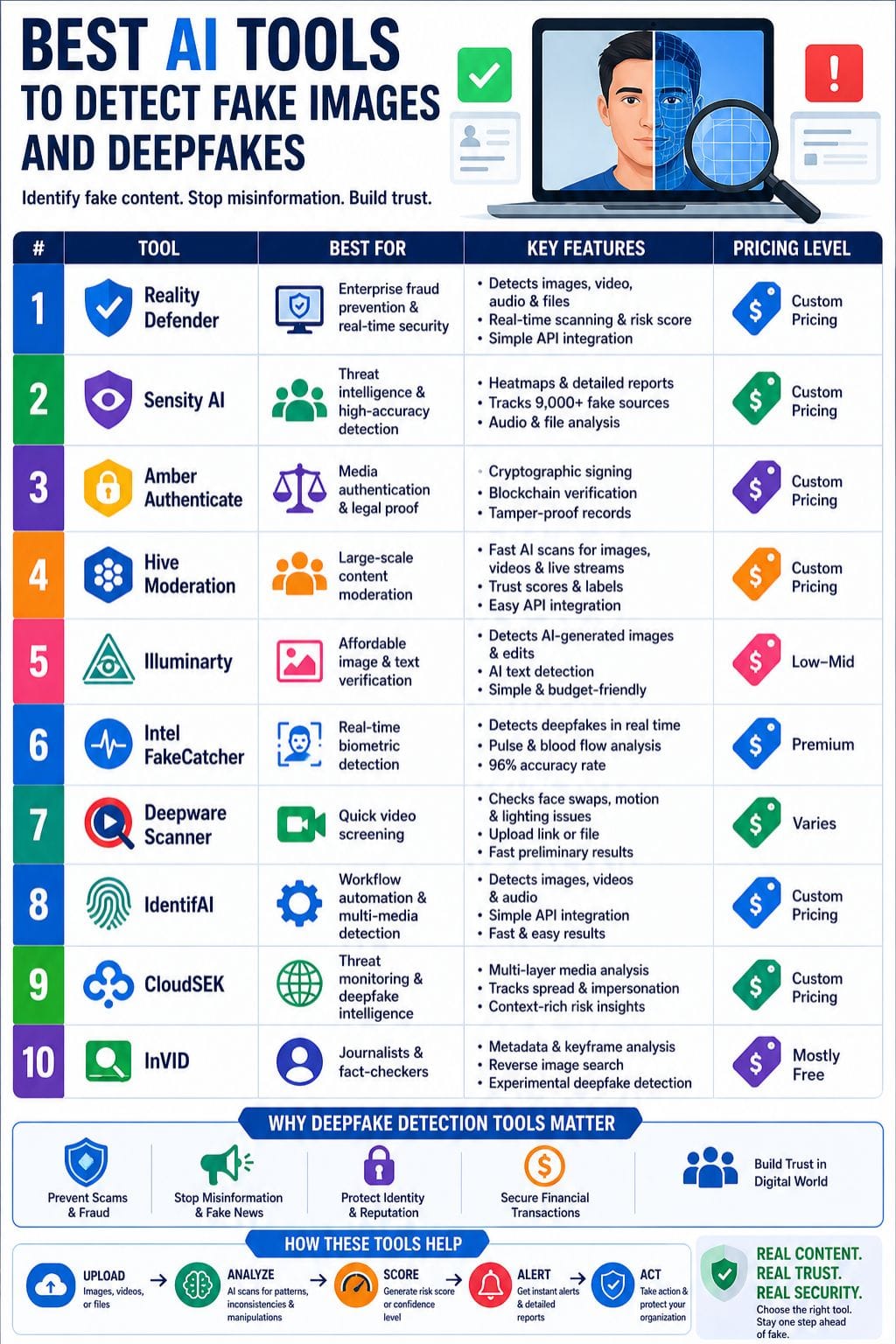
AI Deepfake Detection Tools Comparison Table
| Tool | Best For | Key Features | Pricing Level | Drawbacks |
|---|---|---|---|---|
| Reality Defender | Enterprise fraud prevention | Real-time multimodal detection, API integration | Custom Pricing | Expensive for smaller teams |
| Sensity AI | Threat intelligence | Heatmaps, fake source tracking | Custom Pricing | Limited real-time APIs |
| Amber Authenticate | Media authentication | Blockchain verification, content provenance | Custom Pricing | Complex setup |
| Hive Moderation | Large-scale moderation | Fast API, trust scoring | Custom Pricing | Weak audio detection |
| Illuminarty | Affordable image verification | AI image detection, text checks | Low-Mid | Can miss newer AI techniques |
| Intel FakeCatcher | Real-time biometric detection | Pulse detection, 96% accuracy | Premium | Hardware limitations |
| Deepware Scanner | Quick video screening | Video upload/link scan | Varies | Video-only focus |
| IdentifAI | Workflow automation | API integrations, multimodal scanning | Custom Pricing | Limited public benchmarks |
| CloudSEK | Threat monitoring | Threat intelligence + media analysis | Custom Pricing | Enterprise-focused |
| InVID | Journalists & fact-checkers | Metadata, reverse image search | Mostly Free | Experimental deepfake detection |
Top AI Tools to Detect Fake Images and Deepfakes
Reality Defender
Reality Defender helps spot deepfakes in images, video, audio, and files. It uses AI trained on both real and fake media. It can find face swaps, fake voices, odd pixels, and edited frames. The system scans content in real time and gives a risk score with alerts. It works for live calls, uploads, and checks.
Teams can use it with simple APIs or a drag-and-drop web tool. It is built for large firms and fast use. Banks, law firms, and news teams use it to stop scams. The goal is clear: find fakes early and keep people safe.
Pros
- Identify multiple media types within three seconds
- API setup requires only two lines of code
- Free plan offers 50 monthly scans
Cons
- Expensive for smaller businesses
- New format support takes time
Pricing
| Plan | Pricing |
|---|---|
| Request for Pricing | Custom |
Sensity AI
Sensity AI helps find deepfakes in images, videos, and audio. It runs quick checks to spot fake content. The system scans pixels to catch face swaps, strange frames, and poor edits. It uses heatmaps to show where things look wrong.
It also reviews file data and voice patterns for extra proof. You can use it on the cloud or on your own servers. It helps detect scams in calls, news, and ads. Results come fast and are easy to read. Many companies and public groups use it to check what is real and what is not.
Pros
- High accuracy from multi-layer scans
- Court-friendly heatmaps and reports
- Tracks 9,000+ fake sources
Cons
- Limited real-time APIs
- Resource-heavy deployment
Pricing
| Plan | Pricing |
|---|---|
| Request for Pricing | Custom |
Amber Authenticate
Amber Authenticate finds fake images and deepfakes with strong crypto checks. It signs each file at the moment of capture. This locks proof of where it came from. Its tools scan for edits, face swaps, and pixel tricks that signal a fake.
A blockchain record tracks every change from device to share. This makes it hard to hide tampering. Unlike basic AI tools, it proves what is real from the start, not after the fact. This helps in courts and the news work. The downside is that setup can take time, and teams must follow strict steps to use it well.
Pros
- Strong proof of authenticity
- Excellent for legal evidence
- Tamper-resistant records
Cons
- Complex onboarding
- Limited for unsigned legacy content
Pricing
| Plan | Pricing |
|---|---|
| Request for Pricing | Custom |
 Vivek Dev Jacob
Hive Moderation
Hive Moderation finds deepfake images and fake visuals using fast AI scans. It checks pixels, light errors, and face blends in seconds. The tool spots AI tricks in photos, videos, GIFs, and live streams.
It gives clear scores to show if the content is real or fake. It works well for large platforms that review huge amounts of media each day. Its speed helps stop scams, false claims, and harmful content early.
It also connects easily with apps for real-time checks. This helps teams act fast and keep users safe. In turn, it builds trust and keeps online spaces clean.
Pros
- High-speed processing
- Clear trust scores
- Easy API integration
Cons
- Limited audio detection
- Less effective for text-heavy manipulation
Pricing
| Plan | Pricing |
|---|---|
| Request for Pricing | Custom |
Illuminarty
Illuminarty finds AI-made images, edits, and deepfakes using smart vision tools. It checks how likely an image was made by AI and points out fake areas in the picture. It can also detect text written by bots.
The tool works fast and connects through an API for quick scans. You can use it to review content in posts, news, or chats. It helps stop false visuals before they spread. The results are simple to read and easy to act on.
This makes it useful for teams, creators, and platforms that want to keep content real and trusted online.
Pros
- Affordable
- Fast checks
- Good free version
Cons
- Can miss newer AI models
- Results may vary
Pricing
| Plan | Pricing |
|---|---|
| Basic | $10/month |
| Pro | $30/month |
| Enterprise | Contact Sales |
Intel FakeCatcher
Intel FakeCatcher detects deepfake images and videos in real time. It looks at tiny changes in skin color caused by blood flow. Real faces show natural pulses linked to the heartbeat, but fake ones do not.
The system uses AI to map these signals quickly and accurately. It works on Intel hardware through a web setup. It also checks face movement and eye focus to spot signs of tampering.
The tool can catch scams, false news, and digital fraud. By proving if a face is real, it helps people trust what they see online and avoid being misled.
Pros
- Millisecond live checks
- 96% accuracy
- Unique biometric analysis
Cons
- Hardware restrictions
- Limited software flexibility
Pricing
| Plan | Pricing |
|---|---|
| Growth | $1450/month |
| Enterprise | Custom |
Vivek Dev Jacob
Deepware Scanner
Deepware Scanner is a tool that checks videos for deepfake signs. It looks for face swaps, motion, and lighting issues. The system works fast and helps flag suspicious clips. You can paste a video link or upload a file to test it.
The tool then gives a score that shows how likely the video is to be fake. It focuses on faces, not audio checks. It is useful for journalists, security teams, and content reviewers. They can use it as a first step before deeper checks. It helps spot fake visual media.
Pros
- Fast video scans
- Simple interface
- API access
Cons
- Video-only focus
- Not ideal for final critical decisions
IdentifAI
IdentifAI helps find fake images, deepfakes, and AI-made media fast. It checks videos frame by frame and looks for small errors that people may not see. It scans faces, shapes, and tiny visual glitches to spot changes.
The tool can detect face swaps, morphs, and other fake edits. It works across many types of media and fits into normal workflows. It also offers API access, so teams can use it in their own systems.
Results are quick and easy to understand. This helps users act fast and avoid risk. IdentifAI makes it simple to check.
Pros
- Fast multimodal detection
- Simple API integration
- Broad use cases
Cons
- Limited public benchmarks
- Results depend on input quality
Pricing
| Plan | Pricing |
|---|---|
| Request for Pricing | Custom |
CloudSEK
CloudSEK helps detect deepfake images and fake media with a clear and simple approach. It combines media checks with threat intelligence to find risks early. The system reviews video frames, face movement, sound signals, surface textures, and synthetic patterns. It then gives a clear fakeness score.
It also connects suspicious content to wider impersonation risks across social media and web domains. This helps teams respond fast and take action. Its key strength is context. It does not just flag fake content. It shows how the content spreads and who may be behind it.
Pros
- Strong monitoring
- Deep contextual analysis
- Campaign tracing
Cons
- Enterprise-focused
- Pricing may not suit small teams
Pricing
| Plan | Pricing |
|---|---|
| Request for Pricing | Custom |
Sakshi Jadhav
InVID
InVID is a helpful tool to check if images or videos are real. It lets users pull details from social media posts and break videos into key frames. You can check metadata and run reverse image searches on many platforms.
Its filters help spot edits or changes in visuals. It also has a deepfake feature that can detect fake faces made by AI. This makes it useful for journalists and fact-checkers who need quick checks. It works best for content on the web. It is not a full security tool for newsrooms.
Pros
- Strong verification tools
- Keyframe analysis
- Free access
Cons
- Better for verification than AI detection
- Deepfake detection remains experimental
How to Choose the Right Deepfake Detection Tool
Choosing the right tool depends on your use case.
- For Enterprises: Choose Reality Defender, CloudSEK, or Hive Moderation
- For Journalists: Choose InVID or Amber Authenticate
- For Budget Users: Choose Illuminarty
- For Real-Time Video Analysis: Choose Intel FakeCatcher
- For Threat Intelligence: Choose Sensity AI
Final Thoughts
AI tools help stop deepfake images and fake visuals that fool people. They check light, skin tone, eye movement, and small pixel changes that humans often miss. These tools work fast and give clear results.
In a world full of false content, they help keep news real, protect votes, and make online deals safer. When fake content gets caught early, bad actors lose their edge. This helps people trust what they see again. Using these tools is a smart step today. They help you tell what is real and what is fake.
FAQs
What are AI deepfake detection tools?
AI deepfake detection tools are software platforms that identify fake images, videos, and audio created using artificial intelligence. They analyze facial movements, lighting inconsistencies, pixel distortions, metadata, and other signals to determine if content has been manipulated.
Which is the best tool for detecting fake images?
The best tool depends on your needs. Reality Defender is ideal for enterprise-level real-time detection, Illuminarty is great for affordable image checks, and InVID works well for journalists and fact-checkers verifying online content.
Can AI tools detect deepfakes in real time?
Yes, many advanced tools like Reality Defender, Hive Moderation, and Intel FakeCatcher can detect deepfakes in real time. These tools scan media instantly and provide trust scores or alerts for quick action.
Why is deepfake detection important in 2026?
Deepfake detection is important because fake media is increasingly used for scams, misinformation, identity theft, and financial fraud. Detection tools help protect businesses, individuals, and public trust by verifying whether digital content is real or manipulated.