10 Best Text-to-Motion AI Tools in 2026 for Stunning AI Videos
Discover the best text-to-motion AI tools of 2026 for creating cinematic videos, 3D animations, marketing content, and social media clips. Compare features, pricing, pros, cons, and find the right AI video generator for your needs.

Artificial intelligence has made video creation faster and more accessible than ever. With text-to-motion AI tools, you can turn simple text prompts into realistic animations, cinematic videos, social media content, and 3D characters in just minutes. Whether you're a content creator, marketer, game developer, or business owner, these tools can save time while producing high-quality visuals.
In this guide, we've rounded up the best text-to-motion AI tools of 2026, comparing their features, pricing, pros, cons, and ideal use cases to help you choose the right platform for your needs.
Text-to-motion AI tools Comparison Table
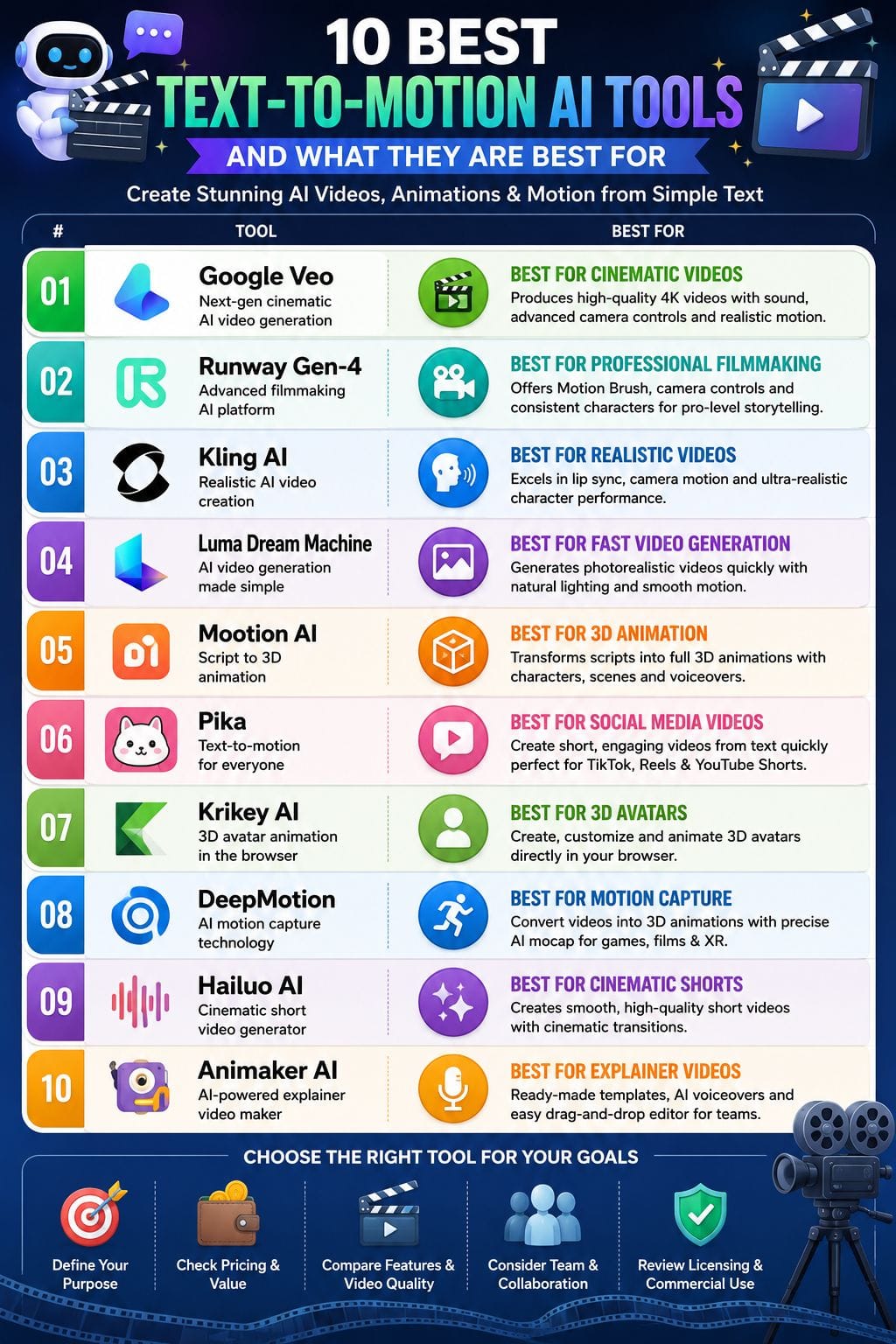
| Tool | Best For | Key Features | Drawbacks |
|---|---|---|---|
| Google Veo | Cinematic AI Videos | 4K output, Sound generation, Advanced camera controls | Requires Google Cloud setup |
| Runway Gen-4 | Professional Filmmaking | Motion Brush, Character consistency, Cinematic controls | Best suited for short clips |
| Kling AI | Realistic Videos | Lip sync, Realistic motion, Camera movement | Steep learning curve |
| Luma Dream Machine | Fast Video Generation | Photorealistic videos, Fast rendering, Natural lighting | Free plan includes watermark |
| Mootion AI | 3D Animation | Script-to-animation, Motion capture, Templates | Credit-based usage limits |
| Pika | Social Media Videos | Text-to-motion, Image animation, Fast generation | Less realistic human output |
| Krikey AI | 3D Avatars | Browser-based animation, Talking avatars, 3D exports | Can be resource-intensive in browser |
| DeepMotion | Motion Capture | AI motion capture, Video-to-animation, Markerless tracking | Requires a stable internet connection |
| Hailuo AI | Cinematic Short Videos | Smooth motion, Camera controls, Realistic animation | Limited to short video durations |
| Animaker AI | Explainer Videos | Templates, AI voiceover, Auto lip-sync | Free plan has feature limitations |
Google Veo
Google Veo is a high-end AI tool that turns short text prompts into cinematic videos with realistic motion and sound. It can create detailed camera movements, natural lighting, and smooth physics, so scenes feel more lifelike.
Veo also adds synchronized dialogue, sound effects, and background ambience without extra tools. Creators can generate new shots or extend existing ones while keeping motion consistent across longer videos.
It supports both fast and high-quality modes, including 4K output. Veo works with Google tools such as Vertex AI Studio and Google Vids, making it useful for ad teams, social media creators, and filmmakers.
Pros
- Industry‑leading realism and motion quality
- Tight integration with Google’s cloud and productivity stack
- Strong prompt adherence and creative controls for cameras, style, and pacing
Cons
- Access and full features often require Google Cloud setup and credits
- Steep learning curve to master advanced controls and prompt craft
Pricing
Request for Pricing (RFP)
Runway Gen-4
Runway Gen-4 is a professional AI tool for creating short cinematic videos from text prompts and images. It focuses on story-driven scenes and gives strong control over characters and camera movement.
The model can generate 5–10 second clips with clear details, natural motion, and realistic physics. It works well for trailers, ads, and concept videos, not just casual social media content.
Gen-4 follows prompts closely, supports smooth camera moves, and helps keep characters consistent across multiple shots. It also includes Motion Brush controls and a faster Gen-4 Turbo mode, which lets creators test ideas quickly while managing production costs.
Pros
- Strong narrative focus with stable characters and scenes across multiple shots
- Near-cinematic visual quality with advanced camera and motion control tools
- Integrated editing, VFX, and audio suite around the model for end-to-end workflows.
Cons
- Credit-based billing can get steep for frequent 4K or long-form use
- Best clips remain short; longer narratives need stitching and more planning
Pricing
Runway Gen-4 Pricing
| Plan | Price |
|---|---|
| Standard | $12/month |
| Pro | $28/month |
| Max | $76/month |
| Enterprise | Contact Sales |
Kling AI
Kling AI is a powerful tool that turns text prompts or still images into realistic videos. It creates smooth motion, sharp details, and natural camera movement in seconds.
The system understands how objects move, so scenes feel more like real footage than CGI. It also supports audio, lip-sync, and dialogue in the same workflow.
Creators can control camera angles, extend scenes, and build multi-scene videos for ads, trailers, and short stories. Kling AI can export high-quality videos up to 4K and keeps characters consistent across scenes.
Pros
- Hyper‑realistic motion and lighting that beats many rivals
- Great for short, polished clips for ads and social content
- Free tier lets you test core quality before paying
Cons
- Steeper learning curve than simpler video tools
- Focus on short clips; longer stories still need editing
Pricing
| Plan | Price |
|---|---|
| Standard | $6.99/month |
| Pro | $25.99/month |
| Premier | $64.99/month |
| Ultra | $127.99/month |
 Rishi Mundra
Luma Dream Machine
Luma Dream Machine turns short text prompts or images into cinematic videos in less than a minute. It creates smooth motion, natural camera movement, realistic depth, and vivid lighting without the need for complex editing tools.
You can make photoreal videos or choose a stylized look, depending on the project. The system also lets you improve a clip with simple follow-up prompts, so creating videos feels more like directing a scene than editing a timeline.
Built for creators, marketers, and studios, Luma makes high-quality video production fast and easy, with footage that is ready for ads.
Pros
- Fast rendering, often under a minute for most clips
- Cinematic motion, depth, and lighting that feel production‑ready
- Flexible styles, from photoreal to animated or painterly looks
Cons
- Free tier has usage limits and may add a watermark to clips
- Long, complex scenes can still need multiple generations and edits
Pricing
| Plan | Price |
|---|---|
| Monthly Plan | $14.99/month |
| Yearly Plan | $9.16/month (billed annually) |
Mootion AI
Mootion AI helps you turn ideas into 3D animated stories in minutes. You can start with a text prompt, a full script, or even an audio file. The platform creates animated characters, environments, and motion automatically.
It also supports video-to-motion capture, so you can convert real video clips into 3D movement. Users can choose from different visual styles, motion presets, and smooth scene transitions.
The cloud-based editor includes ready-made templates, subtitles, background music, and voiceover tools. This makes it useful for marketers, educators, creators, and businesses that want professional-looking animations without a complex production process.
Pros
- Very fast 3D animation generation for longer videos
- Low barrier for non‑animators; simple prompt‑driven workflow
- Generous free tier to test real projects
Cons
- Credit system can feel limiting on heavy use
- Occasional rendering flaws, especially on fine details
Pricing
| Plan | Price |
|---|---|
| Standard | $15/month |
| Plus | $25/month |
Pika
Pika is a text-to-motion AI tool that turns short prompts into vivid video clips in seconds. You can create videos from text, animate a still image, or control motion frame by frame with simple instructions.
It is especially good at cinematic styles such as neon, cyberpunk, and other bold social media visuals. The interface is clean and easy for beginners, so you can start creating without much setup.
Pika works best with short clips, which you can combine into longer videos later. This makes it useful for ads, Instagram reels, product demos, and short story-driven content.
Pros
- Very simple, beginner‑friendly interface
- Strong stylized and cinematic output
- Fast generation for short clips
Cons
- Less ideal for true photoreal humans
- Fine control often needs multiple retries
Pricing
| Plan | Price |
|---|---|
| Standard | $10/month |
| Pro | $35/month |
| Fancy | $95/month |
Muskaan Kapoor
Krikey AI
Krikey AI is a browser-based tool that turns short text prompts into 3D animated scenes in minutes instead of weeks. You can create talking avatars, turn videos into motion, and adjust faces, hands, and camera angles with simple controls.
The platform works in an easy smart mode for quick results, or you can use a timeline for detailed frame-by-frame editing.
It supports exports in video and 3D formats, so the animations can be used in games, video editors, and other creative tools. Krikey AI is a good choice for marketers, teachers, and game teams that need fast results.
Pros
- Simple, web‑based workflow with no install
- Strong 3D avatar focus and text‑to‑animation flow
- Handy exports for video editors and game engines
Cons
- Browser use can strain weak devices or slow networks
- Prompt skill needed for the best motion quality
Pricing
| Plan | Price |
|---|---|
| Krikey AI Pro | INR 549/person/month |
| Krikey AI Teams | INR 499/person/month |
| Krikey AI Enterprise | Contact Sales |
DeepMotion
DeepMotion is a browser-based AI tool that creates 3D character animation from text prompts or video clips. It uses markerless motion capture, so you do not need a motion suit or special hardware.
You can type an action in plain English or upload a video, and the platform generates a realistic full-body animation. The workflow runs in the browser, which makes it fast and easy for solo creators and small teams.
DeepMotion also supports multiple characters and works with popular 3D software used in games, XR, and film. A free tier and credit-based pricing make it easy to test.
Pros
- Low barrier to entry with no mocap suits or sensors
- Strong balance of realism and speed for rapid iteration
- Fits well into game, XR, and virtual production pipelines
Cons
- Cloud-based workflow needs stable internet
- Complex, crowded, or occluded footage may need cleanup
Pricing
| Plan | Price |
|---|---|
| Starter | $15/month |
| Professional | $117/month |
| Studio | $300/month |
Hailuo AI by MiniMax
Hailuo AI from MiniMax is a powerful tool for turning text or images into short cinematic videos. It creates smooth motion, realistic body movement, and natural facial expressions, making clips feel more lifelike.
The model follows prompts well and supports camera moves such as pans, zooms, and spins. It works well for social media videos, ads, product concepts, and quick creative ideas.
Users can guide motion with start and end frames for better shot control. Hailuo offers Standard and Fast modes, so creators can choose between higher quality or quicker, lower-cost video generation depending on their needs and deadlines.
Pros
- Strong, fluid motion that feels less stiff than many rivals
- Great for short, cinematic, social‑ready clips
- Fine control over camera moves, style, and choreography
Cons
- Short clip durations limit long‑form storytelling
- Optimal results need careful prompt craft and iteration
Pricing
Request for Pricing (RFP)
Muskaan Kapoor
Animaker AI
Animaker AI turns a simple text prompt into a complete animated video in a few minutes. It can create a script, choose a visual style, build scenes, add a voiceover, and sync the audio automatically.
You can make 2D explainer videos, social media shorts, and marketing content without learning complex animation tools. The editor also lets you adjust timing, change assets, and add transitions when needed.
This makes it useful for beginners, creators, and small teams who want professional-looking videos with less effort. If speed and ease of use matter, Animaker AI is a strong text-to-video option.
Pros
- Rich asset and template library
- Strong text-to-speech and auto lip-sync
- Good for marketing and explainer videos
Cons
- Free plan has limits and branding
- Browser-based editor can feel heavy on weak systems
Pricing
| Plan | Price |
|---|---|
| Starter | $45/month |
| Pro | $79/month |
| Enterprise | Custom Pricing |
How to Choose the Best Text-to-Motion AI Tool
Choosing the right text-to-motion AI tool depends on your goals, budget, and the type of videos you want to create. Some platforms focus on cinematic realism, while others are better for social media, marketing, or 3D animation. Here's a quick comparison to help you decide.
| Use Case | Recommended Tool | Why It Stands Out |
|---|---|---|
| Best for Beginners | Pika | Simple interface with fast text-to-video generation and minimal learning curve. |
| Best for Cinematic Videos | Google Veo | Delivers realistic 4K videos with advanced camera movements and synchronized audio. |
| Best for Marketing Teams | Animaker AI | Offers templates, AI voiceovers, and ready-made assets for marketing and explainer videos. |
| Best for 3D Animation | Mootion AI | Creates complete 3D animated stories from text, scripts, or audio. |
| Best Free Option | Kling AI | Provides a free tier with impressive video quality for testing AI-generated content. |
| Best for Game Developers | DeepMotion | Supports AI motion capture and exports animations for game engines and XR projects. |
| Best Enterprise Solution | Google Veo | Integrates with Google's enterprise ecosystem, including Vertex AI Studio. |
| Best Value for Money | Runway Gen-4 | Combines professional-quality video generation with powerful editing tools at competitive pricing. |
Things to Consider Before Choosing a Text-to-Motion AI Tool
Before choosing a text-to-motion AI tool, compare the features that matter most for your workflow and budget.
- Video Quality: Look for realistic visuals and HD or 4K output.
- Clip Length: Check whether the tool supports longer videos or only short clips.
- Rendering Speed: Faster rendering helps you create and test content more efficiently.
- Camera Controls: Advanced camera movements can make videos more cinematic.
- Character Consistency: Important for projects with recurring characters or scenes.
- Audio Features: Built-in voice, lip-sync, and sound effects can save editing time.
- API & Collaboration: Businesses may need API access and team collaboration features.
- Commercial Licensing: Ensure your subscription allows commercial use of generated videos.
- Pricing: Compare subscription plans, credit limits, and included features to find the best value.
Conclusion
Text-to-motion AI is not a passing trend. It is changing how people turn ideas into video. It removes many slow production steps, cuts costs, and makes motion design easier for more people.
Writers, marketers, and solo creators can now create scenes with a few clear text prompts. This helps them test ideas faster, create more content, and try new storytelling styles. The biggest change is creative freedom.
Motion is no longer limited to people with advanced design skills. It is becoming a simple visual language that anyone can use to think, explain, promote, and share ideas through moving images.
FAQs
What is a text-to-motion AI tool?
A text-to-motion AI tool converts written prompts into animated or realistic videos using artificial intelligence, reducing the need for manual video production.
Which is the best text-to-motion AI tool for beginners?
Pika is a great choice for beginners because it offers an easy-to-use interface and quickly generates videos from simple text prompts.
Are there any free text-to-motion AI tools?
Yes. Tools like Kling AI and DeepMotion offer free plans or trial versions, allowing users to test their features before upgrading to paid plans.
Which text-to-motion AI tool is best for professional-quality videos?
Google Veo and Runway Gen-4 are among the best options for creating high-quality cinematic videos with advanced camera controls, realistic motion, and professional editing features.