How to File GSTR-1: A Step-by-Step Guide for Indian Businesses in 2026
GSTR-1 is where every GST-registered business reports all its sales to the government, invoice by invoice. What you file here flows into your buyers' credit statement. Miss an invoice or enter a wrong GSTIN and your buyer loses their ITC. Here is the full process, table by table, step by step.

GSTR-1 is the return where every GST-registered business reports all its sales, invoice by invoice, to the government. It is filed monthly or quarterly depending on your annual turnover. What you declare here flows directly into your buyers' credit statement (GSTR-2B). If you miss an invoice or report the wrong GSTIN, your buyer cannot claim the input tax credit on that purchase. That makes GSTR-1 one of the most consequential returns you file. Most businesses use GST invoicing software to generate the return data automatically rather than entering invoices table by table on the portal.
What Is GSTR-1?
GSTR-1 is the return of outward supplies. Every invoice you raise, every credit note and debit note you issue, and every export you make gets reported here. It is not where you pay tax. It is where you declare what you sold. Tax payment happens in GSTR-3B.
Since July 2025, the figures you report in GSTR-1 lock your outward tax liability in GSTR-3B. You cannot declare a lower liability in GSTR-3B than what your GSTR-1 shows. First-time accuracy now matters more than it did before.
Who Has to File GSTR-1?
Every GST-registered business that makes outward supplies must file GSTR-1. This includes regular taxpayers, manufacturers, service providers, exporters, and e-commerce sellers. There is no turnover floor. If you are GST-registered and making sales, GSTR-1 applies to you. The following categories are exempt:
- Composition scheme taxpayers (they file CMP-08 and GSTR-4)
- Input Service Distributors
- Non-resident taxable persons
- Online Information and Database Access Service (OIDAR) providers
Even if you had zero sales in a period, you must file a Nil GSTR-1. Non-filing attracts late fees even for a zero-tax period.
 Muskaan Kapoor
GSTR-1 Due Dates in 2026
Your due date depends on your annual turnover and whether you are on the QRMP scheme.
| Filer type | Turnover | Due date |
|---|---|---|
| Monthly filer | Above INR 5 crore | 11th of the following month |
| Quarterly filer (QRMP) | Up to INR 5 crore | 13th of month after quarter end |
| IFF (optional) | QRMP filers, first two months of quarter | 13th of the following month |
Monthly filer example: GSTR-1 for May 2026 is due by June 11, 2026.
Quarterly filer example: GSTR-1 for April-June 2026 is due by July 13, 2026.
IFF (Invoice Furnishing Facility): QRMP filers can optionally upload B2B invoices in the first two months of each quarter through IFF. This lets buyers claim ITC monthly instead of waiting for the quarterly return. IFF is optional. Not using it does not attract a penalty, but your buyers' GSTR-2B will not reflect your invoices until the quarterly return is filed.
What Do You Report in GSTR-1?
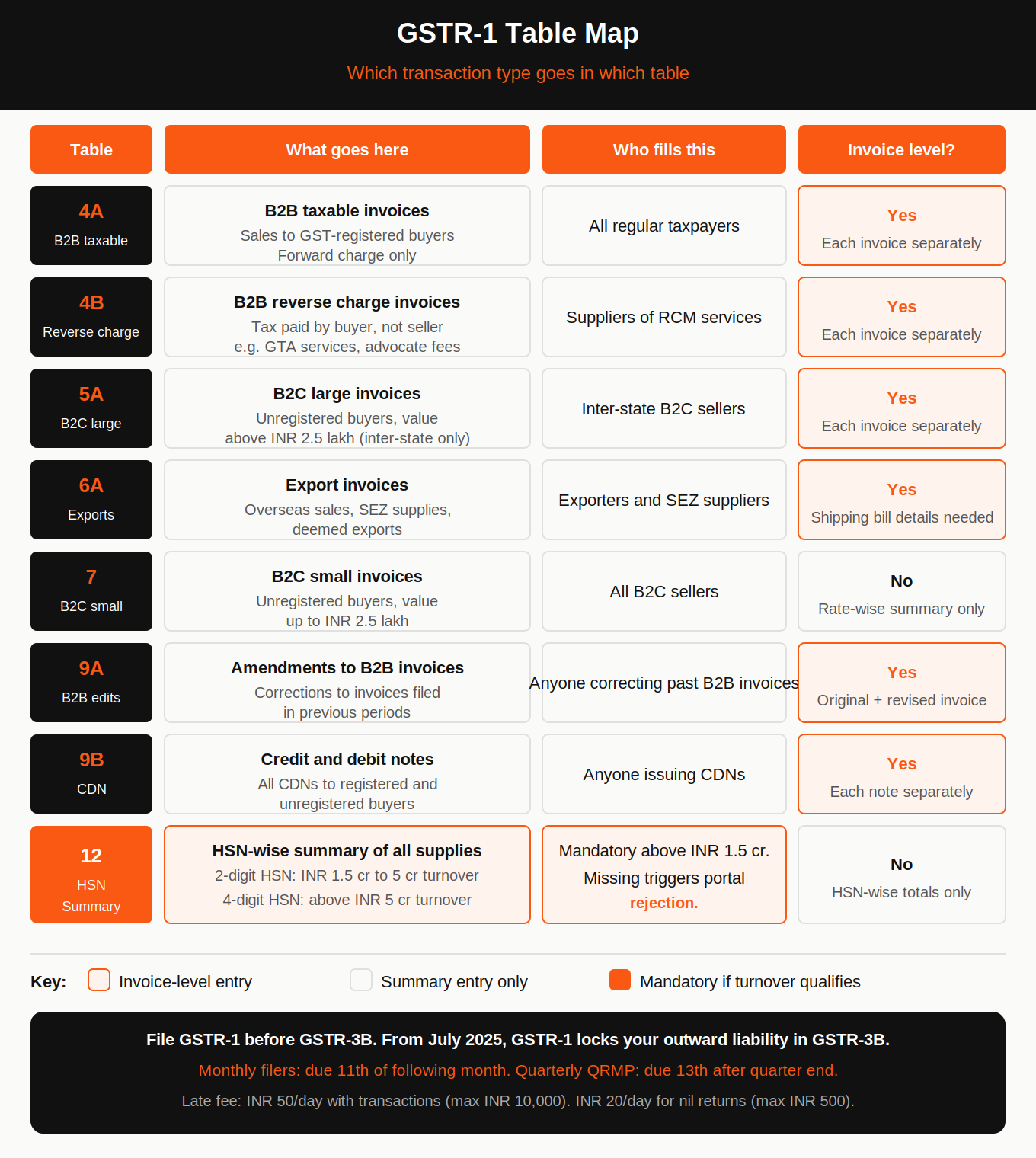
Every sale you made in the period, invoice by invoice, for B2B customers and in summary for small B2C transactions. This includes all tax invoices, credit notes, debit notes, export invoices, advances received, and amendments to invoices from earlier periods. GSTR-1 has multiple tables, and you fill only the ones relevant to your transaction types.
| Table | What goes here |
|---|---|
| Table 4A | B2B invoices (taxable): invoice-wise details for registered buyers |
| Table 4B | B2B invoices with reverse charge |
| Table 5A | B2C large invoices: unregistered buyers, invoice value above INR 2.5 lakh |
| Table 6A | Export invoices: overseas supplies and SEZ supplies |
| Table 7 | B2C small invoices: unregistered buyers, invoice value up to INR 2.5 lakh (rate-wise summary, not invoice-wise) |
| Table 9A | Amendments to B2B invoices from previous periods |
| Table 9B | Credit and debit notes |
| Table 9C | Amendments to B2C invoices from previous periods |
| Table 12 | HSN-wise summary of outward supplies |
For most small businesses, Table 4A (B2B invoices) and Table 7 (B2C small invoices) cover the majority of transactions.
HSN summary in Table 12: Mandatory for businesses with an annual turnover above INR 1.5 crore. 2-digit HSN for INR 1.5 crore to INR 5 crore. 4-digit HSN for above INR 5 crore. Missing this triggers rejection by the GST portal.
Step-by-Step Process to File GSTR-1
Step 1: Reconcile your sales data before starting
Before logging in, match your sales register against your invoices for the period. Check for:
- Invoices with the wrong GSTIN of the buyer (buyer cannot claim ITC)
- Missing invoices
- Credit and debit notes have not yet entered
- Advances received but not invoiced
Do this before filing. Once GSTR-1 is submitted for a period, you can only correct it through amendments in the next period's return.
Step 2: Log in to the GST portal
Go to gst.gov.in. Enter your username, password, and CAPTCHA. Navigate to Services, then Returns, then Returns Dashboard.
Step 3: Select the return period
On the Returns Dashboard, choose the financial year and return period from the dropdown. Click Search. The GSTR-1 tile will appear.
Step 4: Choose online or offline preparation
Online (up to 500 invoices): Click Prepare Online under the GSTR-1 tile. Enter invoice details directly on the portal table by table.
Offline (more than 500 invoices): Click Prepare Offline. Download the GST Returns Offline Tool from the portal. Enter your invoice data in the tool, generate a JSON file, and upload it. The JSON file has a 5 MB limit per upload. If your file exceeds this, split it into multiple files and upload each one before generating the summary.
If you are above the e-invoice limit (INR 5 crore turnover): Your B2B invoice data auto-populates in GSTR-1 from the Invoice Registration Portal within two working days of IRN generation. Review this data before adding entries in the remaining tables. See what the e-invoice limit means for your business if you are unsure whether this applies to you.
Step 5: Fill in the relevant tables
Work through each table that applies to your business:
- Add B2B invoices in Table 4A. Each invoice needs the buyer's GSTIN, invoice number, date, value, and tax amount.
- Add B2C large invoices (above INR 2.5 lakh) in Table 5A with invoice-level detail.
- Add B2C small invoices in Table 7 as a rate-wise summary, not invoice-by-invoice.
- Add export invoices in Table 6A with shipping bill details where available.
- Add credit notes and debit notes in Table 9B.
- Fill HSN summary in Table 12 if your turnover is above INR 1.5 crore.
Save each section as you go. The portal lets you save partial data and return to complete it.
Step 6: Generate GSTR-1 summary
Once all tables are filled, click Generate GSTR-1 Summary. The portal computes the consolidated figures. Review these totals against your books. If any number looks wrong, go back and correct the relevant table before proceeding.
Step 7: Submit and file
Click Proceed to File. Preview the full return. Once satisfied, click File Statement.
- Companies and LLPs: Must use a Digital Signature Certificate (DSC) to authenticate.
- Proprietors, individuals, and partnerships: Can use EVC, which sends an OTP to your registered mobile number.
After successful verification, an Application Reference Number (ARN) is generated and sent by SMS and email. This ARN is your proof of filing. Save it and download the acknowledgement.
How to File a Nil GSTR-1
If you had no outward supplies in the period, you still must file. On the GSTR-1 preparation page, select the File Nil GSTR-1 checkbox. If there is any saved data in the form, delete it first. Then click File Statement and authenticate with DSC or EVC. An ARN is generated confirming the nil return.
GSTR-1A: Amendments Before GSTR-3B
GSTR-1A is available between the filing of GSTR-1 and the filing of GSTR-3B for the same period. If a buyer finds a discrepancy in your filed GSTR-1 data and requests a correction, you can make it in GSTR-1A without waiting for the next month's amendment tables. GSTR-1A changes update the buyer's GSTR-2B and also revise your locked outward liability in GSTR-3B.
Late Fees for Missing the Due Date
| Return type | Late fee per day | Maximum |
|---|---|---|
| GSTR-1 with transactions | INR 50/day (INR 25 CGST + INR 25 SGST) | INR 10,000 |
| Nil GSTR-1 | INR 20/day (INR 10 CGST + INR 10 SGST) | INR 500 |
You cannot file the current period's GSTR-1 unless all previous periods are filed. The portal blocks forward filing if there are pending returns.
Muskaan Kapoor
Common Mistakes to Fix Before Filing
Wrong GSTIN for a buyer: The invoice will not appear in the buyer's GSTR-2B. They cannot claim ITC. Delete the invoice and re-enter it with the correct GSTIN in the same period before filing, or amend it in the next period's Table 9A.
Missed invoices: Add them in the next period's return as additional invoices. You can also use GSTR-1A if GSTR-3B for that period is not yet filed.
Wrong tax rate: Amend via Table 9A in the next return and adjust the difference in GSTR-3B.
Duplicate invoices: Use the amendment tables to reduce the duplicated amount.
GSTR-1 and GSTR-3B mismatch: Output tax declared in GSTR-3B lower than what appears in buyers' GSTR-2B is flagged by the system and can trigger an ASMT-10 scrutiny notice. Always file GSTR-1 before GSTR-3B and verify the figures match. Freelancers and consultants should also check that gross invoice values, not net bank credits, are what gets reported in GSTR-1.
FAQs
What is GSTR-1, and who has to file it?
GSTR-1 is the return of outward supplies filed by every GST-registered business except composition taxpayers, ISDs, and non-resident taxable persons. It reports all sales invoices, credit notes, debit notes, and exports for a period. Monthly filers file by the 11th of the following month. Quarterly QRMP filers file by the 13th of the month after the quarter ends.
What happens if I enter the wrong GSTIN of my buyer in GSTR-1?
The invoice will not appear in the buyer's GSTR-2B, and they cannot claim ITC on it. Correct it in the same period before filing, use GSTR-1A if GSTR-3B is not yet filed, or amend it in Table 9A of the next period's return.
Can I file GSTR-1 before the due date?
Yes. You can file GSTR-1 as soon as the period ends. Most practitioners file by the 10th to give buyers time to see the invoices in their GSTR-2B before the GSTR-3B deadline.
What is IFF and do I have to use it?
IFF (Invoice Furnishing Facility) is an optional facility for quarterly QRMP filers to upload B2B invoices in the first two months of each quarter. It allows buyers to see your invoices in their GSTR-2B monthly instead of quarterly. It is not mandatory. Not using it does not attract a penalty.
What is the late fee for not filing GSTR-1 on time?
INR 50 per day (INR 25 CGST + INR 25 SGST) for returns with transactions, up to a maximum of INR 10,000. For nil returns, INR 20 per day up to INR 500.