Best AI Tools for Pinterest Ads: Features, Pricing & Comparison
Discover the best AI tools for Pinterest ads to create visuals, write ad copy, plan content, and manage campaigns more efficiently.

Want to turn more Pinterest views into clicks and sales? The best AI tools for Pinterest ads can help you create fresh visuals, write clear copy, and test new ideas with less work.
Some also help you reach the right people and make better use of your ad budget. That means less time on routine tasks and more time to shape your message. From your first ad to your next big push, these tools can support each step.
This guide looks at key features, ease of use, and value to help you find the right fit.
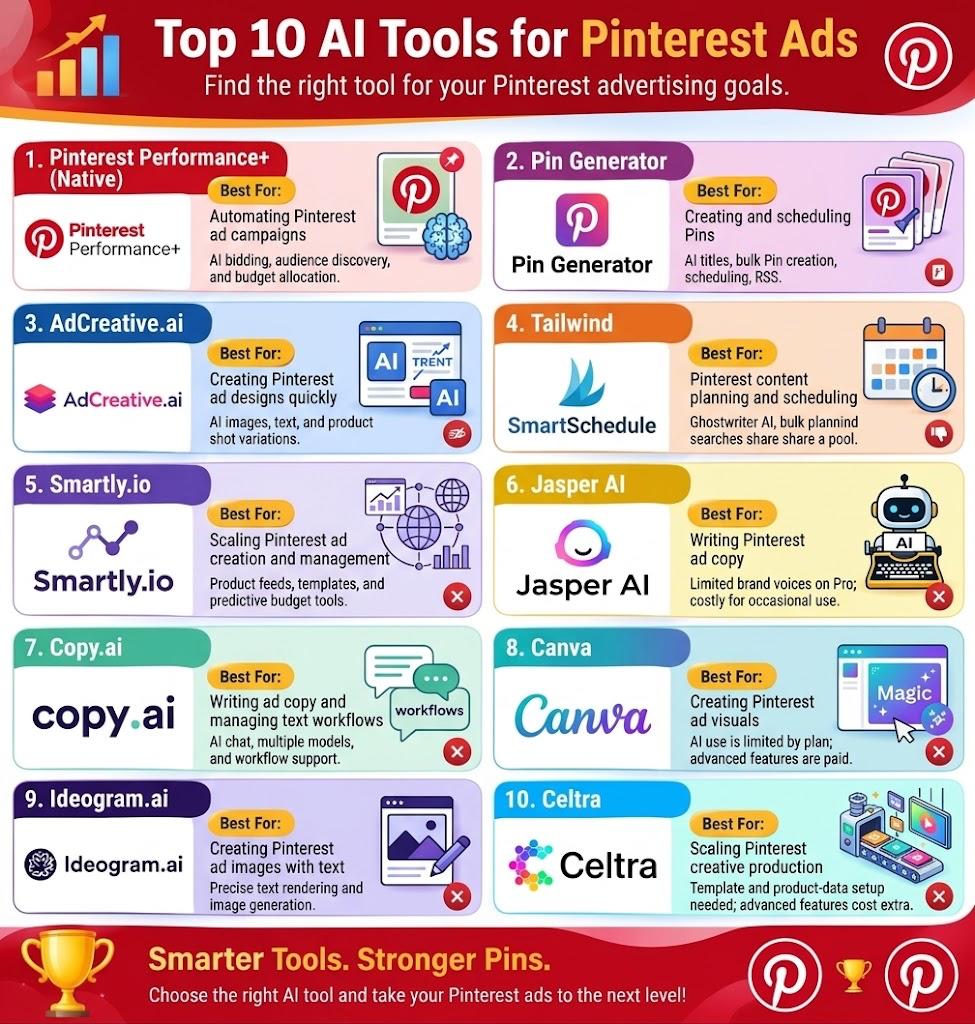
Best AI Tools for Pinterest Ads: Comparison
| Tool | Best For | Key Features | Drawbacks |
|---|---|---|---|
| Pinterest Performance+ (Native) | Automating Pinterest ad campaigns | AI bidding, audience discovery, budget allocation, visual search, catalog ad creation | Pinterest controls bids; costs can shift as the system tests campaigns |
| Pin Generator | Creating and scheduling Pins | AI titles and text, image creation, bulk Pins, scheduling, RSS feeds, Canva imports, store sync | Focuses on Pins rather than paid ad bids or spend control; images use credits |
| AdCreative.ai | Creating Pinterest ad designs quickly | AI images, text, product shots, videos, brand controls, creative scoring, variations | Monthly credits are limited by plan; Starter covers one brand |
| Tailwind | Pinterest content planning and scheduling | Ghostwriter, Create, SmartSchedule, bulk planning, SEO tools, Pin ranking tracking | Posts, AI tasks, and keyword searches share a pool; each Pinterest account needs its own plan |
| Smartly.io | Scaling Pinterest ad creation and management | AI image/video creation, product feeds, templates, bulk launches, predictive budget tools, reporting | Bulk tools may be less useful for small campaigns; feeds and templates need careful setup |
| Jasper AI | Writing Pinterest ad copy | Brand Voice, ad copy, titles, descriptions, calls to action, audience profiles | Limited brand voices and knowledge assets on Pro; may be costly for occasional use |
| Copy.ai | Writing ad copy and managing text workflows | AI chat, multiple AI model providers, workflows, research and writing support | Workflow use varies; focus is mainly on text and workflows |
| Canva | Creating Pinterest ad visuals | Magic Design, Magic Write, AI image tools, Brand Kits, Magic Resize, drag-and-drop editor | AI use is limited by plan; some advanced features require paid plans |
| Ideogram.ai | Creating Pinterest ad images with text | Text rendering, image generation, private creation on paid plans, batch creation, high-quality exports | Private creation requires a paid plan; users must check image rights and service terms |
| Celtra | Scaling Pinterest creative production | AI image/video creation, templates, product feeds, brand rules, ad variations, creative testing | Template and product-data setup is needed; advanced features can affect pricing |
Pinterest Performance+ (Native)
Best for automating Pinterest ad campaigns, bidding, and budget allocation.
Pinterest Performance+ is a native AI tool to include in a top 10 list for Pinterest ads. It helps brands run ads with less hands-on work.
Built into Ads Manager, it can set bids, find audiences, and spread spend based on campaign goals. Setup needs 50% fewer inputs than standard campaigns. Its visual search tech helps match ads with people based on the images they view.
For catalog ads, AI can make product backgrounds and turn Pins into shopping or collection ads. Brands can set daily or lifetime budgets, while Pinterest works to drive more results.
Pros
- Fewer fields cut prep time and reduce manual work
- Visual search helps find people beyond keyword and interest groups
- Turns product Pins into shopping and collection ads, saving creative work
Cons
- Pinterest sets and updates bids, rather than letting you set each one
- Costs can shift while the system tests ways to get results
Pricing
| Plan | Pricing |
|---|---|
| Request for pricing (RFP) | Request for pricing |
Pin Generator
Best for creating Pins in bulk and scheduling posts.
Pin Generator is a useful contender for a top ten list of AI tools for Pinterest ads. It turns web links, blog posts, and store items into pins. Its AI writes titles and pin text, and can make images.
You can set brand fonts, add your logo, and change layouts. Bulk tools help you make more pins with less work. Smart schedules keep posts on track. RSS feeds turn new posts into fresh pins.
Canva imports and store sync add ease. Its main role is pin creation and posting, not paid ad bids, budgets, or full ad campaign control
Pros
- Pull content from a site or sitemap to make pins without starting from scratch
- RSS links help turn new blog posts into pins with less hands-on work
- Save fonts, colours, and logos for a more consistent look. Import Canva designs, too
Cons
- Its listed tools focus on making and posting pins, rather than paid ad bids or spend control
- Each image costs 12 or 24 credits, while scheduling a standard pin costs one
Pricing
| Plan | Pricing |
|---|---|
| Pro | $23.99/month |
| Growth | $39.99/month |
| Agency | $55.99/month |
AdCreative.ai
Best for generating Pinterest ad creatives and testing design variations.
AdCreative.ai is a useful pick for brands that need fresh Pinterest ad designs fast. It makes ad images, text, product shots, and videos from a short brief. You can add your brand’s look, then build more versions to test.
Its AI scores designs before launch to help you choose which ads to try. Brand tools help keep fonts, logos, and colors in sync.
For Pinterest, its main role is to create assets, not prove which Pins will sell. It suits teams that want quick drafts and more test options.
Pros
- This gives teams more designs to test with less work from scratch
- Keep your logo, fonts, and colours in line across ad versions
- AI scores can help you pick designs to test before you spend on ads
Cons
- Plans have set monthly credits. High use may mean you need a higher tier
- The base Starter plan covers one brand, which may not suit teams with several clients
Pricing
| Plan | Pricing |
|---|---|
| Starter Plans | $39/month |
| Professional Plans | $249/month |
| Ultimate Plans | $999/month |
 Vivek Dev Jacob
Tailwind
Best for Pinterest content planning, scheduling, and SEO.
Tailwind is a useful tool for marketers who want to create and plan Pinterest content with less effort. Its AI writing tool, Ghostwriter, helps create captions, while Create turns photos into Pins that fit your brand.
SmartSchedule suggests the best times to post based on audience activity. Bulk tools also let you plan posts weeks ahead. Its SEO features help find search terms and track Pin rankings.
These tools can support your Pinterest ad strategy by making content planning easier. However, Tailwind focuses more on creating Pins and growing organic reach than managing paid ads.
Pros
- Turn your photos into many Pin styles without starting each from scratch
- SmartSchedule picks post times based on your own audience, not a fixed time slot
- Buy just scheduling, SEO, or engagement instead of the full bundle
Cons
- Posts, AI tasks, and keyword searches draw from the same pool
- Each Pinterest account needs its own plan, which can cost teams more
Pricing
| Plan | Pricing |
|---|---|
| Pinterest SEO | $14.99/month |
| Pinterest Engagement | $14.99/month |
| Pin Scheduling & Creation | $29.99/month |
Smartly.io
Best for scaling paid campaigns and managing ads in bulk.
Smartly.io helps brands build, run, and track Pinterest ads in one place. Its AI tools help teams make fresh images and videos with less manual work.
Users can turn product feeds into Pins, change prices, and keep ads on brand with shared templates. Smart budget tools shift spend toward ad sets that perform well. Teams can also launch ads in bulk, review designs, and track results across campaigns.
These features make it a strong pick for brands with large product ranges. For a top ten shortlist, its main strength is scale.
Pros
- Turn product feeds into many Pins which cuts the need to build each ad from scratch
- Pull live data into ads to keep prices and deals up to date
- Predictive budget tools move spend toward stronger ad sets in real time
Cons
- Its bulk tools offer less value when you run just a few ads
- Feed links, field maps, and templates need care
Pricing
| Plan | Pricing |
|---|---|
| Request for Pricing (RFP) | Request for pricing |
Jasper AI
Best for writing on-brand Pinterest ad copy and headlines.
Jasper AI helps teams write Pinterest ad copy with a clear brand voice. It can draft Pin titles, short descriptions, and calls to action from your brief.
Its Brand Voice tool helps keep your tone the same across ads. You can add product facts and audience details to guide each draft.
For Pinterest campaigns, use it to try fresh hooks and shape copy for groups of buyers. Jasper is best viewed as a writing aid, not proof that an ad will sell. Its main strengths are brand control and fast drafts.
Pros
- Feed it brand text to help ads sound like your business, not a generic bot
- Add facts about your goods and buyers to guide more relevant ad drafts
- Pro includes three audience profiles, which can help you shape copy for different buyer groups
Cons
- Pro includes two brand voices and five knowledge assets
- The monthly fee may be hard to justify if you need just a few Pin drafts
Pricing
| Plan | Pricing |
|---|---|
| Pro | $69/month |
| Business | Custom Pricing |
Vivek Dev Jacob
Copy.ai
Best for creating ad copy and automating text-based workflows.
Copy.ai is a useful tool to include in a list of the best AI tools for Pinterest ads. It focuses on writing rather than managing ad campaigns. You can use it to create Pin titles, ad copy, and calls to action based on your product details.
Its Chat feature gives teams access to AI models from OpenAI, Anthropic, and Google. Paid plans also offer workflows that help teams manage research, writing, and other tasks.
The Chat plan includes five seats, unlimited words, and unlimited projects. However, users should review the copy.
Pros
- Access models from three providers in one chat tool
- Five Chat seats let a small team share access without a large team plan.
- Custom workflows can link research and writing tasks
Cons
- Workflow use varies with the steps and text each run creates
- Its listed features focus on text and workflows
Pricing
| Plan | Pricing |
|---|---|
| Chat | $29/month |
| Enterprise | Contact Sales |
Canva
Best for designing Pinterest ad visuals using AI-powered tools.
Canva helps you make Pinterest ad designs with less work. Magic Design turns prompts into layouts, while Magic Write drafts short ad copy.
You can use AI to make images, clear photo backgrounds, and edit scenes. Brand Kits keep your fonts, logos, and colors in one place. Magic Resize adapts designs for new sizes.
The drag and drop editor makes each draft easy to change. Start with a Pinterest Pin layout, add your product shots, and shape the look to fit your brand. Canva suits small shops and teams that want to create fresh ad visuals.
Pros
- Remove a photo’s background, then add a new scene with a text prompt
- Brand Kits store your key fonts, colors, and logos
- Magic Resize lets you adapt one design for more channels, which cuts repeat work
Cons
- Pro gives you more AI use, but not endless use
- Magic Resize and full Brand Kit tools need a paid plan
Pricing
| Plan | Pricing |
|---|---|
| Pro | $18/month |
| Business | $25/month |
| Enterprise | Contact Sales |
Ideogram.ai
Best for generating Pin images with clear, readable text.
Ideogram.ai is a strong pick for a top ten list of AI tools for Pinterest ad design. Its key strength is text, with clear words built into images. This helps you make pins with bold hooks, sale prices, and short brand lines.
You can turn prompts into fresh visuals, test new styles, and build ad concepts fast. Paid plans add private image creation, more credits, and high quality exports. Pro adds batch creation for larger tasks.
Use it to make ad art, then check each word and visual before launch.
Pros
- Built-in text rendering suits pins that need a headline or price within the image
- Paid plans let you keep new ad concepts private while you work
- Pro adds batch creation, which helps teams make more designs for tests
Cons
- Private creation requires a paid plan, so free access may not suit unreleased offers
- Commercial use is allowed, but you must check that your images do not breach others’ rights or the service terms
Pricing
| Plan | Pricing |
|---|---|
| Plus | $15/month |
| Pro | $42/month |
| Team | $20/user/month |
| Enterprise | Contact Sales |
Vivek Dev Jacob
Celtra
Best for producing large volumes of on-brand ad creatives across products and markets.
Celtra helps brands create Pinterest ads in large numbers using AI and ready-made templates. Teams can turn a single design into several ads for different products, markets, and formats.
Its AI features support image and video creation, while brand rules help keep ads consistent. The Pinterest link also makes it easier to create and share ads with less manual work.
Product feeds can add details such as prices and ratings to each design. Teams can review ads, test different versions, and use results to improve future campaigns. Celtra is useful for brands that need many fresh ads at once.
Pros
- Reuse one approved design across many products and markets
- Catalogs refresh each hour, helping ads reflect changes in product data
- Shared templates and brand rules help teams make new ads without losing a consistent look
Cons
- Teams must build templates and link product data before they can scale catalog ads
- Predictive AI, custom API links, and creative services can affect the final quote
Pricing
| Plan | Pricing |
|---|---|
| Request for Pricing (RFP) | Request for pricing |
How to Choose the Right AI Tool for Pinterest Ads
The right AI tool depends on the part of Pinterest advertising you want to improve.
- For campaign automation: Pinterest Performance+ (Native) is the most direct fit because it helps with bids, audiences, budgets, and campaign setup.
- For Pin creation and scheduling: Pin Generator and Tailwind can help reduce the work involved in creating and planning Pins.
- For ad creative: AdCreative.ai, Canva, and Ideogram.ai focus on creating fresh visual concepts and ad assets.
- For ad copy: Jasper AI and Copy.ai can help teams create titles, descriptions, calls to action, and other text.
- For large-scale campaigns: Smartly.io and Celtra are useful for brands that need to produce and manage many creative variations.
Before choosing a tool, consider whether you need help with paid campaign management, creative production, copywriting, scheduling, or a combination of these tasks.
Final Thoughts
Pinterest ads can do more when you pair clear goals with the right AI support. These tools can help you save time, shape fresh ideas, and build ads that speak to your audience.
But great results still need your voice, your taste, and a plan. Start small, test what works, and use each result to guide your next step.
Let AI handle the busy work while you focus on what makes your brand stand out. The goal is not just more clicks. It is to turn fresh ideas into real growth.
FAQs
What are AI tools for Pinterest ads?
AI tools for Pinterest ads help businesses create ad visuals, write copy, find audiences, manage budgets, schedule Pins, and test different creative ideas with less manual work.
Which AI tool is best for Pinterest ads?
The best tool depends on your needs. Pinterest Performance+ is suited to campaign automation, while Canva and AdCreative.ai are useful for creating ad visuals. Jasper AI and Copy.ai focus more on ad copy.
Can AI tools create Pinterest ad designs?
Yes. Tools such as AdCreative.ai, Canva, and Ideogram.ai can help create Pinterest ad images and other creative assets. Some also offer AI-generated copy, layouts, and design variations.
Can AI tools manage Pinterest ad campaigns?
Yes. Pinterest Performance+ and Smartly.io can support campaign management, including bidding, audience targeting, budget allocation, and ad optimization. Other tools in the list focus mainly on creative or content creation.
How do I choose the right AI tool for Pinterest ads?
Choose a tool based on the task you want to improve. Consider whether you need campaign automation, ad creative, copywriting, Pin scheduling, or large-scale creative production. Your budget and campaign size should also guide your choice.