Best AI Tools for Printing Businesses to Simplify Design, Orders, and Production in 2026
Print shops and POD sellers face different problems but both benefit from AI. This guide covers the best AI tools for printing businesses across design, mockups, marketing copy, and fulfilment, with pricing and honest comparisons for both audiences.
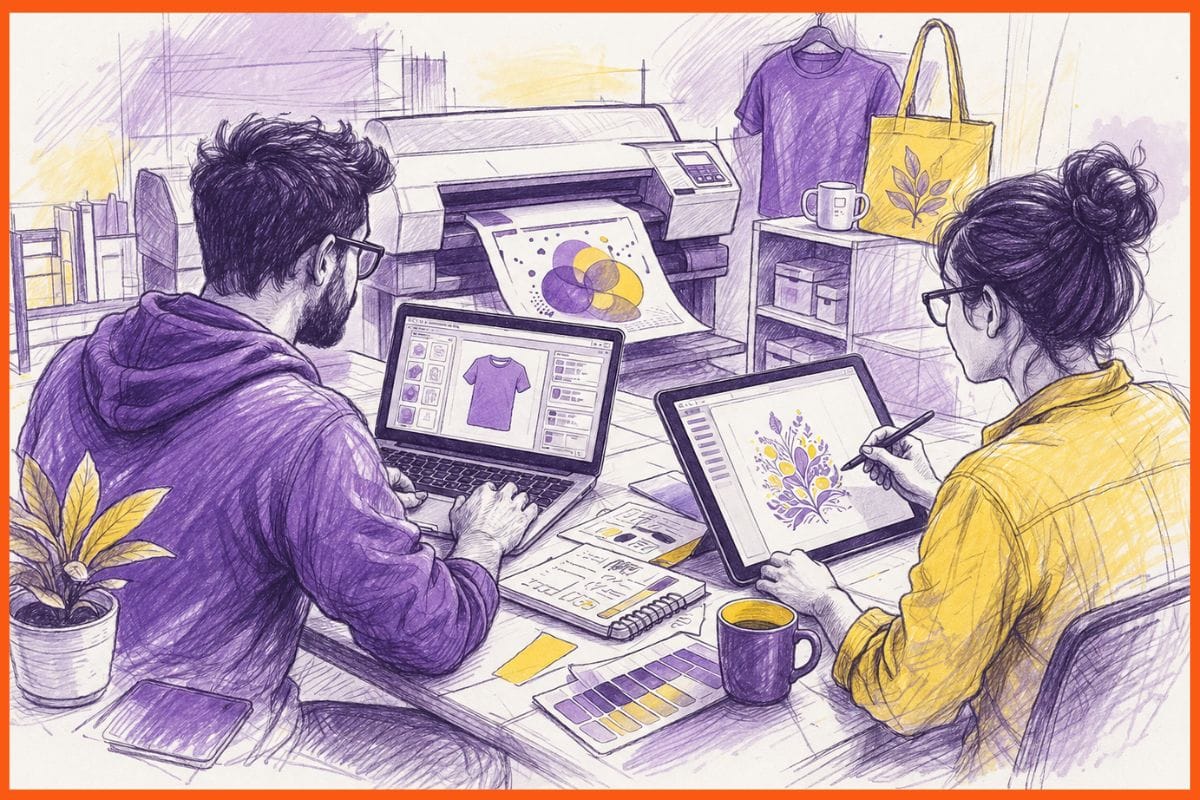
Running a printing business in 2026 means competing on speed, price, and personalisation against companies that use AI to automate what used to take hours of manual work. Whether you run a local print shop, a web-to-print storefront, or a print-on-demand ecommerce business, the AI tools available now cover everything from design generation and background removal to order fulfilment and customer marketing.
This guide covers both audiences. The first half covers tools for traditional print businesses and print shops: design, prepress, workflow, and marketing. The second half covers print-on-demand sellers: AI image generation, mockups, product listings, and fulfilment. All pricing is verified from official sources.
What to Look for in an AI Tool for a Printing Business
The tools that help a commercial print shop are different from the ones that help a POD seller on Etsy. Before picking anything, identify which job you are trying to solve.
- Design and image generation creates original artwork, product visuals, and marketing assets from text prompts. Midjourney and Adobe Firefly work here.
- Image editing and prepress handles background removal, upscaling, colour correction, and file preparation for print. Remove.bg and Adobe Firefly cover this.
- Product mockups places your designs onto realistic product photos for listings and marketing. Placeit does this.
- Marketing and product copy writes product descriptions, ad copy, email campaigns, and social content at scale. Jasper and Canva Magic Studio cover this.
- Fulfilment and order automation handles printing, packing, and shipping automatically when a customer orders. Printful and Printify work here for POD businesses.
- Web-to-print storefronts let customers design, customise, and order print products online. DesignNBuy and OnPrintShop operate here.
Quick Comparison of AI Printing Tools
| Tool | Best For | Key Feature | Free Plan | Starting Price | Website |
|---|---|---|---|---|---|
| Adobe Firefly | Design teams in Creative Cloud | Commercially licensed AI generation; Generative Fill in Photoshop | Yes (25 credits/month) | $9.99/month (Standard) | firefly.adobe.com |
| Midjourney | Original artwork for print products | Highest artistic quality AI image generation | No | $10/month (Basic) | midjourney.com |
| Canva Magic Studio | Marketing assets and non-designer teams | 1M+ templates; Magic Design; background removal | Yes | $15/month (Pro) | canva.com |
| Remove.bg | Background removal at volume | One-click AI background removal; bulk API | Yes (previews only) | From $0.13/image or $9/month | remove.bg |
| Placeit | Product mockups for print listings | 10,000+ product mockup templates; no photography needed | No | $14.95/month | placeit.net |
| Jasper | Marketing copy and product descriptions | Brand Voice; 100+ agents; SEO-optimised product content | 7-day trial | $39/month (Creator) | jasper.ai |
| Printful | POD fulfilment and order automation | 455+ products; automated fulfilment; 20+ platform integrations | Yes | Free (pay per order); Growth $24.99/month | printful.com |
| DesignNBuy | Web-to-print storefront | Online design tool, prepress automation, and order management | No | Custom (enterprise) | designnbuy.com |
How I Selected These Tools
I assessed each tool on the following criteria:
- Output quality: Does it produce files or content good enough for commercial print use?
- Commercial rights: Can you legally use the output for selling printed products?
- Ease of use: Can a print shop owner or POD seller without a design background get results quickly?
- Integration: Does it connect to platforms the printing industry already uses?
- Pricing value: Is the cost reasonable relative to the time or cost it saves?
- User feedback: What do real print business owners report after sustained use?
What Is an AI Tool for a Printing Business?
AI tools for printing businesses use machine learning to automate tasks that used to require design expertise, manual production work, or large marketing teams. In practice, this means generating product artwork from a text prompt, removing backgrounds from product photos in one click, writing 50 product descriptions in the time it used to take to write one, and automatically fulfilling and shipping orders without touching the inventory.
For traditional print shops, AI cuts turnaround time on design approvals, reduces prepress errors, and makes personalised print products viable at scale. For POD sellers, AI makes it possible to run a multi-product business with no design training, no inventory, and no fulfilment team.
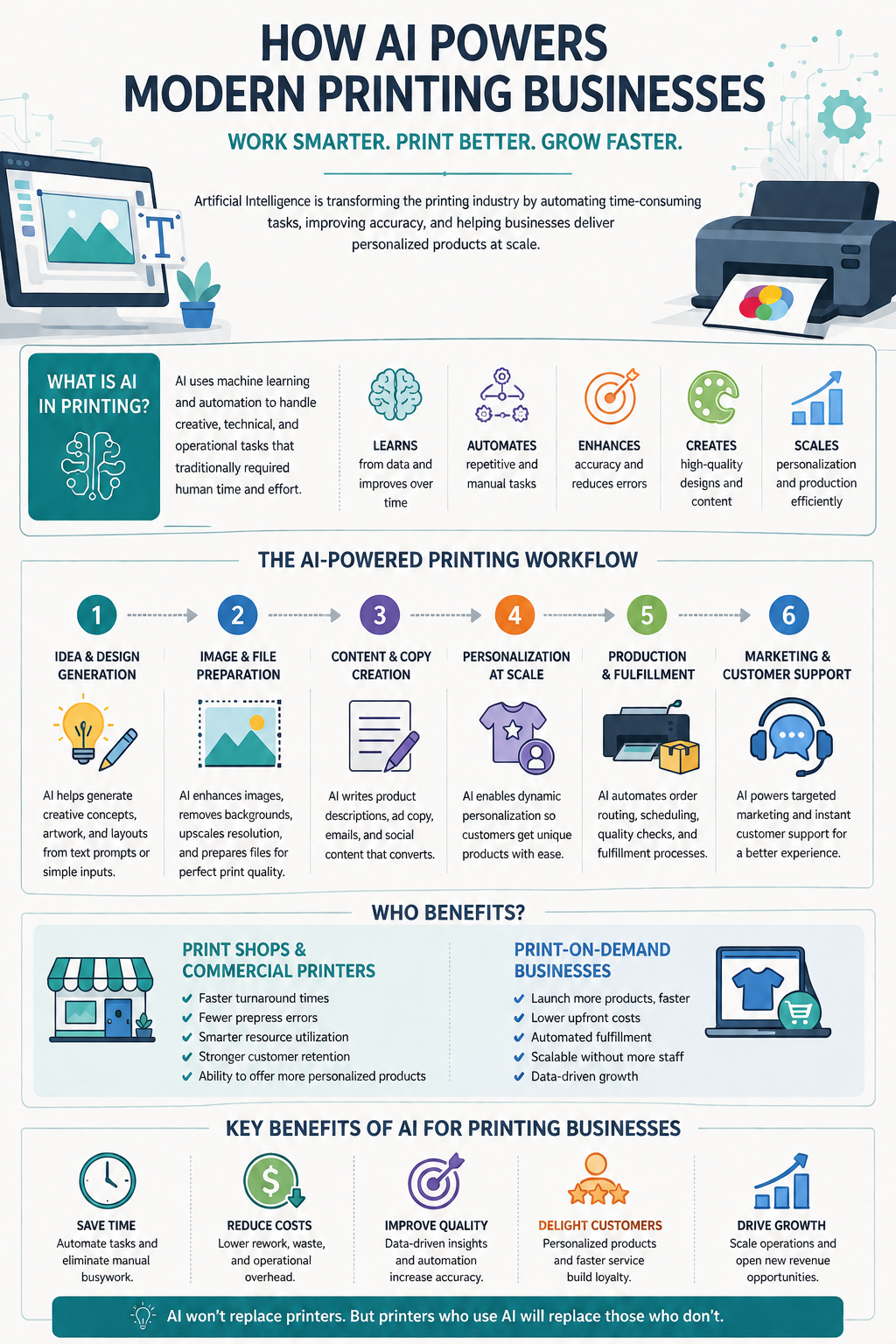
How to Use AI Tools in a Printing Business Workflow
- Start with design generation. Use Midjourney or Adobe Firefly to create original artwork for products or to generate concepts to show clients before committing to production.
- Prepare files for print. Use Remove.bg to strip backgrounds from uploaded images. Use Adobe Firefly's Generative Fill in Photoshop to extend backgrounds, fix composition issues, or upscale low-resolution files.
- Create product mockups. Upload your designs to Placeit to generate realistic product photos for your listings, website, and marketing without a photoshoot.
- Write product listings and marketing copy. Use Jasper or Canva's Magic Write to generate product descriptions, email campaigns, and social posts at scale.
- Automate fulfilment. Connect Printful or Printify to your Shopify, Etsy, or WooCommerce store. When a customer orders, the platform prints, packs, and ships automatically.
Best AI Tools for a Printing Business
Adobe Firefly
Adobe Firefly is the safest AI image tool for commercial printing because every image it generates is trained on licensed Adobe Stock content, meaning you can use the output commercially without copyright risk. It is integrated directly into Photoshop, Illustrator, and InDesign, which are the tools most print shops and designers already use. Generative Fill in Photoshop lets you extend backgrounds, remove objects, and fix composition problems without rebuilding an image from scratch. For prepress work, this saves significant time on file corrections that previously required manual retouching.
I tested it with a print-specific prompt asking for a product label design in a botanical style. The output was usable as a starting point in under 60 seconds, with enough detail to refine in Illustrator. The commercial licensing is the reason to choose Firefly over Midjourney for production work.
Key Features
- Generative Fill and Generative Expand in Photoshop for background extension and object removal
- Text-to-image generation in Firefly web app and Illustrator
- Text effects and recolouring tools in Illustrator
- Trained on licensed Adobe Stock content; commercially safe output
- Content Credentials tagging on all generated files for provenance tracking
- Integrates natively across Photoshop, Illustrator, InDesign, and Premiere
Pricing
| Plan | Price | Credits | Notes |
|---|---|---|---|
| Free | $0 | 25/month | Watermarked previews; basic features |
| Standard | $9.99/month | 2,000 premium credits | Web app access; commercial use |
| Pro | $19.99/month | 4,000 premium credits | Advanced features; priority generation |
| Creative Cloud All Apps | $54.99/month | 1,000 Firefly credits included | Full Adobe suite; best value for design teams |
What Users Like
- Commercial licensing removes the legal risk that other AI image tools carry for print businesses
- Generative Fill in Photoshop is the most practical prepress AI feature in the category
- No need to export and import between tools; AI works inside the existing Creative Cloud workflow
- Content Credentials provide a provenance trail that some enterprise clients require
Potential Drawbacks
- Artistic output quality for illustration-heavy work is below Midjourney
- Free tier's 25 credits per month is only enough for evaluation, not production use
- The credit model can run out faster than expected on larger campaigns
Best for: Design teams and print shops already using Adobe Creative Cloud
Midjourney
Midjourney produces the most artistically compelling AI images in the category. For print businesses that need striking product designs for apparel, posters, wall art, or branded merchandise, the output quality is higher than any other tool in this list. I tested it with a prompt for a maximalist floral t-shirt design. The result was detailed, print-ready in resolution, and more distinctive than stock alternatives. The main limitation for commercial printing is licensing: on the Basic plan, creations are technically public and not covered for commercial use unless you are on the Standard plan or above.
Key Features
- Highest artistic quality text-to-image generation available
- Version 6.1 with improved detail, texture, and composition control
- Style references and character consistency for multi-product collections
- Variation controls for iterating on a design direction
- High-resolution outputs suitable for large-format printing
Pricing
| Plan | Price | Notes |
|---|---|---|
| Basic | $10/month ($8 annual) | ~200 fast generations; public gallery; no commercial use |
| Standard | $30/month ($24 annual) | Unlimited relaxed generations; commercial use included |
| Pro | $60/month ($48 annual) | Stealth mode; private generations |
| Mega | $120/month ($96 annual) | Highest volume; best for studios |
Commercial use requires Standard plan or above. Companies with over $1M annual revenue must use Pro or Mega.
What Users Like
- Output quality for artistic and illustrative print designs is unmatched in the category
- Unlimited relaxed generations on Standard makes it cost-effective for high-volume design work
- Strong community on Reddit and Discord for print-specific prompting techniques
- Style references let you maintain visual consistency across a product collection
Potential Drawbacks
- No commercial use rights on the $10/month Basic plan; most print businesses need Standard at minimum
- All creations on Basic are publicly visible in the Midjourney gallery
- Operates through Discord, which is unfamiliar for users outside the creator community
- No direct integration with Adobe or print management tools
Best for: Print shops and POD sellers who need original, high-quality artwork for apparel, wall art, posters, and branded merchandise.
 Sakshi Jadhav
Canva Magic Studio
Canva Magic Studio is the AI layer across Canva's design platform. For print businesses, it covers two distinct jobs: creating marketing assets (social media posts, email headers, promotional flyers) using Magic Design and AI templates, and editing product images using Magic Eraser, Background Remover, and Magic Expand. Non-designers on a print shop's marketing team can produce consistent, on-brand assets without briefing a designer for every request. I tested it for a print shop promotional flyer and had a publish-ready version in under 10 minutes.
Key Features
- Magic Design: generates design layouts from a text prompt or uploaded content
- Background Remover for product photos and design assets
- Magic Eraser for removing unwanted elements from images
- Magic Expand for extending image backgrounds
- 1M+ templates across social, print, and marketing formats
- Brand kit for logo, colours, and fonts applied across all designs
Pricing
| Plan | Price | Notes |
|---|---|---|
| Free | $0 | 250,000+ templates; limited AI credits |
| Pro | $15/month ($120/year) | Full AI suite; 1M+ templates; brand kit; unlimited storage |
| Teams | $10/user/month (min 3) | Shared brand controls; approval workflows |
What Users Like
- Background Remover is practical for daily product image preparation; no separate tool needed
- Non-designers consistently produce professional-looking marketing materials
- Template breadth covers every print shop marketing format in one subscription
- Teams plan approval workflow is useful for print shops where content needs sign-off before going to social
Potential Drawbacks
- AI image generation is weaker than Firefly or Midjourney for original product artwork
- Teams plan requires a minimum of 3 users; not cost-effective for solo operators
- Free AI credits are limited; heavy use of Magic Design and AI editing requires Pro
Best for: Print shop marketing teams and POD sellers who need marketing assets, social content, and basic image editing without dedicated design staff.
Remove.bg
Remove.bg does one thing: it removes image backgrounds instantly using AI. For print businesses, this is a practical daily task. Removing the background from a customer-supplied logo before placing it on a product, cutting a product out for a catalogue layout, or preparing design files for transparent overlays are all jobs that used to take minutes in Photoshop per image. Remove.bg does it in one click with results that are accurate enough for most print applications. The API makes it scriptable for high-volume operations.
Key Features
- One-click AI background removal for any image
- Bulk processing via API for high-volume operations
- Integrations with Shopify, Canva, Figma, and Adobe Photoshop
- Edge refinement for complex subjects including hair and fine detail
- Download in PNG with transparent background, ready for print placement
Pricing
| Plan | Price | Notes |
|---|---|---|
| Free | $0 | Low-resolution previews only; no HD download |
| Pay per image | $0.13 to $0.23/image | HD downloads; volume discounts at higher quantities |
| Subscription | From $9/month | Fixed monthly image allowance; HD downloads |
| API | From $9/month | Per-call pricing for automated workflows |
What Users Like
- Fastest background removal tool available; results in under 5 seconds per image
- API integration makes it automatable for high-volume print catalogue operations
- Accuracy on product photos and simple logos is high enough to skip manual editing
- Pay-per-image model keeps costs low for businesses with variable volume
Potential Drawbacks
- Free tier only provides low-resolution previews; not usable for print production without a paid plan
- Complex images with similar foreground and background colours require manual edge correction
- Not a full design tool; handles background removal only
Best for: Any print business processing regular volumes of product images, customer logos, or design files that need transparent backgrounds.
Vivek Dev Jacob
Placeit
Placeit provides over 10,000 product mockup templates. Upload your design, choose a product and environment, and download a lifestyle photo showing your print product in a real-world setting. For POD sellers listing products on Etsy, Shopify, or Amazon, professional mockups directly drive conversion rates. For print shops, mockups let you show clients how their design will look on a final product before production begins. I tested it for a tote bag design and had six different lifestyle mockup variations in under three minutes.
Key Features
- 10,000+ mockup templates across apparel, mugs, posters, packaging, and accessories
- Logo maker, video templates, and social media graphics alongside mockups
- Instant download in high resolution for print and web use
- Apparel mockups with model photos for a realistic lifestyle presentation
- No design software required; works entirely in the browser
Pricing
| Plan | Price | Notes |
|---|---|---|
| Single purchase | From $7.95/image | One-off downloads; no subscription required |
| Unlimited | $14.95/month ($89.69/year) | Unlimited mockups, logos, and videos |
What Users Like
- 10,000+ template options cover almost every print product category
- Lifestyle mockups with real models are more effective for e-commerce listings than flat-lay alternatives
- No Photoshop skills required; accessible to anyone managing a POD store
- Unlimited plan at $14.95/month is cost-effective for high-volume POD sellers
Potential Drawbacks
- Mockup quality is consistent but recognisable as template-based to experienced buyers
- Video mockup rendering can be slow on complex templates
- Less flexibility for custom compositions than building mockups in Photoshop
Best for: POD sellers on Etsy, Shopify, or Amazon who need professional product presentation without photography equipment or design skills.
Jasper
Jasper is an AI content platform that covers the writing tasks print businesses spend too much time on: product descriptions for POD listings, email campaigns for print shop promotions, social media posts, ad copy, and SEO-optimised landing pages. For a POD seller with 200 products, writing individual descriptions manually is a full-time job. Jasper generates them at scale while maintaining brand voice. For print shops, it handles the marketing content that often gets deprioritised because production work takes priority.
Key Features
- 100+ AI writing agents for product descriptions, emails, social posts, and ads
- Brand Voice: train the AI on your tone and terminology
- Knowledge assets: upload product details, brand guidelines, and print specs for accurate output
- SEO mode for optimising product listings and landing pages
- Integrates with Chrome, HubSpot, Salesforce, and Google Docs
Pricing
| Plan | Price (annual) | Notes |
|---|---|---|
| Creator | $39/month | 1 user; 1 Brand Voice |
| Pro | $59/month | Up to 5 users; 3 Brand Voices; Instant Campaigns |
| Business | Custom | Unlimited users; SSO; enterprise governance |
7-day free trial on Creator and Pro.
What Users Like
- Product description generation saves hours per week for high-SKU POD stores
- Brand Voice consistency across large content volumes reduces editing time
- Knowledge assets prevent hallucinated product details by grounding the AI in your actual specs
- Useful beyond product listings: email campaigns, social posts, and ads from the same platform
Potential Drawbacks
- No built-in SEO data; requires a separate tool like Surfer SEO for keyword optimisation
- Creator plan's single Brand Voice limit is quickly outgrown by shops with multiple product lines
- Output needs review; AI occasionally misinterprets print specifications if not clearly defined in knowledge assets
Best for: POD sellers managing large product catalogues and print shops with regular marketing content needs who want to reduce writing time without sacrificing brand consistency.
7. Printful
Best for: POD sellers who want the most reliable automated fulfilment for custom print products
Printful is a print-on-demand fulfilment platform. When a customer places an order in your Shopify, Etsy, WooCommerce, or other connected store, Printful automatically prints, packs, and ships the product on your behalf. You never hold inventory. The AI-powered tools inside Printful include a Design Maker for creating and placing artwork on products, a Mockup Generator for listing photos, and automated order routing that selects the nearest fulfilment centre to reduce delivery time. With 455+ products and integrations across 20+ platforms, it is the most comprehensive POD fulfilment option in the category.
Key Features
- Automated fulfilment across 455+ products: apparel, accessories, home goods, and print
- Design Maker with built-in design tools and artwork placement
- Mockup Generator for listing-ready product photos
- Integrations with Shopify, Etsy, WooCommerce, Amazon, eBay, and 15+ more
- AI order routing to nearest fulfilment centre for faster delivery
- No minimum order quantities; print one or one thousand
Pricing
| Plan | Price | Notes |
|---|---|---|
| Free | $0 | Pay per order only; access to all products and integrations |
| Growth | $24.99/month | Up to 33% product discounts; waived if annual sales reach $12,000 |
No setup fees, no transaction fees. Growth plan becomes free once you reach $12,000 in annual qualifying sales.
What Users Like
- Free plan is genuinely full-featured; no meaningful capability is locked behind the paid tier
- Growth plan's discount structure makes it self-funding once monthly order volume reaches around $300
- Product quality is consistently rated above alternatives like Printify on G2
- Integrations cover every major ecommerce platform without custom development
Potential Drawbacks
- Per-unit product costs are higher than competitor platforms like Printify and CustomCat
- Shipping rates increased on several international routes in February 2026
- Embroidery requires a one-time digitisation fee of $2.95 to $6.50 per new design
Best for: POD sellers who prioritise product quality and fulfilment reliability over the lowest possible per-unit cost.
8. DesignNBuy
Best for: Commercial print shops building or upgrading an online ordering storefront
DesignNBuy is a web-to-print platform that combines an online design tool, prepress automation, and order management in one system. Customers visit your storefront, customise a print product (business cards, banners, packaging, promotional items) using the browser-based design tool, and place an order that flows directly into your production workflow. AI features handle prepress checks, colour profile management, and file preflight automatically before jobs reach the press. For print shops that still take orders by phone, email, and walk-in, DesignNBuy provides the infrastructure to move to a self-service model without rebuilding the entire operation.
Key Features
- Browser-based product customiser for customers to design and order online
- Automated prepress: file preflight, colour profile checks, and bleed/safe zone validation
- Order management dashboard for tracking production status across all jobs
- Variable data printing support for personalised print runs
- Integrates with major MIS and ERP systems used in commercial printing
- White-label storefront configurable to your brand
Pricing
| Plan | Price | Notes |
|---|---|---|
| Enterprise | Custom | Contact DesignNBuy for pricing; priced on storefront complexity and volume |
No public pricing. Best suited to print shops with consistent monthly order volumes.
What Users Like
- Covers the full web-to-print workflow in one platform; reduces the number of systems needed
- Prepress automation catches file errors before they reach production, reducing reprints
- Variable data printing support is rare in self-serve web-to-print platforms
- Customer-facing design tool reduces the time print shop staff spend on design briefs and revisions
Potential Drawbacks
- Enterprise pricing with no public rates makes it difficult to evaluate without a sales conversation
- Implementation requires training and workflow integration; not a plug-and-play tool
- Better suited to established print shops than new or small operations
Best for: Commercial print shops that want to move order intake online and automate prepress checks without replacing their existing production infrastructure.
Best AI Tools for Printing Business by Use Case
- Best for original product artwork: Midjourney on the Standard plan. Commercial use is included, and artistic quality is the highest in the category.
- Best for print designers in Adobe: Adobe Firefly. Commercially safe, integrated into Photoshop and Illustrator, and the most practical for prepress file correction.
- Best for marketing assets and non-designers: Canva Magic Studio. The broadest template library and the lowest barrier to entry for non-design staff.
- Best for background removal at volume: Remove.bg. One-click removal with an API for automating high-volume image preparation.
- Best for product mockups: Placeit. 10,000+ templates, lifestyle photography, and no design skills required.
- Best for product descriptions and marketing copy: Jasper. Brand Voice training and 100+ writing agents for POD sellers managing large catalogues.
- Best for POD fulfilment: Printful. 455+ products, automated fulfilment, and integrations across 20+ platforms. Free to start.
- Best for web-to-print storefronts: DesignNBuy. End-to-end web-to-print workflow with prepress automation for established print shops.
Final Thoughts
The right combination depends on whether you run a print shop or a POD business. POD sellers can get started affordably with Printful for fulfillment, Canva Pro for design and marketing, Placeit for mockups, and Jasper for content. Commercial print shops will benefit from Adobe Firefly for prepress, Midjourney for original artwork, and Canva Pro or Jasper for marketing.
If you're taking your print shop online, DesignNBuy is a strong choice for automating ordering, prepress, and production workflows. Together, these tools can improve efficiency, reduce manual work, and help your business scale faster.
FAQs
What are the best AI tools for a printing business?
The best AI tools for a printing business include Adobe Firefly for AI-powered design, Midjourney for original artwork, Canva Magic Studio for marketing materials, Remove.bg for background removal, Placeit for product mockups, Jasper for AI content writing, Printful for print-on-demand fulfillment, and DesignNBuy for web-to-print storefronts. The right tool depends on whether you run a commercial print shop or a print-on-demand business.
How can AI help improve a printing business?
AI can automate many printing business tasks, including graphic design, image editing, background removal, product mockup creation, marketing content generation, prepress checks, and order fulfillment. Using AI tools helps print businesses reduce manual work, speed up production, lower costs, improve design quality, and deliver a better customer experience.
Which AI tool is best for print-on-demand businesses?
For print-on-demand (POD) businesses, Printful is one of the best AI-powered fulfillment platforms, while Midjourney and Adobe Firefly are ideal for creating unique designs. Placeit helps generate realistic product mockups, and Jasper can quickly create SEO-friendly product descriptions and marketing copy, making it easier to scale a POD business.