Best Cold Email Infrastructure Tools in 2026
Cold email only works if your emails reach the inbox. This guide compares the best cold email infrastructure tools in 2026 across pricing, features, and deliverability to help you choose the right setup.

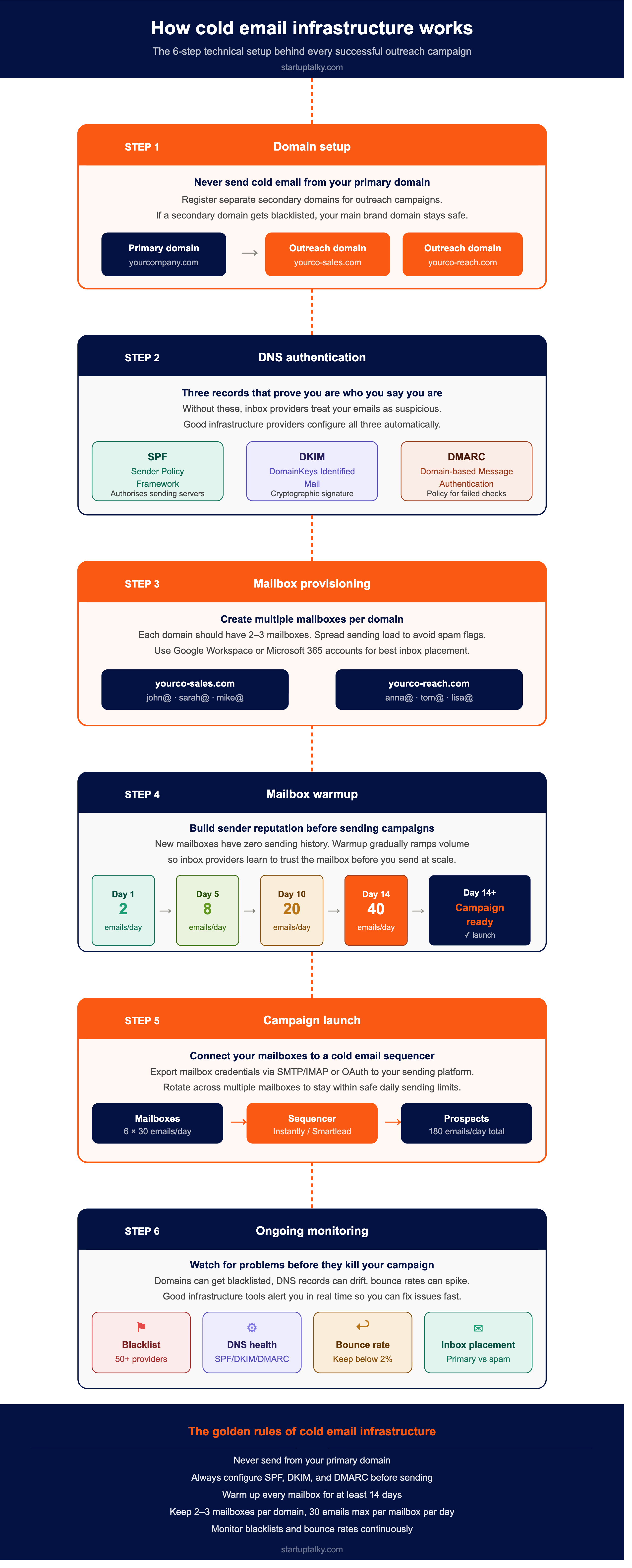
Cold email still works, but only if your emails actually reach the inbox. The technical setup behind your outreach: domains, mailboxes, DNS authentication, IP reputation, and warmup sequences, is what separates campaigns that book meetings from ones that silently land in spam. Cold email infrastructure tools remove that complexity. They provision mailboxes, configure SPF, DKIM, and DMARC automatically, warm up sender reputation, and monitor domain health so your primary domain never gets burned.
Whether you are an agency managing dozens of clients or a founder running your first cold sequence, choosing the right infrastructure provider matters more than almost any other outreach decision.
Why Businesses Need Cold Email Infrastructure Tools
- Improve inbox placement rates and reduce spam folder landings
- Automate SPF, DKIM, and DMARC DNS configuration
- Separate cold outreach from the primary domain to protect brand reputation
- Scale mailboxes and domains without manual provisioning
- Build and maintain sender reputation through structured warmup
- Monitor blacklist status, DNS changes, and bounce rates in real time
- Integrate with cold email sequencers such as Instantly, Smartlead, and Apollo
Best Cold Email Infrastructure Tools Compared
| Tool | Best For | Starting Price | Key Differentiator |
|---|---|---|---|
| InboxKit | Agencies and teams | $31/month | Official Google Cloud partner, Google + Microsoft + Azure |
| Instantly | All-in-one outreach | $47/month | Unlimited accounts, warmup, and lead finder in one tool |
| Mailforge | Bulk shared-IP sending | $3/mailbox/month | Distributed infra, unlimited mailboxes, fast setup |
| Inframail | Unlimited MS inboxes | $99/month flat | Flat-rate unlimited Microsoft 365, dedicated IPs |
| Maildoso | Beginners, fast setup | $75/month (30 SMTP mailboxes) | Self-healing mailboxes, IP rotation, beginner-friendly |
| Infraforge | Agency full-stack | $33/month (10 slots, annual) | Dedicated IPs, warmup, real-time monitoring |
| Mailreach | Warmup and monitoring | $25/mailbox/month | Focused warmup tool with inbox placement tracking |
| Zapmail | Pre-warmed quick start | $39/month (10 mailboxes) | Pre-warmed Google + Microsoft inboxes, US IPs |
InboxKit
InboxKit is a complete cold email infrastructure platform that provides official Google Workspace, Microsoft 365, and Azure mailboxes from a single dashboard. As the only official Google Cloud partner in this space, it offers mailboxes on real provider infrastructure rather than workarounds. This matters because sending from the same provider as your prospect (Gmail to Gmail) increases primary inbox landing rates significantly.
Setup takes under ten minutes. DNS records are configured automatically for every domain, and every domain gets its own isolated panel so that if one domain's reputation is damaged, others remain unaffected. The built-in InfraGuard suite monitors blacklists across 50 providers, watches DNS for configuration changes, tracks bounce rates, and provides unlimited inbox placement tests. A mailbox analytics dashboard shows reply rates, bounce rates, and spam rates at the individual mailbox level. InboxKit integrates with 24 sequencers including Instantly, Smartlead, Apollo, and Lemlist, and provides full API access with webhooks.
Pros
- Official Google Cloud partner with genuine Google Workspace, Microsoft 365, and Azure accounts
- Isolated domain panels prevent cross-contamination between clients or campaigns
- InfraGuard protection suite with domain-level blacklist, DNS, and bounce monitoring
- Bulk mailbox setup with AI-assisted configuration scales from 10 to 1,000 mailboxes
- 24+ sequencer integrations and full API access
Cons
- Email warmup is a paid add-on ($3 per mailbox per month)
- InfraGuard is also a paid add-on (first month free)
Pricing
| Plan | Price (Billed Annually) | Mailbox Slots | Additional Mailbox Cost | Add-ons |
|---|---|---|---|---|
| Professional | $31/month | 10 slots | $3.10/mailbox | Warmup $3/mailbox/mo; InfraGuard (1st month free) |
| Agency | $81/month | 30 slots | $2.70/mailbox | Warmup $3/mailbox/mo; InfraGuard (1st month free) |
| Enterprise | $250/month | 100 slots | $2.50/mailbox | Warmup $3/mailbox/mo; InfraGuard (1st month free) |
Instantly
Instantly bundles cold email infrastructure with a full outreach stack: unlimited email accounts, unlimited warmup, an AI sequence builder, a B2B lead finder, and a unified inbox (Unibox) in one tool. Its Server and IP Sharding system (SISR) isolates sending reputation at scale, which helps high-volume teams maintain deliverability across large contact lists. It is better described as an all-in-one sales engagement platform than a pure infrastructure provider, but for teams that want everything under one roof, it is a strong pick.
Pros
- Best value for teams that want infrastructure, warmup, and outreach sequences bundled together
- Unlimited email accounts with no per-mailbox pricing on core plans
- AI tools for sequences, personalisation, spam-word checking, and reply automation
Cons
- Not a dedicated infrastructure provider; less admin control over individual mailboxes
- Email volume and contact caps apply by tier; heavier sending requires upgrades
Pricing
Instantly uses a modular pricing structure. The Outreach-only plans are:
| Plan | Monthly Price | Key Inclusions |
|---|---|---|
| Growth | $47/month | Unlimited email accounts, unlimited warmup, 1,000 contacts, 5,000 emails/month |
| Hypergrowth | $97/month | Unlimited accounts + warmup, 25,000 contacts, 100,000 emails/month |
| Light Speed | $358/month | Everything in Hypergrowth + 500,000 emails/month, SISR system |
| Enterprise | Custom | 500,000+ emails, dedicated account manager, private deliverability network |
Bundle plans (Outreach + Credits) start at $94/month (Starter) and $194/month (Scale). Annual billing saves 20%.
 Muskaan Kapoor
Mailforge
Mailforge is a distributed cold email infrastructure platform built for teams that need to scale domains and mailboxes quickly. It provisions hundreds of domains and mailboxes on a shared IP pool, handles automated DNS setup, and delivers accounts that work with any SMTP-compatible tool. Infrastructure is ready in about five minutes. The main trade-off is shared IPs, meaning your deliverability is partly tied to the behaviour of other senders on the same pool.
Pros
- Unlimited mailboxes with no hard ceiling on scale
- Fast setup and bulk provisioning for agencies managing multiple clients
- Integrates with Salesforge and all SMTP or IMAP-compatible sending tools
Cons
- Shared IP infrastructure means limited control over pool reputation
- No native Google Workspace or Microsoft 365 accounts
Pricing
Mailforge uses a calculator-based model rather than fixed plan tiers. Pricing is:
| Item | Monthly Rate | Annual Rate |
|---|---|---|
| Mailbox slots (min 10) | $3.75/mailbox/month | $3/mailbox/month (2 months free) |
| .com domains | $14/year per domain (billed once) | $14/year per domain |
| SSL and domain masking (optional) | $2/domain/month | $6/domain/year |
A setup of 25 mailboxes billed annually costs approximately $60/month plus domain fees.
Inframail
Inframail is designed for B2B agencies that need large numbers of mailboxes without per-inbox pricing. It offers unlimited Microsoft-backed mailboxes on dedicated US IP addresses for a flat monthly fee, with automated DNS configuration that gets domains ready in under three minutes. All plans include 1-on-1 deliverability consulting. The flat-rate model makes it particularly cost-effective for agencies managing 50 or more inboxes, where per-mailbox pricing from other providers compounds quickly.
Pros
- Unlimited Microsoft 365 inboxes for a flat monthly fee, with strong unit economics at scale
- Dedicated IPs with Phantom redirect masking to reduce ESP flags
- Deliverability consulting is included in all plans
Cons
- Microsoft only; no Google Workspace option
- Some user reviews report inconsistent inbox placement depending on list and domain quality
Pricing
| Plan | Monthly Price | Inclusions |
|---|---|---|
| Unlimited | $99/month | Unlimited inboxes, 1 dedicated US IP, 20 free domains, unlimited domain setups, auto DNS, priority support |
| Agency Pack | $249/month | Everything in Unlimited + 3 dedicated US IPs, deliverability consultant |
| DFY Email Setup | $299/month (or $3,497 one-time) | Done-for-you setup, warmup, sending platform, 1:1 coach, 2,500 contacts |
Annual billing reduces the Unlimited plan to approximately $79/month. Domains not included in the base monthly plans outside of the free bundle.
Nitin Konde
Maildoso
Maildoso keeps cold email infrastructure straightforward. It registers your domains, creates mailboxes, configures DNS, and gets you into your sequencer of choice with minimal friction. Its self-healing mailbox feature automatically pauses burned accounts and returns them to rotation after 14 days. It supports both SMTP and Google Workspace mailboxes and integrates with Instantly, Smartlead, and Lemlist via IMAP or SMTP export.
Pros
- Straightforward setup with no technical knowledge required
- Self-healing mailbox rotation for automatic reputation recovery
- Supports both SMTP and Google Workspace mailboxes
Cons
- Warmup is a paid add-on; AI warmup costs $160 to $2,000/month, depending on volume
- Domains must be purchased separately on monthly plans (included only on quarterly SMTP plans)
- Some user reports of newly purchased domains arriving pre-blacklisted
Pricing
SMTP Mailboxes (monthly billing, domains sold separately at $12/year):
| Plan | Monthly Price | Mailboxes |
|---|---|---|
| Entry | $75/month | 30 mailboxes |
| Starter | $100/month | 32 mailboxes |
| Growth | $166/month | 68 mailboxes |
| Scale | $733/month | 400 mailboxes |
Annual billing lowers per-mailbox cost to as low as $1.40/month. Google Workspace mailboxes start at $2.50/mailbox/month. A combo of SMTP + Google Workspace drops the Google Workspace cost to $1.90/mailbox/month.
Infraforge
Infraforge is a full-stack agency solution with dedicated IP addresses per mailbox, real-time inbox monitoring, automated DNS configuration, and built-in warmup. It is one of the few providers in this category with a 5/5 rating on G2, suggesting strong satisfaction among early adopters. For agencies that want visibility into deliverability at the IP level, Infraforge provides deeper controls than most shared-IP providers.
Pros
- Dedicated IPs with real-time monitoring for early issue detection
- Built-in warmup, domain health checks, and DNS automation
- Strong early reputation with a high G2 rating
Cons
- Higher per-mailbox entry cost compared to shared-IP alternatives
- Minimum of 10 mailbox slots required, so realistic entry cost is around $170/month, including domain fees
- Smaller user community and less established track record than older providers
Pricing
Infraforge uses a per-slot calculator model. Pricing is:
| Item | Quarterly Rate | Annual Rate |
|---|---|---|
| Mailbox slots (min 10) | $4/mailbox/month | $3/mailbox/month (2 months free) |
| .com domains | $70/year per 5 domains | $70/year per 5 domains |
| SSL and domain masking (optional) | $2/domain/month | $6/domain/year |
| IP addresses (optional) | $99/IP/month | $99/IP/month |
| Masterbox (optional) | $9/workspace/month | $7/workspace/month |
A base setup of 10 mailbox slots billed quarterly costs $40/month, or $33/month on annual billing.
Mailreach
Mailreach is a focused warmup and deliverability monitoring tool rather than a full infrastructure provider. It gradually ramps sending volume through a private warmup network, monitors spam folder placements, checks SPF/DKIM/DMARC configuration, and provides a dashboard with tailored recommendations before campaigns go live. For teams that already have mailboxes provisioned through another provider and simply need a reliable warmup layer, it is one of the cleaner options available.
Pros
- Visual inbox improvement timeline shows exactly when to launch campaigns
- Monitors blacklist status and authentication records alongside warmup
- Simple setup that works with Gmail, Outlook, or custom SMTP
Cons
- No DNS automation, domain management, or mailbox provisioning
- Not a standalone infrastructure solution; requires a separate mailbox provider
Pricing
Mailreach uses sliding-scale per-mailbox pricing that decreases as inbox count grows:
| Inbox Count | Monthly Rate per Mailbox | Annual Rate per Mailbox |
|---|---|---|
| 1 to 5 | $25/mailbox/month | $20/mailbox/month |
| 6 to 20 | $25/mailbox/month | $19.50/mailbox/month |
| 21 to 50 | Sliding discount | ~$18/mailbox/month |
| 50+ | Custom agency pricing | Custom |
All plans include automated warmup, spam testing credits, inbox placement testing, domain health checks (blacklist, SPF, DKIM, DMARC), and the AI co-pilot deliverability assistant. No separate tiers; all features are included at every volume level.
Rishi Mundra
Zapmail
Zapmail provides pre-warmed Google Workspace and Microsoft 365 mailboxes with US-based IP addresses and instant DNS setup. Inboxes come with 12 weeks of warmup history already built in, so you can start cold outreach from day one rather than waiting through a standard warmup cycle. Each domain operates in workspace isolation to prevent cross-domain reputation damage.
Pros
- Pre-warmed inboxes ready to send from day one
- Official Google and Microsoft accounts with US-based IPs
- Workspace isolation prevents one bad domain from affecting others
Cons
- Runs on shared IPs, which means less control over pool reputation at high volumes
- After the first year, mailbox renewal pricing increases based on plan tier
Pricing
| Plan | Annual Price | Mailboxes Included | Additional Mailboxes |
|---|---|---|---|
| Starter | $32.50/month | 10 mailboxes | $3.25/mailbox |
| Growth | $82.50/month | 30 mailboxes | $3.00/mailbox |
| Pro | $250/month | 100 mailboxes | $2.50/mailbox |
Pre-warmed Google Workspace bundles with domains are also available starting at $39 for 3 mailboxes and 1 domain. After the first year, renewal pricing applies: Starter renews at $59/month + $6 per mailbox add-on; Growth at $169/month + $5.50 per mailbox add-on.
How to Choose the Right Cold Email Infrastructure Tool
When selecting a provider, consider:
- Sending volume: Flat-rate tools like Inframail suit high-volume senders; per-mailbox tools suit smaller teams
- Google vs Microsoft preference: InboxKit and Zapmail offer both; Inframail is Microsoft-only
- Built-in warmup: InboxKit, Zapmail, and Instantly bundle warmup; others charge extra or exclude it
- Agency vs solo use: Agencies benefit from isolated domain panels, bulk provisioning, and client-level reporting
- Integration requirements: Check compatibility with your sequencer (Instantly, Smartlead, Apollo, Lemlist, etc.)
- Shared vs dedicated IPs: Dedicated IPs give more control; shared IPs are cheaper but carry pool risk
Feature Comparison Table
| Tool | Official Google/MS | Dedicated IPs | Built-in Warmup | Auto DNS | Blacklist Monitoring | Integrations |
|---|---|---|---|---|---|---|
| InboxKit | Yes | Yes | Add-on | Yes | Yes | 24+ |
| Instantly | Via SMTP | Shared | Yes | Yes | No | 10+ |
| Mailforge | No | Shared | No | Yes | No | SMTP/IMAP |
| Inframail | MS only | Yes | No (standard plans) | Yes | No | 10+ |
| Maildoso | Yes | Shared | Add-on | Yes | No | SMTP/IMAP |
| Infraforge | No | Yes | Yes | Yes | Yes | 10+ |
| Mailreach | No | No | Yes | No | Yes | SMTP |
| Zapmail | Yes | Shared | Pre-warmed | Yes | No | 50+ |
Future of Cold Email Infrastructure
- Stricter inbox provider rules: Gmail, Outlook, and Yahoo continue tightening bulk sender requirements, making proper authentication non-negotiable rather than optional.
- ESP matching as standard: Sending from the same provider as your target is becoming a baseline deliverability strategy, which increases the value of official Google and Microsoft accounts.
- AI-assisted deliverability: Platforms are beginning to use AI for real-time risk detection, adaptive warmup pacing, and proactive blacklist remediation before campaigns are affected.
- Multi-provider stacks: Mature outreach teams are diversifying across Google, Microsoft, and SMTP infrastructure to reduce single-point-of-failure risk.
Ansh Mehrey
Conclusion
Cold email infrastructure is not a background detail. It is the foundation that determines whether your outreach gets seen at all. InboxKit leads this list for teams that want official provider accounts (Google, Microsoft, Azure), built-in domain protection, and broad sequencer integrations under one dashboard. Inframail suits agencies that prioritise unlimited flat-rate scaling on Microsoft. Instantly is the pick for teams that want infrastructure, warmup, and outreach bundled together. Whatever your stack, sort your infrastructure before your next campaign, not after your domain has been burned.
FAQs
What is cold email infrastructure?
Cold email infrastructure refers to the technical setup behind outbound email campaigns, including domain provisioning, mailbox creation, DNS authentication (SPF, DKIM, DMARC), IP management, and warmup sequences. It ensures emails reach inboxes rather than spam folders.
Why should I not send cold emails from my main domain?
Sending cold outreach from your primary domain puts it at risk of blacklisting or spam classification. Secondary domains protect your brand reputation so that if a cold outreach domain gets flagged, your main domain continues to function normally.
How long does it take to warm up a mailbox before cold outreach?
Most providers recommend 10 to 14 days of warmup before sending cold emails at volume. Some tools like Zapmail provide pre-warmed inboxes with existing warmup history, which removes this wait.
Is InboxKit suitable for small teams?
Yes. InboxKit's Professional plan starts at $31 per month with ten mailbox slots, which suits small teams or founders running focused outreach. The Agency and Enterprise plans cater to larger operations and agencies managing multiple clients.