7 Best Instagram Transcript Generators in 2026 (Tested & Compared)
I tested seven Instagram transcript generators across accuracy, ease of use, pricing, and extra features. This guide covers what each tool does, who it suits, and which one to use if you need free, bulk, or multilingual transcription.

If you have ever watched a Reel three times trying to catch one line, or spent an hour manually typing out a competitor's script, you already know the problem. Instagram does not give you a transcript. It never has. And if the creator did not add captions, you are on your own.
That is where Instagram transcript generators come in. Paste a link, convert an Instagram video to text, and get a readable transcript in seconds. What you do with it after, whether that is repurposing your own content, researching what works in your niche, or building captions for accessibility, is up to you.
I tested the tools that come up most when people search for this, checked their pricing directly from their websites, and noted what real users say about them. I ran each one on 10 public Reels across three audio conditions: clear voice only, voice with background music, and fast speech with an accent. Here is what I found.
Quick Comparison of Instagram Transcript Generators
| Tool | Best For | Key Feature | Free Plan | Starting Price | Website |
|---|---|---|---|---|---|
| TokScript | Creators and marketers | Bulk processing, AI agents, MCP integration | Yes (5 transcripts/day) | $39/year | tokscript.com |
| Speak AI | Researchers and agencies | Sentiment analysis, cross-library AI Chat | Yes (7-day trial) | $1.50/hr pay-as-you-go | speakai.co |
| Kapwing | Visual creators adding subtitles | Video editor with AI transcript built in | Yes (watermark) | $16/user/month (annual) | kapwing.com |
| WayinVideo | Casual users, no account needed | URL-to-transcript with no login required | Yes (60 credits/day after signup) | Free | wayin.ai |
| Saveto AI | Multilingual content | 150+ language support, no login needed | Yes (fully free) | Free | saveto.ai |
| Dictationer | Content teams needing extras | Captions, hashtags, summaries post-transcript | Yes (limited credits) | Free (credits) | dictationer.com |
| GetTheScript | Cross-platform creators | Instagram, TikTok, YouTube Shorts in one tool | Yes | One-time payment (no subscription) | getthescript.app |
How I Selected These Tools
I assessed each tool on the following criteria:
- Accuracy: Does the transcript reflect what was actually said, including accents and fast speech?
- Workflow simplicity: Can you go from an Instagram URL to text in under a minute?
- No-download requirement: Does it work directly from a link without making you save the video first?
- Export formats: Does it support TXT, SRT, VTT, or PDF for different use cases?
- Language support: Can it handle non-English Reels?
- Pricing transparency: Is the free tier genuinely usable, or does it hit a wall immediately?
- Extra features: Does it do anything useful beyond the raw transcript?
 Vivek Dev Jacob
What Is an Instagram Transcript Generator?
An Instagram transcript generator converts the spoken audio in an Instagram Reel, Story, or video into written text. You paste a public URL, the tool extracts the audio, runs it through AI speech recognition, and returns a readable transcript, usually in under 30 seconds. Most tools also let you transcribe Instagram Reels to text in bulk or export in subtitle formats like SRT and VTT.
The use cases vary. Creators use them to repurpose video content into captions, blog posts, or newsletters. Marketers use them to analyse competitor scripts and identify what hooks and structures perform well. Agencies use them for client reporting and accessibility compliance. Researchers use them to study language patterns across large sets of content.
The tools in this list fall into two types: dedicated Instagram transcript tools that work from a URL with minimal friction, and broader transcription platforms that include Instagram as one of many supported sources.
How to Use an Instagram Transcript Generator
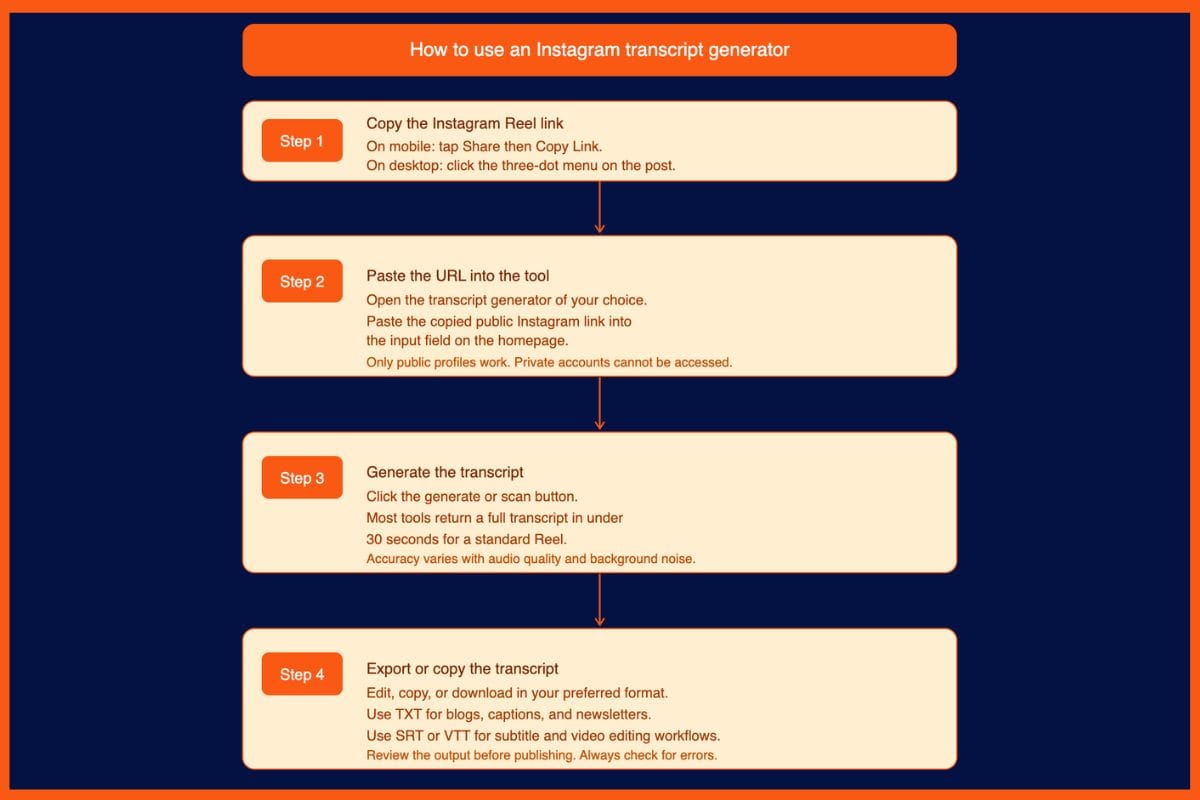
Transcribing Instagram Reels to text takes four steps with any tool in this list:
- Open the Instagram Reel you want to transcribe and copy the link. On mobile, tap the share icon and select "Copy Link." On desktop, click the three-dot menu on the post and select "Copy Link."
- Paste the public Instagram URL into the transcript tool's input field.
- Click the generate or scan button and wait. Most tools return a transcript in under 30 seconds for a standard Reel.
- Edit, export, or copy the transcript in your preferred format. TXT works for repurposing. SRT or VTT works for subtitle workflows.
Note: the video must be from a public account. Private profiles cannot be accessed by any third-party tool.
List of Best Instagram Transcript Generators
1. TokScript
Best for: Creators and marketers who process Instagram content regularly
TokScript was built for short-form video creators. Paste up to 50 Instagram Reel links at once, get every transcript in seconds, then run them through built-in AI agents that analyse hooks, rewrite scripts, and flag what made each Reel perform. It also connects directly to Claude and ChatGPT via an MCP integration, so you can extract text from Instagram and pull it into an AI conversation without switching tabs.
Key Features
- Bulk processing of up to 50 Instagram links in a single batch
- AI agents for hook analysis, script rewriting, and viral pattern recognition
- MCP integration: pulls transcripts, video data, and creator profiles into Claude and ChatGPT
- Chrome extension for one-click transcription while browsing
- Export in TXT, XML, PDF, and CSV formats
- Translation into 16+ languages on paid plans
Pricing
| Plan | Price | Notes |
|---|---|---|
| Free | $0 | 5 transcripts/day, Chrome extension included |
| Pro | $39/year or $10/month | Unlimited transcripts, bulk processing, AI agents, HD downloads |
What Users Like
- Bulk processing is the main draw; no other tool in this list handles 50 links at once
- MCP integration with Claude and ChatGPT is useful for creators already working in AI tools
- The annual price of $39 makes it one of the cheapest paid options in the category
Potential Drawbacks
- Free tier is capped at 5 transcripts per day, which is not enough for agency volume
- Accuracy drops on Reels with heavy background music or fast speech
- Primarily built around TikTok; Instagram support is strong but not the primary focus
Best for: Social media managers and creators who regularly analyse competitor content or need to process multiple Reels in one sitting.
Vivek Dev Jacob
2. Speak AI
Best for: Researchers and agencies who need analysis beyond the transcript
Speak AI is a transcription and analysis platform used by 250,000 people across research, marketing, and content teams. After the transcript is generated, you get AI summaries, keyword extraction, sentiment analysis, and a searchable library you can query across all your videos at once. You can also switch between Claude, Gemini, and GPT depending on the task.
Key Features
- Paste any Instagram link and get a transcript plus AI summary, sentiment breakdown, and keyword extraction
- AI Chat across your entire video library, not just individual files
- Multi-model support: switch between Claude, Gemini, and GPT per task
- Speaker diarisation on uploaded audio files
- 100+ language support
- API and webhook access on Team plans
Pricing
| Plan | Price | Notes |
|---|---|---|
| Pay-as-you-go | $1.50/hour | No subscription; card required after 7-day trial |
| Individual | ~$15/month | 25 hours/month; AI Chat, summaries, and exports |
| Team | $25/user/month ($20 annual) | Starts at 2 users; API, Zapier, CSV upload |
| Enterprise | Custom | SSO, data controls, custom deployment |
7-day free trial with no card required to sign up.
What Users Like
- The only tool here that analyses content at scale across a library, not just one video at a time
- Pay-as-you-go works well for researchers who need transcription occasionally but not monthly
- Multi-model AI Chat is flexible in a way that dedicated transcript tools are not
Potential Drawbacks
- Overkill if you only need a plain text transcript; the interface reflects its broader scope
- Pay-as-you-go requires a card after the trial, which puts off casual users
- Not purpose-built for Instagram; it is a general transcription platform that supports Instagram links
Best for: Agencies, researchers, and content strategists who need to extract insights from Instagram content at scale, not just individual transcripts.
3. Kapwing
Best for: Creators who want to add styled captions to their own Reels
Kapwing is a browser-based video editor that includes AI transcription. If your goal is to get a plain text file from a Reel, it works, but the workflow is heavier than dedicated transcript tools because Kapwing is a full editor first. Where it earns its place is for creators who want to go one step further and burn styled, animated captions directly into their video before posting.
Key Features
- AI transcription built into the video editing timeline
- Auto-generated subtitles with custom fonts, colours, and animations
- Auto-translation into different languages on screen
- Collaborative workspace for social media teams
- Export in SRT and VTT for subtitle workflows
Pricing
| Plan | Price | Notes |
|---|---|---|
| Free | $0 | Watermark on exports, limited to 720p, 1-minute export cap |
| Pro | $24/month or $16/user/month (annual) | No watermark, 1080p/4K, 1,000 AI subtitle minutes/month |
| Business | $64/month or $50/user/month (annual) | 4,000 AI subtitle minutes/month, custom voice clones |
| Enterprise | Custom | Advanced security, dedicated support |
What Users Like
- Subtitle styling options are more flexible than any dedicated transcript tool
- Good for teams that need to review and edit captions collaboratively before publishin
- Handles long videos and multiple formats beyond Reels
Potential Drawbacks
- Free plan watermarks every export, making it unusable for professional content
- Getting a plain text transcript out requires more clicks than a URL-paste tool
- Per-member pricing gets expensive for teams; three people on Pro costs $48/month on annual billing
- Can be slow to render on older devices because it runs a full video engine in the browser
Best for: Creators who need to edit and style captions for their own content, not just extract text from existing Reels
Muskaan Kapoor
4. WayinVideo
Best for: Anyone who wants a transcript immediately with no account or setup
WayinVideo is the lowest-friction option in this list. Paste a public Instagram link, get a timestamped transcript. No login required to start. After signing up you get 60 daily credits, enough to transcribe up to 60 minutes of content every day at no cost. It extracts text directly from the audio track, so it works even when a Reel has no captions.
Key Features
- URL-to-transcript with no login required to start
- Extracts from the audio track directly, not the caption overlay
- Timestamps on every line, clickable to jump to the exact moment
- Export as TXT, DOC, PDF, SRT, or VTT
- Translation to multiple languages after transcription
- Supports Reels, Live replays, and standard video posts on public profiles
Pricing
| Plan | Price | Notes |
|---|---|---|
| Free (no signup) | $0 | Limited credits |
| Free (with signup) | $0 | 60 daily credits; up to 60 minutes of content per day |
Paid tiers exist but were not confirmed from the official pricing page at time of writing. Check wayin.ai for current plans.
What Users Like
- The fastest path to a transcript with zero account setup required
- Timestamped output is useful for locating specific moments in longer videos
- 60 minutes of free daily transcription covers most individual creators
Potential Drawbacks
- Limited to public Instagram profiles and posts only
- No built-in AI features beyond the transcript itself
- Paid plan details are not clearly published, making it harder to evaluate for heavy use
Best for: Occasional users who need a quick transcript without signing up for anything.
Muskaan Kapoor
5. Saveto AI
Best for: Creators working in languages other than English
Saveto AI is a free Instagram transcript generator with 150+ language support and no login required. It exports in TXT, SRT, and VTT formats and is one of the most accessible tools in the category for anyone working across multilingual content.
Key Features
- 150+ language support with no additional setup
- Export in TXT, SRT, and VTT formats
- Editable transcripts after generation
- No login or registration required
- Results in seconds on short Reels
Pricing
| Plan | Price | Notes |
|---|---|---|
| Free | $0 | No restrictions disclosed; no login required |
What Users Like
- Widest language support of any free tool in this list
- No signup removes all friction for one-off use
- SRT and VTT exports make it usable for subtitle workflows
Potential Drawbacks
- Accuracy claims of 99.9% vary with audio quality, accents, and background noise
- No analysis, summaries, or extra features beyond the raw transcript
- Heavy background music reduces accuracy noticeably
Best for: Creators and marketers who regularly work with non-English Instagram content and need a free, no-signup starting point.
6. Dictationer
Best for: Content teams who want captions, hashtags, and summaries alongside the transcript
Dictationer handles Instagram Reels and video posts from a pasted URL and builds on the raw transcript with additional outputs: captions, hashtags, summaries, and translations, all in the same session. For a content team that needs to go from video to publish-ready copy quickly, it cuts down the number of tools in the workflow.
Key Features
- Transcript plus auto-generated captions, hashtags, and summary from one paste
- Translation into multiple languages post-transcription
- Shareable transcript links for team review and approvals
- Export options for social media, blogs, and newsletters
- Filler word removal and punctuation cleanup on output
Pricing
| Plan | Price | Notes |
|---|---|---|
| Free | $0 | Limited credits included |
| Paid | Not publicly listed | Check dictationer.com for current plans |
What Users Like
- Going from URL to ready-to-post captions and hashtags in one place saves switching tools
- Shareable links are useful for client review or internal approvals
- Clean output with filler words removed is useful for copy-paste workflows
Potential Drawbacks
- Paid pricing is not clearly published, making it harder to evaluate for ongoing use
- Extra features (hashtags, summaries) are only as good as the underlying transcript accuracy
- Less established than the other tools in this list; fewer user reviews available
Best for: Content managers and agency teams who want to go from Reel to draft copy in the fewest possible steps.
7. GetTheScript
Best for: Creators who work across Instagram, TikTok, and YouTube Shorts
GetTheScript is a cross-platform transcript tool that handles Instagram Reels, TikTok videos, and YouTube Shorts from a single interface. If you manage content across multiple short-form platforms and want one tool rather than three, it covers the full set without requiring an account to get started.
Key Features
- Cross-platform support: Instagram Reels, TikTok, and YouTube Shorts in one tool
- No account required to start
- Export in TXT, SRT, and VTT formats
- Free tier with no credit card required
- One-time payment model on paid plans; no recurring subscription
Pricing
| Plan | Price | Notes |
|---|---|---|
| Free | $0 | Free tier with limited credits; no card required |
| Paid | One-time payment | Credits never expire; no monthly subscription |
Specific paid plan prices are not listed publicly. Check getthescript.app/pricing for current options.
What Users Like
- One tool for all three major short-form platforms removes the need for separate tools
- One-time payment model appeals to users who dislike recurring subscriptions
- Clean, simple interface with no unnecessary features
Potential Drawbacks
- Paid pricing is not published clearly, making it difficult to compare before purchasing
- Fewer advanced features than TokScript (no AI agents, no bulk processing)
- Smaller user base than established tools; fewer community reviews to reference
Best for: Creators who publish across Instagram, TikTok, and YouTube Shorts and want a single, lightweight tool with a one-time payment option.
Vivek Dev Jacob
Best Instagram Transcript Generators by Use Case
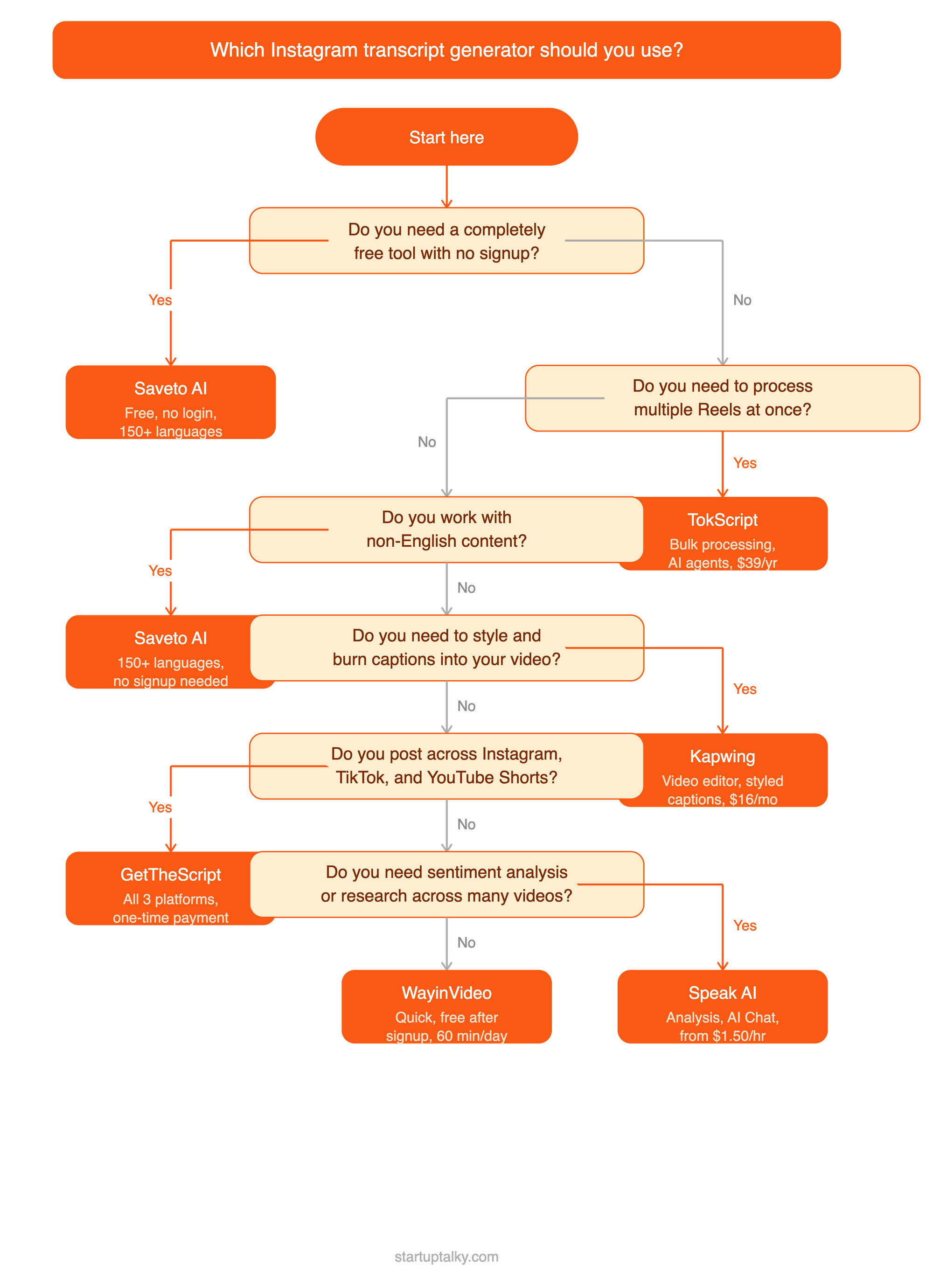
- Best free option: WayinVideo gives you 60 minutes of free daily transcription after a quick signup with no card required. Saveto AI is the better pick if you need zero account setup at all.
- Best for bulk processing: TokScript. Nothing else in this list handles 50 links at once. For agencies processing competitor research or content audits, it is the only tool worth considering at volume.
- Best for non-English content: Saveto AI supports 150+ languages and requires no login. Speak AI is the stronger option if you also need analysis alongside multilingual transcription.
- Best for adding captions to your own content: Kapwing. It is the only tool here built around editing the video rather than just extracting the text.
- Best for cross-platform creators: GetTheScript. Instagram, TikTok, and YouTube Shorts covered in one place, with a one-time payment option that most tools in this category do not offer.
- Best for speed with no friction: WayinVideo or Saveto AI. Paste the link, get the text. No account, no setup, no waiting.
Final Verdict
If you just need a quick transcript once in a while, use WayinVideo or Saveto AI. Both are free, both work from a URL, and neither asks you to sign up.
If you create or manage content regularly, TokScript at $39 per year is worth it. Bulk processing and AI agents at that price point are hard to argue against.
If you are running an agency or doing research across large sets of Instagram content, Speak AI is the right tool. The pay-as-you-go option keeps costs low for occasional work, and the platform grows with you as needs increase.
If styling your own Reels with on-brand captions is the goal, Kapwing is the only tool in this list built for that workflow.
If you publish across multiple short-form platforms and want one tool with no recurring fees, GetTheScript is worth trying.
FAQs
Can you get a transcript of an Instagram Reel for free?
Yes, you can get a free transcript for an Instagram reel. Several tools let you transcribe Instagram Reels to text at no cost. WayinVideo offers 60 minutes of free daily transcription after signing up. Saveto AI requires no login and is completely free. TokScript's free plan allows 5 transcripts per day. GetTheScript also offers a free tier with no credit card required.
Do Instagram transcript generators work on private accounts?
No. All the tools in this list require the Instagram profile and post to be set to public. Private account content cannot be accessed by any third-party tool.
How accurate are AI Instagram transcript generators?
Accuracy depends on audio quality, speech clarity, and background noise. On Reels with a clear speaking voice and minimal music, most tools perform well. Accuracy drops on content with heavy background music, strong accents, multiple speakers, or fast speech. Always review the output before using it in published copy.
Can I use a transcript to repurpose Instagram content into blog posts?
Yes. Most tools export in plain text formats you can paste directly into a document. TokScript and Dictationer generate blog-ready copy or summaries from the transcript. Speak AI can generate summaries across an entire library of videos at once, which is useful if you are repurposing content at scale.