Best AI Reverse Image Search Tools (2026 Guide)
AI reverse image search tools help you find image sources, detect copies, and verify authenticity in seconds. Explore the best tools, features, and use cases in this complete guide.

AI reverse image search tools let you upload a photo and see where it shows up online. They can tell what is in the image and find similar ones. These tools use visual recognition to spot faces, objects, text, and logos. They can also detect patterns and edits.
This helps you find the source of an image, verify its authenticity, and check whether it was misused. You can also discover related images without typing any keywords. The process is fast and simple. It works well for fact-checking and tracking image use.
Quick Comparison Table
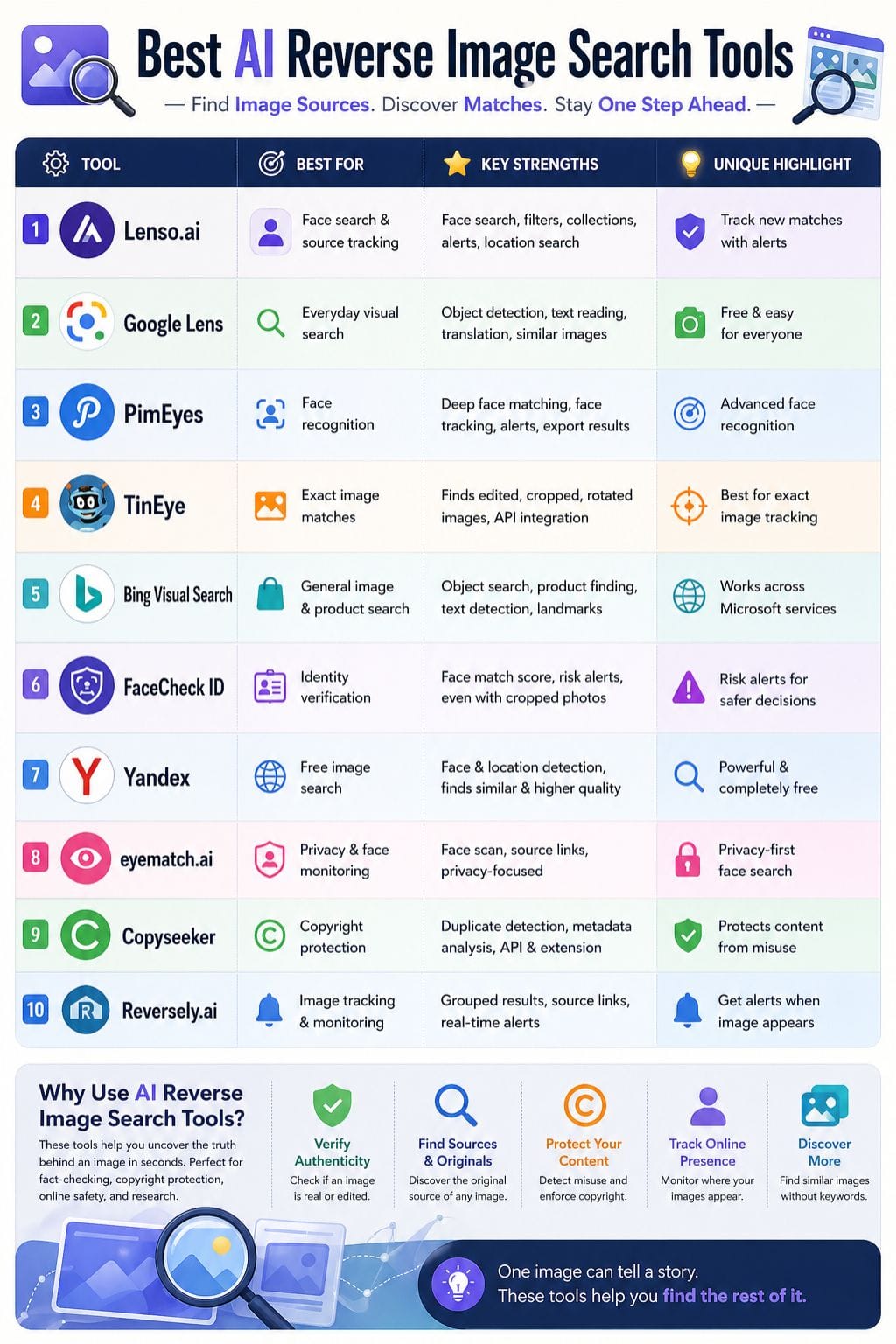
| Tool | Best For | Key Features | Pricing Level | Drawbacks |
|---|---|---|---|---|
| Lenso.ai | Face & source tracking | Face search, filters, alerts | Medium–High | Paid access needed |
| Google Lens | Everyday visual search | Object detection, text scan, translate | Free | Accuracy varies |
| PimEyes | Face recognition | Deep face matching, alerts | Medium–High | No social media search |
| TinEye | Exact image matches | Edited image detection, API | High | Limited discovery |
| Bing Visual Search | General search | Object + product search | Free–Paid API | Microsoft ecosystem |
| FaceCheck ID | Identity checks | Face match score, risk alerts | Medium | False positives |
| Yandex | Free image search | Strong face & location detection | Free | Limited indexing |
| Eyematch.ai | Privacy tracking | Face scan, source links | Medium | No free plan |
| Copyseeker | Copyright checks | Duplicate detection, metadata | Medium | Limited discovery |
| Reversely.ai | Image tracking | Alerts, grouped results | Low–Medium | False positives |
Lenso.ai
Lenso.ai is an AI reverse image search tool. It helps you find where an image comes from. You can search for faces and see close matches. It can find the same image used on other sites. This helps with copyright checks. You can also search for places to spot landmarks and locations.
It shows similar images for easy discovery. Filters let you sort by site, language, date, size, and keywords. You can save results in collections. Alerts help you track new matches over time. It is fast, simple, and useful for research, safety, and content checks.
Pros
- Achieves accurate facial recognition results through its facial recognition capabilities
- Simple process for uploading files through its straightforward user interface
- The tool helps users verify copyright information while tracking the source of content
Cons
- Effective outcomes will need users to pay for premium access
- Learning curve for users
Pricing
| Plan | Pricing |
|---|---|
| Starter | $19.99/month |
| Professional | $69.99/month |
| Developer | $2800/month |
Google Lens
Google Lens is a tool that lets you search using images instead of words. You can point your camera or upload a photo, and it will try to identify what is in it. It can detect objects, read text, find places, and recognize products or landmarks. It also shows similar images, gives quick details, and can translate text.
This makes it helpful for fast checks, finding sources, or shopping. Results are usually useful, but not always perfect. Accuracy can change based on image quality, lighting, and how clear the subject is in the picture you provide.
Pros
- Utilizes visual data to perform rapid image searches and identify objects
- Extract text from pictures and convert it into different languages
- Assists users in recognizing products, landmarks, plant species, and digital image files
Cons
- Preference for images that closely match the original image instead of showing the source image
- Decreased accuracy when it processes low-quality images
Pricing
| Plan | Pricing |
|---|---|
| Free | $0 |
PimEyes
PimEyes is a reverse image search tool that focuses on faces. It scans public websites to find where a face appears online. It uses AI to match facial features, not just whole images.
This helps it find photos with different angles, lighting, or backgrounds. The tool can track new matches and send alerts on higher plans. It also offers takedown support for unwanted images on paid tiers.
Users can export results and run deeper searches with premium options. PimEyes is useful for checking online presence, protecting identity, and finding image use across the web.
Pros
- Provides accurate face-matching results for public website content
- Helps users check their privacy settings while tracking unauthorized use of their images
- A straightforward interface that lets them find images through visual searches
Cons
- Users need to pay for complete results after accessing limited free content
- Does not perform searches on social media sites or video streaming platforms
Pricing
| Plan | Pricing |
|---|---|
| Open Plus | $29.99/month |
| Protect | $34.99/month |
| Advanced | $299.99/month |
 Vivek Dev Jacob
TinEye
TinEye is a powerful reverse image search tool built for exact matches. It can find the same image even if it is cropped, resized, rotated, or edited in color. This makes it useful for checking where an image came from and if it is real.
It helps users find higher-quality versions and see where an image is reused online. Many people use it for copyright checks and source tracking. It also focuses on privacy, which is important for sensitive searches.
TinEye offers an API, so businesses can add it to their tools and workflows with ease.
Pros
- Demonstrates exceptional abilities to identify exact duplicate content
- Effectively handle images that have been both cropped and modified from their original form
- Enables companies to protect their intellectual property rights through copyright enforcement and brand protection activities
Cons
- Performs better with specific image searches than it does with general visual searches through standard search engines
- Results become less effective when the system processes images with low quality or extensive modifications
Pricing
| Plan | Pricing |
|---|---|
| Starter | $200 (5000 searches) |
| Basic | $300 (10,000 searches) |
| Corporate | $1000 (50,000 searches) |
| Enterprise | $10,000 (100,000 searches) |
Bing Visual Search
Bing Visual Search helps you find things using an image. You can upload a photo or paste an image link. It then shows similar images from across the web. You can also find products, objects, and text in the image.
This makes it easy to explore what you see. It works well for places, clothes, flowers, and daily items. You can check where an image came from or find items to buy. It is fast and simple to use. This tool is helpful when words are not enough, and you want to search with what you see instead.
Pros
- Useful for object, text, and landmark identification
- Helpful for developers through API access
- Returns results in a clear search-style format
Cons
- Best features are tied to Microsoft’s ecosystem and services
- API usage is paid, so heavy use can get expensive
Pricing
Plan Pricing
Request for pricing (RFP)
FaceCheck ID
FaceCheck ID is a tool that searches the web using a face. It scans public images to find faces that look the same or very close. It can work even if the photo is cropped or not clear. This helps people check identities, spot scams, and see where a face shows up online.
The tool gives a match score so users can judge how close the result is. It also shows risk alerts to warn about possible issues. This makes it faster and easier to review results and take action with more confidence.
Pros
- Finds face matches, not just identical images
- Works with cropped, renamed, or hard-to-track photos
- Gives confidence scores and risk flags for quicker review
Cons
- Can return false positives when faces look alike
- Pricing may feel steep for casual users
Pricing
| Plan | Pricing |
|---|---|
| Rookie Sleuth | $19 |
| Private Eye | $47 |
| Deep Investigator | $197 |
| Professional | $597 |
Vivek Dev Jacob
Yandex
Yandex Images is a powerful visual search tool. It helps you find where a picture appears online. You can also discover similar images in seconds. It works well with faces, objects, places, and even edited photos.
The tool can show you higher-quality versions of the same image. It is fast and easy to use. You just upload a photo or paste a link. It then scans the web for matches. This makes it useful for checking image sources.
It also helps find duplicates or fake edits. Overall, it is a simple and effective way to search using images.
Pros
- Often performs strongly for face matching and location clues
- Free to use for reverse image search
- Useful for finding source pages and higher-resolution copies
Cons
- Results can be weaker for rare, private, or newly uploaded images
- Search quality depends on what has already been indexed online
Eyematch.ai
Eyematch.ai is a face search tool. It scans public images on the web to find where a person appears. It uses facial analysis to match the same face across photos, even if the angle, light, or edit is different. This helps spot misuse, track a person’s online presence, and check if an image is reused.
The tool is fast, simple, and built with privacy in mind. Each result links back to the source page for easy review. Eyematch.ai works best for people search, not objects. It helps users find faces, not things, with clear and quick results.
Pros
- Helps spot unauthorized image use and monitor digital footprint
- Simple interface with fast results and source links
- Privacy-focused design, with claims that uploads are not stored or shared
Cons
- Paid service with no free trial listed on the sources reviewed
- Focused mainly on faces, so it is less useful for objects, places, or broad image lookup
Pricing
| Plan | Pricing |
|---|---|
| Standard | $20.99/month |
Copyseeker
Copyseeker is an AI tool that helps you find where an image appears online. It can spot copies, track reuse, and help you locate the source. The tool studies visual details like shapes, colors, and patterns to match images with high accuracy.
It also checks metadata when available. This makes it useful for copyright checks and content verification. You can use it to see if your images are being reused without permission or to confirm if an image is real.
Copyseeker keeps the process simple, fast, and clear, so you get reliable results without much effort.
Pros
- Finds similar and duplicate images fast
- Helps protect image rights and spot misuse
- Offers API access and a browser extension for workflow use
Cons
- Results may still depend on how widely the image has been indexed online
- It may be more useful for verification than for broad creative discovery
Pricing
| Plan | Pricing |
|---|---|
| Free Plan | $0 |
| Premium (Optional) | Custom / Not publicly fixed |
Vivek Dev Jacob
Reversely.ai
Reversely.ai is a web tool for visual search. It finds images that look alike by checking shape, color, texture, and faces. You can use it to see where a photo came from, spot copies, and track where it appears online.
The tool shows results in clear groups, so it is easy to scan. It gives source links for each match. You can set alerts to know when matches appear. This helps you follow how an image spreads.
It works fast and needs no skill to start. It is useful for creators and brands.
Pros
- Fast results and a clean, easy interface
- Can handle low-quality or altered images better than simple pixel matching
- Offers real-time alerts and source links for tracking image use
Cons
- Some searches can return false positives
- Newer or AI-made images may be missed
Pricing
| Plan | Pricing |
|---|---|
| Silver | $14.99/month |
| Gold | $29.99/month |
How to Choose the Right Reverse Image Search Tool
Choosing the right tool depends on your use case:
- For face search: PimEyes, FaceCheck ID, Eyematch.ai
- For general search: Google Lens, Bing Visual Search, Yandex
- For copyright checks: TinEye, Copyseeker
- For tracking & alerts: Lenso.ai, Reversely.ai
Consider:
- Accuracy and speed
- Free vs paid access
- Privacy features
- Search type (face, object, or full image)
Why AI Reverse Image Search Tools Matter
AI reverse image search tools help people check and understand images online. They save time, find copies, and reveal misuse better than manual search. With fast and clear visual matches, they help creators, researchers, brands, and daily users. As more images fill the web, these tools grow in value.
They turn one photo into a useful context. This builds trust and helps people make quick choices. In a world full of visual noise, simple clarity matters. These tools give that clarity in a direct way. They make image search easy, reliable, and fast for anyone who needs answers.
FAQs
What is an AI reverse image search tool?
An AI reverse image search tool lets you upload a photo to find where it appears online, identify objects, and discover similar images using visual recognition.
Which reverse image search tool is best for face search?
Tools like PimEyes, FaceCheck ID, and Lenso.ai are best for face search as they use advanced facial recognition to find matches across the web.
Are reverse image search tools free to use?
Some tools, like Google Lens and Yandex, are free, while others offer limited free access with paid plans for advanced features.
How accurate are AI reverse image search tools?
Accuracy depends on image quality, lighting, and how widely the image is indexed online. High-quality images usually give better results.