Top AI Content Repurposing Tools to Turn One Idea into Multiple Posts
AI content repurposing tools help you turn one piece of content into many formats like blogs, social media posts, videos, and emails. These tools save time, increase reach, and help creators and businesses stay consistent across platforms without creating everything from scratch.


One good piece of content can do much more than just serve one purpose. AI content repurposing tools help creators turn a blog into social media posts, a podcast into articles, or a long video into short clips for different platforms.
This saves time and reduces the effort needed to create fresh content from scratch. It also helps brands stay active, reach new audiences, and keep a consistent voice across channels. Instead of constantly chasing new ideas, creators can get more value from the content they already have. The result is better visibility, wider reach.
Best AI Content Repurposing Tools Comparison Table
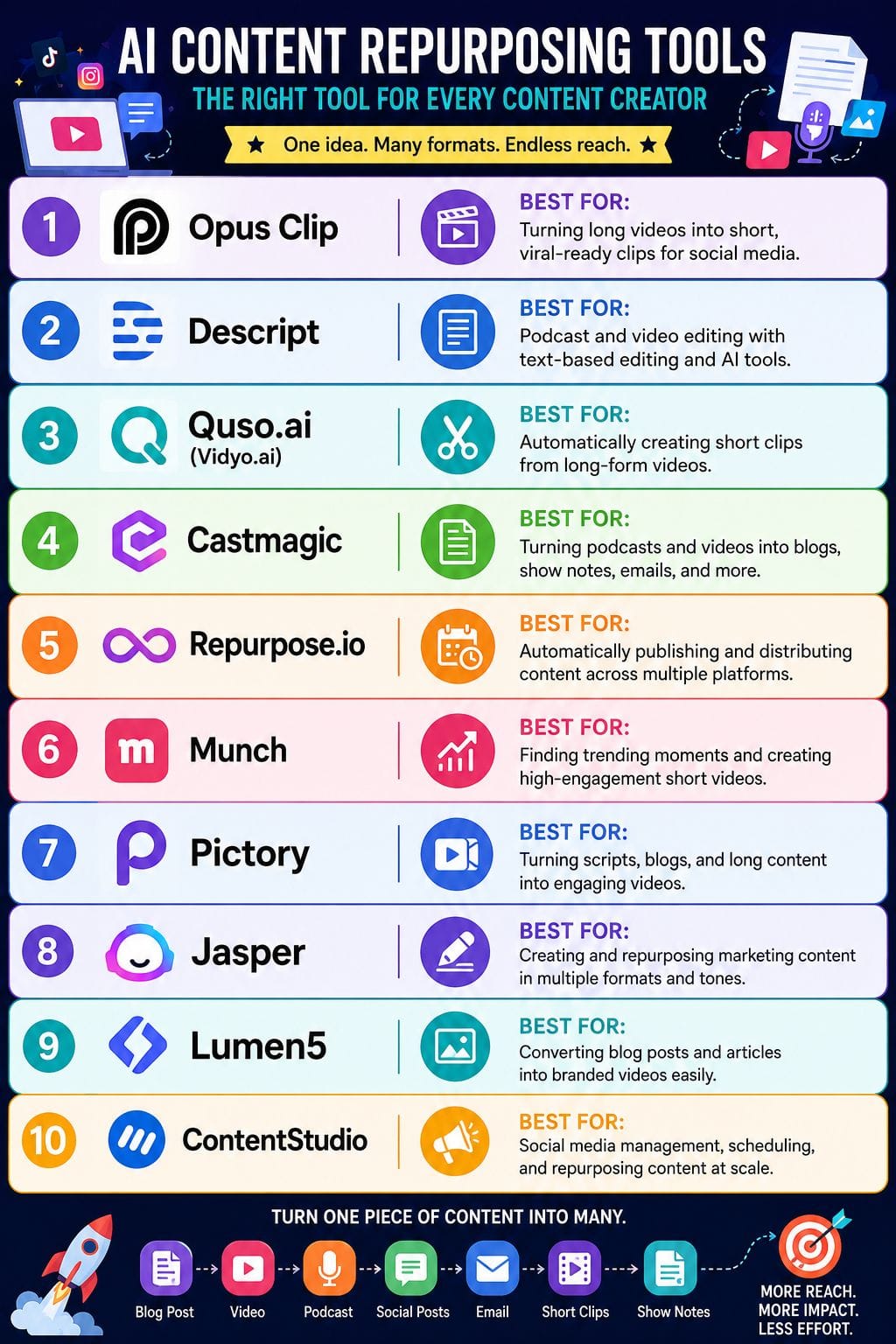
| Tool | Best For | Key Features | Pricing Level | Drawbacks |
|---|---|---|---|---|
| Opus Clip | Short-form video creation | AI clip detection, captions, vertical resizing, templates | Low–Mid | Best for talking videos only |
| Descript | Podcast & video editing | Text-based editing, filler removal, AI clips, Studio Sound | Mid–High | Can feel complex for beginners |
| Quso.ai | Auto video repurposing | Auto clipping, captions, resizing, templates | Mid | Needs manual tweaks for best output |
| Castmagic | Podcasts to content | Blogs, newsletters, summaries, transcripts | Mid–High | Setup required for best results |
| Repurpose.io | Automation at scale | Multi-platform posting, resizing, scheduling | Mid–High | No built-in analytics |
| Munch | Trend-based video clips | AI clipping, hashtags, insights, captions | Mid | AI output may need edits |
| Pictory | Blog to video | Auto highlights, captions, stock visuals, voiceovers | Low–Mid | Limited high-end editing control |
| Jasper | Marketing content repurposing | Brand voice, multi-format content, AI agents | High | Needs setup for best output |
| Lumen5 | Text to video | Blog-to-video, templates, branding, stock media | Mid | Less control for advanced editing |
| ContentStudio | Social media repurposing | Scheduling, recycling posts, AI captions, analytics | Mid–High | AI is less advanced than niche tools |
Opus Clip
Opus Clip is an AI-powered video editing tool that helps turn long videos into short clips for social media in just one click. It scans the full video, finds the most interesting moments, and creates engaging clips that are ready to share.
The tool also changes videos into vertical format, adds animated captions, emojis, and branded layouts to make them more appealing. It works well for podcasts, interviews, webinars, and other video types.
Users can create custom brand templates, collaborate with team members, and publish videos directly to popular short-form platforms, saving both time and editing effort.
Pros
- Very fast way to turn long videos into many shorts
- Auto captions, layouts, and resizing reduce manual editing work
- Team features and templates help keep brand style in sync
Cons
- Works best for talking, social-style content; complex edits still need a human
- Quality of clips depends on input video and niche
Pricing
| Plan | Price |
|---|---|
| Starter | $15/month |
| Pro | $29/month |
| Business | Custom |
Descript
Descript is an AI-powered editor that makes it easy to turn long videos or podcasts into short, engaging content. Instead of using a complex editing timeline, you simply edit the transcript like a document.
It can quickly create clips, social posts, captions, and summaries from a single recording. AI features help find the best moments, remove filler words, improve audio with Studio Sound, and add catchy hooks.
You can also record your screen, work with multiple tracks, and resize videos for different platforms. This makes Descript a great choice for creators, businesses, and marketers.
Pros
- Very fast for dialogue-heavy content thanks to document-style editing
- Strong AI toolkit that improves audio, finds clips, and generates repurposed assets
- Generous free tier to test workflows before scaling up
Cons
- Feature depth and UI can feel heavy for new or casual editors
- Media minutes, AI credits, and advanced collaboration are locked behind higher tiers
Pricing
| Plan | Price |
|---|---|
| Hobbyist | $24/month |
| Creator | $35/month |
| Business | $65/month |
Quso.ai (Vidyo.ai)
Quso.ai, formerly known as Vidyo.ai, is an AI-powered video editing tool that helps turn long videos into short, engaging clips. It can find the best moments, add captions, apply your brand style, and resize videos for platforms like TikTok, Instagram Reels, and YouTube Shorts.
You can also use ready-made templates to speed up editing. The platform is built for creators, marketers, agencies, and businesses that already make long-form videos. Instead of spending hours editing each clip by hand, Quso.ai helps you create and publish more content in less time while reaching a wider audience.
Pros
- Speeds up clip creation from long-form video with automated highlight detection and clipping
- Adds AI subtitles, emojis, and progress bars to boost engagement
- Beginner-friendly interface with templates, branding, and resizing for major social platforms
Cons
- Relies on existing footage and cannot create fully original videos from scratch
- Does not always remove silences and fillers perfectly; may need manual tweaks
Pricing
| Plan | Price |
|---|---|
| Lite | $29/month |
| Essential | $39/month |
| Growth | $49/month |
 Abinaya Arangarajan
Castmagic
Castmagic is an AI tool that helps you turn long audio and video recordings into useful content in minutes. You can upload files from platforms like YouTube, Zoom, Vimeo, or Google Drive.
The tool can create blog posts, show notes, transcripts, newsletters, and social media posts with just a few clicks. It also lets you use ready-made prompts or create your own to match your brand's tone and style.
With support for more than 60 languages and team collaboration features, Castmagic keeps content organized and easy to manage. It is a practical choice for podcasters, agencies, and B2B creators.
Pros
- Fast turn of long media into many assets (blogs, posts, emails)
- Strong brand voice control with custom prompts and recurring templates
- Works with many input sources and integrations like Drive, Zoom, and YouTube
Cons
- Needs some setup time to tune prompts and workflows
- File upload size capped (around 10 GB), which can limit very long recordings
Pricing
| Plan | Price |
|---|---|
| Hobby | $29/month |
| Starter | $99/month |
| Business | $999/month |
Repurpose.io
Repurpose.io is an AI-powered tool that helps creators, marketers, and agencies turn one video or audio file into content for many platforms. It automates the whole process, so you spend less time editing and posting.
The platform can trim videos, resize them for different apps, remove watermarks, add captions, and create titles and descriptions that fit each channel. You can also schedule and publish content from one dashboard.
Repurpose.io works with YouTube, TikTok, Instagram, Facebook, LinkedIn, podcasts, Zoom, and more. It is a simple way to create more short-form content.
Pros
- Big time savings through “set it and forget it” automation
- No editing skills needed for basic repurposing and formatting
- Strong for multi‑platform short‑form video at scale
Cons
- No built‑in analytics, so you rely on each platform’s data
- Learning curve when setting up first workflows and connections
Pricing
| Plan | Price |
|---|---|
| Starter | $35/month |
| Pro | $79/month |
| Agency | $179/month |
Munch
Munch is an AI-powered video editing tool that helps turn long videos into short, engaging clips for platforms like TikTok, Instagram Reels, and YouTube Shorts. It automatically finds the best moments, trims the footage, adds captions, and resizes each clip to match different social media formats.
The platform also studies current trends and suggests hashtags, titles, and hooks to improve reach. It even provides performance insights to help creators understand what works. By handling most of the editing process, Munch saves time and makes it easier for creators, brands, and agencies to publish more content with less effort.
Pros
- Strong AI clipping that finds the best hooks from long
- Built-in captions, subtitles, and platform-specific formats to save editing timenotes.
- Supports multiple languages for global reach
Cons
- Output quality depends on AI judgment, so some clips need manual tweaks
- Subscription can feel pricey for new or small creator
Pricing
| Plan | Price |
|---|---|
| Essential | $38/month |
| Premium | $60/month |
Marlene Ann Anthony
Pictory
Pictory is an AI video tool that helps you turn long content into short, engaging videos in minutes. You can upload videos, paste a script, add a blog post, or even use a URL to create social-ready clips.
The platform automatically transcribes your content, finds key highlights, adds captions, and suggests visuals, music, and AI voiceovers. It also lets you keep every video consistent with your brand by using custom logos, fonts, and colors.
Whether you are a marketer, coach, or B2B team, Pictory makes it easy to create and repurpose video content without needing advanced editing skills.
Pros
- Very fast way to turn webinars, podcasts, and blogs into social-ready clips
- Simple, browser-based workflow with low learning curve for non-editors
- Strong captioning and text-based editing for accessible, silent-friendly videos
Cons
- Output still needs manual polish for high-end brand or ad campaigns
- Minutes-based limits can be tight for heavy video teams on lower tiers
Pricing
| Plan | Price |
|---|---|
| Starter | $29/month |
| Professional | $59/month |
| Team | $199/month |
Jasper
Jasper is an AI marketing workspace that helps teams turn long-form assets into blogs, emails, social posts, ad copy, and scripts while keeping brand voice consistent across channels.
It uses purpose-built agents like content remixers and summarizers to adapt tone, length, and format from one core piece of content into many outputs. Teams can plug in brand guidelines so every repurposed asset sounds on-message, then refine drafts in a shared Canvas for faster reviews.
This makes it useful for campaigns that need high-volume, on-brand content from a few strong source pieces.
Pros
- Strong brand voice control and style guidance
- Multi-channel output from one source asset
- Agent-based workflows built for marketing teams
Cons
- Works best when you invest time in brand setup
- May still need manual edits for nuanced topics
Pricing
| Plan | Price |
|---|---|
| Pro | $69/month |
| Business | Custom |
Lumen5
Lumen5 is an AI-powered video creation tool that helps turn blog posts, articles, and scripts into short, engaging videos. Simply paste a URL or text, and the platform identifies the main points, matches them with stock or brand visuals, and adds motion, captions, and music automatically.
It also applies your brand colors, fonts, and logo to keep every video consistent. Instead of starting from scratch, marketing teams get a ready-to-edit draft that they can quickly refine by changing scenes, timing, or layouts.
This makes Lumen5 a practical choice for B2B marketers who want to create more video content.
Pros
- Very easy for non‑editors to learn and use
- Strong for turning blogs and articles into on‑brand videos
- Brand kits, templates, and collaboration help teams stay consistent
Cons
- Best suited to text‑to‑video, not full multi‑format repurposing
- Less control than pro editors for complex, cinematic videos
Pricing
| Plan | Price |
|---|---|
| Basic | $29/month |
| Starter | $79/month |
| Pro | $199/month |
Vivek Dev Jacob
ContentStudio
ContentStudio is a social media management platform that uses AI to make content creation easier. It helps you turn blog posts, videos, and curated links into engaging posts for different social media channels.
You can customize captions for each platform, save templates, and schedule posts in advance. It also lets you recycle your best-performing content, so valuable posts keep reaching new audiences.
Automation campaigns help keep evergreen content active without extra effort. Built-in analytics show which posts perform well, making it easy to decide what to repurpose next. This helps you save time.
Pros
- Strong content discovery for finding posts to repurpose
- Unified dashboard for planning, scheduling, and recycling content
- Automation campaigns to keep evergreen content in circulation
Cons
- AI writing and repurposing features are more basic than specialized tools
- Costs can rise as you add more social profiles and users
Pricing
| Plan | Price |
|---|---|
| Standard | $29/month |
| Advanced | $69/month |
| Agency | $139/month |
How to Choose the Right AI Repurposing Tool
Choosing the right tool depends on your content type. If you create videos, tools like Opus Clip, Munch, or Quso.ai are best. For podcasts and audio, Descript and Castmagic work better. For marketing teams, Jasper and ContentStudio help manage multi-platform content.
The best strategy is to pick one tool for creation and one for distribution. This keeps your workflow simple and efficient.
Final Thoughts
AI content repurposing tools help you get more value from every great idea. Instead of creating fresh content for each platform, you can turn one blog, video, or podcast into social posts, emails, short videos, and more. This saves time and removes much of the repetitive work.
You can focus on better ideas, stronger messages, and creative planning. These tools also help keep your voice consistent across different channels. By creating more content in less time, you can test what works, reach more people, and learn from real results. Your best ideas stay relevant longer and deliver more value.
FAQs
What are AI content repurposing tools?
AI content repurposing tools help convert one piece of content into different formats like blogs, social posts, emails, and videos automatically.
Why should I use content repurposing tools?
They save time, reduce effort, and help you reach more audiences by reusing the same content in multiple ways.
Can AI tools fully replace content creators?
No. AI helps speed up the process, but human creativity is still needed for quality, tone, and strategy.
What types of content can be repurposed?
Blogs, podcasts, videos, webinars, newsletters, and even social media posts can be repurposed using AI tools.
Are AI content repurposing tools free?
Some tools offer free plans with limited features, while advanced features usually require paid subscriptions.
Which is the best AI content repurposing tool?
It depends on your needs. Some tools are best for social media, while others are better for blogs or video repurposing.