Best AI Expense Tracking Tools for Smarter Money Management
Explore the top AI expense tracking tools that automate receipt scanning, expense categorisation, approvals, and financial reporting. Compare features, pricing, pros, and cons of platforms like Expensify, Ramp, Brex, QuickBooks, Zoho Expense, and more.

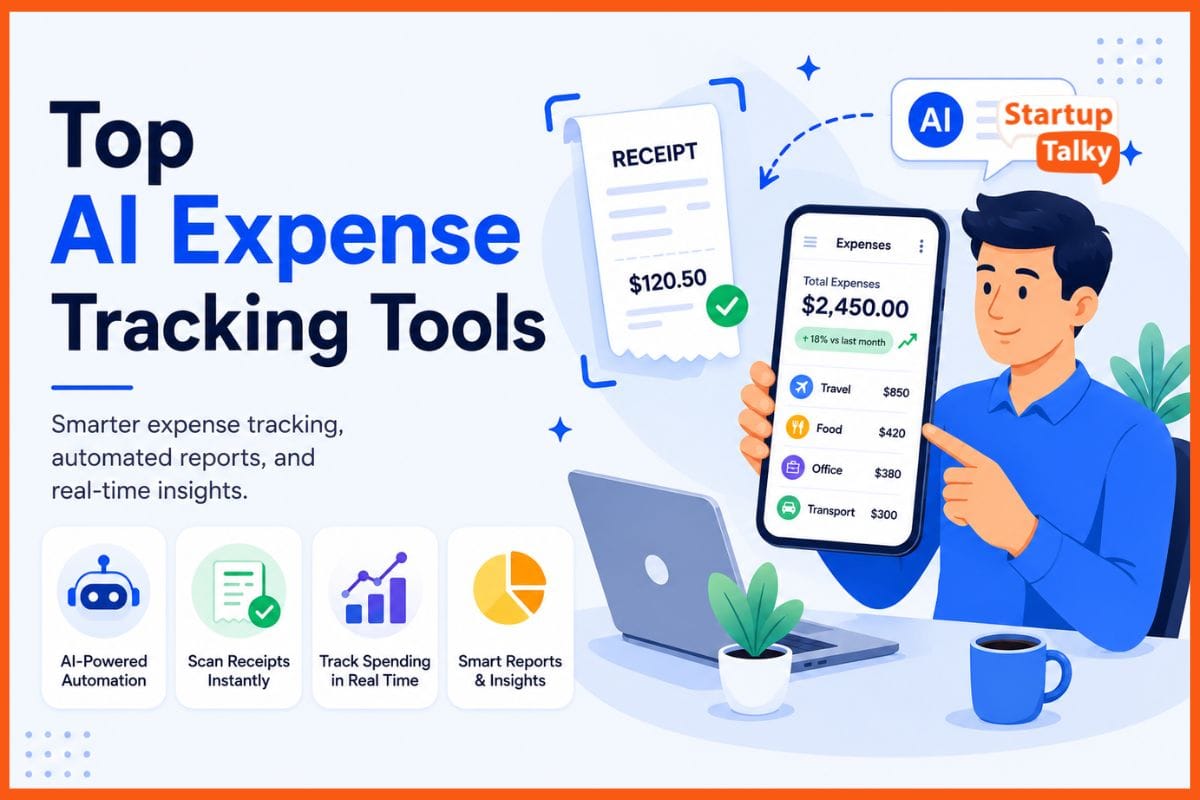
AI expense tools turn messy money records into simple, clear reports. They scan receipts, read dates and amounts, and sort spending into the right categories with little effort. Over time, smart systems learn your spending habits and improve accuracy.
Real-time updates show where your money goes each day, not weeks later. This helps people and businesses build better budgets and avoid mistakes. Tax filing also becomes easier because business costs stand out fast.
These tools save time, reduce stress, and make money management feel simple. In the long run, they help users build smarter financial habits.
Why AI Expense Tracking Tools Matter
Traditional expense management often involves spreadsheets, manual data entry, lost receipts, and delayed reporting. AI-powered expense management software changes this completely.
These platforms can:
- Automatically scan receipts
- Categorize expenses in real time
- Detect duplicate or unusual transactions
- Apply company spending policies
- Sync with accounting and ERP systems
- Generate live reports and dashboards
Businesses gain faster reconciliation, cleaner books, and improved compliance. Freelancers and individuals gain better visibility into spending and cash flow.
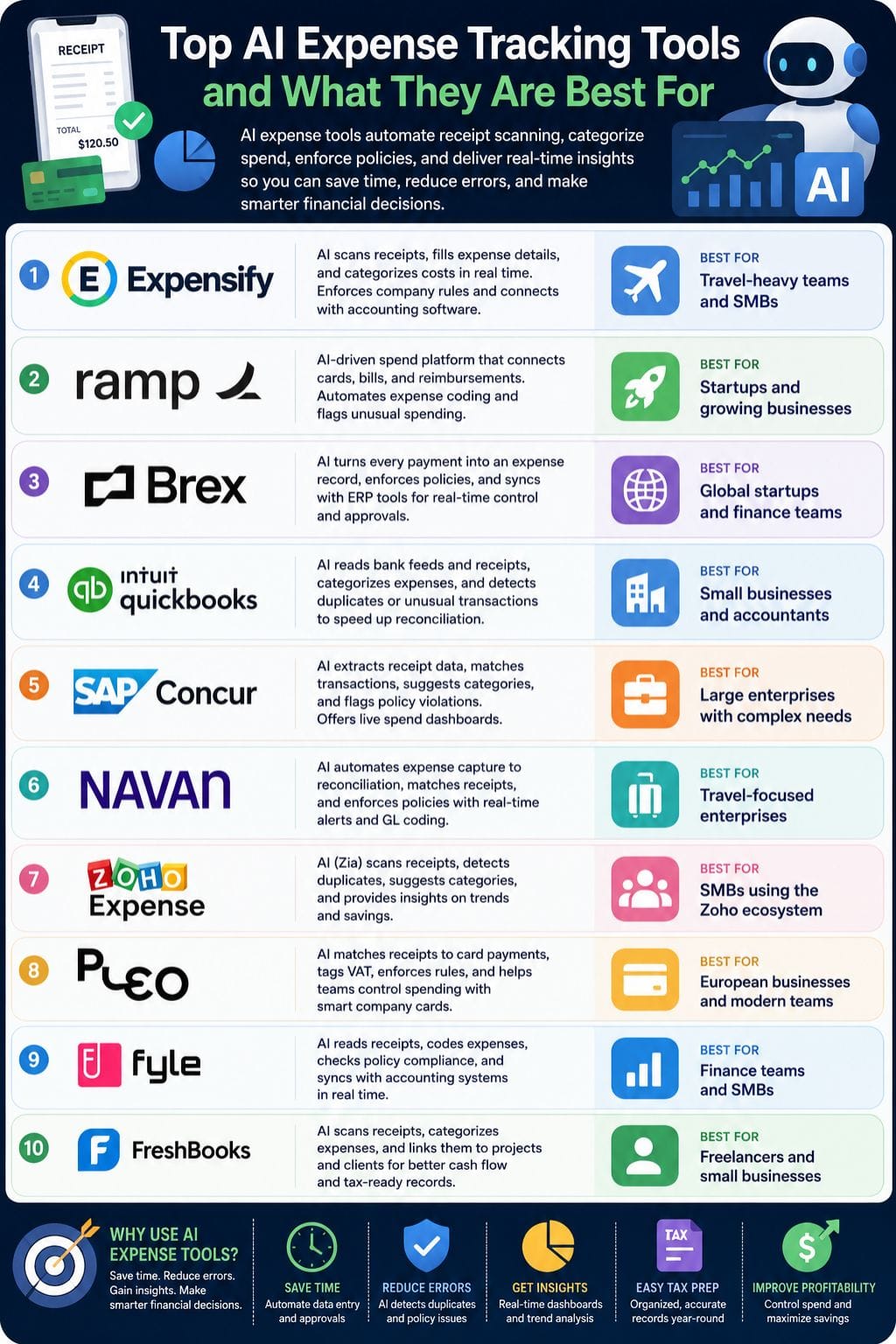
AI Expense Tracking Tools Comparison Table
| Tool | Best For | Key Features | Pricing Level | Drawbacks |
|---|---|---|---|---|
| Expensify | Travel-heavy teams and SMBs | Smart receipt scanning, AI categorisation, policy checks | Custom Pricing | Setup may feel complex for smaller teams |
| Ramp | Startups and growing businesses | AI automation, bill pay, corporate cards, spend tracking | Mid to Enterprise | Advanced setup requires onboarding |
| Brex | Global startups and finance teams | Real-time approvals, AI expense categorisation | Mid to Enterprise | Best suited for US-focused companies |
| QuickBooks | Small businesses and accountants | Bank feeds, anomaly detection, cash flow insights | Affordable to Premium | Can feel difficult for beginners |
| SAP Concur | Large enterprises | Travel integration, compliance controls, audit flags | Enterprise Pricing | Expensive for small teams |
| Navan | Travel-focused enterprises | Touchless automation, travel + expense integration | Custom Pricing | Some performance issues reported |
| Zoho Expense | SMBs using Zoho ecosystem | Zia AI assistant, approvals, expense automation | Budget-Friendly | Learning curve for new users |
| Pleo | European businesses and teams | Smart company cards, VAT tagging, controls | Mid Pricing | Costs rise with larger teams |
| Fyle | Finance teams and SMBs | AI receipt capture, policy engine, ERP integrations | Custom Pricing | Requires admin setup time |
| FreshBooks | Freelancers and small businesses | Receipt scanning, mobile tracking, project expenses | Affordable | Not ideal for large enterprises |
Expensify
Expensify uses AI to read receipts, fill in expense details, and sort costs into the right category in real time. This helps teams save time and reduce manual work.
The platform can enforce company spending rules, detect unusual expenses, and connect with accounting software for smooth tracking. Managers can also view budgets, spending patterns, and reports in one place.
Smart alerts and simple dashboards make it easier to control costs and make faster decisions. Expensify works well for both small teams and large businesses that want an easier way to manage expenses and improve financial visibility.
Pros
- SmartScan reads receipts and auto-categorises, saving time for frequent travellers and finance teams
- Built-in rules and AI checks reduce out-of-policy claims and fraud risk
- Connects with major accounting and card systems for smooth workflows
Cons
- Admin setup for rules and categories can feel complex for small teams
- Per-user pricing may be high for very small or low-volume users
Pricing
Request for Pricing (RFP)
Ramp
Ramp is an AI-driven spend platform that helps companies manage expenses with less manual work. It connects corporate cards, bills, and reimbursements in one place.
The tool uses machine learning to sort expenses, match receipts, and flag unusual spending in real time. Smart rules and automation reduce review time and improve accuracy.
Teams can track vendor costs, view live spending data, and spot ways to save money. Ramp gives startups and growing businesses a clear view of where money goes each day. Instead of only tracking expenses, it helps companies make faster and smarter financial decisions.
Pros
- Strong automation that can remove most manual expense reports
- High accuracy in auto-coding improves data quality for finance teams
- Built-in cards, bill pay, and expense tracking in one platform
Cons
- Advanced features and AI workflows can take time for teams to set up and trust
- Enterprise-grade options often require a sales contact and custom onboarding
Pricing
| Plan | Pricing |
|---|---|
| Plus | $15/user/month |
| Enterprise | Contact Sales |
Brex
Brex uses AI to turn each company payment into a clear expense record in real time. It cuts manual work, reduces month-end stress, and gives finance teams better control over spending.
The platform can create receipts and memos, place merchants in the right expense category, sync data with ERP tools, and apply company rules before a payment goes through.
Managers only need to check unusual cases. Startups and global teams can track expenses, budgets, cards, and reimbursements in one dashboard. Brex also spots risky spending patterns and highlights useful trends so teams can make faster and smarter financial decisions.
Pros
- Strong AI automation for categorisation, receipt creation, and policy enforcement, reducing manual work
- Tight link between corporate cards, expenses, travel, and bill pay in one platform
- Real-time approvals and alerts that help stop out-of-policy spend before it happens
Cons
- Best suited to US-centric banking; global banking coverage can feel limited despite broad card reach
- Some advanced automation and analytics features are locked behind higher tiers or bundles
Pricing
| Plan | Pricing |
|---|---|
| Premium | $12/user/month |
| Enterprise | Contact Sales |
 Anish Sharma
QuickBooks
QuickBooks uses AI to read bank feeds, receipts, and bills. It sorts expenses into the right accounts in real time and learns from past actions to improve accuracy. The system can spot duplicate or unusual transactions before they become problems.
This helps businesses finish reconciliation faster and spend less time on manual data entry. Users can also upload receipts and track expenses from their phones. Live cash flow updates give a clear view of business spending and finances.
By reducing errors and saving time, the platform helps small businesses manage accounts with less effort and better control.
Pros
- Strong AI agents for auto-categorisation and anomaly detection
- Learns user patterns over time to improve accuracy
- Mature ecosystem, bank feeds, and accountant support
Cons
- Can feel complex for very small or non-accounting users
- Region-specific availability of some AI agents and automations
Pricing
| Plan | Pricing |
|---|---|
| Simple Start | $38/month |
| Essentials | $75/month |
| Plus | $115/month |
| Advanced | $275/month |
SAP Concur
SAP Concur uses AI to make expense tracking simple for companies. Staff can snap a photo of a receipt on their phone, and the system reads the details on its own.
It matches receipts with card payments, fills expense reports, and suggests the right spending category based on past use. The platform can also spot claims that look unusual or break company rules.
Finance teams get live dashboards to track spending by team, trip, or project. Since it connects with travel booking and invoicing tools, businesses can manage all employee expenses in one place with less manual work.
Pros
- Tight links between travel, expense, and invoice in one suite
- Powerful policy engine with automatic audit flags
- Good fit for global firms with complex tax rules
Cons
- May feel heavy and costly for very small teams
- User training needed to unlock full value
Pricing
Request for pricing (RFP)
Navan
Navan uses AI to make company spending easier to manage. It tracks expenses from the moment an employee pays until the final reconciliation step.
The system sorts spending by merchant, employee role, and company policy in real time. It also matches receipts automatically and pulls details from travel bookings and calendars.
If a purchase looks risky or breaks policy, teams get alerts early. Finance teams can view live dashboards for cards, trips, and reimbursements in one place. Each expense is linked to the correct GL code, tax rule, and cost center. Navan also connects with other ERP tools.
Pros
- Very high “touchless” rate, with about 73% of expenses fully automated from capture to reconciliation
- Deep travel plus expense plus card bundle, so trip data enriches every expense line
- Strong compliance posture with SOC 1/2, ISO 27001, PCI DSS, GDPR and GoBD coverage
Cons
- Performance issues reported by users
- Advanced AI features and enterprise rollouts may require change management and admin setup effort
Pricing
Request for pricing (RFP)
Vivek Dev Jacob
Zoho Expense
Zoho Expense uses AI to scan receipts, fill expense details, and sort spending with less manual work. It helps teams track travel, mileage, company cards, and budgets in one place.
The platform can spot duplicate claims, flag unusual spending, and stop policy violations before approval. Zia, the built-in AI assistant, gives insights on trends, spending habits, and possible savings.
It also supports multi-currency expenses and automated approval flows for faster processing. Finance teams can connect it with tools like Zoho Books and QuickBooks to keep records accurate and easy to manage.
Pros
- Very strong automation from capture to reimbursement
- Built-in AI insights reduce manual review time
- Tight integration with the Zoho ecosystem
Cons
- Best value often comes when you also use other Zoho products
- Learning curve for non-finance users at first
Pricing
| Plan | Pricing |
|---|---|
| Standard | $4/user/month |
| Premium | $6/user/month |
| Zoho Spend | Contact Sales |
Pleo
Pleo is an AI-driven spend platform that helps companies manage expenses with less manual work. Teams can track spending in real time, match receipts to card payments, and sort expenses automatically.
The system also tags VAT and syncs data with accounting software, which helps finance teams close books faster and avoid errors. Managers can set budgets, approval flows, and spending rules to keep costs under control.
Employees simply pay with a company card, take a photo of the receipt, and continue their work. Pleo handles expense coding, policy checks, and reports in the background, making expense management seamless.
Pros
- Very easy for staff to use with card plus snap-a-receipt flow
- Strong controls with custom limits, approvals, and card freezing
- Deep accounting integrations that speed up month-end
Cons
- Cost can rise as headcount grows
- Best value often comes when you adopt it company-wide
Pricing
| Plan | Pricing |
|---|---|
| Essential | $45/month |
| Advanced | $109/month |
| Beyond | $219/month |
Fyle
Fyle is an AI-powered expense tool that reads receipts, codes spend, and syncs it to accounting in real time, cutting manual work for finance teams.
It uses OCR and AI to extract data, enforce policy checks, and auto-reconcile card transactions across Visa and other major networks. A conversational layer lets users text images of receipts; the system then builds and codes expenses, and nudges for missing fields like project or cost center.
Dashboards and an AI copilot surface spend trends, risky behavior, and optimization ideas for better control and faster book close
Pros
- Receipt capture via text, email, and common work apps, so users avoid learning a new tool
- Strong policy engine that auto-flags noncompliant claims and can auto-approve safe expenses
- Deep integrations with ERPs and accounting tools for smooth reconciliation and faster close
Cons
- Best value appears at team and SMB scale, which may feel heavy for solo users or tiny teams
- Feature richness and policy controls can need admin setup time before the system runs smoothly
Pricing
Request for pricing (RFP)
Vivek Dev Jacob
FreshBooks
FreshBooks uses AI to make expense tracking simple for freelancers and small businesses. Users can snap photos of receipts, connect bank accounts, and sort expenses into tax-ready categories with less manual work.
The platform also links expenses to projects and clients, helping owners track profit for each job. Cloud access and mobile apps make it easy to manage finances from anywhere.
Integrations with AI tools help reduce repetitive tasks like data entry and expense matching. This gives business owners a clear view of cash flow, spending, and profits each month while keeping records organized for tax season.
Pros
- Very easy for non-accountants to learn and use
- Strong mobile experience for on-the-go receipt capture
- AI integrations can reduce repetitive admin work at scale
Cons
- Less suited to very large or complex enterprises
- Costs can rise as you add more clients, team members, or features
Pricing
| Plan | Pricing |
|---|---|
| Lite | $6.90/month |
| Plus | $12.90/month |
| Premium | $21/month |
| Select | Contact Sales |
How to Choose the Right AI Expense Tool
Choosing the right AI expense management software depends on business size, workflow, and budget.
Choose Expensify if:
- Your team travels frequently
- You need fast receipt scanning
- You want simple reimbursements
Choose Ramp or Brex if:
- You want an all-in-one spend management platform
- Your company uses corporate cards heavily
- Real-time spend visibility matters
Choose QuickBooks or FreshBooks if:
- You run a small business or freelance operation
- Accounting and bookkeeping are your top priorities
- You want simple expense tracking with invoicing
Choose SAP Concur or Navan if:
- You manage enterprise-level travel and expenses
- Your business operates globally
- You need advanced compliance and audit controls
Choose Zoho Expense or Fyle if:
- You want affordable automation
- You already use accounting tools like Zoho Books
- Your finance team needs policy automation
Final Thoughts
AI tools for expense tracking and categorisation now make money management feel simple, fast, and clear. They read receipts, scan bank feeds, and sort each cost in seconds, so you spend less time on spreadsheets and more time on real work.
Trends and waste stand out at a glance, not after a long month-end grind. Teams gain clean books, fewer errors, and sharper tax records.
Owners gain calm, because cash flow is no longer a guess. As these systems grow smarter, they turn every transaction into insight and give every decision a stronger base.
FAQs
What are AI expense tracking tools?
AI expense tracking tools are software platforms that use artificial intelligence to scan receipts, categorise expenses, automate reports, and track spending in real time.
Which AI expense management tool is best for small businesses?
QuickBooks, Zoho Expense, and FreshBooks are among the best AI expense tools for small businesses because they are affordable, easy to use, and offer strong automation features.
Can AI expense tools reduce accounting errors?
Yes. AI expense tools can detect duplicate transactions, flag unusual spending, and automatically categorise expenses, helping businesses reduce manual errors.
Do AI expense tracking tools support mobile receipt scanning?
Most modern AI expense management platforms like Expensify, Pleo, and SAP Concur allow users to scan and upload receipts directly from their mobile phones.