Top PPC AI Tools I Tested and Compared: What Actually Works
Your competitors are already using AI to run PPC campaigns faster and cheaper. Here is a breakdown of the tools that actually work, what each one costs, and which type of team each one suits.
Running PPC without AI in 2026 means doing manually what these tools do in seconds. I tested seven tools across bid management, creative production, account automation, and cross-channel management. Here is what each one actually does and who it is for.
What to Look for in a PPC AI Tool
PPC AI tools do different things. Pick the wrong type, and you have paid for something that does not solve your problem.
- Bid management adjusts bids in real time based on conversion data, device, and location. Google Smart Bidding is the free starting point. Optmyzr adds control and visibility on top.
- Ad creative generation produces banners, copy, and video ads using performance data. AdCreative.ai and Madgicx work here.
- Campaign automation handles search term mining, negative keywords, budget tracking, and reporting. Optmyzr and Adalysis cover this.
- Conversational management lets you run campaigns in plain language inside ChatGPT or Claude. Adspirer does this.
Quick Comparison of Top PPC AI Tools
| Tool | Best For | Key Feature | Free Plan | Starting Price | Website |
|---|---|---|---|---|---|
| Google Smart Bidding | Every Google Ads user | Real-time bid adjustment using 70B+ daily signals | Yes (built in) | Free | ads.google.com |
| Optmyzr | Agencies managing Google Ads at scale | Rule Engine, one-click fixes, multi-account reporting | 14-day trial | $299/month | optmyzr.com |
| AdCreative.ai | Marketers who need ad creative at volume | AI-generated banners, copy, and video ads | 7-day trial | $39/month (monthly) | adcreative.ai |
| Madgicx | Meta Ads advertisers | Daily AI action plan, budget automation, creative analytics | No | From $49/month | madgicx.com |
| Adalysis | Google Ads specialists | Automated audits, ad copy testing, quality score tracking | 30-day trial | From $149/month | adalysis.com |
| Adspirer | Teams already using ChatGPT or Claude | Manage Google, Meta, TikTok, LinkedIn through conversation | Yes (15 calls/month) | From $49/month | adspirer.com |
| Semrush | PPC research and competitor intelligence | Competitor ad history, keyword gaps, ad copy analysis | Yes (10 queries/day) | $139.95/month | semrush.com |
How I Selected These Tools
I assessed each tool on the following criteria:
- Real AI or just rules: Does it use machine learning to find things you would miss, or is it automation with an AI label?
- Platform coverage: Which ad networks does it support?
- Ease of use: Can a solo marketer get value quickly, or does it need an expert to configure?
- What it actually does: Does it act, suggest, or just show data?
- Pricing: Is the cost fair for the team size it targets?
- User feedback: What do people say after using it for months, not just during a trial?
What Is a PPC AI Tool?
A PPC AI tool helps you run paid advertising campaigns faster and with less manual work. The best ones handle the high-volume tasks that take too long to do by hand: adjusting hundreds of bids, reading thousands of search terms, generating ad variants, and catching budget issues before they get expensive.
They do not replace strategy. You still decide which keywords to target, how to position against competitors, and what your offer is. AI handles the execution and monitoring.
How to Get Started With a PPC AI Tool
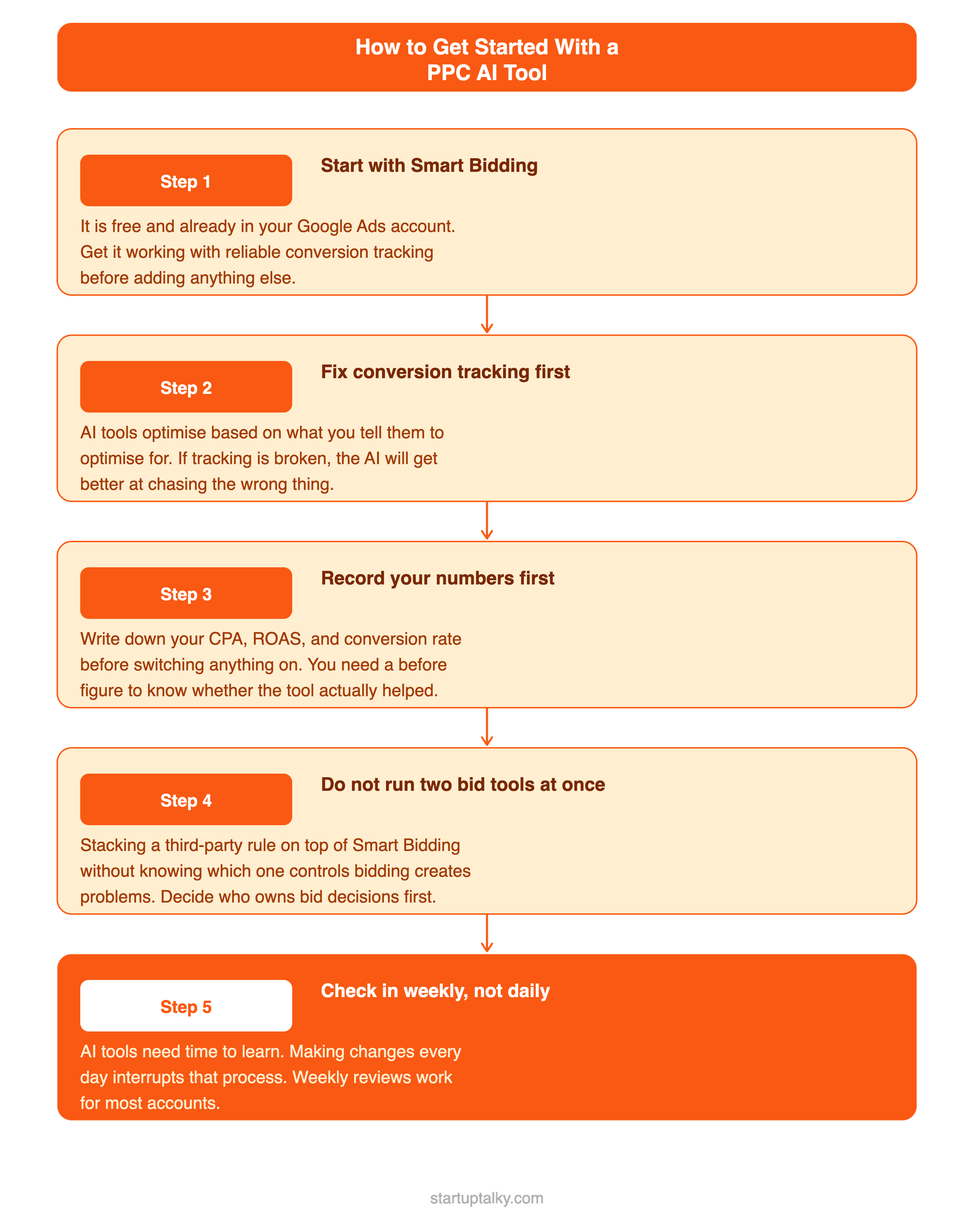
- Start with Smart Bidding: It is free and already in your Google Ads account. Get it set up correctly with reliable conversion tracking before adding anything else.
- Fix conversion tracking first: AI tools optimise based on what you tell them to optimise for. If your tracking is broken, the AI will just get better at chasing the wrong thing.
- Record your numbers before turning anything on: Write down your CPA, ROAS, and conversion rate. You need a before figure to know whether the tool actually helped.
- Do not run two bid tools at once: Stacking a third-party rule on top of Smart Bidding without understanding which one is in control creates problems. Decide who owns bidding decisions.
- Check in weekly, not daily: AI tools need time to learn. Checking in every day and making changes interrupts that process. Weekly reviews are enough for most accounts.
Top PPC AI Tools
Here are some of the best PPC AI Tools that I tested:
1. Google Smart Bidding
Best for: Every Google Ads user before adding any paid tool
Smart Bidding is free, built into Google Ads, and used by more advertisers than every other tool in this list combined. It adjusts bids at the auction level in real time using signals no third-party tool can access: Google's own data on user intent, device, location, time, and search context. For most accounts, getting Smart Bidding right delivers more improvement than any paid optimisation tool layered on top.
Before spending money on any tool in this list, make sure Smart Bidding is active and your conversion tracking is clean.
Key Features
- Real-time bid adjustment on every auction, not just periodic updates
- Four strategies: Target CPA, Target ROAS, Maximise Conversions, Maximise Conversion Value
- Seasonality adjustments for sales events and promotions
- Works across Search, Shopping, Display, and Performance Max campaigns
Pricing
| Feature | Price |
|---|---|
| Smart Bidding | Free, built into Google Ads |
| Performance Max | Free |
What Users Like
- Free and already active in every Google Ads account
- Has access to Google's own signals, which paid tools cannot replicate
- Works well once conversion data reaches 30 to 50 conversions per campaign per month
Potential Drawbacks
- Needs enough conversion data to learn; thin accounts do not benefit as much
- You cannot see why it set a specific bid; it is a black box
- Reacts slowly to sudden budget or campaign changes unless you use seasonality adjustments
Best for: Every Google Ads advertiser as the starting point before any paid tool.
 Muskaan Kapoor
2. Optmyzr
Best for: Agencies and PPC teams managing multiple Google Ads accounts
Optmyzr was built by former Google Ads engineers. It works inside your Google Ads account and gives you tools the native interface does not: a visual rule builder for custom automation, one-click fixes for common account issues, search term analysis, and multi-account reporting. If you manage 10 accounts and spend 35 hours a month on manual checks and report writing, Optmyzr cuts that down. Users on G2 report saving 35+ hours per month after full setup.
It does not make strategic decisions for you. It makes executing and monitoring your decisions faster.
Key Features
- Rule Engine: build custom automations without writing code
- One-click fixes: pre-built recommendations you approve or skip
- Search term analysis for finding negative keyword opportunities
- Multi-account dashboard and scheduled client reports
- Supports Google Ads, Microsoft Ads, Meta, LinkedIn, and Amazon
Pricing
| Plan | Price | Notes |
|---|---|---|
| Essentials | $299/month | Core tools; Google and Microsoft Ads |
| Premium | $389/month | Shopping automation, cross-platform budgets |
| Enterprise | Custom | High-volume agencies; API access |
14-day free trial. Price scales with ad spend above base tiers.
What Users Like
- Rule Engine flexibility is the strongest in the category for experienced PPC managers
- Search term analysis saves hours of manual work each week
- Client reporting is fast and professional without needing a separate tool
Potential Drawbacks
- Requires PPC experience to configure properly; not a tool for beginners
- Starts at $299/month, which is steep for single-account users
- Takes 4 to 6 weeks to set up and learn fully
Best for: PPC specialists and agencies running multiple Google Ads accounts who want structured automation and less time on manual tasks.
3. AdCreative.ai
Best for: Marketers who need lots of ad creative without a design team
AdCreative.ai generates static banners, video ads, product images, and ad copy from your brand assets. The AI is trained on real ad performance data, so the output is built around what converts, not just what looks good. You generate as many variants as you want; credits only get used when you download. Creative Scoring AI ranks your variants before you test them, which saves budget on weak options. Over 4.2 million users are on the platform.
Key Features
- AI-generated banners, video ads, product images, and ad copy
- Credits used on download only, not on generation
- Creative Scoring AI predicts which variants are likely to perform
- Competitor Insights: see what rival brands are running
- Connects directly to Meta Ads and Google Ads accounts
- 100 million+ royalty-free stock images included on all plans
Pricing
| Plan | Monthly billing | Annual billing | Notes |
|---|---|---|---|
| Starter | $39/month | $20/month | 10 credits; 1 brand; 1 user |
| Professional | $249/month | $149/month | 100 credits; 3 brands; video ads |
| Ultimate | $599/month | $299/month | 500 credits; unlimited brands |
7-day free trial with 10 credits. Annual billing saves 50%.
What Users Like
- Generate freely without spending credits until you find something worth using
- Starter at $20/month annually is one of the cheapest paid tools in the category
- Creative Scoring reduces the number of variants you need to test in real campaigns
Potential Drawbacks
- Video ads are locked behind the $249/month Professional plan; Starter is images only
- Some G2 and Capterra reviewers flag unexpected charges after trial; set a cancellation reminder before day seven
- Quality varies; works best when brand guidelines and reference ads are uploaded
Best for: Solo marketers, DTC brands, and agencies who need consistent ad creative at volume without a designer.
Sushree Sangeeta Behera
4. Madgicx
Best for: Meta Ads advertisers who want AI-driven daily recommendations and budget management
Madgicx is built specifically for Meta Ads with a TikTok integration added. Every day, the AI Marketer analyses your account and gives you a ranked action list: what to fix, what to scale, what to pause. The Autonomous Budget Optimiser handles pacing and budget shifts across campaigns without manual input. Creative analytics breaks down which ad elements are driving results at a level Meta's native reporting does not reach. If Meta is your main channel, Madgicx is the most complete AI layer for it.
Key Features
- AI Marketer: daily ranked action plan based on account performance
- Autonomous Budget Optimiser: automatic pacing and reallocation across campaigns
- Creative analytics by element, not just by ad
- Audience targeting AI for building and refining Meta audiences
- TikTok Ads integration
- One-click ad creation from top-performing templates
Pricing
| Plan | Price | Notes |
|---|---|---|
| Starter | From $49/month | Entry tier; scales with ad spend |
| Growth | From $199/month | Advanced AI; more accounts |
| Scale | Custom | Agencies and high-spend accounts |
Pricing scales with managed spend above base tiers.
What Users Like
- Daily action plan is more useful than a dashboard full of metrics with no clear priority
- Budget automation removes most of the daily manual work for Meta-heavy accounts
Potential Drawbacks
- Does not cover Google Ads; you need a separate tool for search
- Pricing grows with ad spend, which can make monthly costs hard to predict
- Creative analytics needs 3 months of historical data before it becomes truly useful
Best for: DTC brands and agencies spending heavily on Meta who want daily AI direction and automated budget management.
5. Adalysis
Best for: Google Ads specialists who want systematic ad testing and account health monitoring
Adalysis does two things well: it finds what is wrong in your account through automated checks, and it runs structured A/B tests on your ad copy with statistical tracking. It watches quality scores, ad group issues, wasted spend, and policy problems, and sends alerts before they get expensive. The ad testing framework tracks statistical confidence so you know when a test has enough data to call a result, rather than guessing.
Key Features
- Automated account checks across quality score, ad copy, landing pages, and structure
- Statistical A/B testing for ad copy with confidence tracking
- Search term analysis and negative keyword suggestions
- Budget pacing alerts before overspend happens
- Supports Google Ads and Microsoft Ads
Pricing
| Plan | Price | Notes |
|---|---|---|
| Starter | From $149/month | Core auditing and testing; up to $50K monthly spend |
| Professional | From $249/month | Larger accounts; more automation |
| Agency | Custom | Multi-account; white-label reporting |
30-day free trial.
What Users Like
- Catches account issues that get missed under time pressure during manual reviews
- Statistical tracking on A/B tests stops you calling a winner too early
- More focused and cheaper than Optmyzr for teams whose main need is auditing
Potential Drawbacks
- Flags issues but does not fix them; you still do the work
- Google and Microsoft Ads only; no Meta or TikTok
- Interface is functional but feels dated compared to newer tools
Best for: Google Ads specialists who want a structured system for ad testing and catching account problems early.
Vivek Dev Jacob
6. Adspirer
Best for: PPC managers who already work inside ChatGPT or Claude every day
Adspirer connects Google, Meta, LinkedIn, and TikTok to ChatGPT and Claude via MCP. You manage campaigns in plain English inside a conversation. Ask "what is my ROAS across all platforms this week?" and get the answer without opening a dashboard. Create a campaign, pause an ad, adjust a budget, or add negative keywords, all through chat. Changes are staged and require your confirmation before they go live. A new team member can pull cross-platform data within 30 seconds of connecting.
Key Features
- Connects Google, Meta, LinkedIn, and TikTok to ChatGPT and Claude
- Read and write access: create, edit, pause, and report through conversation
- Cross-platform queries in a single message
- Staged changes: nothing goes live without your confirmation
- Free tier with 15 tool calls per month
Pricing
| Plan | Price | Notes |
|---|---|---|
| Free | $0 | 15 tool calls/month; no card required |
| Starter | From $49/month | More calls; multi-platform |
| Agency | Custom | Multi-client; pooled seats |
What Users Like
- Zero learning curve if you already use ChatGPT or Claude
- Cross-platform data in one chat without tab-switching
- Staged changes mean you stay in control; nothing runs without approval
Potential Drawbacks
- Not as deep as Optmyzr or Adalysis for rule-building and auditing
- Value depends on how comfortable you are working in a chat interface
- Newer tool; smaller user base and fewer community resources
Best for: PPC managers who live in ChatGPT or Claude and want ad account management in the same place.
7. Semrush
Best for: Keyword research and competitor ad intelligence before campaigns launch
Semrush shows you what competitors are bidding on, what ad copy they have tested, how long specific ads have been running, and where gaps exist in their keyword coverage. This is pre-campaign and ongoing strategy work, not day-to-day management. You use Semrush to build campaigns on what competitors have already proven works, then execute in Google Ads. Combined with SpyFu for ad history depth, it covers most of what a PPC team needs for research.
Key Features
- Advertising Research: competitor ad copy, keywords, and estimated spend
- Keyword Gap: keywords competitors rank or bid on that you do not
- Ad history: every variant a competitor has tested for any keyword
- PPC Keyword Tool: organise keywords by campaign and ad group with match types
- Traffic Analytics: estimate competitor traffic by channel
Pricing
| Plan | Monthly | Annual | Notes |
|---|---|---|---|
| Pro | $139.95 | $117.33/month | 5 projects; core research tools |
| Guru | $249.95 | $208.33/month | Historical data; content toolkit |
| Business | $499.95 | $416.66/month | API; Share of Voice; high limits |
Free tier with 10 daily queries. 7-day free trial on paid plans.
What Users Like
- Competitor ad history shows you what has been tested, not just what is running now
- Keyword Gap finds missed opportunities before you spend money discovering them
- PPC Keyword Tool cuts campaign build time by clustering and deduplicating keywords
Potential Drawbacks
- Research only; you plan in Semrush and execute in Google Ads
- Traffic Analytics requires a separate Trends add-on at extra cost on Pro
- Spend and traffic estimates for smaller sites are rough rather than precise
Best for: PPC managers who want to base keyword and messaging decisions on competitor data before campaigns go live.
Ipsita Acharya
Top PPC AI Tools by Use Case
- Already on Google Ads and not sure where to start: Turn on Smart Bidding first. It is free and gives you the most important AI layer at no extra cost.
- Need to reduce time on manual account work: Optmyzr for Google Ads teams. Madgicx for Meta-focused accounts.
- Need more ad creative without hiring a designer: AdCreative.ai. Starter at $20/month annually covers most solo marketers.
- Want to catch account problems before they cost money: Adalysis. The 30-day trial is enough to see what it finds in your account.
- Already use ChatGPT or Claude and want ads in the same workflow: Adspirer. Free tier is worth trying first.
- Planning a new campaign or entering a new market: Semrush for competitor keyword and ad research before you spend anything.
See the guide to the best AI tools for marketing on StartupTalky for content, social, and campaign creation tools: https://startuptalky.com/top-ai-marketing-tools/
Conclusion
Start with what is free. Smart Bidding is already in your account. Semrush's free tier gives you 10 competitor lookups per day. Adspirer's free tier covers light management through Claude or ChatGPT.
Once you know what is missing, pick one paid tool for that specific job. If manual account work is the problem, Optmyzr. If Meta creative is the bottleneck, Madgicx. If you need more ad variants, AdCreative.ai.
Do not buy tools before you know your bottleneck. The most common PPC mistake is adding more tools when the real problem is a broken tracking setup or an offer that does not convert.
FAQs
Will AI replace my PPC manager?
No. AI handles the repetitive work: adjusting bids, reading search terms, generating creative variants, and flagging budget issues. The decisions about what to bid on, how to position your offer, and how to read your results still need a person.
Is Google Smart Bidding enough on its own?
For many advertisers, yes. Smart Bidding covers bid management at no extra cost. You only need a third-party tool when you hit a specific limit: not enough visibility into what is happening, too many accounts to manage manually, or a need for better ad creative and testing.
How much do PPC AI tools cost?
Free to $299/month for the tools in this list. Smart Bidding and Adspirer's free tier cost nothing. AdCreative.ai starts at $20/month annually. Adalysis from $149/month, Optmyzr from $299/month. Semrush starts at $139.95/month but the free tier covers basic research.
What should I do before turning on a PPC AI tool?
Write down your current CPA, ROAS, and conversion rate. Then check your conversion tracking is recording correctly. Without those two things in place, you cannot tell whether the tool helped or not, and the AI will optimise for the wrong outcomes.